kochetkovma/allure-server
https://github.com/kochetkov-ma/allure-server
1M+
kochetkovma/allure-server repository overview
Allure Portal (Allure Report Server)




Allure server for store / aggregate / manage Allure results and generate / manage Allure Reports.
Upload an allure-results archive over REST, generate a report, get a stable URL back. A
server-rendered Web UI administers the same reports and results.
The server ingests Allure 2 input only. Upload allure-results produced by an Allure 2
adapter; Allure 1 (allure-results in the XML format) and Allure 3 input are not supported.
Full documentation: github.com/kochetkov-ma/allure-server
Quickstart
mkdir -p allure-server-store ext
chown -R 1000:1000 allure-server-store ext

docker run -d --name allure-server \
  -p 8080:8080 \
  -v "$PWD/allure-server-store:/allure:rw" \
  -v "$PWD/ext:/ext:rw" \
  kochetkovma/allure-server:3.0.1
The container runs as non-root uid/gid 1000, so a host bind mount must be owned by 1000:1000
before the first start, otherwise the container cannot write. Named volumes need no chown.
/allure is the working directory and holds all application data: the H2 database file, the
unpacked results and the generated reports. /ext is optional and holds external plugin jars
(-Dloader.path=/ext); mounted jars are added to the app classpath, so it is also where extra
JDBC drivers go.
Then open http://localhost:8080 - the root path / redirects to the Web UI at /app/reports.
The OpenAPI (Swagger UI) is at http://localhost:8080/swagger-ui.html.
Images are also published to GitHub Container Registry at ghcr.io/kochetkov-ma/allure-server.
First login: admin / admin, then a forced password change
Authentication is always on and backed by the database. There is no switch to run the server with security disabled.
On first boot the server seeds one main administrator with the username admin and the password
admin, and marks that password as temporary. Login is HTTP Basic; there is no login form, the
browser prompts for credentials on any protected page.
While the password is still temporary:
- Every
/app/**request made withadmin/adminreturns302to/app/profile/password?forced=true. The rotation page itself returns200, so the redirect terminates there rather than looping. - Requests to
/api/**made withadmin/adminreturn403, not200, with the messagePassword rotation required before API access. The seeded credential works for the Web UI and is refused by the REST API until it is changed.X-API-Tokenrequests are exempt.
Rotate the password by posting the /app/profile/password form with the CSRF token and the
currentPassword, newPassword and confirmPassword fields. The new password must be at least 8
characters and must match its confirmation. After that the old password returns 401 everywhere.
Set BASIC_AUTH_USERNAME and BASIC_AUTH_PASSWORD before the first start to seed something else.
Once the administrator row exists the database is authoritative and changing those variables has
no effect; manage accounts at /app/admin/users.
This is self-hosted software. Changing the default credentials is the operator's responsibility.
Roles, guest read access and API tokens
Three roles exist: GUEST (read-only fallback for anonymous visitors), USER (upload results,
generate / delete reports) and ADMIN (everything, plus user and settings management).
By default (app.security.require-api-auth=false) the server is open and guest-readable:
/api/** and the generated report content under /allure/** are reachable anonymously through
the GUEST fallback. An admin can flip the runtime require API auth toggle at
/app/admin/settings to require an authenticated, non-guest principal for those paths. That
toggle is runtime-authoritative - its value lives in the database, and
APP_SECURITY_REQUIRE_API_AUTH only seeds the initial value on first startup.
Mutations (upload, generate, delete, token minting, password change) always require an authenticated, non-guest user, regardless of the toggle.
REST clients authenticate with a personal API token instead of a password. Mint and revoke tokens
on the Profile page at /app/profile. The plaintext token value is shown exactly once at
creation - copy it immediately. Send it in the X-API-Token header, with no Bearer prefix:
curl -H "X-API-Token: <token>" 'http://localhost:8080/api/report'
Add this header to any REST call when require-api-auth is enabled; otherwise the request
returns 401 Unauthorized.
Docker compose
Both compose files in the repository declare a build: block, which compiles the bootJar from
the source tree and stamps it with the APP_VERSION build arg; keep that arg in lockstep with the
image tag, or delete the build: block to run the published image instead. Both mount
./allure-server-store at /allure, which must be owned by uid/gid 1000 on the host before the
first start.
docker-compose-h2.yml - single container, file-based H2 database:
services:
  allure-server:
    image: kochetkovma/allure-server:3.0.1
    ports:
      - "8080:8080"
    volumes:
      - ./allure-server-store:/allure:rw
      - ./ext:/ext:rw
    restart: unless-stopped
    environment:
      JAVA_OPTS: "-Xms256m -Xmx2048m"
docker-compose.yml - application plus a PostgreSQL database. The database wiring is the only
difference from the H2 file:
services:
  allure-server:
    image: kochetkovma/allure-server:3.0.1
    ports:
      - "8080:8080"
    volumes:
      - ./allure-server-store:/allure:rw
      - ./ext:/ext:rw
    restart: unless-stopped
    depends_on:
      - postgres
    environment:
      SPRING_DATASOURCE_URL: jdbc:postgresql://postgres:5432/allure
      SPRING_DATASOURCE_USERNAME: postgres
      SPRING_DATASOURCE_PASSWORD: postgres
      SPRING_JPA_DATABASE: postgresql
      JAVA_OPTS: "-Xms256m -Xmx2048m"

  postgres:
    image: postgres:16.15-alpine
    environment:
      POSTGRES_USER: postgres
      POSTGRES_PASSWORD: postgres
      POSTGRES_DB: allure
    ports:
      - "5432:5432"
    volumes:
      - ./allure-server-store-db:/var/lib/postgresql/data:rw
    restart: unless-stopped
The postgres/postgres credentials are a local development value; change them for any shared
deployment, and drop the 5432:5432 port mapping, which exists only for local inspection.
The H2 file also carries every other setting as a commented-out line with its default value, so it doubles as a configuration checklist.
Using the REST API
Create a zip archive with your allure-results and upload it. The server works with zip
archives only.
curl -X POST 'http://localhost:8080/api/result' \
-H  "accept: */*" \
-H  "X-API-Token: <token>" \
-H  "Content-Type: multipart/form-data" \
-F "[email protected];type=application/x-zip-compressed"
{
    "fileName": "allure-results.zip",
    "uuid": "1037f8be-68fb-4756-98b6-779637aa4670"
}
Save the uuid and generate a report from it:
curl --location --request POST 'http://localhost:8080/api/report' \
--header 'X-API-Token: <token>' \
--header 'Content-Type: application/json' \
--data-raw '{
  "reportSpec": {
    "path": [
      "master",
      "666"
    ],
    "executorInfo": {
      "buildName": "#666"
    }
  },
  "results": [
    "1037f8be-68fb-4756-98b6-779637aa4670"
  ],
  "deleteResults": false
}'
{
    "uuid": "c994654d-6d6a-433c-b8e3-90c77d0e8163",
    "path": "master/666",
    "url": "http://localhost:8080/allure/reports/c994654d-6d6a-433c-b8e3-90c77d0e8163/",
    "latest": "http://localhost:8080/reports/master/666"
}
The latest report for a path is then served at
http://localhost:8080/allure/reports/master/666/index.html.
:warning: Generated Reports, and their History are grouping by
pathkey. This key means something likeprojectorjoborbranch. The latest report with the samepathwill be active: It is not a real path - it's a logical path.
Listing and deleting:
curl --location --request GET 'http://localhost:8080/api/report'
curl --location --request GET 'http://localhost:8080/api/report?path=master'
curl --location --request GET 'http://localhost:8080/api/result'

curl --location --request DELETE 'http://localhost:8080/api/result'
curl --location --request DELETE 'http://localhost:8080/api/report'
curl --location --request DELETE 'http://localhost:8080/api/report?seconds=1604693740'
Web UI
Allure Server provides a server-rendered Web UI (htmx + JTE + Alpine.js + Tailwind CSS) to
administer reports and results. It is available under /app, and the root path / redirects to
/app/reports. It exposes the same operations as the REST API: upload, list, filter, sort,
generate and delete reports / results.
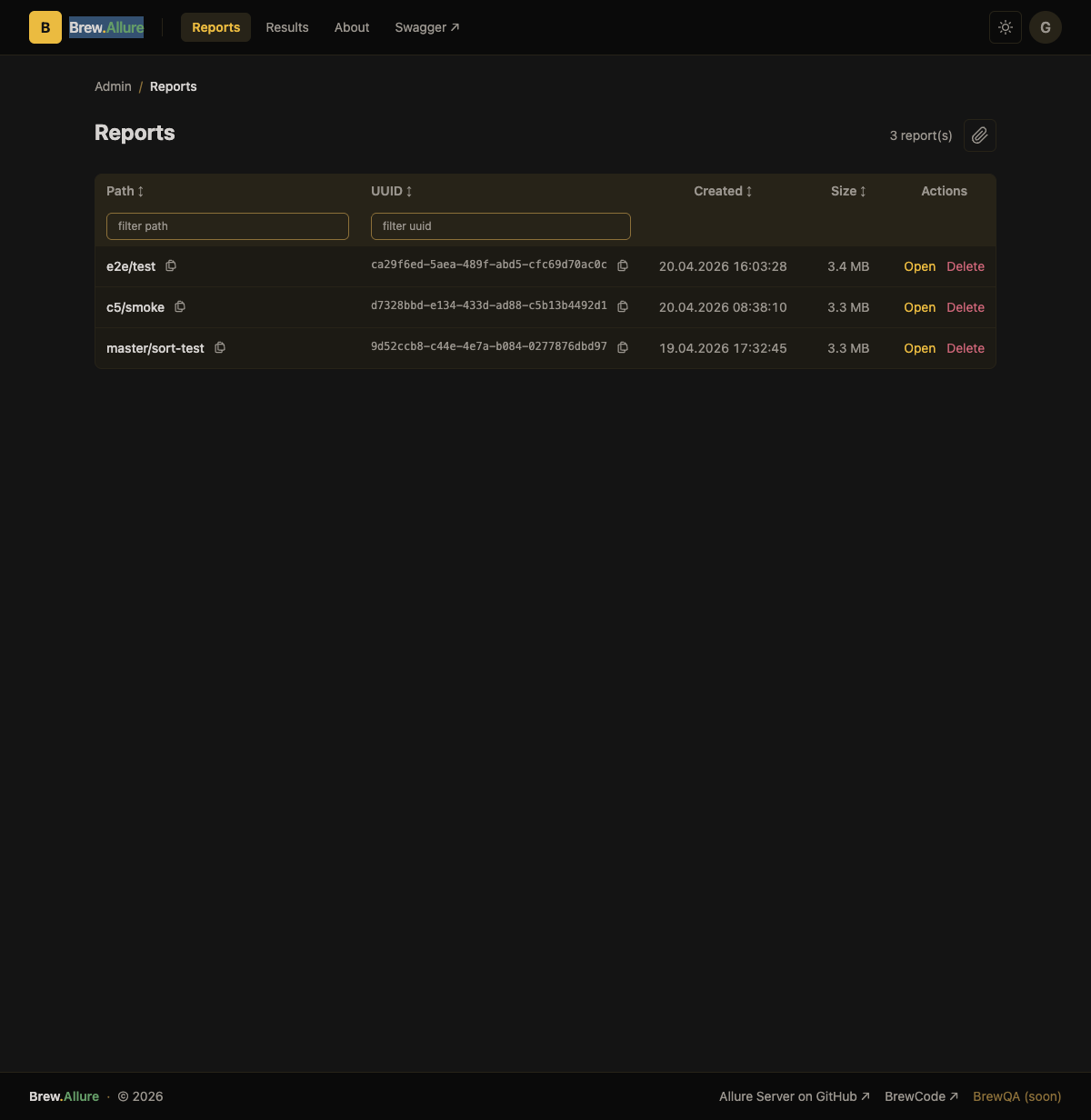
- Reports (
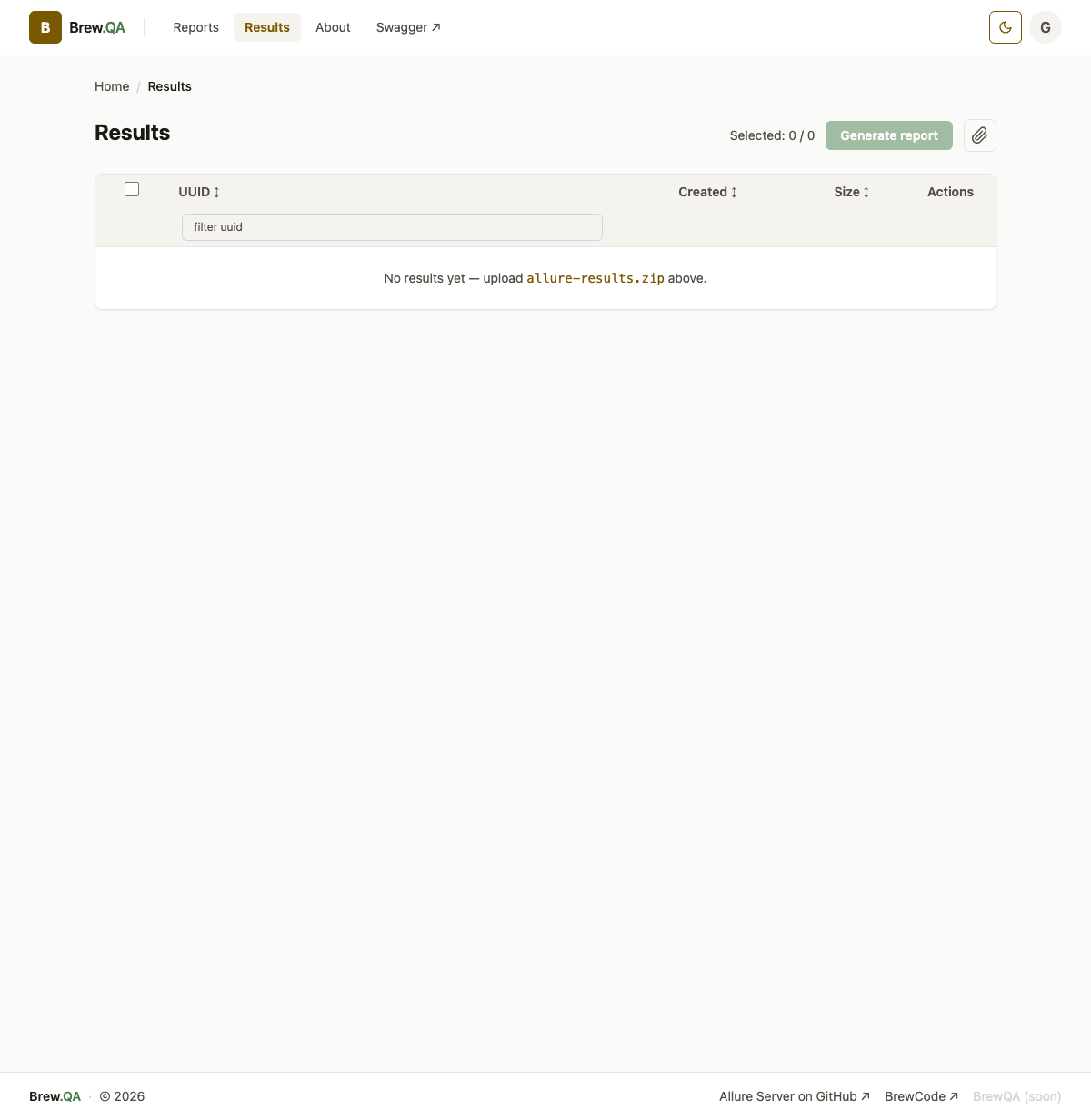
/app/reports) - list, filter, sort, generate and delete reports. - Results (
/app/results) - upload allure-results archives and manage uploaded results. - Profile (
/app/profile) - change your password and mint / revoke API tokens. - Admin (
/app/admin) - manage users (/app/admin/users) and flip the require-api-auth setting (/app/admin/settings); admin-only.
Settings
Every setting below is a Spring property, so it can be given as an environment variable, a JVM
system property (-Dallure.date-format=...) or a key in application.yaml. The env var column is
the Spring relaxed-binding form: uppercase, dots and dashes become underscores
(external config docs).
Runtime
| Property | Env var | Type | Default | Description |
|---|---|---|---|---|
server.port | PORT | int | 8080 | HTTP port the server listens on. Change the container HEALTHCHECK too if you change it in Docker |
| - | JAVA_OPTS | string | -Xms256m -Xmx2048m | JVM options used by the container entrypoint. Not a Spring property |
spring.profiles.active | SPRING_PROFILES_ACTIVE | string | none | Set to oauth to load application-oauth.yaml |
Storage and report generation
| Property | Env var | Type | Default | Description |
|---|---|---|---|---|
allure.results-dir | ALLURE_RESULTS_DIR | string | allure/results/ | Directory holding unpacked uploaded results |
allure.reports.dir | ALLURE_REPORTS_DIR | string | allure/reports/ | Directory holding generated reports |
allure.reports.path | ALLURE_REPORTS_PATH | string | reports/ | URL path segment reports are served under |
allure.reports.history-level | ALLURE_REPORTS_HISTORY_LEVEL | int | 20 | Number of previous runs kept in report history |
allure.date-format | ALLURE_DATE_FORMAT | string | yy/MM/dd HH:mm:ss | Timestamp format in listings and the Web UI |
allure.server-base-url | ALLURE_SERVER_BASE_URL | string | empty | Absolute base URL used in generated links. Set it when the server sits behind a proxy. Keep the trailing /. Empty = infer from the request |
allure.title | ALLURE_TITLE | string | BrewCode | Allure Report | Page/browser title |
allure.logo | ALLURE_LOGO | string | empty | Logo resource. Accepts an https:// URL or file:/images/logo.png inside the container |
Upload limits
| Property | Env var | Type | Default | Description |
|---|---|---|---|---|
spring.servlet.multipart.max-file-size | SPRING_SERVLET_MULTIPART_MAX_FILE_SIZE | size | 100MB | Max size of the compressed upload |
spring.servlet.multipart.max-request-size | SPRING_SERVLET_MULTIPART_MAX_REQUEST_SIZE | size | 100MB | Max size of the whole compressed request |
allure.upload.max-uncompressed-bytes | ALLURE_UPLOAD_MAX_UNCOMPRESSED_BYTES | long | 4294967296 (4 GiB) | Cumulative decompressed size allowed per archive. Zip-bomb guard: multipart limits cap only the compressed body |
allure.upload.max-entries | ALLURE_UPLOAD_MAX_ENTRIES | long | 100000 | Max number of entries in one results archive |
Scheduled cleanup
Once per day the scheduler starts and removes reports older than allure.clean.age-days. Paths
listed under allure.clean.paths get their own retention.
| Property | Env var | Type | Default | Description |
|---|---|---|---|---|
allure.clean.dry-run | ALLURE_CLEAN_DRY_RUN | boolean | false | true logs what would be deleted and deletes nothing |
allure.clean.time | ALLURE_CLEAN_TIME | HH[:mm][:ss] | 00:00 | Daily run time, server local time |
allure.clean.age-days | ALLURE_CLEAN_AGE_DAYS | int | 90 | Global retention in days, excluding paths listed below |
allure.clean.paths[0].path | ALLURE_CLEAN_PATHS_0_PATH | string | manual_uploaded | Report path with its own retention |
allure.clean.paths[0].age-days | ALLURE_CLEAN_PATHS_0_AGE_DAYS | int | 30 | Retention for that path |
Authentication
| Property | Env var | Type | Default | Description |
|---|---|---|---|---|
basic.auth.username | BASIC_AUTH_USERNAME | string | admin | Username used to seed the main administrator on first startup only. Afterwards edit users at /app/admin/users |
basic.auth.password | BASIC_AUTH_PASSWORD | string | admin | Password used to seed the main administrator on first startup only. Left at the default, the first login is forced to change it |
basic.auth.enable | BASIC_AUTH_ENABLE | boolean | false | DEPRECATED, still honored. true = legacy lockdown: every request needs authentication, including /api/** and /allure/**, ignoring the require-api-auth toggle |
app.security.require-api-auth | APP_SECURITY_REQUIRE_API_AUTH | boolean | false | First-start seed for the /api/** and /allure/** gate. The runtime value lives in the database, flip it at /app/admin/settings. false = guest-readable |
app.security.enable-oauth2 | APP_SECURITY_ENABLE_OAUTH2 | boolean | false | Enable OAuth2 login. Set to true by the oauth profile |
API tokens are minted per user at /app/profile and sent in the X-API-Token header. There is no
environment variable for them.
Database
| Property | Env var | Type | Default | Description |
|---|---|---|---|---|
spring.datasource.url | SPRING_DATASOURCE_URL | string | jdbc:h2:file:./allure/db | JDBC URL. The H2 file is created on first startup. PostgreSQL is supported |
spring.datasource.username | SPRING_DATASOURCE_USERNAME | string | sa | Database user |
spring.datasource.password | SPRING_DATASOURCE_PASSWORD | string | empty | Database password |
spring.jpa.database | SPRING_JPA_DATABASE | string | H2 | Hibernate dialect selector. Set to postgresql with a PostgreSQL URL |
YouTrack TMS integration (since 2.13.6)
Links @Issue("KEY-666") / @Link references in your scenarios to YouTrack, and keeps a
pass/fail statistics comment on the issue updated on every report generation. The token needs
permission to read issue comments and to read / add / update issue comments.
| Property | Env var | Type | Default | Description |
|---|---|---|---|---|
tms.enabled | TMS_ENABLED | boolean | false | Master switch for the YouTrack plugin |
tms.host | TMS_HOST | string | tms.localhost | YouTrack hostname only, no scheme |
tms.api-base-url | TMS_API_BASE_URL | string | https://${tms.host}/api | YouTrack REST API base URL |
tms.project | TMS_PROJECT | string | unset | YouTrack project short name |
tms.token | TMS_TOKEN | string | empty | YouTrack permanent token. Keep it out of version control |
tms.issue-key-pattern | TMS_ISSUE_KEY_PATTERN | regex | [A-Za-z]+-\d+ | Pattern matching issue keys found in a report |
tms.dry-run | TMS_DRY_RUN | boolean | false | true resolves issues but never writes back |
OAuth2 (profile oauth only, since 2.12.0)
An optional oauth Spring profile adds OAuth2 login, Google by default. Enable it with
SPRING_PROFILES_ACTIVE: oauth. Override the standard Spring spring.security.oauth2.*
properties to use another provider.
| Property | Env var | Type | Default | Description |
|---|---|---|---|---|
spring.security.oauth2.client.registration.google.client-id | OAUTH2_GOOGLE_ALLURE_CLIENT_ID | string | none, required | Google OAuth2 client id. The context fails to start without it when the profile is active |
spring.security.oauth2.client.registration.google.client-secret | OAUTH2_GOOGLE_ALLURE_CLIENT_SECRET | string | none, required | Google OAuth2 client secret |
The oauth profile also sets app.security.enable-oauth2: true and seeds
app.security.require-api-auth: true. It wires OAuth2 login with no user service, allowlist or
provisioning: any account that completes login at the configured provider is treated as a
signed-in non-guest user and gets the full non-admin surface. Admin pages stay restricted to admin
users. Restrict the provider or its app registration to the audience you intend to grant access to.
Logging
Override log levels with environment variables, for example:
export LOGGING_LEVEL_RU_IOPUMP_QA_ALLURE=DEBUG
export LOGGING_LEVEL_ROOT=DEBUG
Other ways to run it
- Kubernetes: a Helm chart ships in
.helm/allure-server/.
The shipped
values.yamlcarries the maintainer's own deployment as an example - override the ingress hosts, TLS secret, datasource URL and storage class before installing anywhere else. - Jar: download
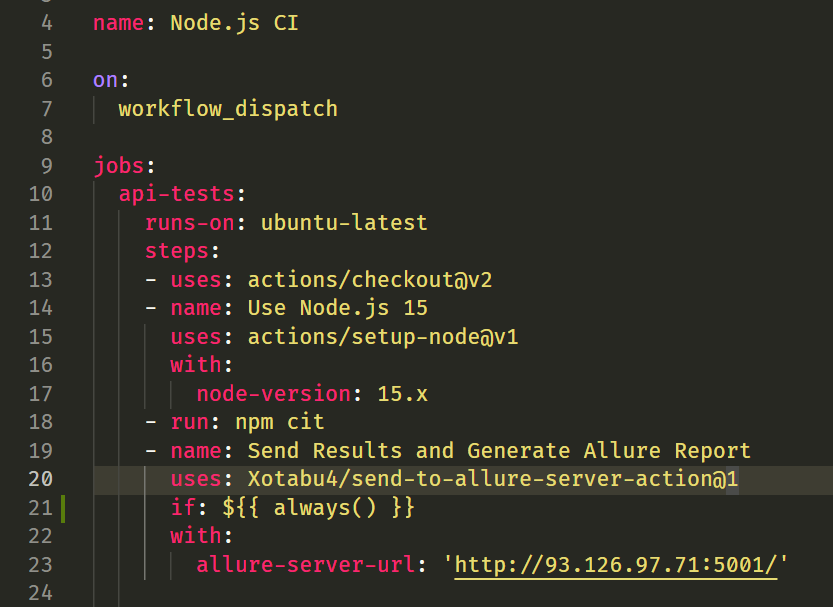
allure-server.jarfrom the Releases page, install Java 25 and runjava -jar allure-server.jar. Data is written relative to the working directory. - GitHub Actions: send-to-allure-server-action by Xotabu4 compresses allure-results, sends them here and triggers report generation, returning the report URL.
Plugin system for Java developers (since 2.13.6, beta)
Implement the ru.iopump.qa.allure.helper.plugin.AllureServerPlugin interface, build a FAT JAR
with all deps and mount it into /ext. The server discovers it at startup and logs the loaded
plugins. See the
README
for the interface definition and the reference implementations.
Upgrading from 2.x
/api/report and /api/result are unchanged. No endpoint was removed and no request or response
field was renamed. One change breaks a 2.x client that would otherwise need no edits: HTTP Basic
credentials sent to /api/** are now evaluated, and can be rejected. In 2.13.9 the Basic filter
was registered only when basic.auth.enable=true, so a Basic header on /api/** was ignored and
the request was served anonymously with 200. In 3.0.0 Basic is always registered. -u admin:admin
returns 403 while the password is still the shipped default; a wrong password returns 401. A call
that sends no credentials behaves exactly as it did in 2.x.
Also worth checking before you upgrade:
- The Vaadin UI at
/ui/*is gone, replaced by the server-rendered UI at/app/*. Old bookmarks are redirected. - Error responses are now RFC 7807
application/problem+json. Several upload error paths moved from 500 to 400, andDELETE /api/result/{uuid}on an unknown uuid moved from 500 to 404. POST /api/reportnow validatesreportSpec, which 2.13.9 never did. A blankpathsegment, an emptypatharray or more than 32 segments now return 400. A blank segment is what an unresolved CI variable expands to, so check the values your pipeline sends.tms.tokenno longer defaults to the literalmy-token; it defaults to empty and readsTMS_TOKEN.
The full endpoint-by-endpoint compatibility matrix is in docs/COMPATIBILITY.md, and the upgrade section of the README has the detail behind each item.
Links
Tag summary
Content type
Image
Digest
sha256:c08680a67…
Size
171.3 MB
Last updated
2 months ago
docker pull kochetkovma/allure-server