lupohan44/games_hub
GamesHub provides a framework to develop plugins to scrap games from different websites
10K+
lupohan44/games_hub repository overview
GamesHub






This project is inspired by SteamDB-FreeGames
Telegram discussion group: https://t.me/GamesHubDiscussion
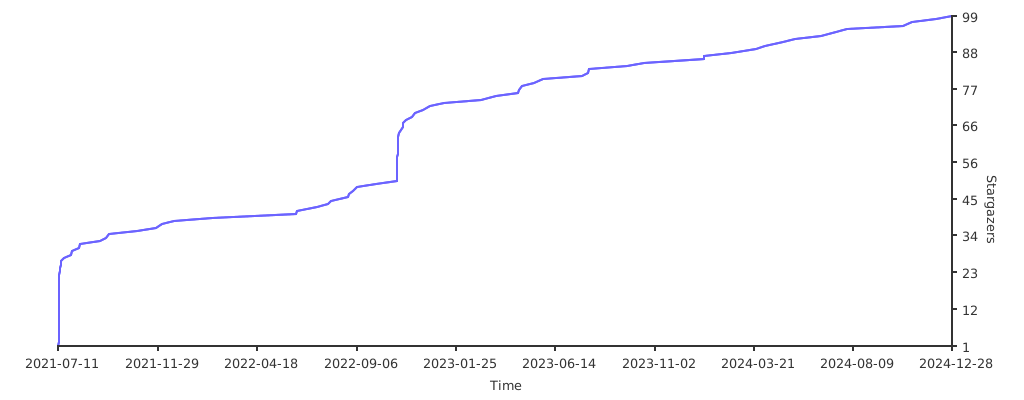
Star History
Features
Provide a framework to develop plugins to scrap games from different websites and send notifications to other plugins
Official Plugins (Maintained by project)
:white_check_mark: Gather Steam free games from SteamDB. (Not recommended)
:white_check_mark: Gather free games from Keylol. (recommended)
:white_check_mark: Use Apprise to send free games information. (Telegram demo channel)
:white_check_mark: Use ASF to redeem games
Requirements
- python3
Usage
Direct run
- Clone repository
git clone https://github.com/lupohan44/GamesHub.git - Go into GamesHub directory
cd GamesHub - Install requirements
or install minimum requirements
pip3 install -r requirements.txt playwright install webkit chromium firefox || python3 -m playwright install webkit chromium firefox # Depends on the browser(s) you want to useand install requirements for each plugin you want to enablepip install -r requirements-no_plugin.txt - Copy config.example.json5 to
config.json5, change settings in it according to the comment. - Run
Each enabled official plugin should create a folder in
python3 app.py{WORKING_DIR}/plugins/{PLUGIN_PACKAGE_NAME}to store runtime files and configs - Change plugins' config files from step 5
- Rerun step 5
Docker (For Linux only)
-
Create a folder for record and config, let's say folder name is /var/GamesHub
Please note that this folder name must be absolute path.
export GAMES_HUB_FOLDER_NAME=/var/GamesHub mkdir -p "$GAMES_HUB_FOLDER_NAME" -
Download config.example.json5 and rename to
config.json5into the folder created in step 1, change settings in it according to the comment.wget -c "https://raw.githubusercontent.com/lupohan44/GamesHub/main/config.example.json5" -O "$STEAM_DB_FOLDER_NAME/config.json5" || curl -o "$STEAM_DB_FOLDER_NAME/config.json5" "https://raw.githubusercontent.com/lupohan44/GamesHub/main/config.example.json5" -
Run with docker
docker pull lupohan44/games_hub:latest && docker run -v $GAMES_HUB_FOLDER_NAME:/home/wd --rm lupohan44/games_hub:latestAll changes by script inside docker will be permanently save to this folder.
Each enabled official plugin should create a folder in{WORKING_DIR}/plugins/{PLUGIN_PACKAGE_NAME}to store runtime files and configs -
Change plugins' config files from step 3
-
Rerun step 3
Plugins structure example
/var/GamesHub (working directory)
├── config.json5
└── plugins
    ├── gameshub.official.notification.apprise
    │   └── config.json5
    ├── gameshub.official.scrapper.steamdb
    │   └── config.json5
    ├── gameshub.official.scrapper.keylol
    │   ├── config.json5
    │   └── cookies.txt
    └── gameshub.official.redeemer.asf
        └── config.json5
Known issue
- Playwright does not support CentOS. (issue)
- Use docker
Develop plugins
- Think a package name for your plugin, format should be like gameshub.unofficial.{plugin_purpose}.{plugin_description}[.{your_name}]
- Copy one of the official plugin in plugins folder and rename it to your package name
- Follow the official plugin's structure and modify it to your needs
Changelog
Special Thanks
- The logo is designed by 限免喜加一

Support me

- Star this repository
- Contribute to this project by pull request
Each of them is appreciated. Thank you.
Tag summary
Content type
Image
Digest
sha256:2ca558cfe…
Size
785.1 MB
Last updated
almost 3 years ago
docker pull lupohan44/games_hub