qmcgaw/cod4
Runs a Call of duty 4 Modern Warfare dedicated server in a Docker container
50K+
qmcgaw/cod4 repository overview
COD4 Docker dedicated server
Call of duty 4 dedicated server in a 125MB Docker image.









Requirements
- COD4 Client game
- COD4 running on version 1.7 have to update to 1.8-20.1
- Original COD4 main and zone files required (from the client installation directory)
Features
- Cod4x server features
- Works with custom mods and maps (see the Mods section)
- Built-in HTTP file server for usermaps and mods (only works with .ff and .iwd files for security reasons)
- Runs without root (safer)
- Default cod4 configuration file server.cfg when not using mods, with
exec server.cfg - Works with the cod4x masterlist
- Cod4x server built from source
- Other Cod4x files server downloaded from cod4x.me
- Auto updates to the latest cod4x release
- Only 125MB
- See more Docker image tags: Docker Hub tags
Setup
We assume your call of duty 4 game is installed at /mycod4path
-
On your host, create the directories
./main,./zone,./modsand./usermaps. -
From your Call of Duty 4 installation directory:
- Copy all the
.iwdfiles from/mycod4path/mainto./main - Copy all the files from
/mycod4path/zoneto./zone - (Optional) Copy the mods you want to use from
/mycod4path/modsto./mods - (Optional) Copy the maps you want to use from
/mycod4path/usermapsto./usermaps
- Copy all the
-
As the container runs as user ID 1000 by default, fix the ownership and permissions:
chown -R 1000 main mods usermaps zone chmod -R 700 main mods usermaps zoneYou can also run the container with
--user="root"(unadvised!) if this doesn't work, or build the image with--build-arg UID=yourid. -
Run the following command as root user on your host:
docker run -d --name=cod4 -p 28960:28960/tcp -p 28960:28960/udp -p 8000:8000/tcp \ -v /mycod4path/main:/home/user/cod4/main \ -v /mycod4path/zone:/home/user/cod4/zone \ -v /mycod4path/mods:/home/user/cod4/mods \ -v /mycod4path/usermaps:/home/user/cod4/usermaps:ro \ qmcgaw/cod4 +map mp_shipmentThe command line argument
+map mp_shipmentis optional and defaults to+set dedicated 2+set sv_cheats "1"+set sv_maxclients "64"+exec server.cfg+map_rotateYou can also download and modify the docker-compose.yml file and run
docker-compose up -d
HTTP server for custom mods and maps
By default, the container runs with an HTTP file server for mods and usermaps on port 8000.
- You can disable it with
-e HTTP_SERVER=off - You can change its published port with for example
-p 9000:8000/tcp - You can change its root URL with for example
-e ROOT_URL=/cod4. This is useful if you use a reverse proxy.
-
Locate the relevant cod4 configuration file - for example
main/server.cfgormods/mymod/server.cfg -
Modify/add the following lines & change
youraddressto your IP or domain name:set sv_allowdownload "1" set sv_wwwDownload "1" set sv_wwwBaseURL "http://youraddress:8000" // supports http, https and ftp addresses set sv_wwwDlDisconnected "0" -
Feel free to open an issue for help setting this up, such as port forwarding or reverse proxy setup help
Update your game
- Make sure you updated your game to version 1.7 first (see this)
- Download the COD4x client ZIP file
- Using Winrar / 7Zip / Winzip, extract cod4x_client_20_1.zip to your COD4 game directory
- Go in the extracted directory cod4-client-manualinstall_20.1 and double click on install.cmd
- When launching the multiplayer game, you should see at the bottom right
20.1
Testing
- Make sure you updated your COD4 Game to 1.8-19.0
- Launch the COD4 multiplayer game
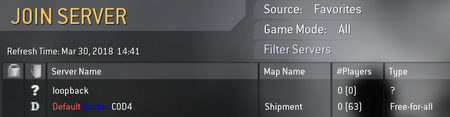
- Click on Join Game
- Click on Source at the top until it's set on Favourites
- Click on New Favourite on the top right
- Enter your host LAN IP Address (i.e.
192.168.1.26)- Add the port if you run it on something else than port UDP 28960 (i.e.
192.168.1.26:28961)
- Add the port if you run it on something else than port UDP 28960 (i.e.
- Click on Refresh and try to connect to the server in the list
Mods
Assuming:
- Your mod directory is
./mymod - Your main mod configuration file is
./mymod/server.cfg
Set the command line option to +set dedicated 2+set sv_cheats "1"+set sv_maxclients "64"+set fs_game mods/mymod+exec server.cfg +map_rotate
Write protected args
The following parameters are write protected and can't be placed in the server configuration file, and must be in the command passed to the container:
+set dedicated 2- 2: open to internet, 1: LAN, 0: localhost+set sv_cheats "1"- 1 to allow cheats, 0 otherwise+set sv_maxclients "64"- number of maximum clients+exec server.cfgif using a configuration file+set fs_game mods/mymodif using a custom mod+set com_hunkMegs "512"don't use if not needed+set net_ip 127.0.0.1don't use if not needed+set net_port 28961don't use if not needed+map_rotateOR i.e.+map mp_shipmentshould be the last launch argument
By default, the Docker image uses this command.
TODOs
- UDP proxy for Windows
- Reload ability of cod4x
- Docker Healthcheck + HTTP healthcheck endpoint (i.e. for K8s)
- Add extra ping with udp proxy
- More env variables
- Plugins
- Plugins
- Built-in mods?
Acknowledgements
- Credits to the developers of Cod4x server
- The help I had on Cod4x.me forums
Tag summary
Content type
Image
Digest
Size
48.3 MB
Last updated
about 5 years ago
docker pull qmcgaw/cod4