setokinto/slack-shogi
Automated build for slack-shogi
1.0K
setokinto/slack-shogi repository overview


Slack-Shogi
This is a room, with a shogi board.
How to use
- Create a Bot https://your-team-name.slack.com/apps/A0F7YS25R-bots
- Copy config file
cp slackbot_settings.py.default slackbot_settings.py - Replace your api key with your bot from slack
Commands
@shogibot: start with @username
@shogibot: board
@shogibot: 76歩
@shogibot: resign or @shogibot: 参りました
And more!
If you want to try it, use this command @shogibot: start with @your_user_name
How to input shogi emojis
We provide an images for playing shogi, and a script to input images to your slack team.
The script required your slack id and password because an api which saves a new emoji does not exist.
Emoji example is here:
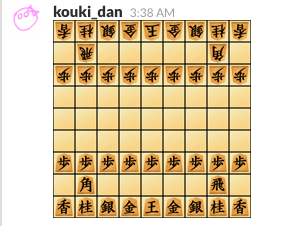
It requires Python2 for mechanize.
% cd input_emojis
% pip install mechanize
% python input_emojis.py
your slack team id: [your_team_id]
your id (email): [[email protected]]
your password: [******]
authentication code for two factor(If needed) : [two-factor code or empty if you don't use two-factor-authentication]
...
...
...
Completed!!
If you already inputted emojis and has a difference for adding emojis, you can use --patch option for this script. The script called with this optioin ignores emojis which already registed.
Using Docker
You are using Docker? Yes. It is available for Docker.
Try it easily
Try this bot with docker run --env SLACK_SHOGI_API_TOKEN="<Your Slack Bot Token>" setokinto/slack-shogi
Develop with Docker
- Move slackbot_settings.py from slackbot_settings.py.default and put youput your keys.
docker-compose up- In your slack team, say
@yourbot: start with @username
Thanks for
LICENSE
MIT
Tag summary
Content type
Image
Digest
Size
255.7 MB
Last updated
about 9 years ago
docker pull setokinto/slack-shogi