timurila/mt5rest
MT5 RESTFul API that allows to work directly with any MT5 Server.
10K+
timurila/mt5rest repository overview
Client RESTful API for MT5 Servers
Full functional trial version for 14 days. More details and full version available at:
- Main website: https://mtapi.io
- Demo environment and documentation: https://mt5.mtapi.io
- Postman RESTful
- Postman Websockets
If you need to run trial version at your own server you can use docker:
docker run -d --restart always --name mt5rest -p 5000:80 timurila/mt5rest
After that open in browser: http://localhost:5000
Connect to MT5 Server
To establish connection with MT5 Server use Connect endpoint. It requires broker host, port, mt5 account number and password.
https://mt5.mtapi.io/Connect?user=62333850&password=tecimil4&host=78.140.180.198&port=443
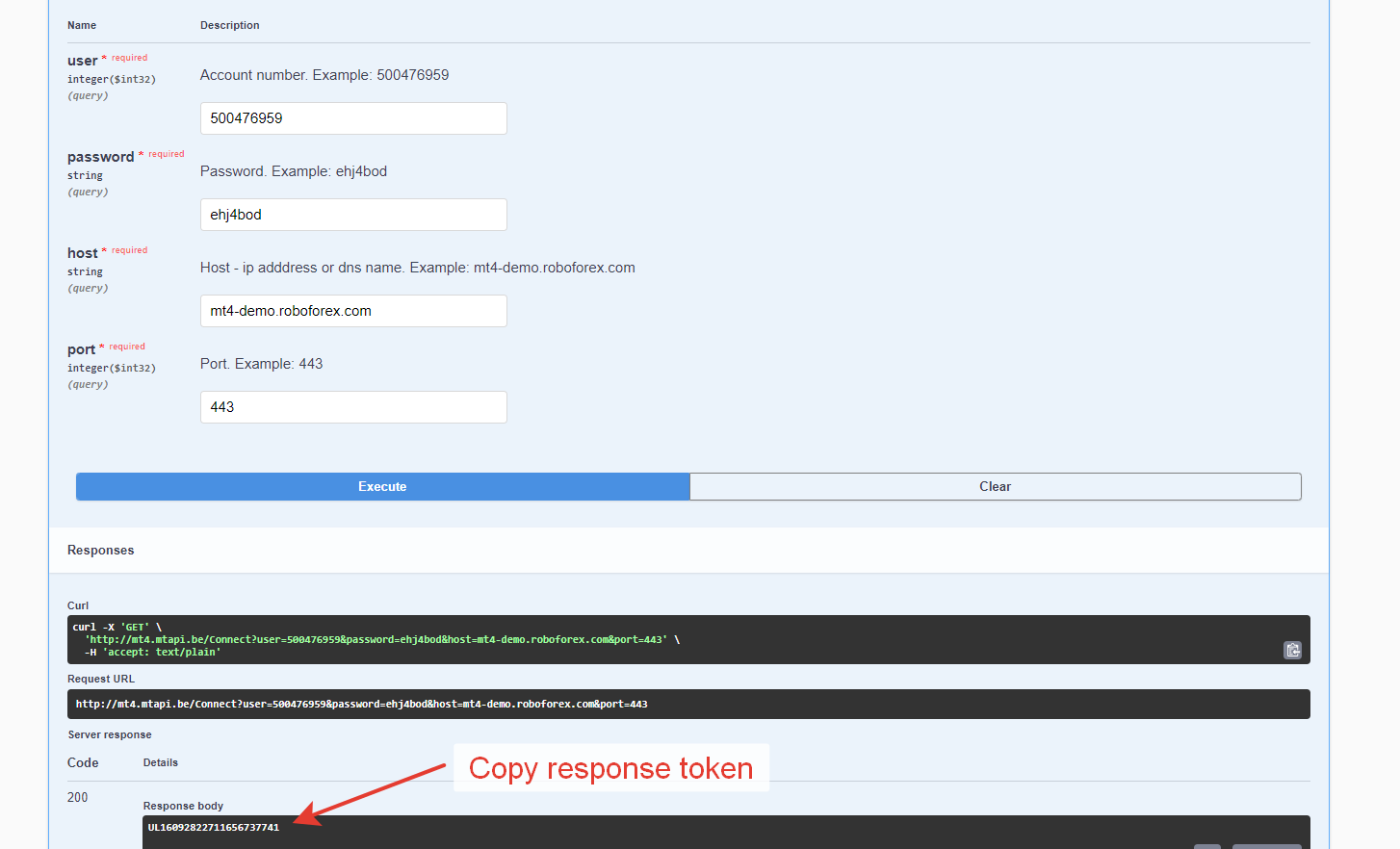
It returns token that you need to use as 'id' parameter in further requests to server.
Account details
If you need Balance, Equity, Currency, FreeMargin etc. please use AccountSummary endpoint.
https://mt5.mtapi.io/AccountSummary?id=demo-token-mt5
Trading
To send different types of orders use OrderSend endpoint.
-
Market order: https://mt5.mtapi.io/OrderSend?id=demo-token-mt5&symbol=EURUSD&operation=Buy&volume=0.01
-
Stop order: https://mt5.mtapi.io/OrderSend?id=demo-token-mt5&symbol=EURUSD&operation=BuyStop&volume=0.01&price=1.5
-
Limit order: https://mt5.mtapi.io/OrderSend?id=demo-token-mt5&symbol=EURUSD&operation=BuyLimit&volume=0.01&price=0.5
Order history
Use OrderHistory endpoint to get list of closed orders.
https://mt5.mtapi.io/OrderHistory?id=demo-token-mt5&from=1970-01-01T00:00:00&to=2022-09-01T00:00:00
Opened orders
To get list of active market and pending orders use OpenedOrders endpoint.
https://mt5.mtapi.io/OpenedOrders?id=demo-token-mt5
It returns array of orders.
Trading instruments
To get list of trading instruments please use Symbols endpoint.
https://mt5.mtapi.io/Symbols?id=demo-token-mt5
To get details of certain symbol use SymbolParams endpoint.
https://mt5.mtapi.io/SymbolParams?id=demo-token-mt5&symbol=EURUSD
Realtime quotes with websockets
-
Call /Connect method to get identification token.
https://mt5.mtapi.io/Connect?user=62333850&password=tecimil4&host=78.140.180.198&port=443
-
In websocket test client open link like this:
wss://mt5.mtapi.io/events?id=demo-token-mt5
where “id” parameter is identification token from previous step.
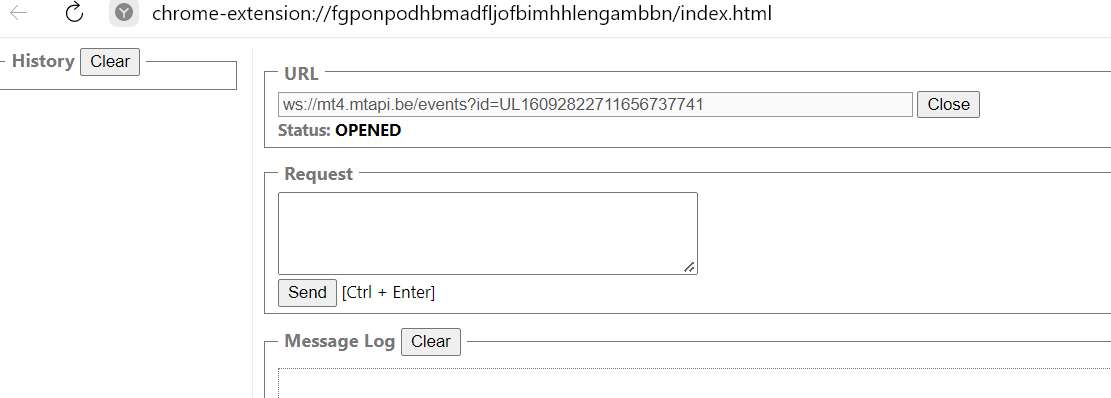
Simple Web Socket test client for chrome browser: https://chrome.google.com/webstore/detail/websocket-test-client/fgponpodhbmadfljofbimhhlengambbn
-
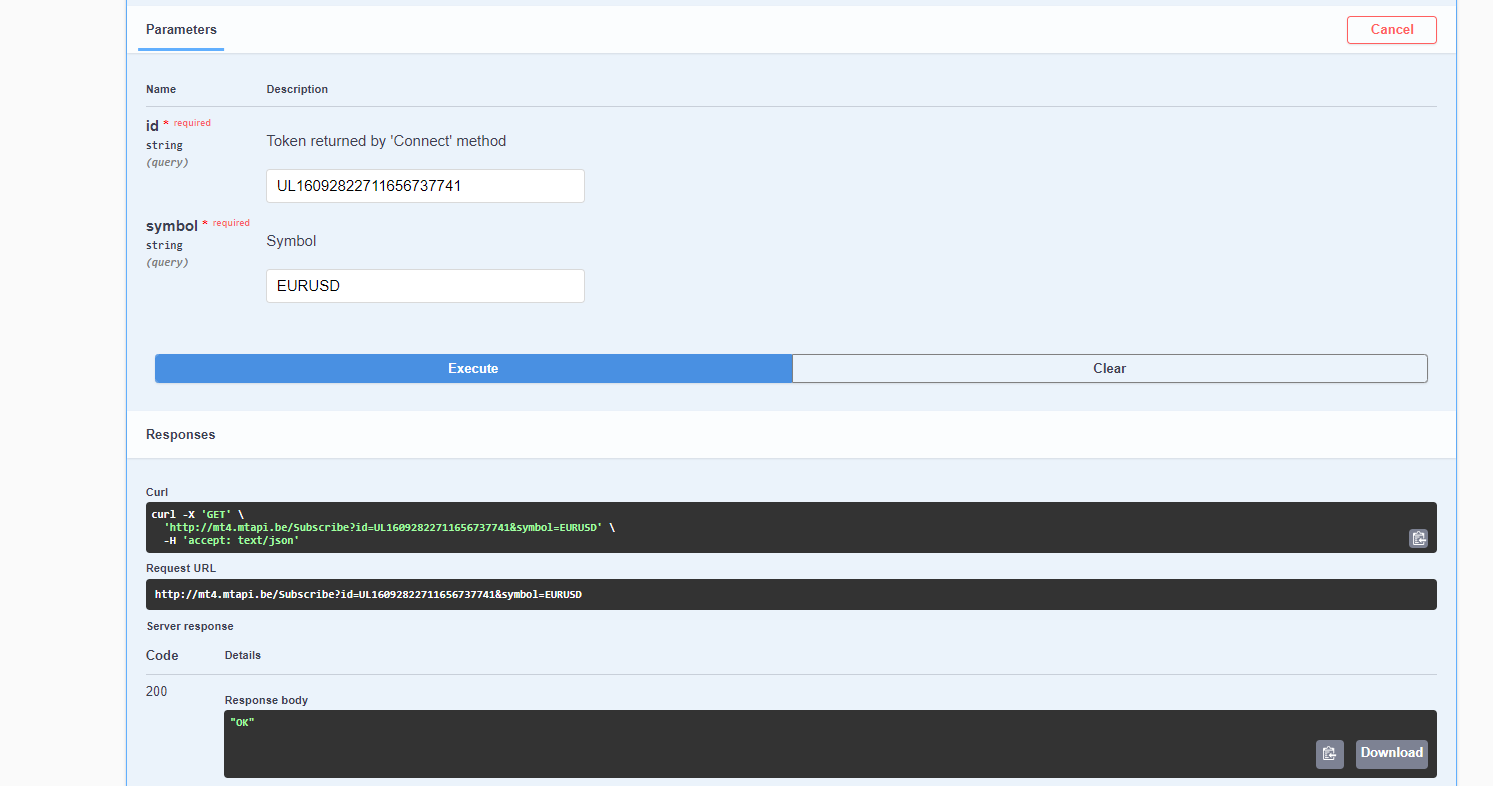
Call /Subscribe method
https://mt5.mtapi.be/Subscribe?id=demo-token-mt5&symbol=EURUSD
-
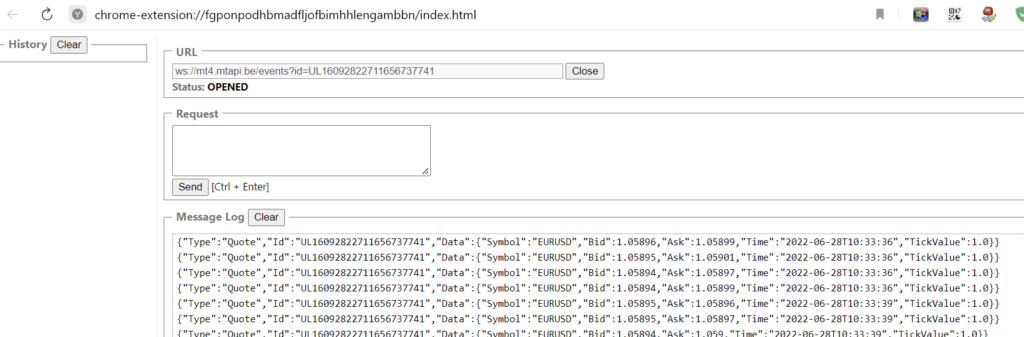
Quotes should start to flow in websocket test client
Installation with Docker
-
Install docker. https://docs.docker.com/engine/install/debian/
-
Pull and run
docker pull mtapiio/mt5rest
docker run --rm -p 5000:80 mtapiio/mt5rest
After that you can access API at http://localhost:5000.
Installation with microk8s
We recommend to install on Debian 11 as below:
sudo apt-get update
sudo apt install snapd
sudo snap install microk8s –classic
cd /snap/bin
./microk8s enable dns dashboard storage
nano ~/mt5dep.yaml
apiVersion: apps/v1
kind: Deployment
metadata:
name: mt5rest
labels:
   app: mt5rest
spec:
replicas: 2
selector:
   matchLabels:
     app: mt5rest
template:
   metadata:
     labels:
       app: mt5rest
   spec:
     containers:
     – name: mt5rest
       image: mtapiio/mt5rest
       ports:
       – containerPort: 80
       livenessProbe:
         httpGet:
           path: /healthz
           port: 80
         initialDelaySeconds: 10
         timeoutSeconds: 2
         periodSeconds: 3
./microk8s.kubectl apply -f ~/mt5dep.yaml
nano ~/mt5srv.yaml
kind: Service
apiVersion: v1
metadata:
name: mt5rest
spec:
selector:
   app: mt5rest
type: NodePort
ports:
– name: http
   protocol: TCP
   port: 80
   nodePort: 30400
sessionAffinity: ClientIP
./microk8s.kubectl apply -f ~/mt5srv.yaml
./microk8s.kubectl –namespace kube-system patch svc kubernetes-dashboard -p ‘{“spec”: {“type”: “NodePort”}}’
./microk8s.kubectl –namespace kube-system patch svc kubernetes-dashboard -p ‘{“spec”: {“ports”:[{“nodePort”: 30100,”port”: 443,”protocol”: “TCP”,”targetPort”: 8443}]}}’
Check how is whole system running:
./microk8s kubectl get all –all-namespaces
Get control panel token:
token=$(./microk8s kubectl -n kube-system get secret | grep default-token | cut -d ” ” -f1)
./microk8s kubectl -n kube-system describe secret $token
After that control panel should be available at https://localhost:30100 and restful service at http://localhost:30400.
k8s: how to get latest version from our container registry
-
Install docker. https://docs.docker.com/engine/install/debian/
-
Login to our container registry with your username and password.
docker login reg.mtapi.io:5050
- Create k8s credentials.
microk8s kubectl create secret generic regcred2 --from-file=.dockerconfigjson=/root/.docker/config.json --type=kubernetes.io/dockerconfigjson
- Use created credentails in deployment like below.
apiVersion: apps/v1
kind: Deployment
metadata:
name: mt5rest
labels:
   app: mt5rest
spec:
replicas: 2
selector:
   matchLabels:
     app: mt5rest
template:
   metadata:
     labels:
       app: mt5rest
   spec:
     containers:
     – name: mt5rest
       image: reg.mtapi.io:5050/root/mt5rest-full/mt5rest
       ports:
       – containerPort: 80
       livenessProbe:
         httpGet:
           path: /healthz
           port: 80
         initialDelaySeconds: 10
         timeoutSeconds: 2
         periodSeconds: 3
     imagePullSecrets:
     - name: regcred2
📡 OnOrderProfit WebSocket – Real-Time Profit Tracking
This document explains how to connect to the OnOrderProfit WebSocket endpoint in the mt5rest API to receive real-time order profit updates. It also outlines how to use these updates to implement automated break-even stop loss logic.
🔗 WebSocket Endpoint
GET /OnOrderProfit?id={session_id}
- Method: WebSocket only (not regular HTTP)
- Parameter:
id: Session token obtained from theConnectmethod
📥 Establishing the WebSocket Connection
-
Use Connect or ConnectEx or ConnectProxy to get session ID
-
Open WebSocket
const ws = new WebSocket("wss://mt5.mtapi.io/OnOrderProfit?id=your-session-token");
- Listen for Messages
ws.onmessage = function (event) {
  const msg = JSON.parse(event.data);
  if (msg.type === "OrderProfit") {
    handleProfitUpdate(msg.data);
  }
};
📦 ProfitUpdate Message Structure
Each WebSocket message contains a JSON payload like this:
{
  "type": "OrderProfit",
  "id": "your-session-id",
  "timestampUTC": 1715250821123,
  "data": {
    "balance": 10000.0,
    "credit": 0.0,
    "equity": 10120.5,
    "margin": 500.0,
    "freeMargin": 9620.5,
    "profit": 120.5,
    "marginLevel": 2024.1,
    "user": 123456,
    "orders": [
      {
        "ticket": 12345678,
        "symbol": "EURUSD",
        "lots": 1.0,
        "openPrice": 1.0850,
        "stopLoss": 1.0830,
        "profit": 50.2,
        "commission": -2.0,
        "swap": 0.0,
        "comment": "Buy"
      }
    ]
  }
}
⚙️ Handling Break-Even Stop Loss
function handleProfitUpdate(update) {
  update.orders.forEach(order => {
    if (order.profit > 10 && order.stopLoss < order.openPrice) {
      setBreakEvenStopLoss(order);
    }
  });
}

function setBreakEvenStopLoss(order) {

}
🔁 Optional: Control Update Frequency
To reduce network traffic, updates can be throttled using server-side interval control:
WebSocketSender.SubscribeOrderProfits(id, intervalInMs);
This limits how often ProfitUpdate events are sent for a given session.
🧪 Built-In WebSocket Tester
If you call the endpoint using HTTP instead of WebSocket, the server will respond with a link to a built-in test UI:
https://mt5.mtapi.io/static/EventsTest.html?id={id}&type=OnOrderProfit
Open this link in a browser to manually test your WebSocket connection.
✅ Use Cases
| Use Case | Description |
|---|---|
| Real-time profit monitoring | Receive live updates on account equity and position PnL |
| Break-even SL | Automate stop-loss updates when position turns profitable |
| Risk control | Adjust exposure in high-volatility conditions |
🛠️ Technical Notes
- WebSocket events use type
OrderProfit. - Events include only open position orders (
DealInternalIn != null). - Message is sent when a quote updates and matching orders exist.
- Filtering by interval is supported via
SubscribeOrderProfits. - JSON output uses camelCase property names.
📌 Summary
- Connect via WebSocket using
/OnOrderProfit?id={id} - Receive real-time profit and margin data
- Use it to manage trade exits, trailing stops, or break-even SL
- Ideal for building automated trading assistants or dashboards
Tag summary
Content type
Image
Digest
sha256:61ed64ea9…
Size
92.1 MB
Last updated
about 17 hours ago
docker pull timurila/mt5rest