0x8861/nginx-le
Forked from https://github.com/nginx-le/nginx-le - Nginx with automatic let's encrypt
Image
1
3.6K
0x8861/nginx-le repository overview
NGINX-LE - Nginx web and proxy with automatic let's encrypt


Simple nginx image (alpine based) with integrated Let's Encrypt support.
Provide a collection of nginx configuration snippets from h5bp/server-configs-nginx
The source code can be found here
How to use
- get docker-compose.yml and change things:
- set timezone to your local, for example
NGINX_LE_TZ=UTC. For more timezone values check/usr/share/zoneinfodirectory - set
NGINX_LE_LETSENCRYPT=trueif you want automatic certificate install and renewal NGINX_LE_EMAILshould be your email andNGINX_LE_FQDNfor domain- for multiple FQDNs you can pass comma-separated list, like
NGINX_LE_FQDN=aaa.example.com,bbb.example.com - alternatively set
NGINX_LE_LETSENCRYPTtofalseand pass your own cert inNGINX_LE_SSL_CERT, key inNGINX_LE_SSL_KEYandNGINX_LE_SSL_CHAIN_CERT - use provided
templates/service-example.confandtemplates/no-ssl.service-example.confto make your owntemplates/service.confandtemplates/no-ssl.service.conf. Keep ssl directives as is:ssl_certificate NGINX_LE_SSL_CERT; ssl_certificate_key NGINX_LE_SSL_KEY; ssl_trusted_certificate NGINX_LE_SSL_CHAIN_CERT;
- set timezone to your local, for example
- make sure
volumesin docker-compose.yml changed to your service config - you can map multiple custom config files in compose for any
service*.confandno-ssl.service*.conf(see docker-compose.yml forservice2.conf) - pull image -
docker-compose pull - if you don't want pre-built image, make you own.
docker-compose buildwill do it - start it
docker-compose up
Some implementation details
Important: provided nginx.conf handles
http->https redirect automatically, no need to add it into your custom service.conf. In case if you need a custom server on
http (:80) port, make sure you handle /.well-known/
path needed for LE challenge.
- provided a collection of nginx configuration snippets that can help your server improve the website's performance and security. Thanks to h5bp/server-configs-nginx
- image uses alpine's
certbotpackage. script/entrypoint.shrequests LE certificate and will refresh every 10 days in case if certificate is close to expiration (30day)script/le.shgets SSL- nginx-le on docker-hub
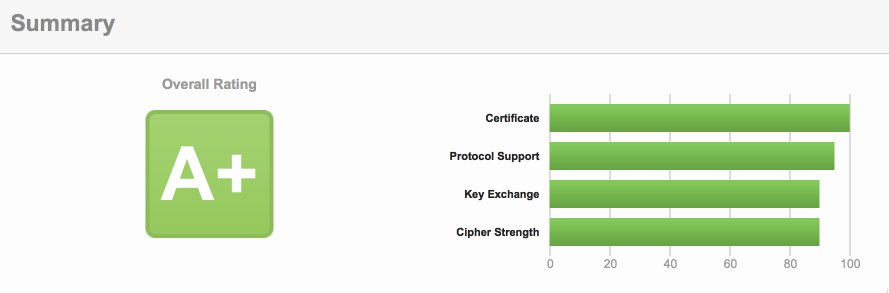
- A+ overall rating on ssllabs
Alternatives
- Træfik HTTP reverse proxy and load balancer. Supports Let's Encrypt directly.
- Caddy supports Let's Encrypt directly.
- leproxy small and nice (stand alone) https reverse proxy with automatic Letsencrypt
- bunch of others
Examples
- Reverse proxy for WebRTC solutions, where you need multiple ports on one domain to reach different services behind your
nginx-lecontainer.
Tag summary
Content type
Image
Digest
Size
28.8 MB
Last updated
over 5 years ago
docker pull 0x8861/nginx-le