0xwulf/py-scratchpad
Self-hosted Python scratchpad: a code editor that never leaves your browser tab.
1.1K
0xwulf/py-scratchpad repository overview
py-scratchpad
A Python scratchpad that never leaves your browser tab.
py-scratchpad is a small, self-hosted editor to keep open next to a course
video or a terminal: Python syntax highlighting, 4-space auto-indent, bracket
matching, search (Ctrl+F), comment toggle (Ctrl+/), undo history, a light
and dark theme, and import/export of .py files that round-trips byte for
byte. There is no backend, no account and no login — the container serves
static files and nothing else. Everything you type is autosaved to your
browser's localStorage and never reaches the server, so the image holds no
state, needs no volume and can be replaced at any time.
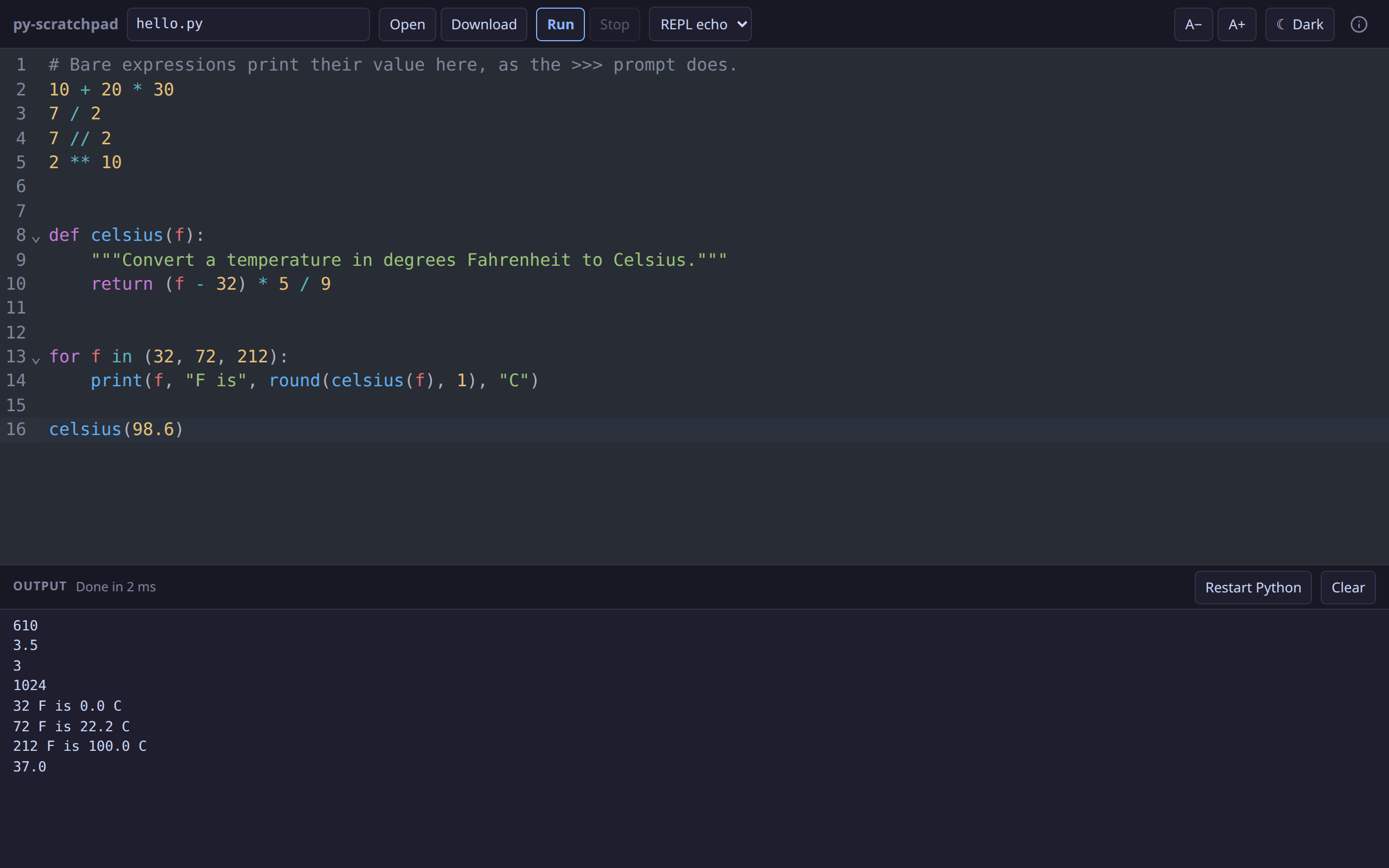
Since 0.3.0 it also runs the code. A Run button (Ctrl+Enter) executes
the buffer in Pyodide — CPython 3.14 compiled to
WebAssembly — inside a Web Worker, with stdout, stderr and real tracebacks in a
panel below the editor. The interpreter is served from this container, not from
a CDN, so the whole thing still works on an air-gapped network. Your code is
executed in your own browser and is still never uploaded: there is no
server-side Python here at all.
Source, issues and docs: github.com/hexawulf/py-scratchpad
Quick start
docker run -d --name py-scratchpad --restart unless-stopped \
  -p 8080:80 0xwulf/py-scratchpad:0.3.3
Then open http://<host>:8080/. That is the whole setup: no data directory to
create, no first-run account, no configuration.
The image is happy on a read-only root filesystem if you give nginx its three writable paths:
docker run -d --name py-scratchpad --restart unless-stopped \
  -p 8080:80 --read-only \
  --tmpfs /var/cache/nginx --tmpfs /var/run --tmpfs /tmp \
  0xwulf/py-scratchpad:0.3.3
Docker Compose
services:
  py-scratchpad:
    image: 0xwulf/py-scratchpad:0.3.3 # pin a release; :latest also exists
    container_name: py-scratchpad
    restart: unless-stopped
    ports:
      - '127.0.0.1:5040:80' # put a TLS reverse proxy in front
    mem_limit: 64m
    read_only: true
    tmpfs:
      - /var/cache/nginx
      - /var/run
      - /tmp
    healthcheck:
      test: ['CMD', 'wget', '-q', '-O', '/dev/null', 'http://127.0.0.1/']
      interval: 30s
      timeout: 5s
      retries: 3
      start_period: 10s
docker compose up -d
Tags and platforms
| Tag | Meaning |
|---|---|
X.Y.Z | one exact release, e.g. 0.3.3 |
X.Y | the newest patch release of that minor line |
latest | the newest release (pre-releases never move it) |
Pin X.Y.Z. A pinned tag is immutable, so the container you verified is
the container that comes back after a host reboot or a docker compose pull.
:X.Y and :latest are conveniences for trying it out, and they move under
you. If you run a tag-watcher such as watchtower, exclude this container.
- Platforms:
linux/amd64andlinux/arm64(Raspberry Pi 4/5) in one multi-arch manifest. - Images are built and pushed by
GitHub Actions
from version tags, only after lint, the test suite and the production build
pass on that tag. The workflow refuses to publish if the tag and
package.json's version disagree. - Each image carries SBOM and SLSA provenance attestations:
docker buildx imagetools inspect 0xwulf/py-scratchpad:latest --format '{{ json .Provenance }}'(or.SBOM). - OCI labels give the version and the exact source commit
(
org.opencontainers.image.revision).
Running Python in the browser
- Two modes. REPL echo (the default) compiles each top-level statement in
singlemode, so a bare expression prints itsreprjust as the>>>prompt does; Script compiles the whole buffer inexecmode, i.e. whatpython3 file.pydoes. Every Run gets a fresh namespace. - Tracebacks name your file and your line numbers, with the runtime's own
frames stripped and the offending source line and caret shown. A
File "scratch.py", line 7reference is clickable and moves the cursor. - Stop raises
KeyboardInterruptthrough Pyodide's interrupt buffer and keeps the interpreter; if that does not take within 500 ms it terminates the worker instead.while True: passis recoverable in under a second. input()works where the page is cross-origin isolated, throughSharedArrayBufferandAtomics.wait; elsewhere a Program input box supplies the lines before the Run.- Standard library only. There is no
pip, nomicropipand no network access, so no third-party package can be installed — andtkinterandturtlecannot work in a browser tab. Each gets one explanatory line rather than a rawModuleNotFoundError.
Two headers your reverse proxy must pass through
The image sends Cross-Origin-Opener-Policy: same-origin and
Cross-Origin-Embedder-Policy: require-corp. Together they make the page
cross-origin isolated, which is what browsers require before handing out
SharedArrayBuffer — and that is what Stop's interrupt and interactive
input() are built on. Isolation also needs a secure context, so serve the
container over HTTPS (or reach it at localhost).
Without them, or over plain HTTP on a LAN address, everything else still works:
Stop falls back to terminating the worker, and input() falls back to the
Program input box, which says so on screen. The About dialog's diagnostics
line reports isolated yes|no either way.
Do not add your own copies of these two headers at the proxy — a duplicate
Cross-Origin-Embedder-Policy is as broken as a missing one.
The runtime is served under /pyodide/<version>/, which is immutable
(Cache-Control: public, max-age=31536000, immutable, no-transform) because the
version is
in the path. Three of its Content-Types are asserted by the image rather than
looked up, because a browser rejects any of them being wrong: .wasm as
application/wasm (WebAssembly.instantiateStreaming requires it) and the two
.mjs files as text/javascript (a module script needs a JavaScript MIME
type, and .mjs is not in nginx's mime.types — this is what 0.3.0 got
wrong).
Container details
| Item | Value |
|---|---|
| Port | 80 (HTTP, static files) |
| Volume | none — there is no server-side state to persist |
| User | nginx's default: master as root, worker processes as nginx |
| Healthcheck | not baked in; the Compose snippet above adds one with busybox wget |
| Base | nginx:1.30.5-alpine3.24, built with node:22.23.3-alpine3.24 |
| Size | about 32 MB compressed (113 MB on disk); 5–15 MiB RAM |
| Runtime | Pyodide 314.0.7 (CPython 3.14.2), 13 MB served from /pyodide/ |
Reverse proxy: serve it over HTTPS on its own hostname. It is plain static
files over HTTP/1.1 — no WebSockets, no server-sent events, no buffering
quirks. The one thing to get right is to pass the container's response
headers through unchanged and not add your own Content-Security-Policy or
Cache-Control at the proxy, or the response arrives with duplicate or
conflicting headers.
Security
- No telemetry, no analytics, no third-party requests. The page loads only
from its own origin; the Content-Security-Policy is
default-src 'self'withconnect-src 'self',object-src 'none',base-uri 'none'andframe-ancestors 'none'. Your code is never transmitted anywhere — and that includes the Python runtime, which is served from this container rather than from jsdelivr. - The interpreter is sandboxed by the browser, not by us. Pyodide is
WebAssembly: it has no access to your filesystem, and
connect-src 'self'means code you run cannot reach the network.script-srcadds'wasm-unsafe-eval', which permits WebAssembly compilation and nothing else — it is not'unsafe-eval'. - No source maps. The bundle ships without them, so the page is a few MB smaller and there is nothing extra to fetch. The TypeScript source is on GitHub if you want to read it.
- Read-only root filesystem supported (see above). The nginx entrypoint detects it and skips its config rewrite instead of failing.
- Two more headers on every response, including error pages:
X-Content-Type-Options: nosniff, so a response is never re-typed by content sniffing, andReferrer-Policy: no-referrer, so no URL of yours is passed to a site you follow a link to. - No SPA fallback: an unknown path returns a real
404, and error responses are sentCache-Control: no-store, no-transformso a miss is never cached. - The container writes no files of its own and makes no outbound connections:
it answers requests on port
80and does nothing else.
Changelog
-
0.3.4 — search and link-preview metadata; no change to the editor or the runtime. The page names
https://py-scratchpad.com/as its canonical URL, so the copy still served atpython.piapps.devis not indexed as a duplicate, and carries a fuller title and description, Open Graph / Twitter tags with a 1200x630 preview image, andWebApplicationstructured data. New static files:robots.txt,sitemap.xmlandog-image.png. -
0.3.3 — fixes the
input()prompt when a program asks more than once. The prompt is whatever the program wrote to stdout since the last newline — there is nothing else to read it from, sinceinput("width: ")is a plain write with no newline followed by a read — but that text was never cleared once it had been shown. A program with two questions asked the second one aswidth: height:. Reading the prompt now consumes it, on both input paths, so each question carries only its own text. Nothing else changed in the app. -
0.3.2 —
no-transformon everyCache-Controlthe container sends. Cloudflare Web Analytics was injecting a beacon script into the HTML of both hostnames; a barecurlcould not see it, because the rewriter only acts on browser-shaped requests, which is how 0.3.0 and 0.3.1 shipped believing the page was untouched. HTTP says an intermediary must not modify a payload sent withCache-Control: no-transform, so no response from this image is transformable any more. Nothing else changed in the app. -
0.3.1 — fixes a 0.3.0 release bug that broke every Run on a deployed container.
pyodide.mjsandpyodide.asm.mjswere served asapplication/octet-stream, because.mjsis not in nginx'smime.types, and a browser refuses to execute a module script that does not arrive with a JavaScript MIME type: the Run button reported "Failed to fetch dynamically imported module". Both are now sent astext/javascript, andLICENSEastext/plain. If you are on 0.3.0, upgrade. Nothing else changed in the app. -
0.3.0 — a Run button. The buffer is executed by Pyodide 314.0.7 (CPython 3.14.2) in a Web Worker, with an output panel below the editor: stdout, stderr and tracebacks that carry your filename and your line numbers, with the runtime's frames stripped and clickable
line Nreferences. A REPL echo / Script mode toggle decides whether a bare expression prints its value. Every Run gets a fresh namespace, and there is a Restart Python action. Stop raisesKeyboardInterruptthrough the interrupt buffer and terminates the worker only if that does not take within 500 ms.input()works — inline when the page is cross-origin isolated, from a Program input box when it is not. Output is batched and capped at 1,000,000 characters or 10,000 lines. The image now sendsCross-Origin-Opener-PolicyandCross-Origin-Embedder-Policy, and serves the runtime from/pyodide/<version>/as immutable withapplication/wasmand gzip. The interpreter is self-hosted: still no CDN and no third-party request anywhere. Also: served at the oldpython.piapps.dev, a dismissible notice points atpy-scratchpad.com; and the build date now comes from the source commit rather than the build clock, so two builds of one tag are identical. -
0.1.2 — two interface fixes. The notice bar no longer sits on screen from the first paint showing bare Reload / Keep mine buttons: an author rule setting
displaywas overriding the browser's[hidden], so nothing it marked hidden ever hid. The About button is now a drawn icon in a true circle rather than a text glyph that sat off-centre in it. -
0.1.1 — adds an About dialog: the version and build month, the exact stack versions, contact and links, and a one-line diagnostics string with a Copy button to paste into a bug report. The line carries no buffer content and no filename.
-
0.1.0 — first release. CodeMirror 6 editor with Python highlighting,
localStorageautosave that survives a reload, byte-exact.pyimport and export (drag-and-drop,Ctrl+S), a multi-tab guard, light/dark theme and font-size controls. Multi-arch image with SBOM and provenance.
Links
- GitHub: https://github.com/hexawulf/py-scratchpad
- Build plan and scope: https://github.com/hexawulf/py-scratchpad/blob/main/docs/PLAN.md
- Deployment and release guide: https://github.com/hexawulf/py-scratchpad/blob/main/docs/DEPLOY.md
- Release workflow: https://github.com/hexawulf/py-scratchpad/actions/workflows/release.yml
- Issues: https://github.com/hexawulf/py-scratchpad/issues
- Licence: MIT
Tag summary
Content type
Image
Digest
sha256:0184c03ca…
Size
31.2 MB
Last updated
8 days ago
docker pull 0xwulf/py-scratchpad