adamdecaf/hasherdash repository overview
hasherdash
Read-only fleet dashboard for ASIC miners. Go + oat.ink UI, powered by asic-rs-go.
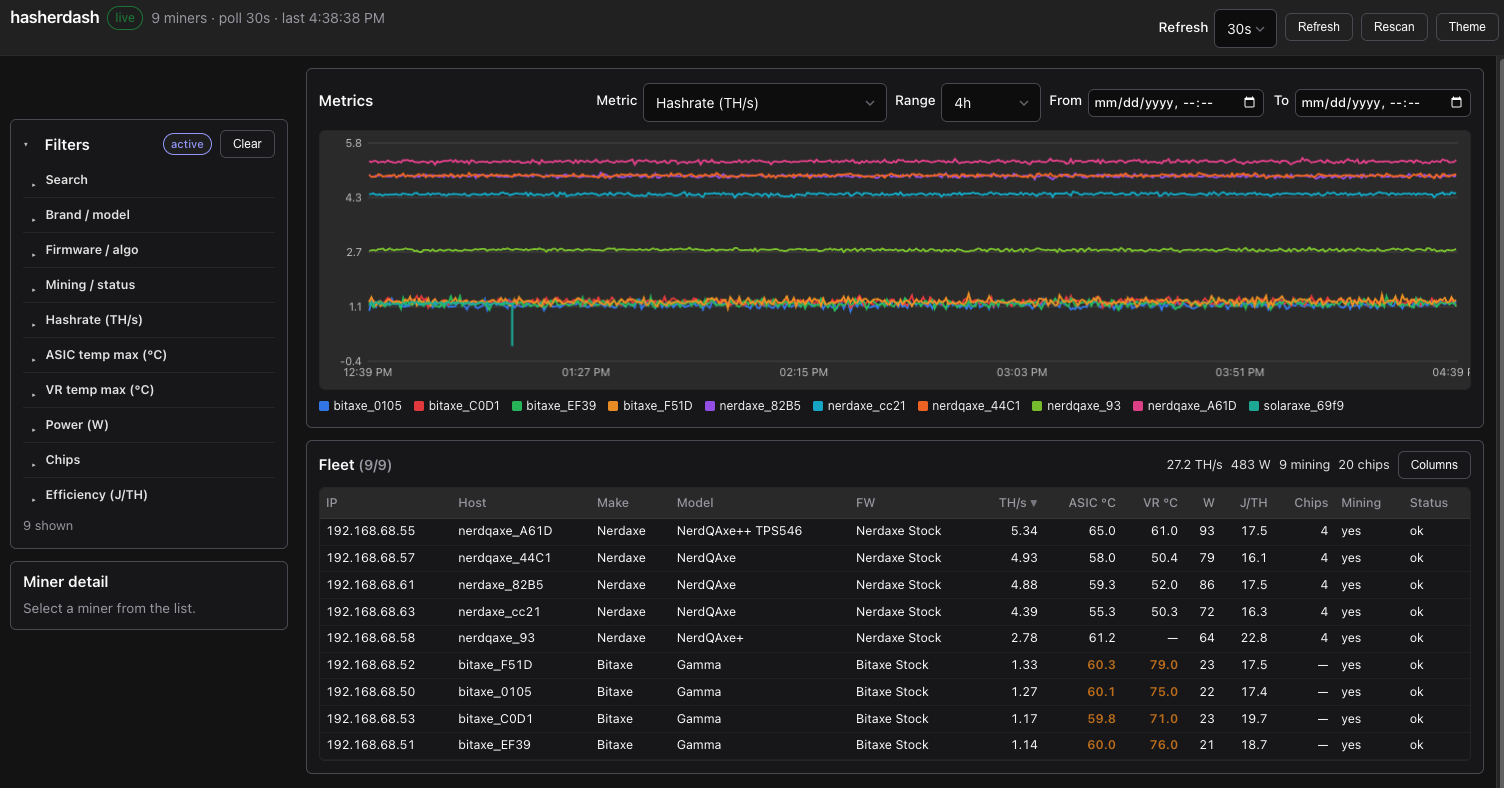
Compact table, filters, miner detail, and live charts for a wall monitor (20+ miners). Metric history is stored in SQLite so charts survive restarts.
Quick start (Docker)
The image builds asic-rs-go from the public Go module proxy — no separate checkout.
Published images: adamdecaf/hasherdash (pushed on git tags v*).
Pull a release (no local build):
mkdir -p data
docker pull adamdecaf/hasherdash:latest
docker run --rm --network host \
  -e MINER_SUBNET=192.168.1.0/24 \
  -e SQLITE_PATH=/app/data/hasherdash.db \
  -v "$PWD/data:/app/data" \
  adamdecaf/hasherdash:latest
Docker Compose (recommended — pulls :latest from Hub):
mkdir -p data
# optional: MINER_SUBNET=192.168.1.0/24
docker compose up -d
# upgrade to newest latest:
# docker compose pull && docker compose up -d
# or build from this checkout instead of pulling:
# docker compose up -d --build
SQLite is bind-mounted to the host at ./data/hasherdash.db (./data → /app/data in the container). Create the directory first if needed:
mkdir -p data
Plain docker run (local build):
make docker
mkdir -p data

docker run --rm --network host \
  -e MINER_SUBNET=192.168.1.0/24 \
  -e SQLITE_PATH=/app/data/hasherdash.db \
  -v "$PWD/data:/app/data" \
  hasherdash:latest
With a config file:
cp hasherdash.example.yaml hasherdash.yaml
# edit subnets, then:

docker run --rm --network host \
  -v "$PWD/hasherdash.yaml:/app/hasherdash.yaml:ro" \
  -v "$PWD/data:/app/data" \
  -e CONFIG_FILE=/app/hasherdash.yaml \
  -e SQLITE_PATH=/app/data/hasherdash.db \
  hasherdash:latest
--network host lets the container scan your LAN. Always mount a host directory on /app/data (and keep SQLITE_PATH under that path) so metric history survives restarts and is easy to back up.
Subnets are re-scanned every rescan_interval (default 30m). Discovered miners stay in the fleet until miner_ttl (default 7d) after last successful poll, and are re-polled every poll_interval (default 30s).
Local run (no Docker)
Needs a built asic-rs-go FFI (sibling checkout is simplest):
# optional: clone next to this repo if you don't already have it
# git clone https://github.com/adamdecaf/asic-rs-go ../asic-rs-go

make ffi   # builds FFI in ../asic-rs-go (override with ASIC_RS_GO=…)

export MINER_SUBNET=192.168.1.0/24
# or: cp hasherdash.example.yaml hasherdash.yaml  # edit subnets

make run
By default metrics are written to ./hasherdash.db in the working directory.
Metric storage (SQLite)
Successful polls append samples (hashrate, temps, power, efficiency, chips, …) to a SQLite database. Charts and /api/history read from that DB.
| Setting | Default | Notes |
|---|---|---|
sqlite_path / SQLITE_PATH | hasherdash.db (Docker: /app/data/hasherdash.db) | File path; parent dirs are created as needed |
history_retention / HISTORY_RETENTION | 168h | Samples older than this are deleted after each poll |
sqlite_path: off / SQLITE_PATH=off | — | In-memory ring buffers only (lost on restart) |
Docker data mount: bind a host directory to /app/data and leave SQLITE_PATH=/app/data/hasherdash.db. With Compose this is ./data → host file ./data/hasherdash.db.
The image entrypoint runs briefly as root to chown the bind-mounted data dir to uid 10001, then drops privileges. After upgrading the image, recreate the container (docker compose pull && docker compose up -d).
If you still hit permission errors on an old image:
mkdir -p data && sudo chown -R 10001:10001 data
Fleet snapshots (live table/detail) stay in memory and are refreshed by the poller. Only time series are durable.
Configuration
Precedence: defaults → config file → environment (env wins).
Config file
Auto-loaded from cwd: hasherdash.yaml, hasherdash.yml, config.yaml, config.yml, hasherdash.json, config.json.
Or set: -config /path / CONFIG_FILE=/path.
http_addr: ":8080"
poll_interval: 30s
rescan_interval: 30m
miner_ttl: 168h
history_retention: 168h
sqlite_path: hasherdash.db
subnets:
  - 192.168.1.0/24
# ips:
#   - 192.168.1.10
Full template: hasherdash.example.yaml.
Environment
| Env | Default | Description |
|---|---|---|
MINER_SUBNET / MINER_SUBNETS | — | CIDR(s), comma-separated; re-scanned on RESCAN_INTERVAL |
MINER_IPS | — | Comma-separated IPs to poll |
MINER_RANGES | — | asic-rs range strings (e.g. 192.168.1.1-50) |
CONFIG_FILE | auto | Path to YAML/JSON config |
HTTP_ADDR | :8080 | Listen address |
POLL_INTERVAL | 30s | Backend poll interval for known miners |
RESCAN_INTERVAL | 30m | Full subnet/range discovery cadence (0 = startup only) |
MINER_TTL | 168h | Keep offline miners this long after last success (0 = forever) |
HISTORY_RETENTION | 168h | How long metric samples are kept for charts |
SQLITE_PATH | hasherdash.db | SQLite file for metrics (off = memory only) |
HISTORY_POINTS | auto | Optional in-memory ring size when SQLite is off |
SCAN_TIMEOUT_SEC | 8 | Per-miner identify timeout |
SCAN_CONCURRENT | 200 | Discovery concurrency |
UI refresh interval is separate (top-right control, localStorage). Chart range defaults to 1d with options for 4h / 12h / 1d / 3d / 7d / custom.
API
| Method | Path | Description |
|---|---|---|
| GET | /api/health | Liveness |
| GET | /api/meta | Fleet status + filter facets |
| GET | /api/miners | Compact snapshots |
| GET | /api/miners/{ip} | Detail (boards, fans, pools) |
| GET | /api/history?metric=hashrate&ids=a,b&window=1d | Time series (window, or since/until RFC3339) |
| POST | /api/rescan | Kick a full subnet/range discovery + poll now |
Metrics: hashrate, temp, asic_temp, vr_temp, wattage, efficiency, chips.
Project layout
cmd/hasherdash/     entrypoint
internal/          api, config, poller, store (SQLite metrics)
web/static/        oat.ink UI
docs/              GitHub Pages site
Dockerfile         multi-stage (module proxy + Rust FFI + cgo)
Notes
- Read-only — no restart / pool / power control in the UI.
- Canvas charts (no Chart.js); styling via oat.
- Metric history uses pure-Go SQLite (modernc.org/sqlite); no extra system library.
- Docker builds pull
github.com/adamdecaf/asic-rs-goand compile the FFI inside the image. - CI builds the binary and Docker image on every push/PR.
- Release tags
v*publish two Hub tags:adamdecaf/hasherdash:<version>(e.g.1.0.0fromv1.0.0) andadamdecaf/hasherdash:latest. Compose always pulls:latest. - Local publish:
make docker-push(afterdocker login; override withDOCKER_IMAGE=/VERSION=). - GitHub Actions secrets for Hub publish:
DOCKER_USERNAME,DOCKER_PASSWORD(Hub password or access token with write access).
Tag summary
Content type
Image
Digest
sha256:91434a0dc…
Size
40.9 MB
Last updated
about 2 months ago
docker pull adamdecaf/hasherdash