adminneoorg/adminneo
Powerful database manager in a single PHP file.
100K+
adminneoorg/adminneo repository overview
AdminNeo Docker image
AdminNeo is a full-featured database management tool written in PHP. Free for commercial and non-commercial use.
AdminNeo is based on the Adminer project by Jakub Vrána.
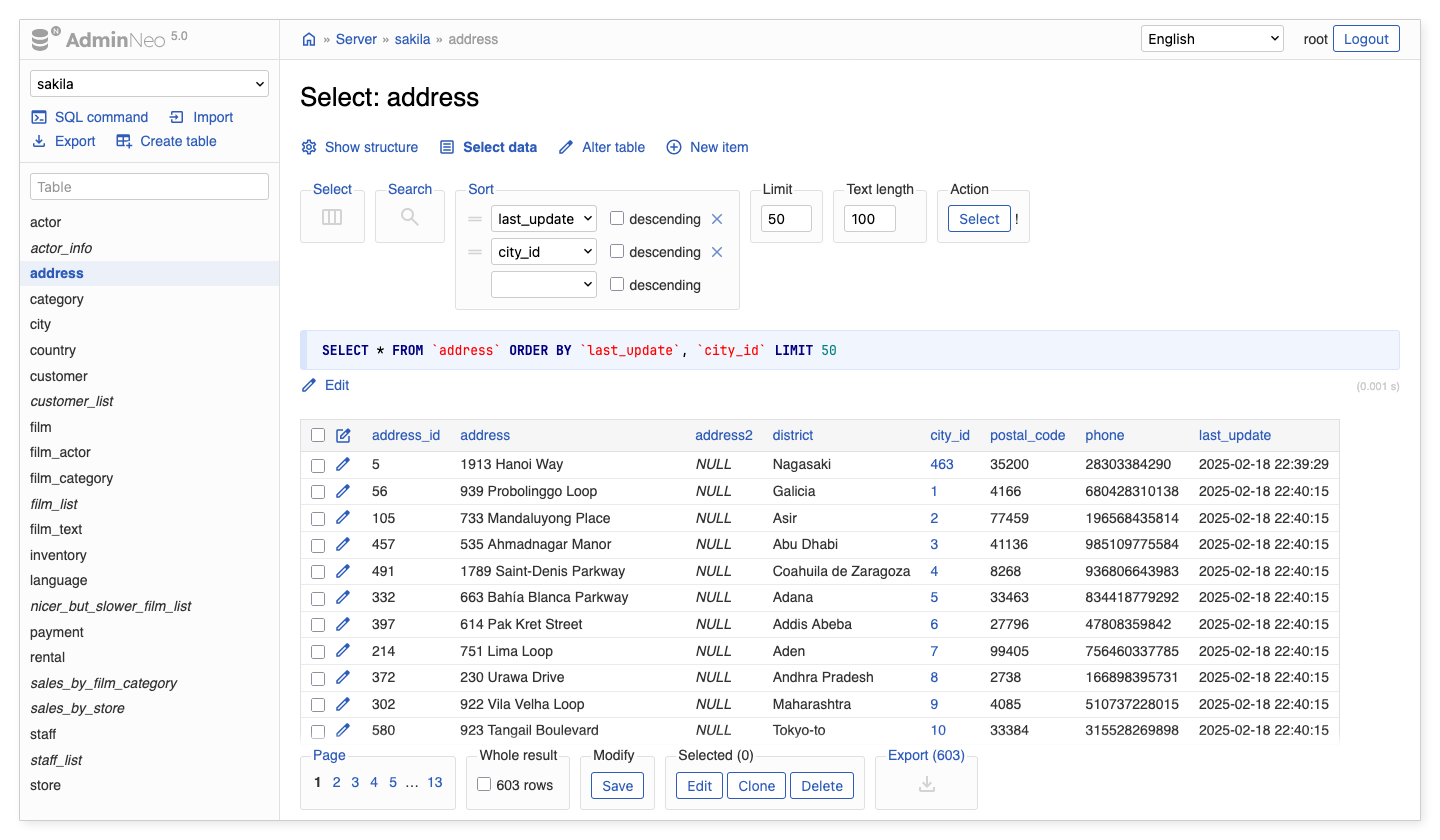
Key features
- Clean modern user interface
- Managing the structure of databases and tables
- Data manipulation and searching
- Exporting and importing databases and data
- Executing batch SQL commands
- Extendable by plugins
- And much more…
Supported databases
- MySQL, MariaDB, PostgreSQL, MS SQL, SQLite
- MongoDB, SimpleDB
- Elasticsearch (beta), ClickHouse (alpha)
Tags
devel- Current development version.latest- Latest stable version.x.y.z- Particular stable version (e.g.,5.0.0). Only the last stable version is supported.
Usage
docker run -d --name adminneo -p 8080:8080 adminneoorg/adminneo:latest

docker run -d --name adminneo -p 8080:8080 \
  -e NEO_COLOR_VARIANT=green \
  -e NEO_PREFER_SELECTION=true \
  -e NEO_JSON_VALUES_DETECTION=true \
  -e NEO_JSON_VALUES_AUTO_FORMAT=true \
  -e NEO_VISIBLE_COLLATIONS='ascii_general_ci,utf8mb4*czech*ci' \
  -e NEO_HIDDEN_DATABASES=__system \
  -e NEO_HIDDEN_SCHEMAS=__system \
  -e NEO_DEFAULT_PASSWORD_HASH= \
  -e NEO_SSL_TRUST_SERVER_CERTIFICATE=true \
  adminneoorg/adminneo:latest
Configuration
For detailed information see Configuration documentation.
| Environment variable | Default | Description |
|---|---|---|
| NEO_THEME | default | Theme code. Available themes are: default, dune. |
| NEO_COLOR_VARIANT | blue | Theme color variant. Available variants are: blue, green, orange, purple, red. |
| NEO_CSS_URLS | null | Comma-separated list of custom CSS files. |
| NEO_JS_URLS | null | Comma-separated list of custom JavaScript files. |
| NEO_NAVIGATION_MODE | simple | Main navigation mode that affects the left menu with the list of tables and top links: simple, dual, hover, reversed. |
| NEO_PREFER_SELECTION | false | Whether data selection is the primary action for all table links. |
| NEO_JSON_VALUES_DETECTION | false | Whether to detect JSON objects and arrays in text columns. |
| NEO_JSON_VALUES_AUTO_FORMAT | false | Whether to automatically format JSON values while editing. |
| NEO_ENUM_AS_SELECT_THRESHOLD | 5 | Threshold for displaying <select> for enum fields instead of radio list in edit form. |
| NEO_RELATION_LINKS | false | Whether to display links to tables referencing the current row. |
| NEO_RECORDS_PER_PAGE | 50 | Number of selected records per one page. |
| NEO_VERSION_VERIFICATION | true | Whether verification of the new AdminNeo's version is enabled. |
| NEO_SQL_AUTOCOMPLETION | true | Whether autocompletion is enabled in SQL command input field. |
| NEO_HIDDEN_DATABASES | null | Comma-separated list of databases to hide from the UI. Value __system will be expanded to all system databases. Access to these databases will be not restricted. |
| NEO_HIDDEN_SCHEMAS | null | Comma-separated list of schemas to hide from the UI. Value __system will be expanded to all system schemas. Access to these schemas will be not restricted. |
| NEO_VISIBLE_COLLATIONS | null | Comma-separated list of collations to keep in select boxes while editing databases or tables. |
| NEO_DEFAULT_DRIVER | null | Default driver for the login form. |
| NEO_DEFAULT_SERVER | null | Default server host and port for the login form. |
| NEO_DEFAULT_DATABASE | null | Default database name for the login form. |
| NEO_DEFAULT_PASSWORD_HASH | null | Hash of the default password for authentication to password-less databases. Set to an empty string to allow connection without password. |
| NEO_SSL_KEY | null | MySQL: The path name to the SSL key file. |
| NEO_SSL_CERTIFICATE | null | MySQL: The path name to the certificate file. |
| NEO_SSL_CA_CERTIFICATE | null | MySQL: The path name to the certificate authority file. |
| NEO_SSL_TRUST_SERVER_CERTIFICATE | null | MySQL, MS SQL: Whether to trust server certificate. Values: true, false, null. |
| NEO_SSL_MODE | null | PostgreSQL: Value for sslmode connection parameter. |
| NEO_SSL_ENCRYPT | null | MS SQL: Whether the communication is encrypted. Values: true, false, null. |
Custom CSS and JavaScript
It is possible to modify the appearance and functionality by creating a custom CSS or JavaScript file. AdminNeo will automatically include files adminneo.css, adminneo-light.css, adminneo-dark.css and adminneo.js that are placed in /var/www/html directory (next to the index.php). You can find more information in the documentaion.
Custom files can be bind-mounted to the target directory:
docker run -d --name adminneo -p 8080:8080 \
  -v "/some_path/adminneo.css:/var/www/html/adminneo.css" \
  -v "/some_path/adminneo.js:/var/www/html/adminneo.js" \
  adminneoorg/adminneo:latest
Plugins
The Docker image contains all the official plugins. These plugins can be enabled by modifying the /var/www/html/adminneo-plugins.php file described in the documentation.
This can be done by bind-mounting the custom file:
docker run -d --name adminneo -p 8080:8080 \
  -v "/some_path/adminneo-plugins.php:/var/www/html/adminneo-plugins.php" \
  adminneoorg/adminneo:latest
More information
Source code and license information can be found on GitHub.
The Docker image is available on Docker Hub.
Tag summary
Content type
Image
Digest
sha256:498135b32…
Size
58.9 MB
Last updated
4 days ago
docker pull adminneoorg/adminneoThis week's pulls
Pulls:
3,789
Last week