aghost7/nodejs-dev
Neovim + Tmux setup for Nodejs. Part of my docker-dev series.
7.9K
aghost7/nodejs-dev repository overview
Docker Dev
Spin up a container to develop from anywhere!
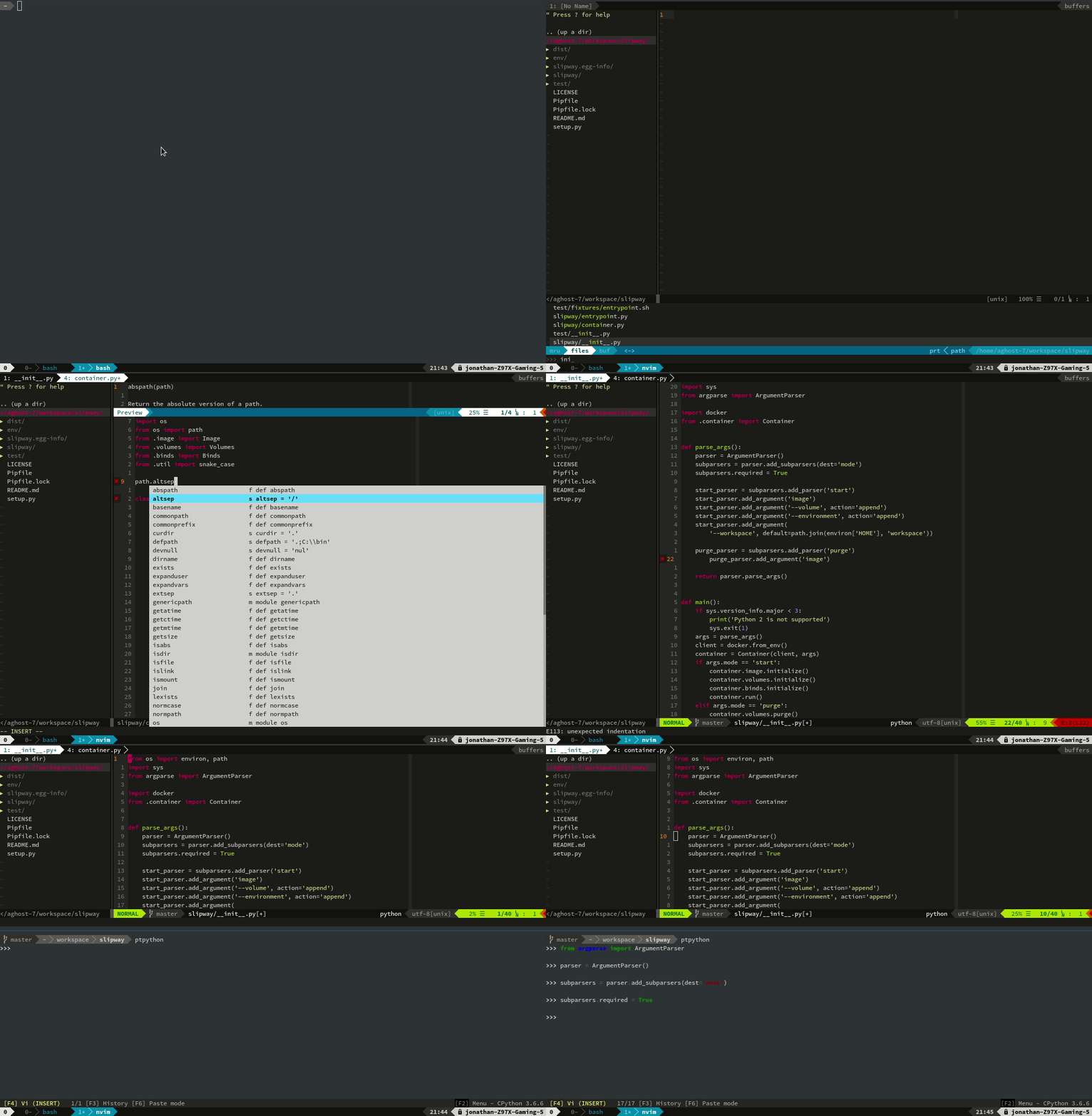
To run, just:
docker run -ti aghost7/nodejs-dev:boron tmux new
Alternatively, if on Linux:
python3 -m pip install --user slipway
slipway start aghost7/nodejs-dev:carbon
Images
Language Images
ubuntu-dev-base: Ubuntu image with a few presets such as docker of already installed. Might add docker-compose in there eventually. Not decided. Main thing with this image though is that it downgrades from root to a regular user. It is also configured to allow passwordlesssudojust like those nice vagrant images. Tags available:latest: Ubuntu xenial based image.bionic: Experimental Ubuntu Bionic Beaver (18.04) image.
power-tmux: Powerline + Tmux. Based from theubuntu-dev-baseimage. Images available:latestbionic
nvim: NeoVim image. Based fromubuntu-tmux. Language agnostic vim setup (no language-specific plugins in there). Images available:latestbionic
nodejs-dev: nvm + nodejs specific configurations. Tags available:bionic-carbon: Ubuntu 18.04 + NodeJs 8.bionic-dubnium: Ubuntu 18.04 + NodeJs 10.
rust-dev: NeoVim configuration and autocomplete for the Rust language.stableuses rust stable with YouCompleteMe backed by only racer.nightlyuses rust nightly with deoplete backed by RLS.
py-dev: Python configuration with autocomplete for python and ptpython.latest: Ubuntu 16.04 + Python 3.5bionic: Ubuntu 18.04 + python 3.6
ruby-dev: Ubuntu Xenial image with rvm and ruby 2.3 pre-installed.c-dev: Ubuntu Bionic image for c development with cquery for completions. There is only abionictag.
Database Images
pg-dev: Postgresql image with pgcli, a command line client with autocompletions and syntax highlighting. Tags correspond to the Postgresql version:9.39.610
my-dev: MySql image with mycli utility. Tags correspond to the mysql version:5.65.78.0
mongo-dev: Official mongodb image with Mongo Hacker added. Tags correspond to the mongdb version:4.1
Vim Configuration
Vim configurations are broken down into three parts:
init.vim: This is the equivalent for.vimrcin NeoVim.plugin.vim: This contains all plugins which will be installed usingvim.plug.post-plugin.vim: Contains all plugin-specific configurations for Neovim. Configurations which aren't plugin-specific reside in theinit.vimfile.
Breaking it down this way allows one to just run
cat addition.vim >> $XDG_CONFIG_PATH/file to add new plugins and configs for
specific programing languages and libraries.
Calling Docker on the Host
The docker daemon run over a socket. The command line tool is just a client to the daemon. In other words, if we make the socket connectable from within the container we're in business.
For some reason it needs privileged to work as well.
docker run -ti --rm \
	--privileged \
	-v `readlink -f /var/run/docker.sock`:/var/run/docker.sock \
	aghost7/ubuntu-dev-base:latest \
	tmux new
SSH Forwarding and Git
For ssh, just pass the socket over to the container.
docker run -ti --rm \
	-v $SSH_AUTH_SOCK:$SSH_AUTH_SOCK \
	-e SSH_AUTH_SOCK=$SSH_AUTH_SOCK \
	aghost7/ubuntu-dev-base:latest \
	tmux new
I like to avoid having to reconfigure git every time, so I mount a volume for
.gitconfig. ~/.ssh/known_hosts is also anoying.
Getting the Clipboard Working
Basically, X11 is built in a manner that allows sending display data over the wire. I've managed to run GUI applications from a headless server through an ssh connection in the past. The way I'm doing this is through the same old unix socket trick for controlling the docker daemon that's on the host machine.
docker run -ti --rm \
	-e DISPLAY=$DISPLAY \
	-v /tmp/.X11-unix:/tmp/.X11-unix:ro \
	aghost7/ubuntu-dev-base:latest bash
On the host you'll need to disable one of the security features in X11.
xhost +si:localuser:$USER > /dev/null
Complete Example Startup Script
This is what I use on my current machine to get it working with everything.
Tag summary
Content type
Image
Digest
sha256:da7087dd9…
Size
423.8 MB
Last updated
7 months ago
docker pull aghost7/nodejs-dev:noble