ailuntz/fastgo_c
FastGo - file sharing with direct links, no login FastGo -文件分享:直链下载、免登录
690
ailuntz/fastgo_c repository overview









FastGo is a revolutionary file sharing solution designed specifically for developers. No login required, direct download links, say goodbye to cloud storage speed limits! Simply right-click in VSCode Explorer to instantly generate exclusive sharing links, making file sharing unprecedentedly simple and efficient.
🚀 Core Advantages
- ⚡ Lightning Fast: No registration required, click to download, unlimited speed transfer
- 🔐 Private Deployment: Complete control over data security, no third-party servers involved
- 🎨 Beautiful Interface: 11 professional templates, each sharing link is a visual feast
- 🔧 Developer Friendly: Deep VSCode integration, containerized deployment, one-click startup
🚀 Quick Deployment
Prerequisites
- VSCode with FastGo extension installed
- A public server with Docker installed
- A local computer with Docker installed
1. Server Side - Pull and Run Docker Container
Run on your public IP server:
docker run --restart=always --network host -d --name fastgo_s \
  -e TOKEN=fastgo \
  ailuntz/fastgo_s:latest
Environment Variables:
TOKEN: Authentication token, must match the client (default: fastgo)
2. Client Side - Pull and Run Docker Container
Run on your local machine:
Linux/macOS:
docker run -d --restart=always \
  -v /path/to/share:/app/fastgo \
  -e SERVER_ADDR=your.server.ip \
  -e REMOTE_PORT=8409 \
  -e TOKEN=fastgo \
  --name fastgo_c \
  ailuntz/fastgo_c:latest
Windows:
docker run -d --restart=always \
  -v C:\path\to\share:/app/fastgo \
  -e SERVER_ADDR=your.server.ip \
  -e REMOTE_PORT=8409 \
  -e TOKEN=fastgo \
  --name fastgo_c \
  ailuntz/fastgo_c:latest
Important Parameters:
-vmount parameter: Path used for sharing and uploading, plugin will use this path as prefix- Linux/macOS:
/path/to/share:/app/fastgo - Windows:
C:\path\to\share:/app/fastgo
- Linux/macOS:
SERVER_ADDR: Replace with your server IP address or domain nameREMOTE_PORT: Public access port (default 8409)TOKEN: Authentication token, must match server side (default: fastgo)
3. Download FastGo Extension from VSCode
Search and install FastGo extension in VSCode
4. Configure FastGo Extension
After installation, configure two key parameters (prompted on first use):
-
Server Address (fastgo.baseUrl)
- Your server address or domain name
- Format:
http://your.server.ip:8409 - Example:
182.98.98.101:8409
-
Path Prefix (fastgo.pathPrefix)
- Local path prefix mounted to Docker container
- Linux/macOS example:
/path/to/share - Windows example:
C:\path\to\share - Must match the local path in Docker mount command
Important Note: Only folders mounted to Docker container will show sharing and upload options when right-clicking in VSCode Explorer.
📖 Usage Guide
Creating Download Links
- Right-click on file or folder in VSCode Explorer
- Select "Create Share Link"
- Configure parameters:
- Max Downloads: Limit download count (default: 3)
- Expiry Time: Link validity period (default: 24 hours)
- Template Style: Choose interface template
- Get sharing link for others to download via browser
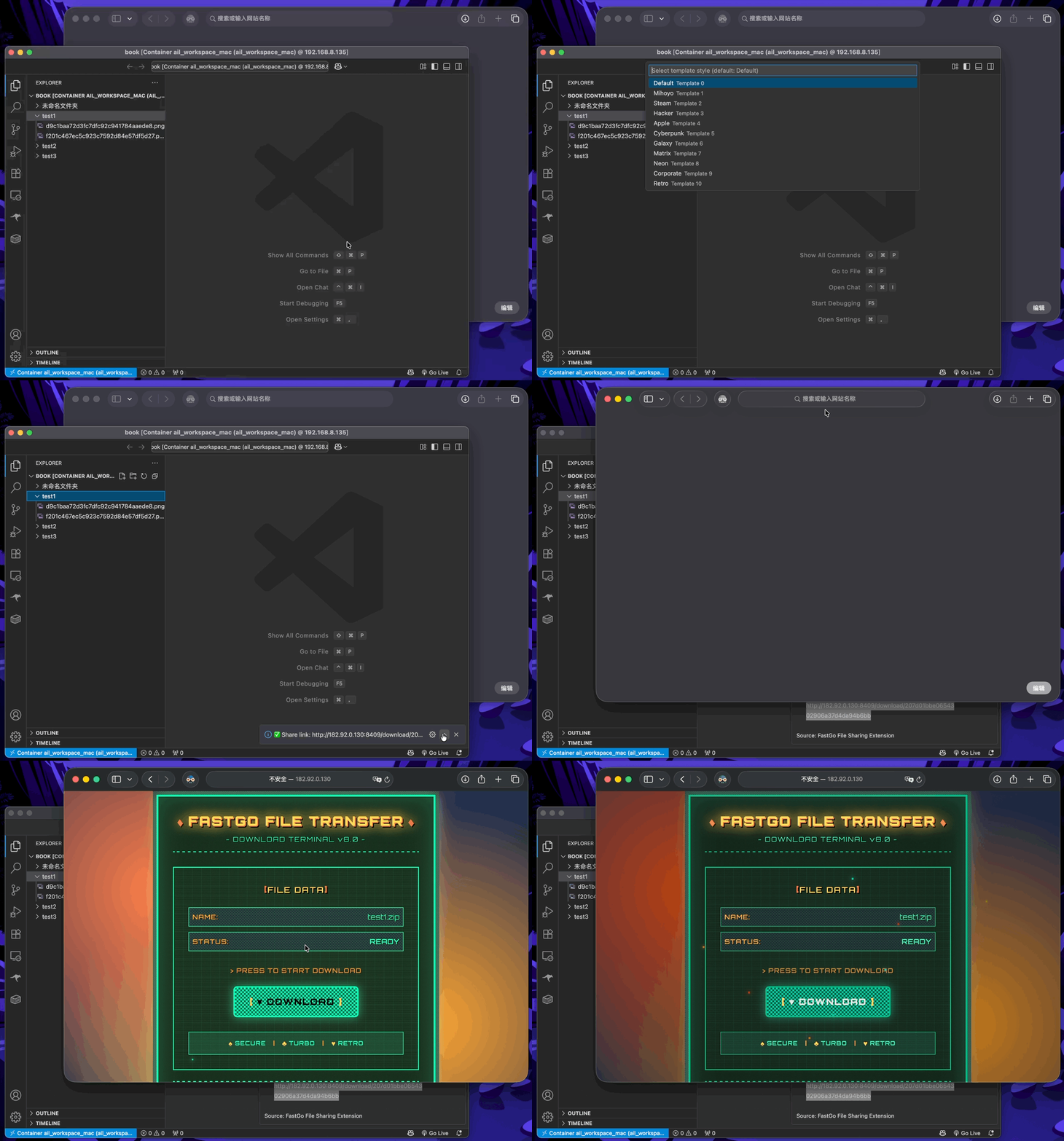
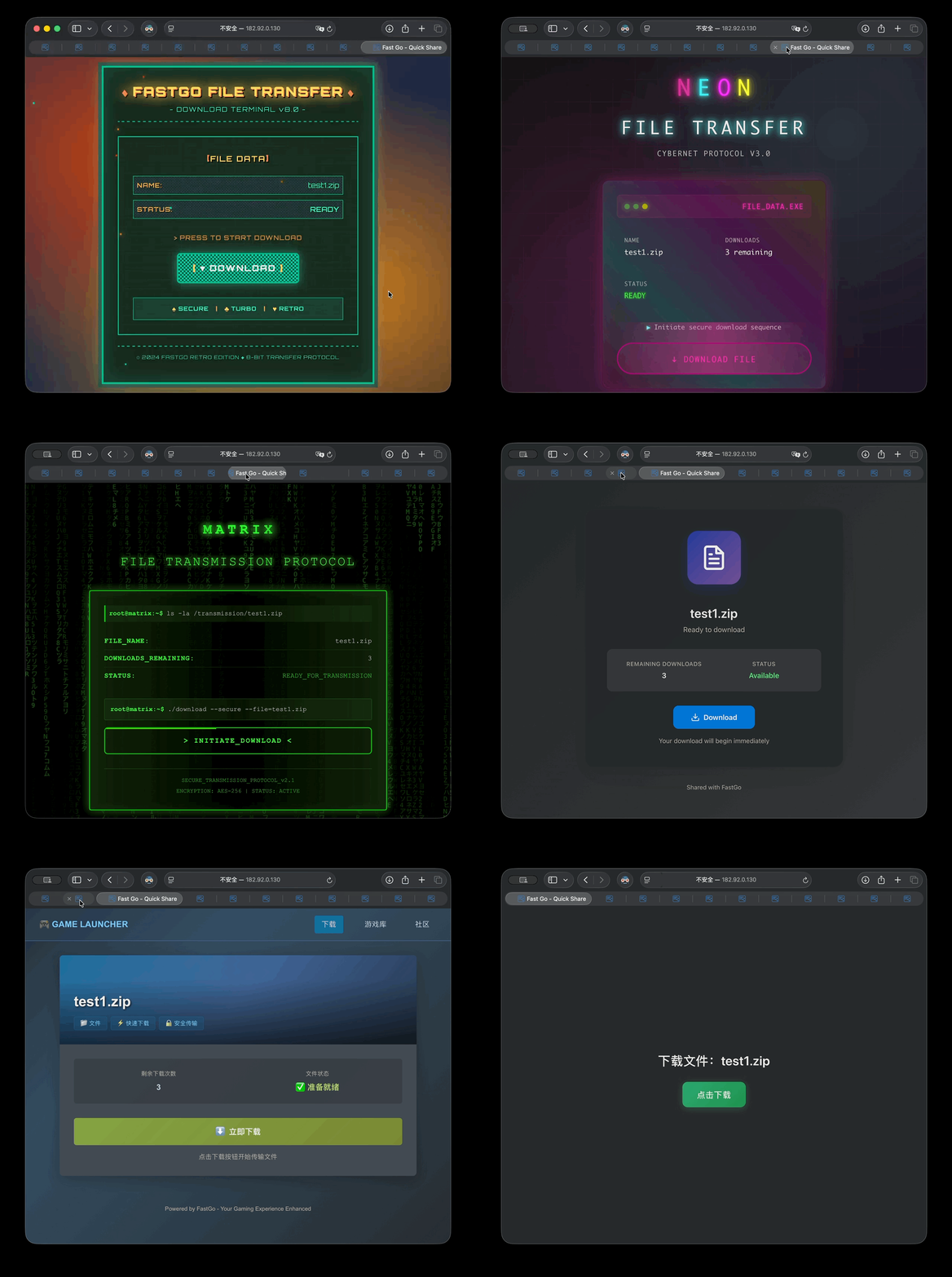
Template Showcase - System provides multiple beautiful download page templates:
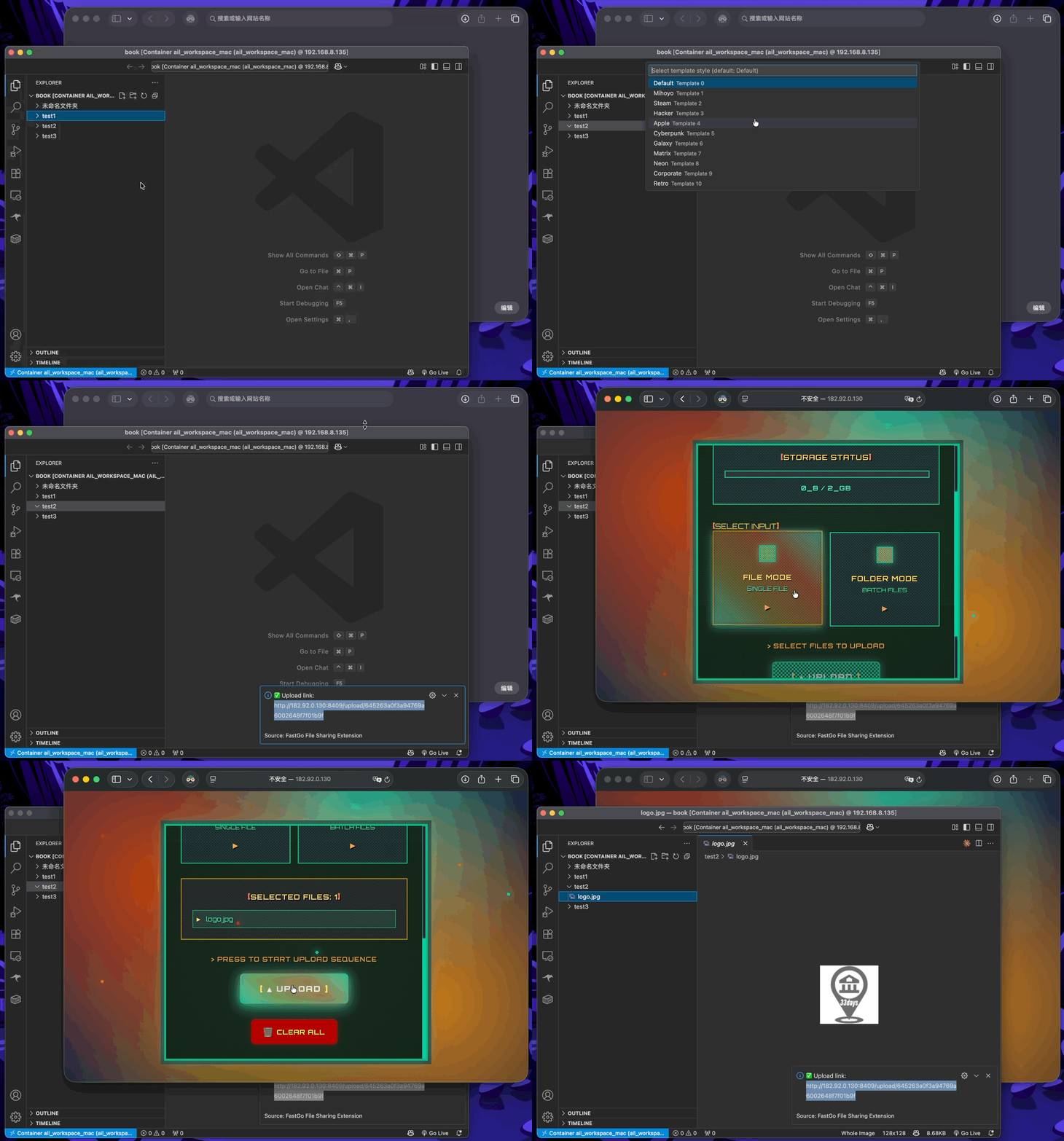
Creating Upload Links
- Right-click on folder in VSCode Explorer
- Select "Create Upload Link"
- Configure parameters:
- Expiry Time: Link validity period (default: 24 hours)
- Storage Capacity: Maximum upload capacity (default: 2GB)
- Template Style: Choose interface template
- Get upload link for others to upload files via browser
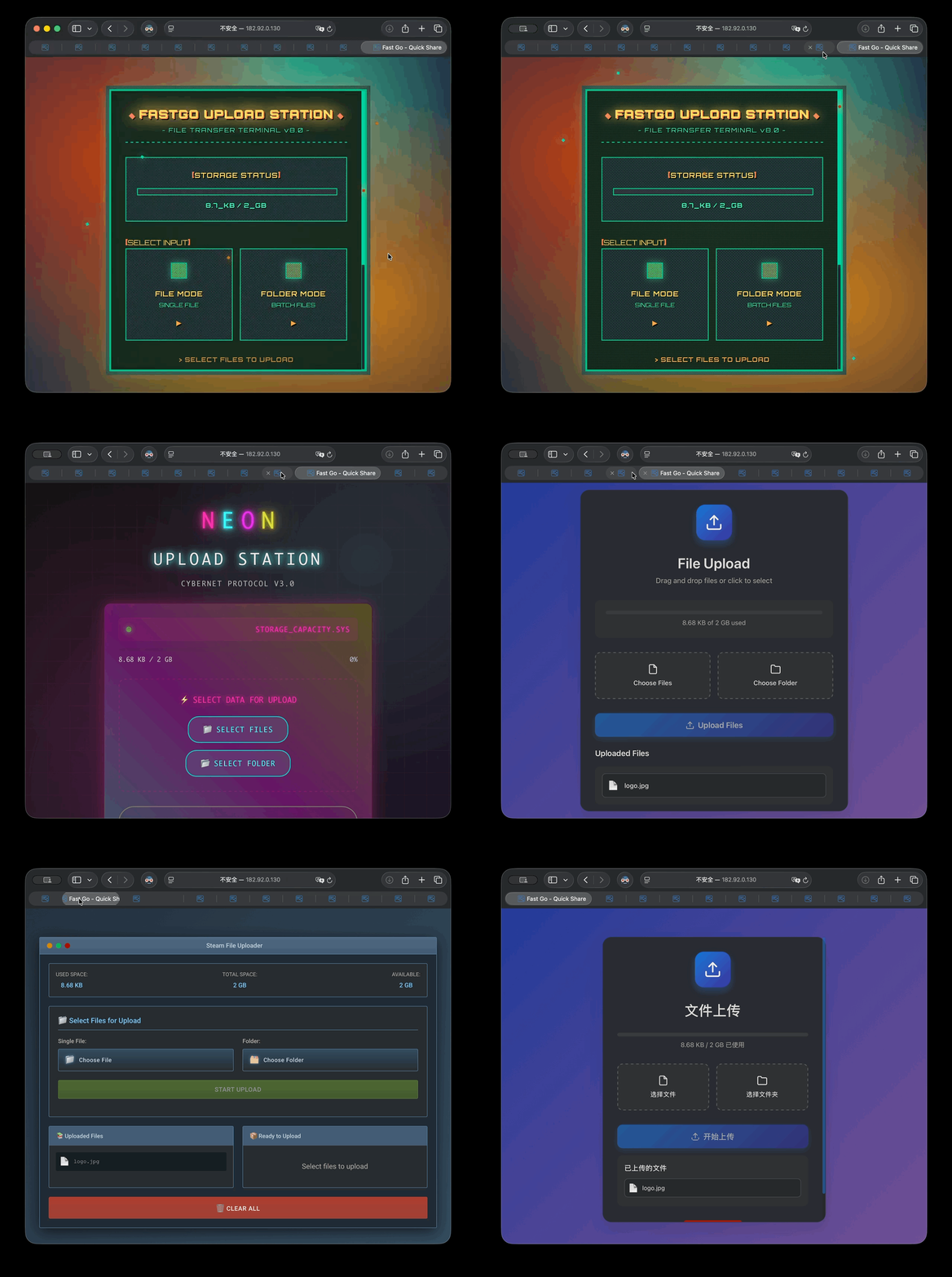
Template Showcase - System provides multiple beautiful upload page templates:
✨ Features
VSCode Extension Features
- 📂 Explorer Integration: Right-click files/folders in Explorer to create sharing links directly
- 🔗 Download Link Generation: Create temporary download links for files or folders (folders auto-packaged as ZIP)
- 📤 Upload Link Generation: Create upload links for directories, allowing others to upload files
- ⚙️ Flexible Configuration: Support server address, path mapping and other configurations
- 🎨 Multiple Templates: 11 beautiful interface templates to choose from
- 🌍 Multi-language Support: Support Chinese and English interfaces
Web Features
- 🎯 Intuitive Interface: Each sharing link has independent beautiful download/upload pages
- ⚡ Chunked Upload: Support large file chunked upload and resume transfer
- 📊 Real-time Progress: Upload and download progress displayed in real-time
- 🔒 Security Control: Support download count limits and expiration time control
- 💾 Storage Management: Upload links support storage capacity limits
🏗️ System Architecture
┌─────────────────┐    ┌──────────────────┐    ┌─────────────────┐
│   VSCode Plugin │────│   fastgo-c Client  │────│  fastgo-s Server │
│   (Local Usage) │    │   (Local Container) │    │  (Public Server)  │
└─────────────────┘    └──────────────────┘    └─────────────────┘
- fastgo-s (Server): Runs on public IP server as reverse proxy server
- fastgo-c (Client): Runs locally, contains Web backend, frontend interface and reverse proxy client
- VSCode Plugin: Provides convenient right-click menu operations, communicates with fastgo-c
🎨 Template Styles
The system provides 11 beautiful interface templates:
| Template ID | Template Name | Style Description |
|---|---|---|
| 0 | Default | Simple default style |
| 1 | Mihoyo | Mihoyo gaming style |
| 2 | Steam | Steam platform style |
| 3 | Hacker | Hacker terminal style |
| 4 | Apple | Apple design style |
| 5 | Cyberpunk | Cyberpunk style |
| 6 | Galaxy | Starry galaxy style |
| 7 | Matrix | Matrix movie style |
| 8 | Neon | Neon light style |
| 9 | Corporate | Corporate business style |
| 10 | Retro | Retro nostalgic style |
🛠️ Development & Debugging
Frontend Development
cd fastgo
npm install
npm run dev  # Development server runs on http://localhost:4000
npm run build  # Build production version
Backend Development
cd app
pip install -r requirements.txt
python fastapi_app.py  # Development server runs on http://localhost:8080
VSCode Extension Development
cd vscode_extension/fastgo
npm install
npm run compile  # Compile TypeScript
npm run watch   # Watch file changes and auto-compile
🔧 Tech Stack
- Frontend: Vue 3 + TypeScript + Vite
- Backend: FastAPI + Python
- Reverse Proxy: FRP (Fast Reverse Proxy)
- Containerization: Docker + Docker Compose
- VSCode Extension: TypeScript + VSCode Extension API
📦 Project Structure
├── app/                    # Backend code
│   ├── fastapi_app.py     # FastAPI main application
│   ├── storage.py         # Storage management
│   ├── config.py         # Configuration file
│   └── utils.py          # Utility functions
├── fastgo/               # Frontend code
│   ├── src/
│   │   ├── components/   # Vue components (including various templates)
│   │   ├── pages/       # Page components
│   │   └── api/         # API interfaces
│   └── dist/           # Build output
├── vscode_extension/     # VSCode extension
│   └── fastgo/
│       ├── src/
│       │   ├── extension.ts  # Extension main logic
│       │   └── i18n/        # Internationalization support
│       └── package.json     # Extension configuration
├── Dockerfile.fastgo-c   # Client container
├── Dockerfile.fastgo-s   # Server container
├── fastgo-c.toml.template        # FRP client configuration
├── fastgo-s.toml        # FRP server configuration
└── nginx.conf           # Nginx configuration
🔒 Security Features
- Access Control: All sharing links have unique tokens, cannot be enumerated
- Time Limits: Support link expiration time settings
- Count Limits: Download links can limit maximum download count
- Capacity Limits: Upload links can limit maximum storage capacity
- Path Validation: Strict path validation to prevent directory traversal attacks
📋 TODO
- Add file preview functionality
- Support batch operations
- Add access statistics
- Support custom domains
- Add user authentication system
🤝 Contributing
Welcome to submit Issues and Pull Requests to improve the project!
📊 Star History
📄 License
This project is licensed under the MIT License.
Tag summary
Content type
Image
Digest
sha256:713ca0a7d…
Size
76.1 MB
Last updated
about 1 year ago
docker pull ailuntz/fastgo_c