
akiletour/oubliette
Self-hosted email sandbox for staging sites. Nothing is ever delivered.
423
akiletour/oubliette repository overview

Oubliette · self-hosted email sandbox for staging sites
An oubliette is a dungeon you drop into through a trapdoor in the ceiling, and nobody comes back out. This one is for email. Your staging sites send their mail to it over SMTP, it keeps every Message, and none of them ever reaches a real person.
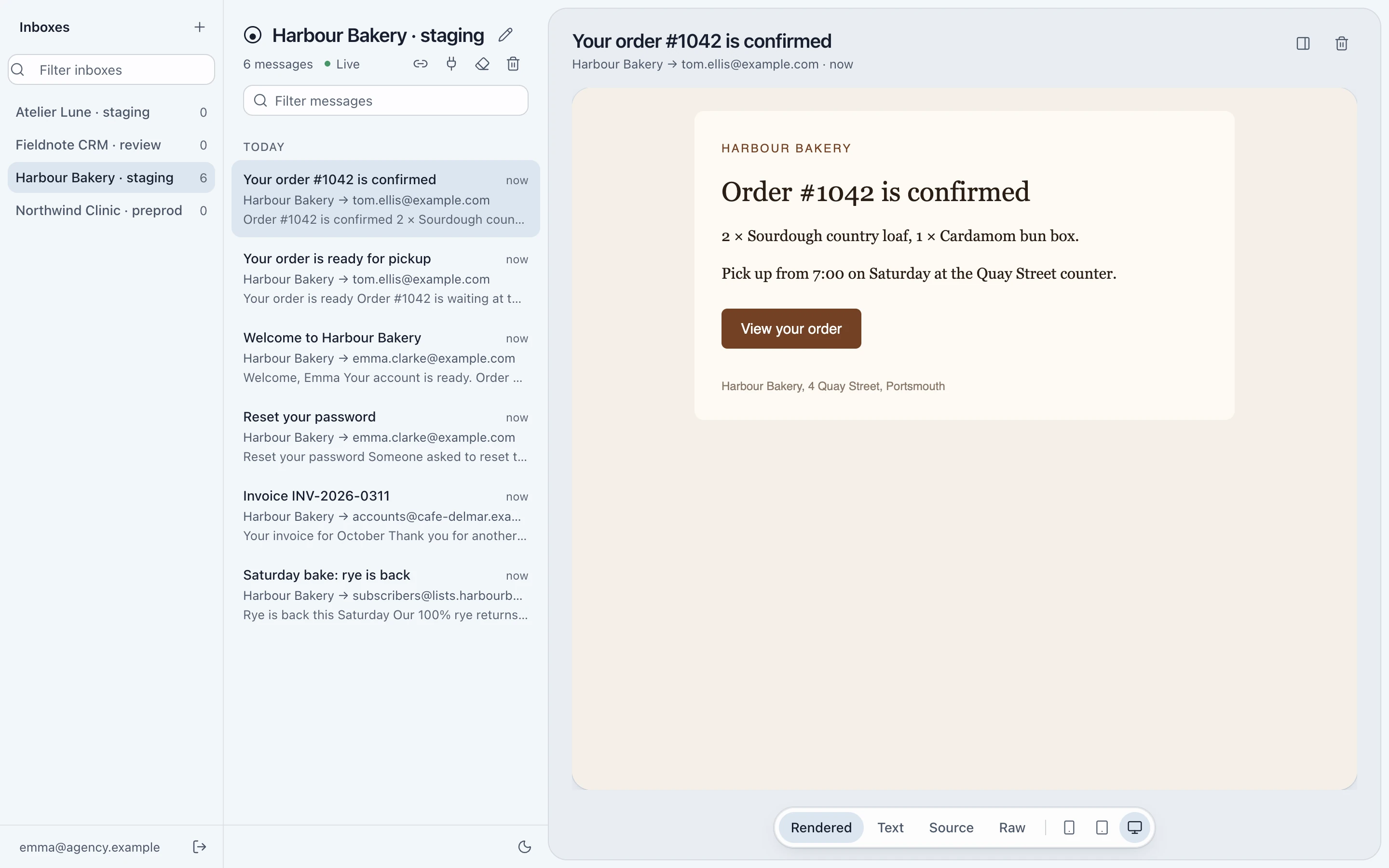
Mailpit and similar SMTP testing tools catch every staging email in one shared mailbox. Oubliette gives each Application its own Inbox, chosen by the Credentials it signs in with. The agency's Members see every Inbox. A customer gets a Share Link to their own Inbox and reads their emails without an account, so nobody has to forward screenshots any more.
It ships as one binary with the interface built in, and keeps everything in one SQLite file.
The interface
Every email as the customer will see it
Messages land in the list as they arrive, grouped by day, with a green Live dot that tells you the list is listening. The filter matches subject, sender and recipient. An email renders in a sandboxed frame with its scripts blocked, and the toggle under it narrows the frame to 375 px or 768 px to check the mobile layout. Text, Source and Raw show the same Message as the Application sent it.
The theme follows your system, or the moon button. The language follows the browser, in English or French.
What the Application actually sent
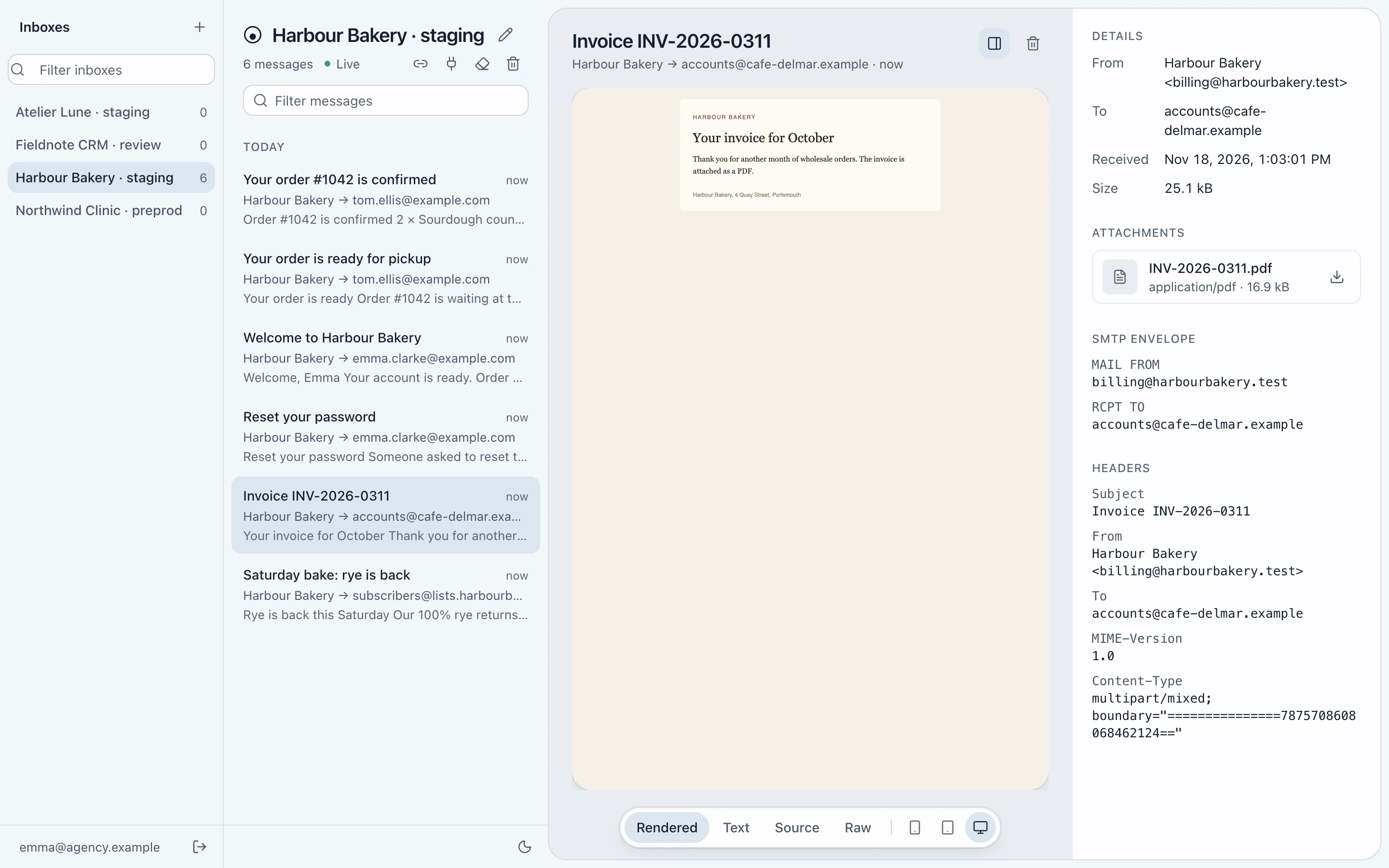
The details panel shows the headers, the attachments and the SMTP envelope. The envelope is where the surprises are: a recipient in RCPT TO who appears in no header is a Bcc your template didn't mean to send. Attachments always download, with a neutral type, so nothing in them runs in the browser.
Plugging in an Application
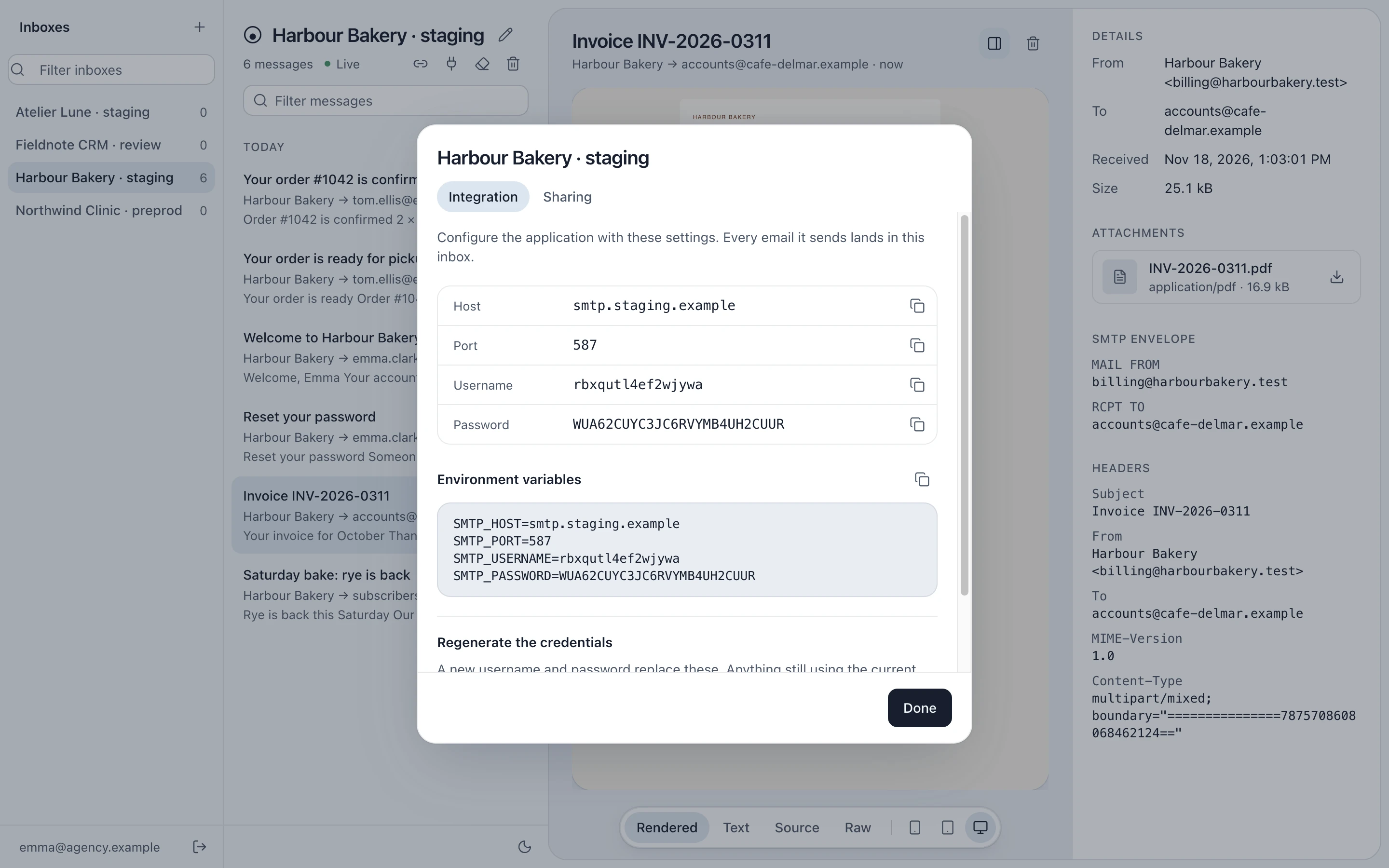
The Integration tab gives the host, port, username and password, and the same four as environment variables to paste into the Application's .env. Regenerating them refuses the old pair at once, even on a connection that is already open, unless the instance has an Anonymous Inbox (see below).
What the customer sees
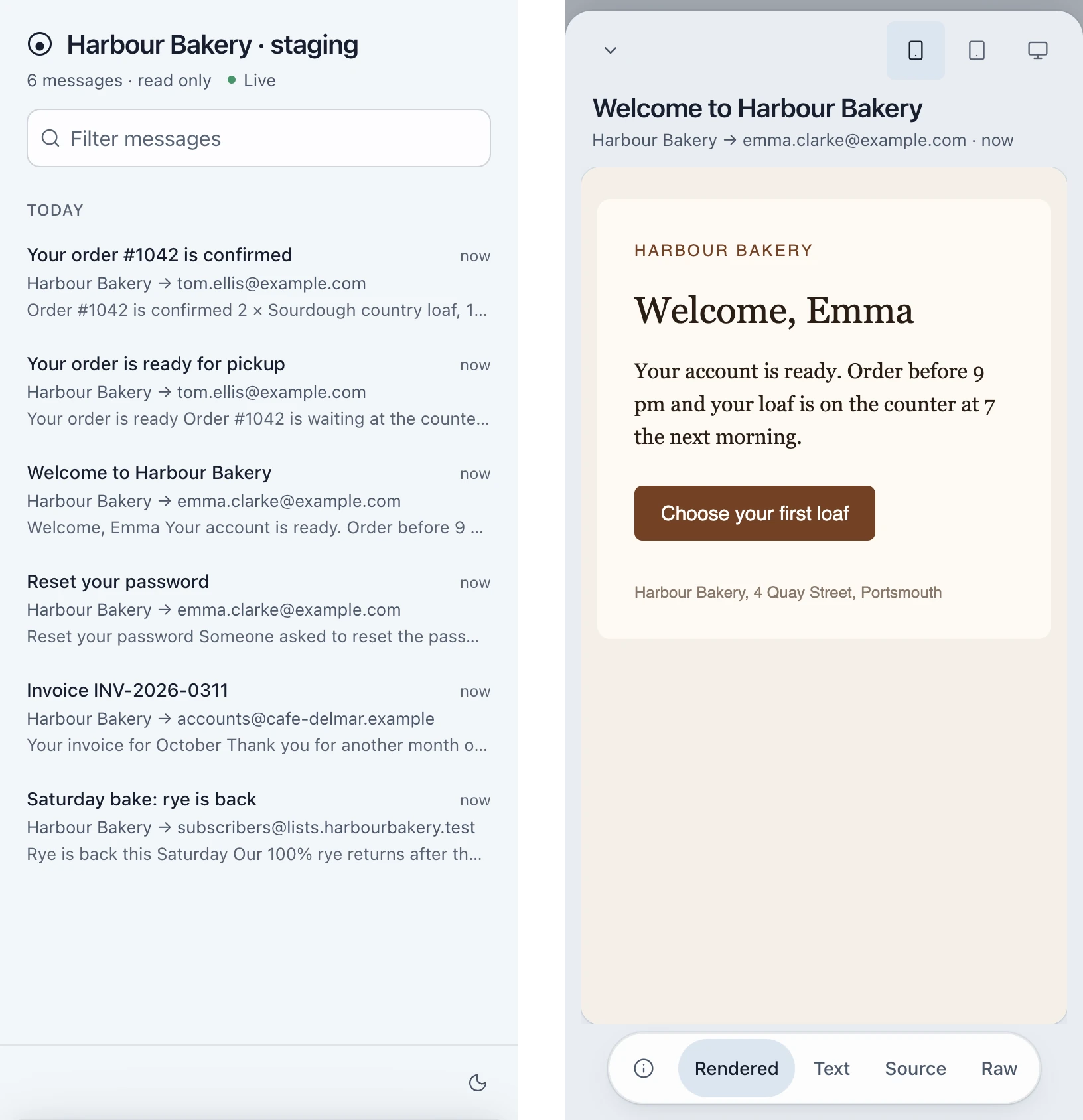
A Share Link opens one Inbox, read-only, on a laptop or a phone. It can expire on a date, an Inbox can have several, and revoking one leaves the others working. The sharing tab shows when each link was last opened.
Try it on your machine
Start it without encryption, which is fine on your own machine:
docker run -d --name oubliette -p 8080:8080 -p 1025:1025 \
  -e OUBLIETTE_SMTP_INSECURE_AUTH=true akiletour/oubliette
The image is on Docker Hub as akiletour/oubliette and on GitHub as ghcr.io/akiletour/oubliette, for amd64 and arm64. Each release also has the binary on its own, for Linux, macOS and Windows.
Create yourself a Member. It asks for the password twice:
docker exec -it oubliette oubliette member add [email protected]
The first start creates an Inbox called Default and logs its Credentials once:
docker logs oubliette | grep smtp_username
Send it something, then open http://localhost:8080 and sign in:
printf 'Subject: Hello from staging\r\n\r\nIt works.\r\n' > hello.eml
curl --url smtp://localhost:1025 --user USERNAME:PASSWORD \
  --mail-from [email protected] --mail-rcpt [email protected] --upload-file hello.eml
Running it for real
docker volume create oubliette-data
docker run -d --name oubliette \
  -p 8080:8080 -p 1025:1025 \
  -v oubliette-data:/data \
  -v /etc/oubliette/tls:/tls:ro \
  -e OUBLIETTE_SMTP_TLS_CERT=/tls/tls.crt \
  -e OUBLIETTE_SMTP_TLS_KEY=/tls/tls.key \
  akiletour/oubliette
The image runs as the non-root user 65532 and keeps its data file at /data/oubliette.db. A named volume works as is. A host directory mounted on /data must be writable by user 65532, and the certificate files must be readable by that user.
To create Members from a script, pass the password on standard input:
printf '%s\n' "$PASSWORD" | docker exec -i oubliette oubliette member add [email protected]
member list, member remove <email> and member set-password <email> manage the other accounts. There is no sign-up and no password reset by email. Members exist only when the Operator creates them.
Replacing Mailpit
Applications set up for Mailpit often send without credentials, or with placeholder ones. Name an Anonymous Inbox and they keep working unchanged:
--smtp-anonymous-inbox Default --smtp-insecure-auth
Every Message sent without Credentials, or with Credentials that belong to no Inbox, lands in that Inbox. An Application that presents the Credentials of another Inbox still lands in its own. The name ignores case, the Inbox is created if none has it, and when several share it the oldest one is used. While the setting names it, the Inbox can't be renamed or deleted. The price is that wrong Credentials no longer show up as an error, and Credentials you regenerate fall into the Anonymous Inbox instead of being refused.
SMTP encryption
The server won't start without a certificate (--smtp-tls-cert and --smtp-tls-key) or the override --smtp-insecure-auth. With a certificate, Applications must use STARTTLS before they authenticate, unless the override is also set. In that case the override wins and the server logs a warning at start, so remove the override when you add a certificate. The files are read again at each TLS handshake, which means a certificate renewed by cert-manager or ACME is picked up without a restart.
Behind a reverse proxy, SMTP needs its own TCP port. STARTTLS begins in cleartext, so a proxy can't route it by SNI. Two setups work:
- The proxy passes the TCP connection through, and Oubliette does STARTTLS with a mounted certificate. That can be a cert-manager Secret, Caddy's PEM files on a shared volume, or a certificate extracted from Traefik's
acme.json. - The proxy terminates implicit TLS on port 465 and forwards cleartext to Oubliette, which then runs with
--smtp-insecure-authon the private network behind it.
The web interface is served in plain HTTP. Let the reverse proxy terminate TLS for it.
Settings
Every flag has an environment variable with the OUBLIETTE_ prefix, and the flag wins when both are set. There is no configuration file. oubliette --help prints the same list.
| Flag | Variable | Default | Meaning |
|---|---|---|---|
--data | OUBLIETTE_DATA | oubliette.db | The data file. The image sets it to /data/oubliette.db. |
--http-addr | OUBLIETTE_HTTP_ADDR | :8080 | Address the web interface listens on, in plain HTTP. |
--smtp-addr | OUBLIETTE_SMTP_ADDR | :1025 | Address the SMTP server listens on. |
--smtp-tls-cert | OUBLIETTE_SMTP_TLS_CERT | none | PEM certificate the SMTP server offers through STARTTLS. |
--smtp-tls-key | OUBLIETTE_SMTP_TLS_KEY | none | PEM private key of that certificate. |
--smtp-insecure-auth | OUBLIETTE_SMTP_INSECURE_AUTH | false | Accept SMTP authentication without encryption. Only on a private network. |
--smtp-advertised-host | OUBLIETTE_SMTP_ADVERTISED_HOST | the host of the page | SMTP host shown in the Integration tab. |
--smtp-advertised-port | OUBLIETTE_SMTP_ADVERTISED_PORT | the listening port | SMTP port shown in the Integration tab. |
--smtp-anonymous-inbox | OUBLIETTE_SMTP_ANONYMOUS_INBOX | none | Inbox that holds Messages sent without Credentials or with Credentials of no Inbox, as Mailpit accepts any sender. Created at start if no Inbox has that name. |
--retention-days | OUBLIETTE_RETENTION_DAYS | 30 | Days a Message is kept before it is purged, from 1 to 36500. |
--inbox-cap | OUBLIETTE_INBOX_CAP | 1000 | Messages an Inbox holds, the oldest leaving first, from 1 to 1000000. |
--max-message-mb | OUBLIETTE_MAX_MESSAGE_MB | 25 | Largest Message accepted, in MB of 1,048,576 bytes, from 1 to 100. |
A boolean takes true or false. A value Oubliette can't read stops the server at start, with a message naming the setting.
Looking after it
GET /healthz answers 200 without authentication, for the platform's probes. Logs go to standard output, one key=value line per event.
On SIGTERM or SIGINT, which is what docker stop sends, Oubliette:
- stops accepting connections;
- closes the SMTP connections that aren't sending a Message;
- lets a Message whose sending has begun (
MAIL FROManswered) finish, for up to 8 seconds, then closes that connection; - closes the data file with every write in it.
A Message still arriving after 8 seconds is not kept. Its Application gets no 250 and should send it again, and Oubliette exits with status 1. Give the platform a grace period of at least 10 seconds, which is Docker's default.
Backups
While the server runs, recent writes sit in a -wal file next to the data file, so a copy of the data file alone can miss them or be inconsistent. Stop the server, copy the file, start it again. After a clean stop the data file holds everything on its own.
docker stop oubliette
docker run --rm -v oubliette-data:/data -v "$PWD":/backup alpine cp /data/oubliette.db /backup/
docker start oubliette
To restore, put the copy back as the data file while the server is stopped.
Building from source
make build
This builds the interface and produces ./oubliette, a static binary built without CGO. It needs Go 1.27 and Node 26. docker build -t oubliette . builds the image instead and needs only Docker. make test runs go vet and the tests, which drive a real server over real SMTP and HTTP.
What it won't do
Oubliette never delivers, relays or forwards a Message, and has no setting that would make it. It has no POP3 or IMAP, no search inside bodies, and no read or unread state. Customers get Share Links rather than accounts, and the whole state lives in one file written by one process, so it doesn't run as several replicas.
Tag summary
Content type
Image
Digest
sha256:a73cfe231…
Size
7.5 MB
Last updated
8 days ago
docker pull akiletour/oubliette