aliasunder/vault-cortex
Standalone MCP server for Obsidian vaults — hybrid search, notes & files, memory, tasks, OAuth 2.1
10K+
aliasunder/vault-cortex repository overview







Full documentation: github.com/aliasunder/vault-cortex
This is an abbreviated version for Docker Hub. See the full README for quick-start guides, authentication details, and development instructions.
Vault Cortex is a standalone MCP server that gives any AI agent hybrid search, task management, structured memory, and read/write access to your Obsidian vault. No plugins, no running Obsidian, no separate bridge. One Docker container, your vault folder, a full tool suite + guided prompts. Run it on a remote server with Obsidian Sync, and the same vault is accessible from your phone, claude.ai, or any remote MCP client, secured with OAuth 2.1. Deploy it with one click or self-host it; either way, the vault is always yours.
What you get
| Search the vault | Reason over notes | Write back to Obsidian |
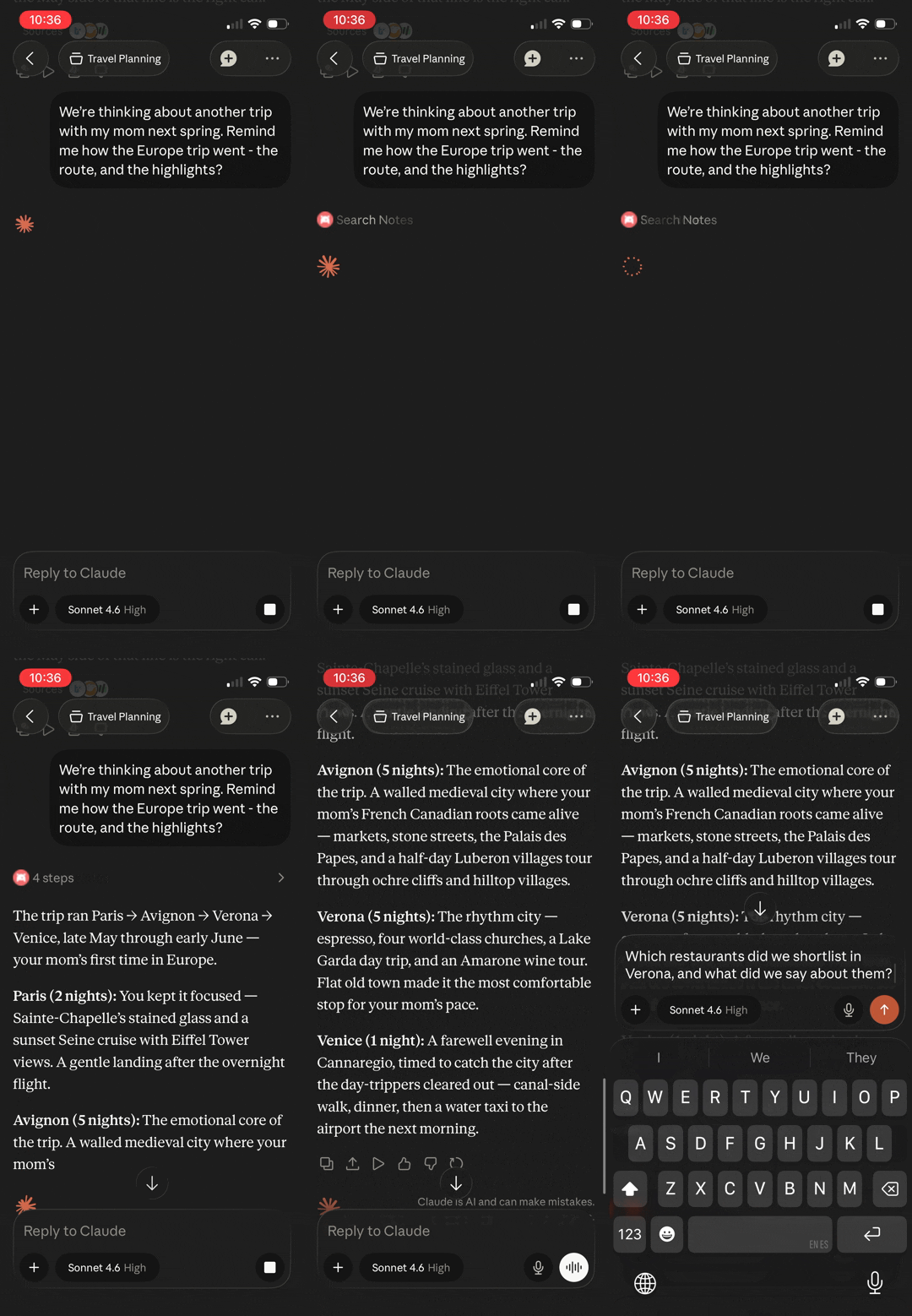 | 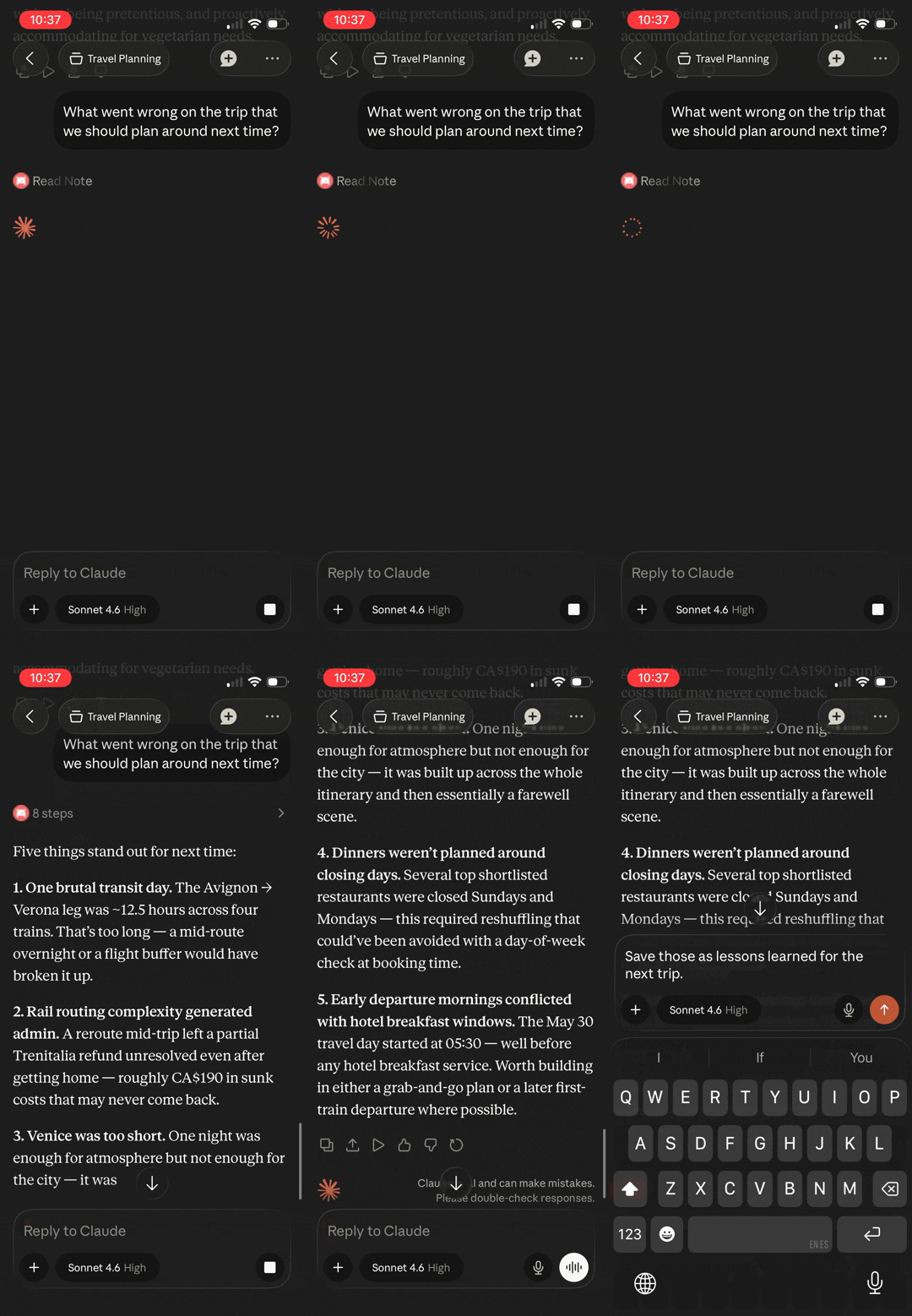 | 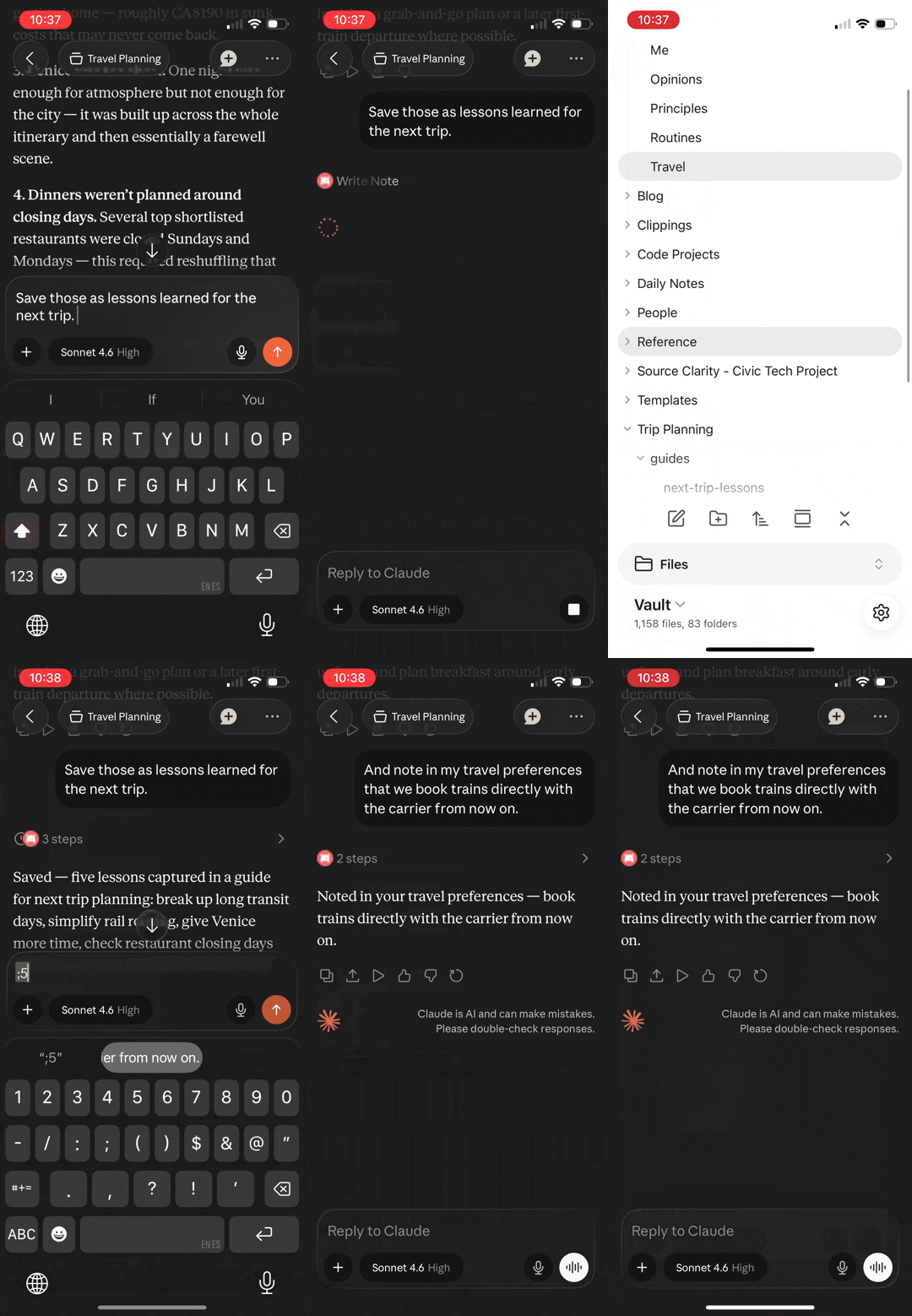 |
All three demos run on Claude mobile. The vault is on a remote server, not the phone.
- Remote access — works from your phone, a remote server, or any MCP client via OAuth 2.1. One click on Render or Railway gets you there with no server to manage; a VPS works too.
- Plugin-free — Obsidian doesn't need to be running. The server works directly with
.mdfiles on disk. Headless sync keeps the vault current. - Hybrid search — FTS5 keyword matching + vector semantic similarity via RRF fusion, refined by cross-encoder reranking for intent-heavy queries. Keywords stay precise on exact terms and jargon; vectors find notes even when your words differ from the vault's.
- Structured memory — dated, append-only entries accumulate into a personal knowledge layer, auto-initialized for AI personalization. Topic recall answers "what do I think about X?" with the current take and the dated history behind it — evolution included.
- Tasks — Kanban-aware task queries and updates: triage by status, dates, or priority, then complete, reprioritize, or move tasks between lanes in one call. Completing a recurring task spawns its next occurrence. Parses both Tasks plugin emoji and Dataview inline-field formats.
- Link graph — backlinks, outgoing links, and orphan detection across the vault
- Files — read the vault's non-markdown files too: images arrive as actual images (shrunk to fit when needed), PDFs as structured text or rendered pages, canvases as readable outlines, data files as text
- Obsidian-native — understands frontmatter, wikilinks, tags, headings, and daily notes
- Guided workflows — built-in prompts for vault health, memory review, and daily reconciliation — assembled from live vault data each time
Tested across a 15-day trip through Europe. 30+ sessions from a phone, 216 tool calls, zero laptop access needed. Writes in one session were immediately available in the next, across cities and days.
Quick Start
See the full Quick Start guide for local setup (2 minutes with Docker), one-click hosting on Render or Railway, remote deployment with Obsidian Sync, and MCP client configuration.
Files
Your notes embed screenshots, reference architecture diagrams, and link out to canvases and data files — but to an agent reading markdown, ![[diagram.png]] is just text. Vault Cortex treats files as part of the vault rather than clutter around it — linked, sized, and readable, each in the form an agent can use:
- Images — the image itself, not the filename. Screenshots and diagrams are downscaled and recompressed server-side when they exceed what MCP clients accept, so even a phone session can look at a 5MB architecture diagram
- Canvases — a Canvas board arrives as a readable outline: its groups, each card's content in reading order, and the connections between them. Canvas content is full-text searchable, and file references on the board appear in the link graph — backlinks and outgoing links work just like note-to-note links. The exact JSON source is one flag away when full fidelity matters
- PDFs — text is extracted with heading hierarchy, code blocks, and hyperlinks preserved; PDF content is full-text searchable alongside your notes. Set
raw: trueto render pages as images instead, showing layout, diagrams, and tables that text extraction can't preserve — scanned and image-only PDFs work in this mode - Text and data files — TXT, SVG, JSON, XML, CSV, YAML, logs, and Bases files return exactly as written; the first 100 KB of content is full-text searchable. Big data files and logs can be read a line range at a time, with each page reporting where you are and how much file remains
- Browse — list any visible folder's files with per-extension counts and file sizes; files a note links to report their size in the link graph too
Set FILE_TOOLS_ENABLED=false to hide the file tools — useful when your remote vault syncs without attachments.
See ARCHITECTURE.md → Files for the image pipeline and dispatch model.
Tools
| Category | Tool | Description |
|---|---|---|
| Vault CRUD | vault_read_note | Read a note — full body, properties, outline, or a section |
vault_write_note | Create a note (fails if it already exists; set overwrite to replace) | |
vault_patch_note | Heading-targeted edit (append, prepend, replace with include_children guard, insert) | |
vault_replace_in_note | Find-and-replace text in a note (first match or replace_all_occurrences) | |
vault_delete_span | Delete a block of lines by short anchors, no full re-quote | |
vault_replace_span | Replace a block of lines by short anchors with new content | |
vault_insert_at_anchor | Insert content before or after a line identified by a short anchor | |
vault_list_notes | List notes with optional glob/folder filter | |
vault_delete_note | Delete a note, honoring the vault's trash setting (protected paths enforced) | |
vault_move_note | Move or rename a note, rewriting links across the vault | |
| Search | vault_search | Hybrid search with tag/folder/property/date filters |
vault_search_by_tag | Find notes by tag (exact or prefix match) | |
vault_search_by_folder | Browse notes in a folder with metadata | |
vault_recent_notes | Recently modified or created notes | |
vault_list_tags | All tags with usage counts | |
| Tasks | vault_list_tasks | Vault-wide task index with sub-task depth — Kanban-aware, date/priority/heading filters |
vault_create_task | Create a correctly-formatted task — dates, priority, recurrence, on_completion, sub-tasks, block_id | |
vault_update_task | Edit any task field in one call — completing a recurring task creates its next occurrence | |
| Memory | vault_get_memory | Read structured memory (file, section, or all) |
vault_update_memory | Append a dated entry to a memory section | |
vault_delete_memory | Remove a specific memory entry by date | |
vault_list_memory_files | Discover memory files, their sections, and each file's entry policy | |
vault_memory_recall | Entry-granular hybrid recall of a topic across memory files, oldest-first | |
| Properties | vault_list_property_keys | All property keys with sample values |
vault_list_property_values | Distinct values for a property key | |
vault_search_by_property | Find notes by property key-value | |
vault_update_properties | Add, update, or replace properties without touching the body | |
| Links | vault_get_backlinks | Notes linking to a given path |
vault_get_outgoing_links | Links from a given note | |
vault_find_orphans | Notes with no incoming links | |
| Files | vault_read_file | Read a non-markdown file — images delivered as images, canvases as readable outlines |
vault_list_files | Browse the vault's non-markdown files with sizes and per-extension counts | |
| Daily Notes | vault_get_daily_note | Today's (or any date's) daily note |
Prompts
Tools are model-driven — the assistant calls them. Prompts are workflows you trigger. Each one queries the search index, link graph, and memory layer at invocation time, then assembles the results with guided instructions — so the session starts grounded in your vault's actual state, not assumptions.
| Prompt | Arguments | What it does |
|---|---|---|
vault-orientation | — | Surveys vault stats, folder distribution, property adoption rates (flags low adoption), orphans, broken link count, tags, recent notes, and the memory layer — with contextual tool suggestions |
memory-review | file?, max_chars? | Structural overview (scope callouts, section entry counts) + dated content as a timeline. Guided reflection: evolution narrative, scope-fit, backfill gaps, and coverage analysis — append-only by default, pruning proposed only for entry-policy: living files. Hidden when MEMORY_ENABLED=false, READONLY_MODE=true, or DISABLED_TOOLS includes vault_update_memory. |
daily-review | date?, max_chars? | Reconciles a day — daily note, vault-wide task status (due/overdue, scheduled), modified notes, outgoing links (broken-link detection), and backlinks — surfaces what happened, what's open, and what needs follow-up |
Prompts adapt to your configuration (MEMORY_DIR, daily-notes settings) and work for any vault out of the box. Pass max_chars to cap embedded content if your client has payload limits.
Client support: Prompts work in Claude Desktop (Chat and Cowork — via the + menu under your connector), Claude Code (slash commands), and OpenCode. Support in other clients (Cursor, Windsurf) varies — see the MCP clients matrix for the latest.
Properties
Vault Cortex indexes every property in your notes, but five get promoted treatment — dedicated columns for fast filtering, and top-level fields in every search and discovery result:
| Property | What you can do |
|---|---|
title | Display name in search results; falls back to the filename when missing |
tags | Search and filter by tag, including parent-child hierarchies (project matches project/vault-cortex) |
type | Filter by note type — meeting, person, session-log, or any value your vault uses |
created | Sort by creation date and see when each note was created alongside every search result |
related | Filter for notes that cross-reference a specific link — surfaces connections invisible without a graph query |
Configuration
All settings are environment variables with sensible defaults. Some defaults derive from other settings — the Default column shows each derivation, and a value you set replaces the whole derived default. Remote deployments also forward Obsidian Sync's own settings — DEVICE_NAME, SYNC_MODE, CONFLICT_STRATEGY, SYNC_CONFIGS, SYNC_EXCLUDED_FOLDERS, SYNC_FILE_TYPES — documented in the remote guide's configuration table.
| Variable | Required? | Default | Description |
|---|---|---|---|
MCP_AUTH_TOKEN | Yes | — | Bearer token for authentication (also the JWT signing key) |
VAULT_PATH | Local only | — | Host path to your vault (bind mount source; remote uses a named volume). Must not contain *, ?, or [ — rejected at startup. |
PUBLIC_URL | Remote only | — | Public URL for OAuth discovery metadata. Filled in automatically on Render and Railway (from RENDER_EXTERNAL_URL or RAILWAY_PUBLIC_DOMAIN) when left unset |
OBSIDIAN_AUTH_TOKEN | — | — | Obsidian Sync auth token. Leave empty to sign in through the /setup page after deploy; or the CLI's get-sync-token captures it for you |
VAULT_NAME | Remote only | — | Exact name of your Obsidian vault (case-sensitive) |
VAULT_PASSWORD | Remote only | — | End-to-end encryption password, if your vault has one. Leave empty otherwise. |
STORAGE_ROOT | — | — | One directory for everything that must persist — the vault, the search index, and Obsidian Sync state — for container hosting platforms that allow a single persistent volume (Railway, Render). Mount the volume there and set this to the same path. Must not contain *, ?, or [ — rejected at startup. |
EMBEDDING_ENABLED | — | true | Set false to disable the embedding pipeline — skips model download, vector tables, embedding passes, and hybrid search. Search falls back to FTS5 keyword matching. |
RERANK_MODE | — | blended | Cross-encoder reranking mode: blended applies position-aware score blending after RRF fusion (~200ms added latency), none skips reranking. Only takes effect when EMBEDDING_ENABLED is true. |
MEMORY_ENABLED | — | true | Set false to fully disable the memory layer — hides memory tools, skips bootstrap, omits memory from server metadata. MEMORY_DIR still supplies the defaults for PROTECTED_PATHS and ORPHAN_EXCLUDE_FOLDERS when false. |
FILE_TOOLS_ENABLED | — | true | Set false to hide file tools (vault_read_file, vault_list_files) — useful for remote deployments where Obsidian Sync has attachment syncing disabled. |
READONLY_MODE | — | false | Set true to hide every tool that changes the vault and skip memory folder auto-creation — connected clients can read and search but never edit. |
DISABLED_TOOLS | — | — | Hide individual tools by name, comma-separated (e.g. vault_delete_note,vault_move_note). Names match the Tool column in the tools table. Subtractive only — it cannot re-enable a tool another setting hides. An unknown tool name stops the server at startup, so typos surface immediately. |
MEMORY_DIR | — | About Me | Vault folder for structured memory files |
PROTECTED_PATHS | — | MEMORY_DIR, daily notes folder | Folders that vault_delete_note and vault_move_note refuse to touch. The default daily notes folder is read from DAILY_NOTES_FOLDER or .obsidian/daily-notes.json (default Daily Notes); see Daily notes for root and empty settings. Overrides the default entirely when set. |
ORPHAN_EXCLUDE_FOLDERS | — | daily notes folder, Templates, MEMORY_DIR | Folders excluded from orphan detection. The daily notes folder is read from DAILY_NOTES_FOLDER or .obsidian/daily-notes.json (default Daily Notes); see Daily notes for root and empty settings. Set a list to replace all defaults, or ORPHAN_EXCLUDE_FOLDERS=, to exclude nothing. An empty value uses the defaults. |
DAILY_NOTES_FOLDER | — | from daily-notes.json | Sets the folder your daily notes live in. When unset, read from .obsidian/daily-notes.json; Daily Notes when that file is missing or unreadable. See Daily notes. |
DAILY_NOTES_FORMAT | — | from daily-notes.json | Sets the daily note filename format — same tokens as Obsidian's daily note date format setting. When unset, read from .obsidian/daily-notes.json, falling back to YYYY-MM-DD. See Daily notes. |
TZ | — | UTC | IANA timezone for timestamps and daily note resolution |
SERVICE_DOCUMENTATION_URL | — | GitHub repo URL | URL returned in OAuth discovery metadata |
LOG_LEVEL | — | info | Logging verbosity: debug, info, warn, error |
LOG_DIR | — | /data/logs (remote), $STORAGE_ROOT/data/logs (single-volume), none (local) | Directory for log files that survive container re-creation. The container's own log (what docker logs shows) is always written, but Docker discards it whenever the container is recreated — on image updates or config changes. Date-stamped files under LOG_DIR live on the data volume and survive. none keeps only the container log. |
LOG_RETENTION_DAYS | — | 90 | Days to keep log files before automatic cleanup on startup; only applies when LOG_DIR is a path |
WINDOWS_MODE | — | false | On Windows? Set true. Switches the file watcher to polling and note moves to rename-based writes so a vault on a C: drive works through Docker Desktop. Safe to leave on for any Windows setup; unneeded on macOS/Linux/WSL2. |
MAX_FILE_BYTES | — | 52428800 (50 MiB) | Maximum file size vault_read_file will read (in bytes). Files exceeding this are rejected before reading. Raise for vaults with very large individual files. |
MAX_IMAGE_OUTPUT_BYTES | — | 49152 (48 KiB) | Byte budget for images delivered by vault_read_file, in binary bytes before base64 encoding. Images exceeding this are downscaled and recompressed to fit. Sized for the tightest mainstream MCP client cap; raise for clients that accept larger responses. |
MAX_PDF_RENDER_PAGES | — | 5 | Maximum PDF pages to render as images when raw: true is set on vault_read_file. The per-page byte budget is MAX_IMAGE_OUTPUT_BYTES divided evenly across the rendered pages — fewer pages means higher quality each. |
TRASH_RETENTION_DAYS | Local only | 30 | Days a note deleted under Obsidian's default "Move to system trash" setting stays in .trash/ before the server cleans it up. Set none to keep those notes forever. Only notes the server itself moved there are cleaned up. With Obsidian Sync, deletes are permanent on the server and recoverable from Sync's version history. |
TRUST_PROXY_HOPS | — | 0 | Number of trusted reverse-proxy hops used to derive the client IP from X-Forwarded-For (OAuth rate limiting, request logs). Set 1 when exactly one proxy you control sits in front of the server (Caddy, nginx, Cloudflare Tunnel, API Gateway). With 0, injected forwarding headers are ignored. |
TRUST_FORWARDED_HOPS | — | 0 | How many trailing for= entries in the RFC 7239 Forwarded header belong to proxies you control. 0 ignores the header; 1 when the proxy in front writes it (e.g. AWS API Gateway); 2 when a CDN fronts that proxy and is the only way to reach it. |
Deployment Options
Local runs on your machine. Remote deployments run on a VPS or a hosted container platform — your vault is accessible even when your laptop is closed.
Whichever path you pick, the server is replaceable and your vault isn't. Your notes are plain Markdown files, synced by Obsidian to every device you own; the container holds a copy and an index it can rebuild from scratch. Shut down the VPS, delete the Render or Railway service, switch hosts — the same files are still on your machine and in Obsidian Sync, readable by anything. That's the difference from an AI notebook whose real home is the vendor's database: here the host is a convenience, not a custodian.
| Path | What | Guide |
|---|---|---|
| Local | Your vault on your machine — free, no cloud | deploy/local/ |
| Remote · one-click | Render or Railway — one persistent volume, no server to manage | deploy/render/ · deploy/railway/ |
| Remote · self-hosted | VPS + Obsidian Sync — access from any device | deploy/remote/ |
| Remote · AWS (SST) | IaC reference deployment — automated infra, defense-in-depth auth | DEPLOY.md |
License
MIT — see the full License section for details on bundled components.
Tag summary
Content type
Image
Digest
sha256:0594d9d82…
Size
400.5 MB
Last updated
1 day ago
docker pull aliasunder/vault-cortex