altrdev/torchio
Stress CPU, memory, disk and latency on demand. For testing autoscaling, limits and probes.
2.3K
altrdev/torchio repository overview
torchio
Break your containers on purpose. torchio is a small server, a single static binary written in Rust, that burns CPU, holds memory, fills disk, answers slowly or returns any HTTP status, all on demand over HTTP. Use it to see how your setup behaves under pressure: autoscaling, resource limits, OOM kills, probes, timeouts and retries.
Torchio is the Italian word for the press that squeezes wine and oil, as in mettere sotto torchio: to put under pressure. Put your containers under the press. It began in 2019 as high-cpu-node, when it could only burn CPU.
Documentation: https://torchio.altr.dev · Source code and issues: https://github.com/altrdev/torchio
For AI agents: llms.txt, llms-full.txt and a skill to run tests with torchio.
Warning: this server is meant to consume resources on purpose. Don't expose it to the public internet.
Install
Pick one way to get torchio. It is a single static binary for Linux and macOS (amd64 and arm64), and an image of about 1.4 MB.
Docker
docker pull altrdev/torchio
The image holds the binary and nothing else. The tags and the rest are in Docker.
Homebrew
For macOS and Linux:
brew install altrdev/tap/torchio
It installs the shell completions too. If Tab does nothing in zsh, see Shell completion.
Install script
A script that downloads the binary of the latest release for your system (macOS or Linux, amd64 or arm64), checks its checksum and installs it:
curl -fsSL https://torchio.altr.dev/install | sh
It installs in /usr/local/bin (with sudo if needed, or in ~/.local/bin when there is none). TORCHIO_VERSION=v4.0.0 picks a release and TORCHIO_INSTALL_DIR the folder, for example curl -fsSL ... | TORCHIO_INSTALL_DIR=$HOME/bin sh.
Release binary
Take the binary of your system by hand from the releases: torchio-linux-amd64, torchio-linux-arm64, torchio-macos-amd64 or torchio-macos-arm64. SHA256SUMS is there to check it (shasum -a 256 -c on macOS):
curl -LO https://github.com/altrdev/torchio/releases/latest/download/torchio-linux-amd64
curl -LO https://github.com/altrdev/torchio/releases/latest/download/SHA256SUMS
grep ' torchio-linux-amd64$' SHA256SUMS | sha256sum -c
chmod +x torchio-linux-amd64
From source
Build it with cargo (Rust 1.88 or later):
cargo install --git https://github.com/altrdev/torchio
Try it in 30 seconds
Start the server with the image or with the binary (see Install if you have neither yet):
docker run --name torchio -p 3000:3000 altrdev/torchio    # with Docker
torchio serve                                             # with the binary
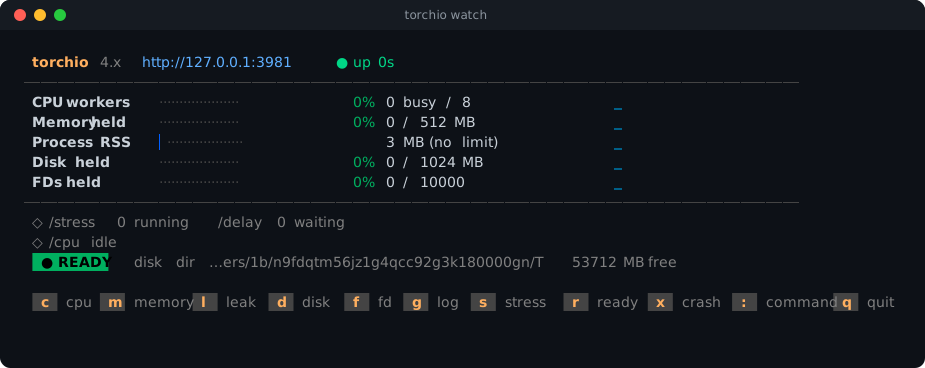
torchio with no command does the same as torchio serve: it is what the Docker image runs. The server stays in the foreground, so Ctrl+C stops it; use a second terminal tab for torchio watch.
In a second terminal, watch what it does:
docker exec -it torchio torchio watch    # with Docker
torchio watch                            # on your local machine, press m to start a memory test
In a third one, put it under load, and see the bars move:
torchio memory 200 --hold 20
torchio disk 100 --hold 20
torchio stress 44
The same thing with curl: curl "http://127.0.0.1:3000/memory?mb=200&hold=20". See Starting a test.
What you can test
Each of these has a page with the commands and what to expect, in the documentation:
- Memory limits and OOM kills: ask for more than the container may hold and see it killed.
- Autoscaling: keep the CPU at a level, or send requests that keep cores busy.
- Probes, timeouts and retries: answers that are slow, that fail, or that fail only some of the time.
- Disk and volumes: fill the disk a container or a volume has.
- Leaks and slow starts: memory that grows by itself, a port that opens late.
- Readiness, restarts and descriptors: a pod that leaves the Service, a container that crashes, a process that runs out of descriptors or connections.
- Metrics and dashboards: everything is in
/infoand in/metrics, for Prometheus.
Endpoints
| Endpoint | What it does |
|---|---|
/stress | Runs a Fibonacci calculation to load a CPU |
/cpu | Keeps the workers busy for a share of the time |
/memory, /leak | Allocates memory and holds it, or makes it grow by itself |
/disk | Writes a file and keeps it |
/fd, /connections | Opens file descriptors or TCP connections and holds them |
/delay, /status/:code, /flaky | Slow answers, any status, or failures a share of the time |
/ready/off, /ready/on, /crash | Takes the instance out of the Service, or ends the process |
/scenario | Runs a list of steps one after the other, written in JSON |
/payload | Sends or takes a large body, to test the limits of proxies and ingresses |
/block, /oom | Freezes the server for a while, or gets it killed for memory (ALLOW_OOM=1) |
/log | Writes lines to stdout at a rate |
/echo, /info, /metrics, /help, /config | What the server sees and does |
/ui | Control panel in the browser, with UI=1 |
Every endpoint, with its parameters and limits, is in the documentation, and the same list comes from /help on a running server.
Documentation
The full documentation is at https://torchio.altr.dev:
- Endpoints and the reference of their parameters.
- Starting a test from the command line, and shell completion.
watch and the control panel.- Configuration, the token, logs and shutdown.
- Docker, and examples for Compose and Kubernetes. The
deployfolder of this repository has the manifests and the Helm chart. - How it works, load testing and development.
- The changelog and the releases.
Security
This tool is meant to consume resources, so run it only in environments you control and don't expose it to the internet. If you find a security problem, please open an issue at https://github.com/altrdev/torchio/issues.
License
MIT
Tag summary
Content type
Image
Digest
sha256:ba4845c94…
Size
915.5 kB
Last updated
2 days ago
docker pull altrdev/torchio