amayer1983/docksentry
Docker auto-update with interactive Telegram bot, Web UI, Discord, webhooks, lifecycle commands
50K+
amayer1983/docksentry repository overview
Docksentry
Watches Docker and Podman containers for new images and updates them, rolling back automatically when the new container fails its healthcheck. One instance manages several hosts over ssh:// or tcp://; container groups keep a stack's update order, including containers that share a VPN sidecar's network; and update policy, major-version confirmation, update windows and pinning are set per container. When something dies you get the exit code from the live event stream, host memory and load, what each container was using at that moment, and whether the kernel OOM-killed it. Web UI, Telegram bot, Discord bot, /metrics and a read-only JSON API all drive the same update engine — 16 languages, and Telegram is optional: it runs fully headless.




⚠️ Only these two sources are official
Code: github.com/amayer1983/docksentry · Image:
amayer1983/docksentry on Docker Hub, orghcr.io/amayer1983/docksentry.Copies of this project exist on GitHub that carry my name and my MIT copyright notice, and whose README links to a ZIP file containing a Windows executable. Docksentry is Python running in a Linux container; it has never shipped a
.exe, and it is not distributed as a ZIP download. One such file is listed by Netskope Threat Labs as a command-and-control indicator and appears in the URLhaus malware feed.If you arrived here from a search result offering a download, you were somewhere else. Install with
docker pullfrom the addresses above and nothing else.
What's different
Most Docker auto-update tools either set-and-forget like Watchtower (no human in the loop, no veto) or notify-only like Diun (heads-up but you SSH in to apply it). Docksentry does both, plus interactive control from your phone or browser:
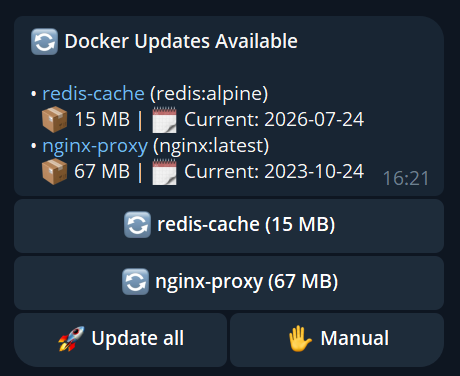
- Tap "Update all" in Telegram or "Bulk update" in the Web UI — updates apply, results stream back
- Container groups — update Gluetun first, restart the Sonarr / Radarr / qBittorrent stack after it's healthy
- Lifecycle commands —
/status nginxshows state + inline[🔁 Restart] [🟥 Stop]buttons. One tap to fix a hung container without leaving the chat - Auto-rollback if the new container fails its healthcheck (respecting the image's own
start_period) - State monitoring — a healthcheck flips to unhealthy, a container dies with a non-zero exit code, gets OOM-killed or crash-loops through its restart policy → you hear about it, with flap protection and quiet hours
- Maintenance mode to pause everything while you tinker with the host (
/maintenance 2h) - Multi-bot setup for several Docker hosts in one Telegram group, each labelled so you can tell them apart
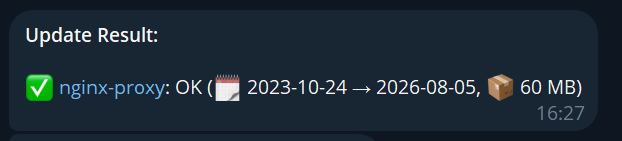
Telegram is optional — Web UI alone is plenty for a single-host setup. Discord and generic webhook channels work in parallel.
Features
- Docker and Podman — set
CONTAINER_CLI=podmanand checks, updates, recreates, rollback,podman composeand image cleanup all go through Podman. Mounting the Podman socket where Docksentry expects the Docker one works too - Multi-host — one instance managing several machines over
ssh://ortcp://, with per-host checks and pending queues, a host column in the Web UI and@host/@alltargeting in the bots - Automatic update detection — compares image digests on a configurable cron schedule. A pinned version tag, whose digest never moves, gets an advisory badge when a newer version exists — advisory only, nothing is switched behind your back
- Container groups — ordered updates for a stack: database before app, or Gluetun before the containers sharing its network namespace (how to set that up). Those are recreated against the head's name rather than its dead container ID, so they come back instead of being left stopped, and a failure in the group aborts the rest of it
- Update policies per container —
all/minor/patch, major-version confirmation, per-container update windows, andMIN_IMAGE_AGE_DAYSso you need not be the first to pull a new image - Web UI — dashboard with status, logs, history, settings, pin/unpin, auto-update toggles, manual update triggers, image cleanup, self-update. Container cards instead of a table below 700px
- Telegram bot (optional) — full interactive control with inline buttons and 35 commands
- Discord bot — 35 slash commands and the same control surface, driven by the same update engine (setup guide)
- Discord notifications — rich embeds for updates, successes, and failures
- Generic webhooks — JSON POST to Home Assistant or any HTTP endpoint
- Native push channels — ntfy, Gotify, Matrix, and Apprise (which fans out to ~100 further services)
/metricsand a read-only JSON API — Prometheus format andGET /api/status, both behind namedAPI_TOKENSso a scraper never needs the Web UI password- Headless mode — run without Telegram; Web UI + Discord/Webhook is enough
- Per-container auto-update — selected containers update without confirmation
- Pin/Freeze containers — exclude containers from updates
- Auto-rollback — failed updates automatically restore the previous container
- Container monitoring — transition-based alerts for unhealthy containers, non-zero exits, OOM kills and crash-restarts; disk-space warnings with reclaim preview. A crash alert carries the exit code taken from the runtime's live event stream (not from
inspect, which reports 0 for a container the restart policy already brought back), the host's memory and load, what each container was using at the moment of death, and whether the kernel OOM-killed it. Every event is kept in a persistent history you can browse on the Web UI History page or recall with/events - Audit trail — who did what, through which front end, kept across restarts. Secrets are redacted before anything is written
- Docker Compose support — native
docker compose pull/upfor Compose stacks - Self-update — the bot can update itself automatically
- Persistent settings — Web UI changes survive restarts
- Multi-language — 16 languages, switchable at runtime
- Lightweight — Python standard library only, zero external dependencies
Quick Start
You need at least one of: Web UI, Telegram, Discord webhook, or generic webhook. The most popular setup is Web UI + Telegram.
Option A — Web UI only (headless, no Telegram)
docker run -d \
  --name docksentry \
  --restart unless-stopped \
  -e WEB_UI=true \
  -e WEB_PORT=8080 \
  -p 8080:8080 \
  -v docksentry_data:/docksentry \
  -v /var/run/docker.sock:/var/run/docker.sock \
  amayer1983/docksentry:latest
Option B — Web UI + Telegram (full interactive)
- Message @BotFather →
/newbot→ copy the token - Send a message to your bot, then open
https://api.telegram.org/bot<TOKEN>/getUpdatesand find yourchat.id - Run:
docker run -d \
  --name docksentry \
  --restart unless-stopped \
  -e BOT_TOKEN=your-bot-token \
  -e CHAT_ID=your-chat-id \
  -e WEB_UI=true \
  -p 8080:8080 \
  -v docksentry_data:/docksentry \
  -v /var/run/docker.sock:/var/run/docker.sock \
  amayer1983/docksentry:latest
Don't leave out
-v docksentry_data:/docksentry. The image declares/docksentryas a volume, so without a name Docker gives it an anonymous one — and the nextdocker rmtakes your settings, groups, pins, history and update state with it. Named, they survive.
Docker Compose
services:
  docksentry:
    image: amayer1983/docksentry:latest
    container_name: docksentry
    restart: unless-stopped
    environment:
      - BOT_TOKEN=your-bot-token
      - CHAT_ID=your-chat-id
      - CRON_SCHEDULE=0 18 * * *
      - TZ=Europe/Berlin
    volumes:
      - /var/run/docker.sock:/var/run/docker.sock
      - docksentry_data:/docksentry   # already on /data? leave it — see docs/configuration.md
      # Optional: mount your compose project directories so Docksentry
      # can call `docker compose up` for compose-managed containers.
      # When not mounted (or path doesn't match), Docksentry falls back
      # to a standalone `docker run` recreate from the container's
      # inspect data — works for almost everything but loses some
      # compose-only metadata. See "Compose-managed containers" below.
      # The path has to match the compose file's label EXACTLY — see
      # "Compose-managed containers" below, and check the label first.
      # - /opt/stacks:/opt/stacks:ro              # started on the host
      # - /share/stacks:/app/data/stacks:ro       # created by a stack manager
    security_opt:
      - no-new-privileges:true

volumes:
  docksentry_data:
Trying new features early: the beta tag
New features land on amayer1983/docksentry:beta first and move to
:latest once they have settled — usually a day later, sooner when
testers confirm. :latest is never moved by a pre-release, so an
instance with AUTO_SELFUPDATE on only ever pulls settled versions.
Running a beta alongside your real instance is one compose change:
image: amayer1983/docksentry:beta
Give it its own container name and data volume if you run both at once. Bug reports from the beta are what makes it become the release, so if something looks wrong there, say so in the issues.
Compose-managed containers
When a container was started by docker compose, Docker records the path of the compose file on the container — as whatever created the stack saw it. That is not always a host path, and this is where most of the confusion comes from:
- You ran
docker composeon the host → the label holds a host path, e.g./opt/stacks/myapp/docker-compose.yml. Mount that directory at the same path and you are done. - A stack manager created it → the label holds its internal path. Portainer records
/data/compose/<id>/docker-compose.yml, Dockhand and Dockge-style managers/app/data/stacks/.... Neither of those exists on your host.
Docksentry only ever gets that one string, and looks for the file at exactly that path inside its own container. So check the label before you mount anything:
docker inspect <container> --format '{{index .Config.Labels "com.docker.compose.project.config_files"}}'
Then mount your stacks directory so that this exact path resolves inside Docksentry. If the label says /app/data/stacks/QNAP/dozzle/compose.yaml and your stacks live at /share/stacks, that is:
- /share/stacks:/app/data/stacks:ro
Note that everything after stacks/ in the label — QNAP/dozzle/… — stays inside the mount. One mount covers every stack the manager holds.
| Mount setup | Update path |
|---|---|
| Compose dirs mounted at the same paths inside Docksentry | docker compose pull + docker compose up -d --no-deps <service> (preserves all compose semantics) |
| Compose dirs not mounted | Falls back to standalone docker run recreate from inspect data — preserves capabilities, devices, sysctls, mounts, env, ports, labels, network mode, network aliases, fixed IPs, MAC, resource limits, etc. A short list of things it genuinely cannot reproduce is in the Compose guide — the healthcheck is on it. |
The standalone fallback is comprehensive. As of v1.19.0 it covers everything _build_run_args() knows to read from docker inspect:
- Network state:
--network(primary),--network-alias(compose service hostnames likedb,redis,broker),--ip/--ip6(fixed IPs),--mac-address,--link. Additional networks (containers attached to >1 network) getdocker network connectafter run, preserving aliases/IPs per network. - Capabilities / devices / sysctls / tmpfs / extra-hosts / DNS / security-opts (Gluetun-style stacks).
- Resource limits: memory, CPU, pids, oom, blkio, ulimits, group-add.
- Lifecycle: stop-signal, stop-timeout, auto-remove (when no restart policy).
- Process config: working-dir, domainname, tty, stdin, and the healthcheck — except in the few shapes
docker runhas no flag for, which Docksentry names in the update message. Which ones, and why. - Image-default-aware Cmd / Entrypoint — only restores container-level Cmd/Entrypoint when they actually differ from the new image's defaults, so image updates that change CMD aren't locked to the old value.
If you have compose-specific orchestration (depends_on chains, profiles, multiple compose files merged via -f, project-level network options beyond defaults), mounting your compose dirs is still the cleanest path to keep those intact.
The log line Compose file not found: <path> — falling back to standalone is the marker that the fallback is being taken. Not an error per se, just informational. If you see it on every update and want the compose path instead, mount the relevant host directory read-only into Docksentry.
Audit mode (debug): on every update check Docksentry logs [audit] HostConfig.<key> / [audit] Config.<key> to the container log (docker logs docksentry) for any inspect field that's non-default but not restored on recreate. Set DEBUG=true to also fan the check's debug output out to Telegram (and flip it at runtime with /debug or the Web UI — that toggle persists). Future Docker versions adding new keys surface here — please report any sightings as an issue so we can extend coverage.
Registry diagnostics (debug). With DEBUG=true the update check also explains itself instead of just printing a verdict — see Update Workflow → Why didn't it see my new release? for the full annotated log. Short version: the URL it asked, the status and content type it got back, any redirect, the auth method (category only — never the token), full digests with their repository prefix, the version a digest resolves to, and one line naming the host platform, the daemon's registry mirrors and every proxy in the path. All of it is DEBUG-only: without it the log stays exactly as short as it was.
Podman support
The full Podman guide is in docs/podman.md — what CONTAINER_CLI=auto actually resolves to, what socket activation does and doesn't buy you, remote Podman hosts over SSH (and why the key handling differs from Docker's), pods, and the io.containers.autoupdate label. What follows here is the short version and the socket recipes.
Since v1.61.0 Docksentry can drive podman directly — set CONTAINER_CLI=podman and checks, updates, recreates, rollback, start/restart, podman compose and image cleanup all go through it. No aliasing needed. Originally surfaced by @LeeNX in #23, with the recreate-level fixes in #43, #48, #49 and #50.
Two caveats worth knowing up front:
- Self-update still needs
dockerto resolve. It launches adocker:clihelper container, because it can't run inside the container it's replacing. Everything else uses the CLI you picked. - There's now a Podman test bed, added in v1.62.0 —
scripts/test_podman_live.pyruns the backend against a realpodman, including a remote Podman service over TCP. Everything before that was fixed from bug reports rather than a machine to try things on, so if something still misbehaves please open an issue; that's genuinely how all of them got found. Podman isn't in CI yet, only in the local suite.
The older route still works too, and is what you want if you'd rather not set anything: Podman implements the Docker REST API, so mounting the Podman socket where Docksentry expects the Docker one is enough. No env var changes, no different image.
Rootful Podman
sudo systemctl enable --now podman.socket
# creates /run/podman/podman.sock
services:
  docksentry:
    image: amayer1983/docksentry:latest
    volumes:
      - /run/podman/podman.sock:/var/run/docker.sock:ro
      - docksentry_data:/docksentry
    environment:
      - WEB_UI=true
      # ... rest of your config
Rootless Podman
systemctl --user enable --now podman.socket
# creates /run/user/$UID/podman/podman.sock
services:
  docksentry:
    image: amayer1983/docksentry:latest
    volumes:
      - /run/user/1000/podman/podman.sock:/var/run/docker.sock:ro
      - docksentry_data:/docksentry
    environment:
      - WEB_UI=true
What's expected to work
/status,/check,/updates,/history— read-only inspection via the Docker REST APIdocker pullof registry images,docker stop,docker rm,docker rename,docker start,docker run- Container groups, the
restart_dependentscascade - The v1.18.10 17-field HostConfig recreate (Podman's inspect carries the same
HostConfig.CapAdd,Devices,Sysctlsstructure — see release notes)
Known limitations
- Rootless Podman with complex UID mappings. Docksentry's #16 PID-1 self-protection reads container IDs from cgroup paths, which behave differently rootless. May misidentify the running container.
- Quadlets / systemd-managed Podman containers. Completely different paradigm — containers are managed by systemd, the update cycle is a
.containerfile edit +systemctl restart, notdocker stop+docker run. Out of scope for the v1.x line. podman-compose-specific labels. Podman Compose uses some compose-project labels with slightly different formats. Compose-detection might miss them and fall back to the standalone recreate (which is comprehensive after v1.18.10 but loses compose-project orchestration).- Multi-arch. Docksentry's image is published as
amd64andarm64. Raspberry Pi 4/5 and most other ARM SBCs work. Pi 3 (armv7) is not currently built.
Reporting issues
If you try this and something breaks, open a new issue with:
- Your Podman version (
podman --version) - Rootful or rootless
- Architecture (
uname -m) - The exact failure mode (Telegram message, log line, web UI screenshot)
Concrete failure modes let us add targeted Podman-specific fixes; vague "doesn't work" can't be acted on.
Commands
| Command | Description |
|---|---|
/status | Container overview with health, uptime, images |
/status <name> | Per-container detail with inline Stop/Restart/Start buttons |
/check | Manually trigger an update check (add a name/glob to scope) |
/update <name|*> | Update a container or everything matching a glob |
/updateall | Update every container with a pending update |
/updates | Show pending updates |
/start <name> | Start a stopped container |
/stop <name> | Stop a running container |
/restart <name> | Restart a container |
/logs <name> | Show last 30 log lines of a container |
/pin <name> | Pin container — excluded from updates |
/unpin <name> | Unpin container |
/autoupdate <name> | Toggle auto-update per container |
/askmajor <name> | Ask before applying a major update to this container |
/trustrunning <name> | Accept running-but-unhealthy for this container |
/cooldown <name> <seconds> | Per-container post-update cooldown before the next in a batch |
/protect <name> | Protect a container from /stop |
/setlink <name> <url> | Set a repo/changelog link for a container |
/note <name> <text> | Attach a note to a container |
/groups | Show container groups (or /groups <name>) |
/maintenance <2h|off> | Pause auto-updates for a window |
/history | Show update history |
/events | Recent container events (crashes, OOM, health flips) |
/audit <name> | Audit container inspect coverage |
/cleanup | Remove old unused images |
/checkimages | How much space /cleanup would free (dry-run) |
/backup | Send settings, groups and pins as a file |
/restore | Restore from a backup — send the file, or attach it here |
/selfupdate | Update the bot itself (latest) |
/selfupdate <version> | Pin to a specific version (e.g. /selfupdate 1.17.4) |
/selfupdate previous | Roll back to the previous release |
/changelog | Show what's new in versions ahead of yours (fetched from GitHub) |
/debug | Toggle debug mode |
/lang <code> | Switch language |
/settings | Show current configuration |
/testchannel | Send a test notification to every channel |
/help | Show all commands |
Partial name matching:
/pin ngimatchesnginx.
Per-command help: append
-?to any command for its detailed help —/protect -?is the same as/help protect.
On Discord the same commands take named options rather than positional words:
/status container:nginx,/check host:nas. Both fields suggest values while you type, so you don't have to know them in advance — the container list follows whichever host you picked, and the machine Docksentry itself runs on is calledlocal./hostslists them all. Setting the bot up is a trip through Discord's developer portal — docs/discord-bot.md walks it screenshot by screenshot.
Container labels (GitOps)
For GitOps-style setups where you keep all container config in one place, Docksentry reads a few docksentry.* labels straight off your containers. A label, when present, overrides the equivalent bot/Web-UI toggle — so your compose file stays the source of truth.
services:
  myapp:
    image: ghcr.io/me/myapp:latest
    labels:
      - "docksentry.auto=true"        # auto-update this container without touching the Web UI
      - "docksentry.protect=true"     # refuse /stop for this container (#38-style protection)
      - "docksentry.ask-major=true"   # pause auto-updates on major version bumps until confirmed
      - "docksentry.link=https://github.com/me/myapp/releases"  # repo / changelog link
| Label | Effect |
|---|---|
docksentry.enable=false | Take the container out of Docksentry's scope entirely (not checked, not listed) |
docksentry.exclude=true | Same as docksentry.enable=false |
docksentry.pin=true | Freeze the container — never listed as an update, never updated (twin of /pin) |
docksentry.auto=true / =false | Opt in to / out of auto-updates (auto-updating your other containers, not Docksentry itself). =false keeps a container manual even with AUTO_UPDATE_ALL=true; =true opts it in without the per-container toggle |
docksentry.protect=true | Protect from /stop (a =false label force-unprotects, overriding the toggle) |
docksentry.ask-major=true / =false | Require / skip the major-version confirmation gate for auto-updates |
docksentry.policy=all / minor / patch | Cap auto-updates by semver bump level: all applies every bump (default), minor applies minor+patch but holds back majors, patch applies patch only. Manual /update and the Bulk "Update all" button always apply regardless. An update whose version can't be classified is allowed. Overrides the global UPDATE_POLICY. |
docksentry.trust-running=true | Accept "running" |
Tag summary
Content type
Image
Digest
sha256:139fa19be…
Size
40.9 MB
Last updated
11 days ago
docker pull amayer1983/docksentry