aminnausin/mediaserver
A self-hosted media server and sharing platform
10K+
aminnausin/mediaserver repository overview

MediaServer
A self-hosted Media Server built with Laravel.



Core Features • Demo • Getting Started • Similar Projects
Overview
MediaServer is a lightweight, self-hosted media player for your home server (or NAS). It scans your folders, indexes your video and audio files, and serves them through a fast, minimalist web interface.
It was built for people who prefer a YouTube-like browsing experience for their collection of media files with metadata customisation.
How it differs from Jellyfin
Jellyfin is designed primarily for commercial media, is metadata-first and works great for large automatically downloaded libraries. MediaServer is naturally folder-oriented and great for mixed, personal, or highly customised libraries.
Both can serve shows, movies, and music but with different approaches.
| Feature | Jellyfin | MediaServer |
|---|---|---|
| Content Focus | Official metadata-first; built for movies/TV/Music | Folder-first; great for mixed/personal content and TV shows / music |
| Watch History | Only resume + watched flag | Full watch history with timestamps, re-watch counts, total view counts, per-user history, and playback heatmaps |
| Player Experience | Fullscreen; no browsing while playing | YouTube-style; browse folders while watching |
| Libraries | Unified global search | Library-scoped and account based access control |
| Sharing | No shareable URLs for videos/folders/shows | Direct and readable folder/video links with rich open graph previews |
Features
Core Features
- Fully custom-built media player (no native browser controls)
- Folder-based browsing & sharing
- Watch history, view counts and playback analytics
- Subtitle support (VTT) with auto-extraction from embedded and external SRT / ASS
- Music support with embedded cover art detection
- Music player with lyrics viewer/editor based on LrcLib
- Editable metadata for videos, folders, and albums
- Docker-based deployment with automatic releases
- Server dashboard for library management and background task queue
- Open Graph preview generator (Anilist-style)
- Fully responsive UI with Dark/Light mode
Extended Features
🖥️ Media Player
- Custom UI with Keyboard Shortcuts:
k: Play/Pausej/←: Rewind 10sl/→: Fast Forward 10sSHIFT+N: Play NextSHIFT+P: Play Previousm: Mutef: Toggle Fullscreent: Toggle Theatre Modec: Toggle Lyrics / Default Subtitle Trackp: Toggle playlist (autoplay)
- Playback Features:
- Speed Controls
- Player Statistics
- Ambient Background Effect
- User Playback Activty Graph
- Auto-Scrolling Lyrics Viewer
- Media Session API Integration
- Skip Intro (manual detection)
- Watch Party UI Demo (coming soon)
🔗 Sharing
- Share individual videos or folders via URL (
/library/folder?video={id}or/library/{folder-name})
🗃️ Metadata
- Video Metadata:
- Thumbnail
- Description
- Tags
- Season/Episode
- Release Dates
- Captions
- Music Metadata:
- Cover
- Description
- Tags
- Disk/Track
- Release Dates
- Lyrics
- Artist
- Album
- Folder Metadata:
- Thumbnail
- Description
- Studio
- Release Dates
- Persistent Metadata Mapping:
- Retains info even if file is moved or renamed when metadata tagging is enabled
📈 History & Stats
- Track view counts (per user and total)
- Filterable watch history
- Future: playback frequency analytics
💬 Subtitles & Captions
- Automatic extraction of embedded subtitles (SRT / ASS → VTT)
- Manual extraction of external subtitles next to media (in format
/media/library/folder/{filename}.{lang}.{extension}) - Subtitle size controls in player
🛠️ Server Dashboard
- Scanning Job Manager
- Library / Folder Manager
- User Manager
- Server Performance Metrics
🖼️ Open Graph Image Previews
MediaServer automatically generates Open Graph images for media and folders, styled similarly to platforms like AniList.
These previews are embedded when sharing links on platforms like:
- Discord
- Twitter / X
- Telegram
Each image includes:
- 📸 Thumbnail from the media or folder
- 🎞️ Title, studio, description and metadata (e.g. season, tags, release date)
- 🎨 Custom layout designed to look clean and modern
The preview is rendered server-side using Browsershot and cached for performance.
Example:
Sharinghttps://yourserver.com/library/showwill show a rich preview card with folder art and metadata.
✅ Works even on private, self-hosted domains as long as your Open Graph routes are accessible.
Roadmap
See ROADMAP.md for planned features, ongoing improvements, and known bugs.
Demo
Note
The demo is running the latest beta image with static media. User accounts and edits are reset automatically every 15 minutes.

What to look for
Take some time to explore the demo:
- Browse through the available folders on the right in the sidebar
- Interact with the player to see custom features
- Hover over the timeline to see playback activity on each video
- Login with the demo account to see the dashboard, server activity and library manager
- Watch the default video on the demo to get a step by step installation guide.
Below are screenshots of the current webpage on Desktop and Android.
Desktop Browser View
Android Browser View
Open Graph Preview Example
Other Pages
Music Player
Lyrics Editor
Lyrics Viewer
Player Options
Setup Page
Analytics
Library Management
User Management
Task Dashboard
Site Preferences
User Account Settings
Getting Started
MediaServer can be run via Docker (recommended) or a standard manual installation.
🐳 Docker Installation (Recommended)
Warning
Use the beta image to get the latest features.
-
Download the latest or beta Docker release ZIP for your platform.
- It includes a
docker-compose.yamlfile that automatically sets up the (latest by default) required images.
- It includes a
-
Unzip it to a folder with generous read/write/execute permissions.
- The server will perform the following in this directory:
- Rewrite your media with embedded UUID's for tracking (ffmpeg copy codec).
- Read and write extracted album art and thumbnails from music and videos.
- Read and write generated preview images.
- Read and write Laravel + NGINX logs.
- Permissions must stay consistent in this folder to prevent server errors.
- The container uses the UID and GID 9999 under www-data.
- The server will perform the following in this directory:
-
Run the startup script (with Docker running) and let it create/copy the required files:
- Windows:
startDocker.bat - Linux/macOS:
sudo bash startDocker.sh
- Windows:
-
Visit
https://app.test in your browser and follow the setup wizard.- You will need to add app.test to your hosts file if you don't have a real url or set your APP_HOST to localhost manually.
- There is a powershell script included to do this automatically.
- On Linux, you are given the command.
- You will need to add app.test to your hosts file if you don't have a real url or set your APP_HOST to localhost manually.
-
Add your media to
./data/media/LIBRARY/FOLDER/VIDEO.MP4- Media must be grouped by a folder (library) and subfolder (folder) in order to show up on the website
- There are certain names that you cannot use for folders or videos such as
- profile
- settings
- history
- dashboard
- log-viewer
- pulse
- horizon
- __debug
- api
- ...
More to come...
⚙️ Manual Installation
Warning
This setup is probably outdated and may need some tinkering to get right. I have since moved to docker for production installations but still use this method on my main instance (Linux).
To set up MediaServer without Docker, you’ll need:
- A web server: Caddy or NGINX
- Backend: PHP 8.3+, PostgreSQL
- Frontend (for compiling only): Node.js with Vue 3 + Tailwind CSS
- Media tools: FFmpeg (required), ExifTool (optional)
- HTTPS: A valid SSL certificate is required to enable certain metadata features
Tip
You can use [Laragon](https://laragon.org/) to simplify local setup. This will only be available on the host machine.
# 1. Clone the repository
git clone https://github.com/aminnausin/mediaServer.git
cd mediaServer

# 2. Install backend dependencies
composer install

# 3. Install frontend dependencies
npm install

# 4. Set up your database and .env
cp .env.example .env

# Edit the .env file with your PostgreSQL DB info
# Example:
# DB_CONNECTION=pgsql
# DB_HOST=127.0.0.1
# DB_PORT=5432
# DB_DATABASE=mediaServer
# DB_USERNAME=postgres
# DB_PASSWORD=

# 5. Generate Laravel app and reverb keys
php artisan key:generate
php artisan reverb:generate

# 6. Run database migrations
php artisan migrate

# 7. Link storage (for thumbnails, posters, etc.)
php artisan storage:link

# 9. Build frontend assets
npm run build

# 9. Set app domain in .env (required for Sanctum & WebSockets) (6001 for reverb)
# Example:
# APP_URL=https://app.test:8080
# SANCTUM_STATEFUL_DOMAINS=app.test:8080,0.0.0.0:6001,app.test:6001
# SESSION_DOMAIN=app.test
# REVERB_HOST=app.test

# 10. Run the app in development mode
npm run vite:php
📚 Additional Documentation
- Operations Guide – Symbolic linking, scanning, metadata jobs, supported formats
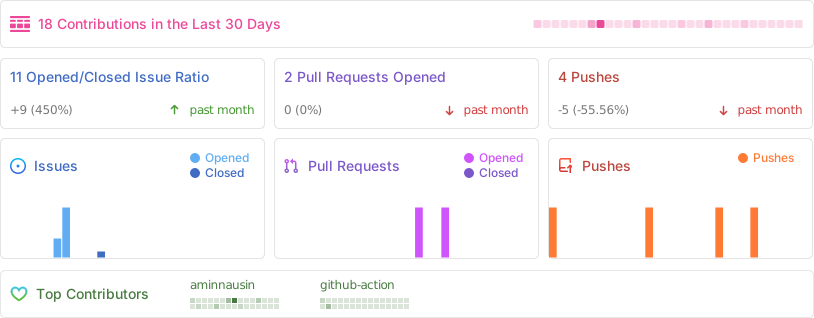
Activity
Similar Projects

Services Used

Disclaimer
MediaServer is intended for personal use only. It is designed to help users organise and access their own legally obtained media on a self-hosted server.
This project does not condone or support piracy, and I do not encourage the use of MediaServer for unauthorised distribution or consumption of copyrighted material.
Please respect local laws and content ownership rights when using this software.
Tag summary
Content type
Image
Digest
sha256:d1db0e84c…
Size
488.9 MB
Last updated
7 days ago
docker pull aminnausin/mediaserver