anhowe/azure-file-workload
Add the azure-file-workload project to scale test Azure Storage CIFS
711
anhowe/azure-file-workload repository overview
azure-file-workload
This script demos using the Microsoft Azure File Service from a Docker Container.
To see how this works, try the demo:
-
create an azure storage account and file share according to: http://blogs.msdn.com/b/windowsazurestorage/archive/2014/05/12/introducing-microsoft-azure-file-service.aspx
-
next type "docker run --privileged anhowe/azure-file-workload STORAGEACCOUNTNAME STORAGEACCOUNTKEY SHARENAME"
Running in Marathon on a Mesos Cluster
If you have created a mesos cluster from the Mesos Azure Quickstart template, then following the instructions below.
-
In Azure Portal, create a storage account in the same region as the mesos cluster (alternatively you can one of the existing storage accounts created with the mesos cluster).
-
Using the Portal, get the primary access key for later in the instructions.
-
Create a share with the cluster, using the following commands from powershell
$ctx=New-AzureStorageContext STORAGEACCOUNT STORAGEACCOUNTKEY
$s = New-AzureStorageShare SHARE -Context $ctx
- Go to Marathon, start the App, and run the command docker run --privileged anhowe/azure-file-workload STORAGEACCOUNTNAME STORAGEACCOUNTKEY SHARE (replacing the ALLCAPS names with the correct values)
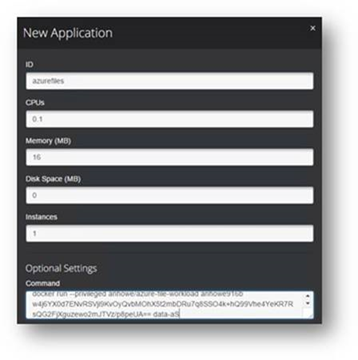
-
The docker image anhowe/azure-file-workload will mount the share to /mnt/sharename in the docker container, and then start writing 1MB random files to that share.
-
Use Marathon to scale up to 5
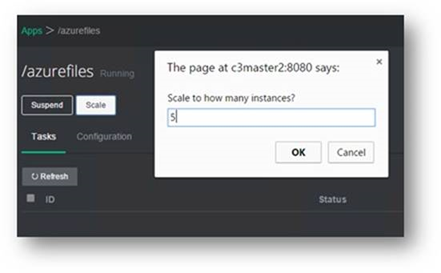
-
Then scale up to 20 and then to 30 containers
-
Looking at the storage account performance you can see the load increase as you increase the containers
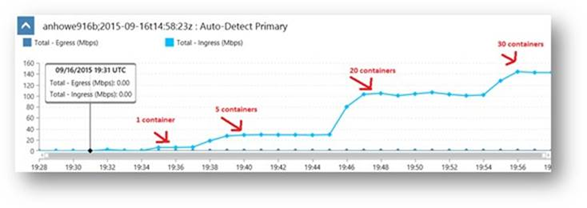
Tag summary
Content type
Image
Digest
sha256:64545d55a…
Size
103.4 MB
Last updated
about 11 years ago
docker pull anhowe/azure-file-workload