anonshield/anon
AnonShield: Scalable On-Premise Pseudonymization for CSIRT Vulnerability Data
3.5K
anonshield/anon repository overview
AnonShield: PII Pseudonymization for CSIRTs
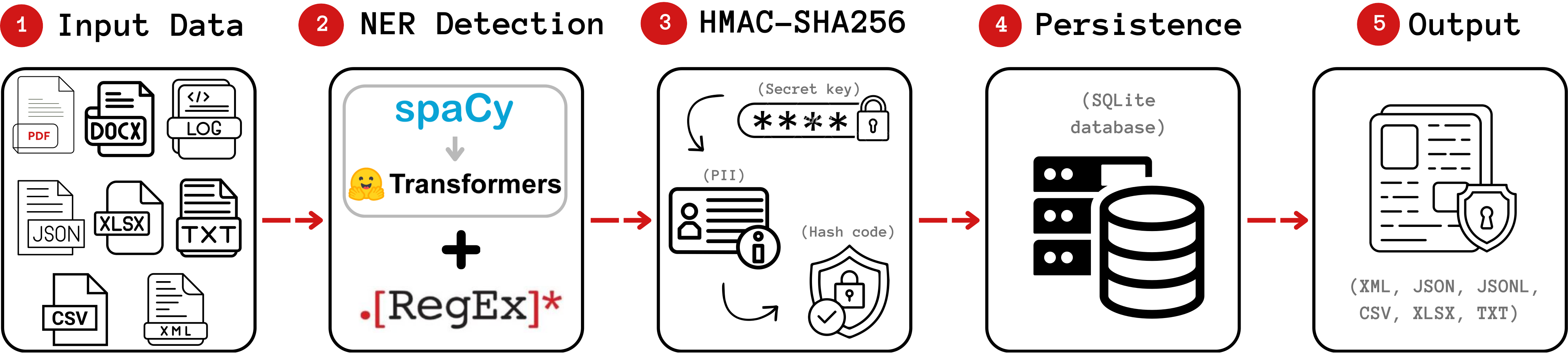
AnonShield lets Computer Security Incident Response Teams share incident data without leaking personal data. It replaces PII and cybersecurity indicators (names, emails, IPs, CVEs, hashes, URLs, and more) with deterministic HMAC-SHA256 pseudonyms, so the same value always maps to the same pseudonym and your JSON, XML, and CSV files keep their structure. It is multilingual, ships with Tesseract OCR for scanned documents, and adds custom cybersecurity recognizers on top of standard NER. Everything runs on-premise, and the substitution is reversible as long as you keep the local mapping database.

Selected Best Artifact at SBRC 2026 (official results). Source code, documentation, and research artifact: github.com/AnonShield/anonshield.
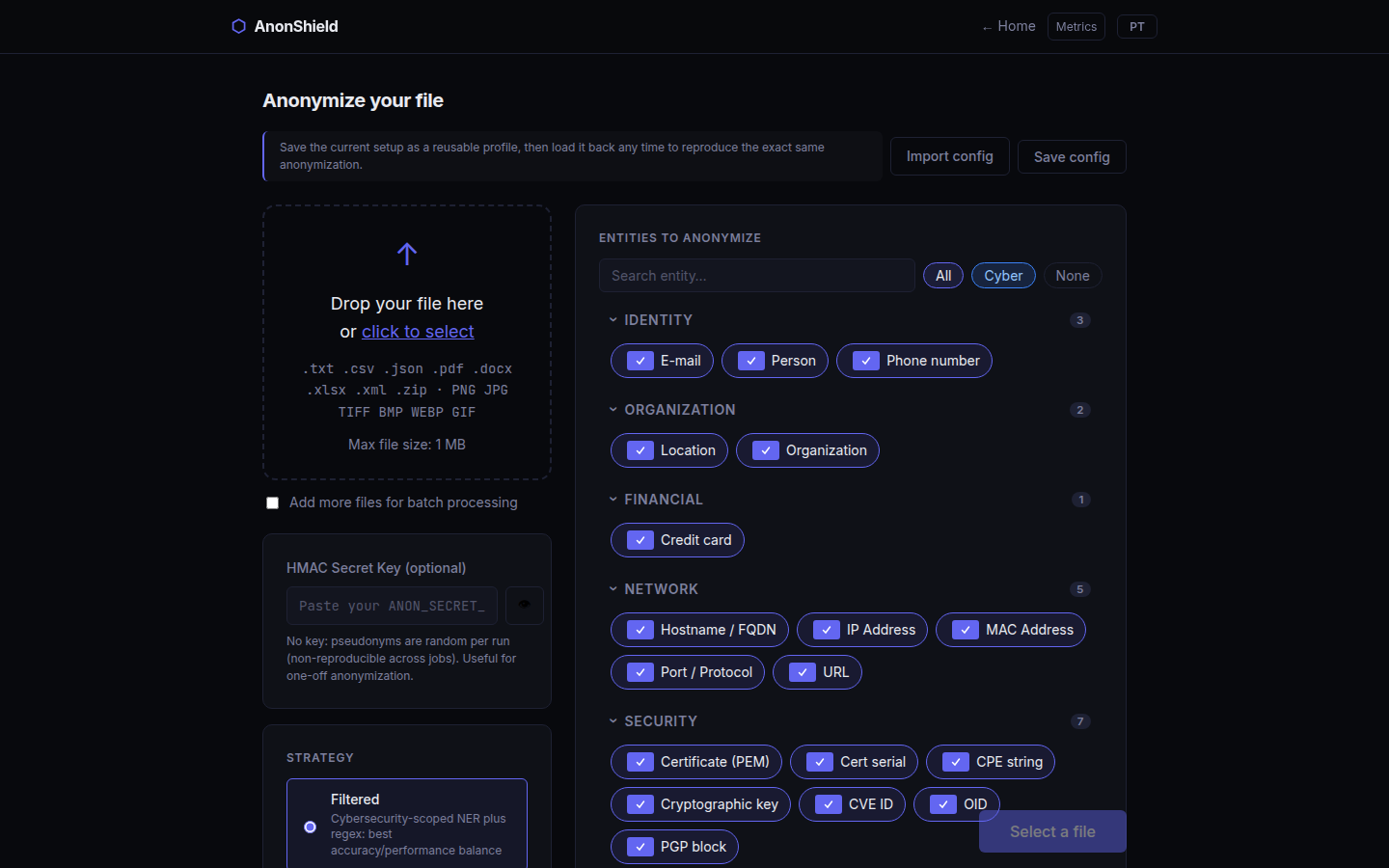
Two ways to run it
In your browser (drag and drop, no size limit, nothing leaves your computer):
docker run -d --name anonshield -p 127.0.0.1:8080:8080 -v anonshield:/data anonshield/anon:web
Open http://localhost:8080, drop a file and click Anonymize. docker stop anonshield stops it and docker start anonshield starts it again; the key and model cache stay in the anonshield volume. For another port, change only the first number: -p 127.0.0.1:8081:8080. With the wrapper script below, ./run.sh --web does all of this (--stop, --update, --port 8081, and a clear message if the port or name is taken). More in the local guide.
In your browser, on an NVIDIA GPU (NER about three times faster on an RTX 5060 Ti; needs the NVIDIA Container Toolkit): ./run.sh --web --gpu picks the image for your GPU and driver, or run it yourself:
docker run -d --gpus all --name anonshield -p 127.0.0.1:8080:8080 -v anonshield:/data anonshield/anon:web-gpu
For a GTX 10xx or older, or a driver older than 580, use web-gpu-cu126 instead (see Available Tags). It uses the same name and volume as the CPU container: remove that one first (docker rm -f anonshield), the key and models stay in the volume; ./run.sh --web --gpu does this for you.
On the command line (files and folders, scripts, NVIDIA GPU): use the wrapper script in the Quick Start below; it runs the latest, gpu or gpu-cu126 image for you.
A hosted demo runs at anonshield.org.
Why AnonShield
- Deterministic and reversible. Identical values always map to the same pseudonym, so cross-references survive anonymization. With the mapping database you can de-anonymize later; without it, the output is irreversible.
- Structure-preserving. JSON, XML, and CSV stay valid and keep their schema. Only the sensitive values change.
- Security-aware. Beyond standard PII, it recognizes IPs, CVEs, hashes, URLs, hostnames, MAC addresses, certificates, and more (full list below).
- Multilingual with OCR. Handles many languages and reads scanned PDFs and images via Tesseract.
- Fully on-premise. No data leaves your machine. The only external network call is the one-time model download on first run.
Quick Start
The only prerequisite is Docker. Install it for your OS: Linux | macOS | Windows. Everything else is included in your operating system. A small wrapper script handles docker run, volume mounts, and path mapping for you, so you never type a raw docker run command.
Step 1: Download the wrapper script
Linux / macOS (open a terminal):
curl -fsSL https://raw.githubusercontent.com/AnonShield/anonshield/main/docker/run.sh -o run.sh
chmod +x run.sh
Windows (open PowerShell):
Invoke-WebRequest -Uri https://raw.githubusercontent.com/AnonShield/anonshield/main/docker/run.ps1 -OutFile run.ps1
curlis built into Linux and macOS.Invoke-WebRequestis built into Windows 10/11. No extra installation needed.
Step 2: Anonymize
Pass any file or folder, using a relative or absolute path. No other setup is needed. Run the script without arguments for examples, even before Docker is installed.
Single file (CPU):
# Linux / macOS
./run.sh ./YOUR_FILE.csv
# Windows: Windows blocks script execution by default.
# Bypass it for the current session only, then run:
Set-ExecutionPolicy -Scope Process -ExecutionPolicy Bypass -Force
.\run.ps1 .\YOUR_FILE.csv
Single file (GPU):
# Linux / macOS
./run.sh --gpu ./YOUR_FILE.csv
# Windows
.\run.ps1 --gpu .\YOUR_FILE.csv
Entire folder:
# Linux / macOS
./run.sh ./your/folder/
# Windows
.\run.ps1 .\your\folder\
A failed file returns a nonzero exit code. Existing results are kept unless you pass --overwrite. For folders, subdirectories are preserved; an incomplete run reports which files failed.
By default the output is written to ./anon/output/. For example, anonymizing report.csv produces ./anon/output/anon_report.csv. The script creates an ./anon/ folder in your current directory to keep everything together:
./anon/
├── input/      (optional: put files here if you prefer)
├── output/     (anonymized files appear here)
├── db/         (entity mapping database; keep it to de-anonymize later)
├── logs/       (performance reports)
├── models/     (NER model cached here on first run, about 1 GB, automatic)
└── secret.key  (secret key, created on the first run)
First run: the NER transformer model (about 1 GB) downloads automatically into
./anon/models/and is reused on every subsequent run. This is the only network call AnonShield makes.
The secret key
Pseudonyms are HMAC-SHA256 hashes under a secret key: the same value with the same key always gives the same pseudonym, which is what keeps references consistent across files and runs. On the first run the script creates a random key in ./anon/secret.key (readable only by you) and reuses it from then on, so there is nothing to set up. Keep it next to ./anon/db/; to de-anonymize later you only need the db/ folder.
To use your own key instead (for example the same one on several machines), set ANON_SECRET_KEY, which takes precedence over the file:
export ANON_SECRET_KEY=$(openssl rand -hex 32) # Linux / macOS
$env:ANON_SECRET_KEY = "<64 hex characters>" # Windows
No de-anonymization needed? Use
--slug-length 0. Entities are then replaced with their type only (for example[IP_ADDRESS]), and no key is created or used.
Available Tags
latest is the CPU command-line image; gpu and gpu-cu126 are the same GPU image with two PyTorch builds, because no single build runs on every NVIDIA GPU and driver. web is the web app in one container (see the top of this page), and web-gpu / web-gpu-cu126 the same app with the two GPU builds.
| Tag | PyTorch build | Use case | Approx. download |
|---|---|---|---|
latest | CPU | Any x86_64 machine | ~1.4 GB |
gpu | CUDA 13.0 | NVIDIA driver 580+ and an RTX 20xx (Turing) or newer GPU; required for RTX 50xx (Blackwell) | ~4.3 GB |
gpu-cu126 | CUDA 12.6 | Older GPUs (GTX 10xx and earlier) or drivers older than 580; no RTX 50xx | ~5 GB |
web | CPU | The web interface on your computer, no limits | ~1.4 GB |
web-gpu | CUDA 13.0 | The web interface on an NVIDIA GPU: driver 580+ and an RTX 20xx or newer | ~4.3 GB |
web-gpu-cu126 | CUDA 12.6 | The web interface on older GPUs or drivers; no RTX 50xx | ~5 GB |
All images are based on python:3.12-slim and include Tesseract OCR (English and Portuguese language data) and the spaCy pipelines for English and Portuguese. The wrapper script picks the right image automatically: plain ./run.sh uses latest; ./run.sh --gpu reads the GPU and driver from nvidia-smi and uses gpu or gpu-cu126 (set ANON_GPU_IMAGE to override), and ./run.sh --web --gpu chooses between web-gpu and web-gpu-cu126 the same way (ANON_WEB_GPU_IMAGE). If the image does not match the GPU anyway, AnonShield says so at startup and runs on the CPU instead of failing.
Requirements
CPU (latest): any x86_64 machine with 4 GB or more of RAM.
GPU (gpu, web-gpu and their -cu126 builds):
- NVIDIA GPU and driver: see the table above (the CUDA runtime comes inside the image; only the driver is needed on the host)
- NVIDIA Container Toolkit installed and configured (see GPU Setup below)
Common Options
| Flag | Description | Default |
|---|---|---|
--lang <code> | Document language (en, pt, es, ...) | en |
--db-dir <path> | Local folder for the mapping database | ./anon/db/ |
--output-dir <path> | Local folder for anonymized files | ./anon/output/ |
--anonymization-strategy <s> | Detection strategy (see Anonymization Strategies) | filtered |
--preserve-entities <types> | Comma-separated entity types to skip (for example LOCATION,IP_ADDRESS) | none |
--allow-list <terms> | Comma-separated terms to never anonymize | none |
--word-list <path> | JSON file of known terms to always anonymize (internal names, acronyms, ...) | none |
--anonymization-config <path> | JSON file with field-level rules for structured files | none |
--slug-length <n> | Hash length in the pseudonym (0 to 64). 0 requires no secret key | 64 |
--transformer-model <id> | NER model: Davlan/xlm-roberta-base-ner-hrl (default) or attack-vector/SecureModernBERT-NER | Davlan/xlm-roberta-base-ner-hrl |
--optimize | Turn on all optimizations at once: standalone strategy, cache, min-word-length=3, in-memory DB | off |
Run ./run.sh --help (Linux/macOS) or .\run.ps1 --help (Windows) for common options, or use --cli-help for the complete flag list. Every option is explained with examples in the CLI reference on GitHub.
Examples
All examples use
./run.sh(Linux/macOS). On Windows substitute.\run.ps1and use backslashes in paths.
Portuguese document:
./run.sh ./YOUR_FILE.pdf --lang pt
Preserve hostnames and IPs (do not anonymize them):
./run.sh ./YOUR_FILE.txt --preserve-entities "HOSTNAME,IP_ADDRESS"
Always anonymize known internal terms:
./run.sh ./YOUR_FILE.txt --word-list ./internal_terms.json
Structured file with field-level config:
./run.sh ./YOUR_FILE.json --anonymization-config ./anon_config.json
GPU run with the cybersecurity-focused NER model:
./run.sh --gpu ./YOUR_FILE.txt --transformer-model attack-vector/SecureModernBERT-NER
Entire folder, output to a separate directory:
./run.sh ./reports/ --output-dir ./results/
Skip the secret key (irreversible, type-only labels):
./run.sh ./YOUR_FILE.csv --slug-length 0
List all supported entity types:
./run.sh --list-entities
Detected Entity Types
Standard PII: PERSON, LOCATION, ORGANIZATION, EMAIL_ADDRESS, PHONE_NUMBER, CREDIT_CARD, USERNAME, PASSWORD
Cybersecurity (custom recognizers): IP_ADDRESS, URL, HOSTNAME, MAC_ADDRESS, FILE_PATH, HASH, AUTH_TOKEN, CVE_ID, CPE_STRING, CERT_SERIAL, CERTIFICATE, CRYPTOGRAPHIC_KEY, UUID, PGP_BLOCK, PORT, OID
When --lang pt is set, additional Brazilian recognizers are enabled (for example BR_CPF, BR_CNPJ, BR_RG, BR_CEP). Run ./run.sh --list-entities (Linux/macOS) or .\run.ps1 --list-entities (Windows) for the full, up-to-date list.
Anonymization Strategies
Choose with --anonymization-strategy <name>. The three production strategies are filtered (default), standalone, and presidio. A regex strategy (pure pattern matching, no ML) is also available; see the strategies guide.
| Strategy | What it does | Best for |
|---|---|---|
filtered (default) | Presidio pipeline scoped to a curated recognizer set; handles overlapping entity merges correctly | Best accuracy; the safe default |
standalone | Zero Presidio dependency, fastest on GPU | Maximum throughput |
presidio | Full upstream Presidio pipeline | Comparison and baseline use |
Recommendation: keep filtered (the default) for the best accuracy at a small throughput cost. Switch to standalone on GPU when you need maximum throughput.
The numbers below come from the AnonShield benchmark suite. See benchmark/BENCHMARK.md for the methodology and raw data.
Throughput, GPU (NVIDIA RTX 5060 Ti 16 GB, D2 operational dataset, 420 MB CSV / 551 MB JSON, 70,951 Tenable vulnerability records):
| Strategy | CSV (KB/s) | JSON (KB/s) | vs. slowest |
|---|---|---|---|
standalone | 732 | 1,250 | 4.3x faster |
filtered (default) | 240 | 627 | 1.4x faster |
presidio | 171 | 575 | baseline |
Throughput, CPU only (AMD Ryzen 5 8600G, 6c/12t, D3 synthetic dataset, 247 MB CSV / 444 MB JSON, 70,951 CVE vulnerability records):
| Strategy | CSV (KB/s) | JSON (KB/s) | vs. slowest |
|---|---|---|---|
standalone | 526 | 518 | CSV: 4x faster |
filtered (default) | 132 | 459 | similar |
presidio | 130 | 439 | baseline |
Throughput, CPU, heterogeneous formats (Intel Xeon E5-2650, D1 OpenVAS dataset, 136 vulnerability reports in CSV, XML, and PDF, median KB/s on older server hardware):
| Strategy | CSV (KB/s) | XML (KB/s) | PDF (KB/s) | vs. slowest |
|---|---|---|---|---|
standalone | 0.94 | 2.05 | 4.26 | about 15% faster |
presidio | 0.85 | 1.85 | 3.56 | similar |
filtered (default) | 0.81 | 1.82 | 3.83 | baseline |
On GPU,
standaloneis about 4x faster thanpresidioon CSV. On the AMD Ryzen (CPU only, large dataset) the same roughly 4x CSV advantage holds; on heterogeneous OpenVAS reports (Intel Xeon) the gap narrows to about 15%.
Accuracy (67 annotated vulnerability records, GPU, attack-vector/SecureModernBERT-NER model, annotated by 3 security specialists):
| Strategy | Precision | Recall | F1 | Notes |
|---|---|---|---|---|
filtered (default) | 91.9% | 96.7% | 94.2% | Best accuracy. Curated recognizer set; handles overlapping merges correctly. |
standalone | 87.9% | 94.5% | 91.1% | Slightly lower precision. Fastest on GPU. |
presidio | 71.6% | 96.7% | 82.3% | Many false positives. Rarely the best choice. |
hybrid was removed in October 2026: it ran the same detection as filtered and gave the same results (SBRC 2026 paper, Table 8: F1 94.2% for both; throughput within 3%). --anonymization-strategy hybrid and profiles with strategy: hybrid still run, as filtered, with a warning.
Word List (--word-list)
If your organization uses internal names, system names, acronyms, or codenames that a general NER model might miss, supply a JSON file listing them. Every term in the list is always anonymized, regardless of context.
Format: a JSON object where each key is the entity type label and the value is a list of terms. The key is used directly as the entity type, so any label is valid, including custom ones.
{
  "ORGANIZATION": ["AcmeCorp", "CSIRT-BR", "ProjectPhoenix"],
  "PERSON":       ["Jane Doe", "Carlos Souza"],
  "HOSTNAME":     ["fw-edge.internal", "siem.corp.local"],
  "IP_ADDRESS":   ["10.0.0.1", "192.168.100.254"],
  "MY_SYSTEM":    ["SIEM-Alpha", "FW-CORE-01", "PROXY-DMZ"]
}
./run.sh ./incident_report.txt --word-list ./my_terms.json
Field-Level Config (--anonymization-config)
For structured files (JSON, CSV, XML), a JSON config file controls exactly which fields are anonymized. Without it, the tool runs NER inference on every field, which is accurate but slow on large datasets. The config lets you:
fields_to_exclude: fields that are never anonymized (for example severity scores, timestamps)fields_to_anonymize: explicit list of fields to run NER on; everything else is skippedforce_anonymize: map a field directly to an entity type, bypassing NER entirely (useful for fields such asPortorHostnamethat lack obvious syntactic patterns)
Example, Tenable JSON scan (config.json):
{
  "fields_to_exclude": ["severity", "port", "protocol", "age_in_days"],
  "force_anonymize": {
    "asset.ipv4_addresses": { "entity_type": "IP_ADDRESS" },
    "asset.display_fqdn":   { "entity_type": "HOSTNAME" },
    "asset.display_mac_address": { "entity_type": "MAC_ADDRESS" },
    "scan.target":          { "entity_type": "HOSTNAME" }
  },
  "fields_to_anonymize": ["asset.name", "output"]
}
With this config, severity, port, and the other excluded fields are preserved; asset.ipv4_addresses is always pseudonymized as IP_ADDRESS regardless of its format; and only asset.name and output go through NER inference.
Save the config anywhere and pass its path:
./run.sh ./YOUR_FILE.json --anonymization-config ./anon_config.json
Performance impact (GPU, NVIDIA RTX 5060 Ti, 70,951 vulnerability records):
| Strategy | CSV without | CSV with | CSV gain | JSON without | JSON with | JSON gain |
|---|---|---|---|---|---|---|
standalone | 732 KB/s | 34,341 KB/s | 47x | 1,250 KB/s | 31,272 KB/s | 25x |
filtered | 240 KB/s | 32,115 KB/s | 134x | 627 KB/s | 29,937 KB/s | 48x |
presidio | 171 KB/s | 32,034 KB/s | 188x | 575 KB/s | 29,855 KB/s | 52x |
The config gain is largest for the Presidio-based strategies because they have a higher per-record baseline cost to eliminate. standalone stays the fastest even with config (34,341 KB/s vs. about 32,000 KB/s for the others). When you use only force_anonymize and fields_to_exclude (with no fields_to_anonymize), NER inference is bypassed entirely and the strategy choice no longer affects throughput.
GPU Setup (NVIDIA Container Toolkit)
The GPU image needs the NVIDIA Container Toolkit on the host. Install and configure it once:
# Install the toolkit
curl -fsSL https://nvidia.github.io/libnvidia-container/gpgkey | sudo gpg --dearmor -o /usr/share/keyrings/nvidia-container-toolkit-keyring.gpg
curl -s -L https://nvidia.github.io/libnvidia-container/stable/deb/nvidia-container-toolkit.list | \
  sed 's#deb https://#deb [signed-by=/usr/share/keyrings/nvidia-container-toolkit-keyring.gpg] https://#g' | \
  sudo tee /etc/apt/sources.list.d/nvidia-container-toolkit.list
sudo apt update && sudo apt install -y nvidia-container-toolkit
sudo nvidia-ctk runtime configure --runtime=docker --set-as-default
sudo systemctl restart docker

# Verify the GPU is visible to Docker
docker run --rm --gpus all nvidia/cuda:12.8.0-runtime-ubuntu22.04 nvidia-smi
Once nvidia-smi works inside that test container, ./run.sh --gpu ... and ./run.sh --web --gpu will use your GPU automatically.
Source Code and Documentation
| Resource | Link |
|---|---|
| Repository | github.com/AnonShield/anonshield |
| CLI reference | docs/users/CLI_REFERENCE.md |
| Architecture | docs/developers/ARCHITECTURE.md |
| Anonymization strategies | docs/developers/ANONYMIZATION_STRATEGIES.md |
| Benchmark suite | benchmark/BENCHMARK.md |
| Issues | github.com/AnonShield/anonshield/issues |
Support and Contact
We welcome feedback, questions, and contributions from the community.
- Bugs and feature requests: please open an issue on GitHub. This helps us track problems and keep the community informed.
- Institutional inquiries and security reports: for partnerships, institutional questions, or to report a security bug directly, reach our team at [email protected].
Tag summary
Content type
Image
Digest
sha256:27ebe70d3…
Size
1.3 GB
Last updated
9 days ago
docker pull anonshield/anon