azagramac/adguard
DNS server blocking ads and trackers in the whole network, with DNS over TLS, DNS over HTTP, DNSSEC.
3.2K
azagramac/adguard repository overview

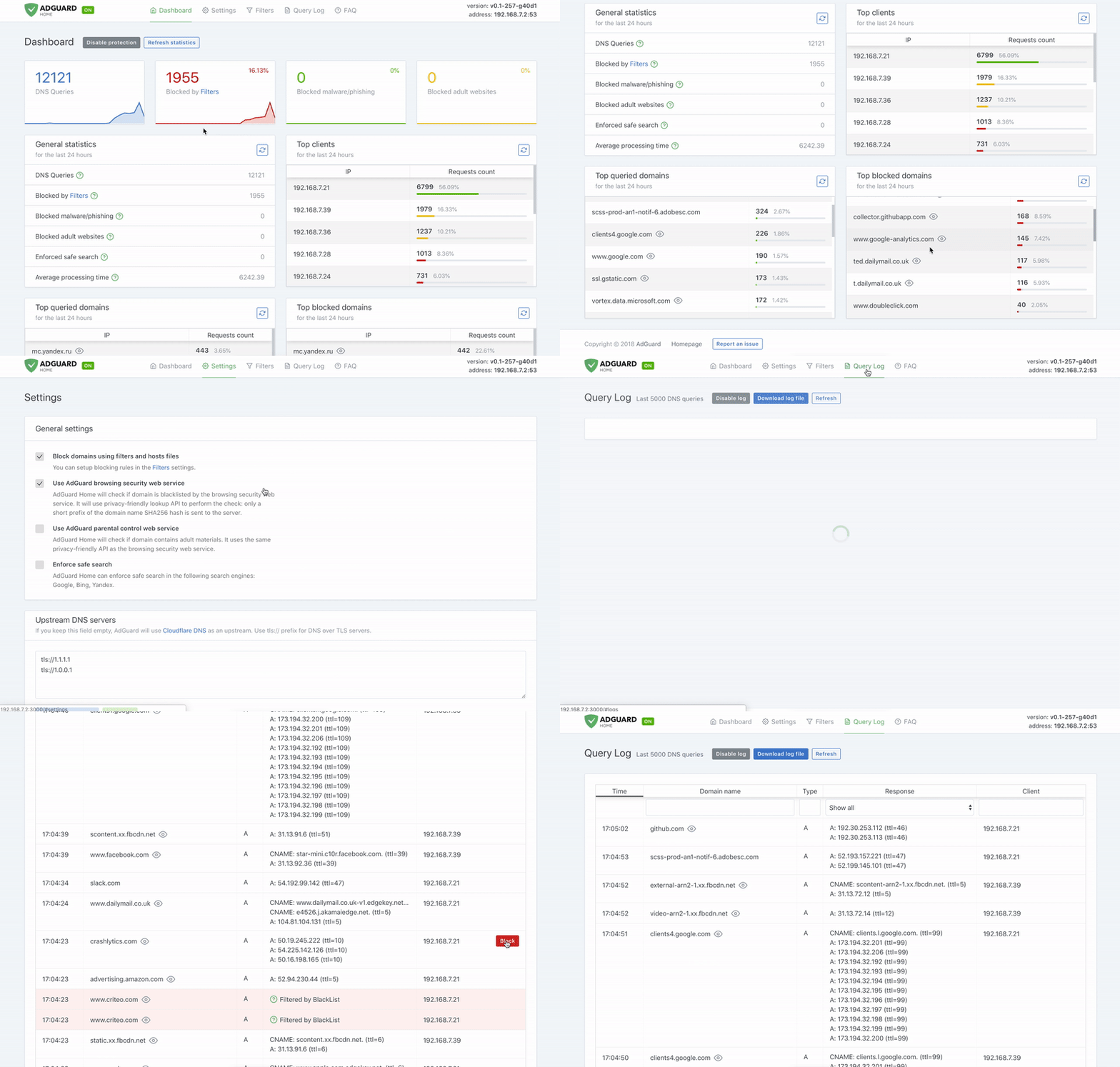
Requeriments
- Service docker running
Install Docker
sudo apt update && sudo apt install git vim wget curl net-tools ca-certificates gnupg -y
sudo install -m 0755 -d /etc/apt/keyrings
sudo curl -fsSL https://download.docker.com/linux/debian/gpg -o /etc/apt/keyrings/docker.asc
sudo chmod a+r /etc/apt/keyrings/docker.asc

echo \
  "deb [arch=$(dpkg --print-architecture) signed-by=/etc/apt/keyrings/docker.asc] https://download.docker.com/linux/debian \
  $(. /etc/os-release && echo "$VERSION_CODENAME") stable" | \
  sudo tee /etc/apt/sources.list.d/docker.list > /dev/null

sudo apt update && sudo apt install docker-ce docker-ce-cli containerd.io docker-buildx-plugin docker-compose-plugin -y
sudo usermod -aG docker $USER
sudo reboot
Test Docker
$ docker version
Client: Docker Engine - Community
 Version:           24.0.2
 API version:       1.43
 Go version:        go1.20.4
 Git commit:        cb74dfc
 Built:             Thu May 25 21:52:41 2023
 OS/Arch:           linux/arm64
 Context:           default

$ docker compose version
Docker Compose version v2.18.1
Clone repo
git clone https://github.com/AzagraMac/adguardhome-docker.git
Running
adguardhome-docker
docker-compose up -d
Check
docker ps -a
Adguard Home® configuration: 
Setting to have DNS over TLS or DNS over HTTPS enabled
In AdGuard settings, DNS settings:
- Upstream DNS servers, copy one of these URLs:
For Cloudfare DoH-DoT:
https://dns.cloudflare.com/dns-query
tls://1dot1dot1dot1.cloudflare-dns.com
For DoH-DoT de Quad9:
https://dns.quad9.net/dns-query
tls://dns.quad9.net
and check the option: "Load balancing", by default this option is checked.
- Boot DNS servers, we put the DNS of our choice:
Cloudflared in both IPv4 and IPv6:
1.1.1.1
1.0.0.1
2606:4700:4700::1111
2606:4700:4700::1001
Quad9 in both IPv4 and IPv6:
9.9.9.9
149.112.112.112
2620:fe::fe
2620:fe::fe:9
- DNS server configuration, check the option "Enable DNSSEC".
Add domain for DoH and DoT:
Create the certificate with Let's Encrypt
Create the self-signed personal certificate with Let's Encrypt:
Create the self-signed personal certificate with Let's Encrypt:
Installing a free SSL certificate with CertBot:
- We update the list of packages.
sudo apt-get update
- Install the Certbot package
sudo apt-get install certbot
- Run the following command modifying the valid email to acquire a Wildcard certificate:
certbot certonly --manual --preferred-challenges=dns --rsa-key-size 4096 --email [email protected] --agree-tos --server https://acme-v02.api.letsencrypt.org/directory -d "*.your_domain"
- Finally, it will ask to make an
_acme-challengeTXT record in our name server provider with the content it tells us: It creates the following files, in the directory/etc/letsencrypt/live/:
fullchain.pem– your SSL certificate encrypted in PEM.privkey.pem– your private key encrypted in PEM.
Configuración de Lets encrypt
Steps to follow after requesting the certificate:
- You will be prompted to enter the domain to be certified, enter it using
*.plus the domain you wish to certify to obtain the Wildcard. - Finally, it will ask you to register
_acme-challengeTXT type in our name server provider with the content you indicate.
To check if the certificate will self-renew:
- Renewal test (simulación):
certbot renew --dry-run - Check the status of the Certbot timer service:
systemctl status certbot.timer - To renew a certificate:
certbot renew- To force self-renewal:
--force-renewal
- To force self-renewal:
- To list jobs:
systemctl list-timers --allDebe aparecer el siguiente configurado para la renovación automática:certbot.timer - certbot.service - Listing certificates:
certbot certificates
To revoke a certificate:
- Delete a certificate completely:
certbot delete --cert-name example.com - From the account for which the certificate was issued:
certbot revoke --cert-path /etc/letsencrypt/archive/${YOUR_DOMAIN}/cert1.pem - Using the certificate's private key:
certbot revoke --cert-path /PATH/TO/cert.pem --key-path /PATH/TO/key.pem
If you don't want to go through all these steps, you can obtain the certificate with Zero SSL. but the wildcard certificate is via payment.
Create the self-signed personal certificate with OPENSSL:
Create the self-signed personal certificate:
Crear el certificado personal autofirmado:
Info: INFO
- We update the list of packages.
sudo apt-get update
- Install the openssl package
sudo apt-get install openssl
- Create the directory where we want to store the certificates:
mkdir certs
cd certs/
- Create certificate with the following command, changing the certificate path or leave the name of the .key and dot crt to store it in the directory:
sudo openssl req -x509 -nodes -days 1825 -sha384 -newkey ec:secp384r1 -keyout privkey.key -out privcert.pem
- You may ask us these questions:
Country Name (2 letter code) [AU]: USState or Province Name (full name) [Some-State]: New YorkLocality Name (eg, city) []: New York CityOrganization Name (eg, company) [Internet Widgits Pty Ltd]: Bouncy Castles, Inc.Organizational Unit Name (eg, section) []: Ministry of Water SlidesCommon Name (e.g. server FQDN or YOUR name) []: server_IP_address or domainEmail Address []: admin@your_domain.comConfigure certificate in AdGuard Home:
- Open the AdGuard Home web interface and go to configuration.
- Scroll down the menu to settings:
Encryption settings. - Enable check
Enable encryption (HTTPS, DNS via HTTPS and DNS via TLS). - Enable
Redirect to HTTPS automatically. - Enter your domain name in
Server name. If you are entering a wildcard, enter the domain name only"example.com". - Copy/paste the contents of the file
fullchain.peminCertificados. - Copy / paste the contents of the file
privkey.peminPrivate key. - Click
Save configuration.
Configure the domain to allow private DNS DoH and DoT clients:
To create a zone in your domain for both *.example.org to enable clients, follow these steps:
Instructions for use:
- Log into the control panel of your web hosting provider or domain registrar where you purchased the domain name.
- Find the
DNS Zonesoption. - Create a new
DNS Zonesentry. To add the entry for each client, e.g.one.example.org. This will allow the client created in theClient Configurationpanel to connect. - Configure
Settings/Client Configuration/Persistent clients. ClickAdd Clientsand underIdentifiercreate a name.
Current instructions in the developer's documentation documentación.
Change password in Adguard
In order to change the password in Adguard we can access these websites and create a username and password:
We create the user and password. Once created, it has this format:
ser:$apr1$x4gcjzrl$qSvcJK46C2rQUGRl4z1kl0
Once the user and password have been created, we proceed to access the adguard configuration file, AdGuardHome.yaml.
We look for the following line in the configuration file and replace the created data.
- For the
user: user - For the
password: $qSvcJK46C2rQUGRl4z1kl0
users:
  - name: user
    password: $apr1$x4gcjzrl$qSvcJK46C2rQUGRl4z1kl0
Once the data has been changed, restart adguard.
List for Pihole  and AdGuard Home
Main safelist
| List | Link | Description |
|---|---|---|
| safelist repository | Link | safelist JuanRodenas |
| safelist hagezi | Link | safelist hagezi (Not tested) |
Main Black Lists
Column Link: Pi-hole® | Adguard Home®.
Host
| List Host | Link | Description |
|---|---|---|
| List oisd | Link | Link | To Block host Adguard and domains dbl.oisd |
| The big list | Link | Link | The big list oisd |
| urlhaus-filter-domains | Link | Link | urlhaus-filter DEV Link |
| everything | Link | Link | To Block everything |
| energized pro | Link | Link | To Block energized |
| d3ward | Link | Link | d3ward popular list |
Malware / Shock / Porn / Adult
| List | Link | Description |
|---|---|---|
| The NSFW list | Link | Link | The NSFW list oisd |
| Gambling-porn | Link | Link | To Block Gambling and porn |
| Malware | Link | Link | To Block malware |
| Ransomware | Link | Link | To Block ransomware |
| phishing | Link | To Block phishing |
Tracking/Ads
| List Tracking/Ads | Link | Description |
|---|---|---|
| SmartTV | Link | Link | To Block SmartTV |
| WindowsSpyBlocker | Link | To Block WindowsSpyBlocker |
| GoodbyeAds-Ultra | Link | Link | To Block hagezi and jerryn70 |
| ads-and-tracking-extended | Link | To Block ads-and-tracking-extended |
| Adblock_Plus | Link | Link | To Block Tracking AdBlock |
| Android tracking | Link | Android tracking for AdGuard Home |
Adguard team filters
| List Tracking/Ads | Link | Description |
|---|---|---|
| AdGuardSDNSFilter | Link | AdGuard team DNS filter |
| AdAway | Link | AdAway default blocklist |
| Game Console Adblock List | Link | Game Console Adblock List |
| SmartTV-AGH | Link | Smart-TV Blocklist for AdGuard Home |
| Peter Lowe's List | Link | Blocklist for use with Adblock Plus |
Services
| List Services | Link | Description |
|---|---|---|
| Youtube | Link | Link | To Block youtube |
| Link | To Block Facebook/Instagram/Whatsapp | |
| Whatsapp open | Link | To Block Facebook/Instagram but leave Whatsapp open |
| Link | To Block Google | |
| Mozilla | Link | Link | To Block Mozilla tracking |
| Microsoft | Link | To Block Microsoft |
| VideoGamesAdiction | Link | To Block VideoGames Adiction |
uBlock Origin uAssets
| List Services | Link | Link dev | Description |
|---|---|---|---|
| uBlock filters | Link | Link DEV | uBlock filters |
| Badware risks | Link | Link DEV | uBlock filters – Badware risks |
| Privacy | Link | Link DEV | uBlock filters – Privacy |
| Quick fixes list | Link | Link DEV | Quick fixes list |
| Resource abuse | Link | Link DEV | uBlock filters – Resource abuse |
| Unbreak | Link | Link DEV | uBlock filters – Unbreak |
| i-dont-care-about-cookies | Link | Link DEV | i-dont-care-about-cookies |
| urlhaus-filter | Link | Link DEV | urlhaus-filter |
A tab has been added for AdGuard with lists adapted to its format.
Check your SelfHosted:
fivefilters:
Page to check your selfhosted from fivefilters
https://blockads.fivefilters.org/
canyoublockit:
Page to check your selfhosted from canyoublockit
https://canyoublockit.com/
No more ads:
Page to check your selfhosted from No more ads
https://ads-blocker.com/es/pruebas/
AdBlock Tester:
Page to check your selfhosted from AdBlock Tester
https://adblock-tester.com/
Check DoH, DoT and DDNSSEC:
1.1.1.1 de Cloudflare:
Page to check encryption of 1.1.1.1 de Cloudflare
https://1.1.1.1/help
Tenta VPN Browser:
Page to check encryption of Tenta VPN Browser
https://tenta.com/test/
Cloudflare:
Page to check encryption of Cloudflare
https://www.cloudflare.com/es-es/ssl/encrypted-sni/
The technologies analysed are:
- Secure DNS: a technology that encrypts DNS queries and includes DNS-over-TLS and DNS-over-HTTPS.
- DNSSEC: a technology designed to verify the authenticity of DNS queries.
- TLS 1.3: the latest version of the TLS protocol that includes many improvements and closes security holes from previous versions.
- Encrypted SNI: stands for Server Name Indication encryption that reveals the hostname during a TLS connection. This technology aims to ensure that only the IP address can be leaked.
The only browser that supports all four technologies is Firefox.
To activate the technologies, go to about:config and activate:
network.security.esni.enabled - pulsamos en el + y se ponga en true.
network.trr.mode – (valor 2)
network.trr.uri – valor en la web Mozilla.
HTTPS-Only Mode - pulsamos en el + y se ponga en true.
DNSSEC Resolver Test:
Page to check DNSSEC
http://dnssec.vs.uni-due.de/
http://www.dnssec-or-not.com/
http://en.conn.internet.nl/connection/
https://wander.science/projects/dns/dnssec-resolver-test/
Page to check DNSSEC encryption
https://rootcanary.org/test.html
DNS leak test:
Page to check DNS leakage
https://www.dnsleaktest.com/
Applications for Android or iOS.
Link to the developer of the application: 
Adguard Home® android application

Adguard Home® iOS application

Any and all rights and responsibilities pertaining thereto remain the property of the respective developer.
HELP ME 🙌
If you want to contribute to improve the lists, open a issue here: ISSUE
Credits 🚀
This repository is made with all my love and affection.


:coffee: Donations
1K7bU83Lw1LxzN2dKWrLrWjA51HDpfyzWm
0x9C4e7853cB77F57EFd834F540Bc31F4f06562A11
DJfiHJGmJK6iCB8iugG879a4L6ixNHtYg1
LgWSf87Vfcz5yejVjZJWvSbi5WwBRaRsZg
🎉 ¡Ready!
These files/texts are provided "AS IS", without warranties of any kind, express or implied, including, but not limited to, warranties of merchantability, fitness for a particular purpose and non-infringement. In no event shall the authors or copyright holders be liable for any claims, damages or other liability arising out of or relating to the files or the use thereof.
Any and all trademarks are the property of their respective owners.
I will be updating with information and adding procedures in my spare time.
Tag summary
Content type
Image
Digest
sha256:40e48b26b…
Size
23.3 MB
Last updated
almost 2 years ago
docker pull azagramac/adguard