bandsintown/alertmanager
Docker images for Alertmanager based on Linux Alpine
880
bandsintown/alertmanager repository overview





What is Alertmanager?
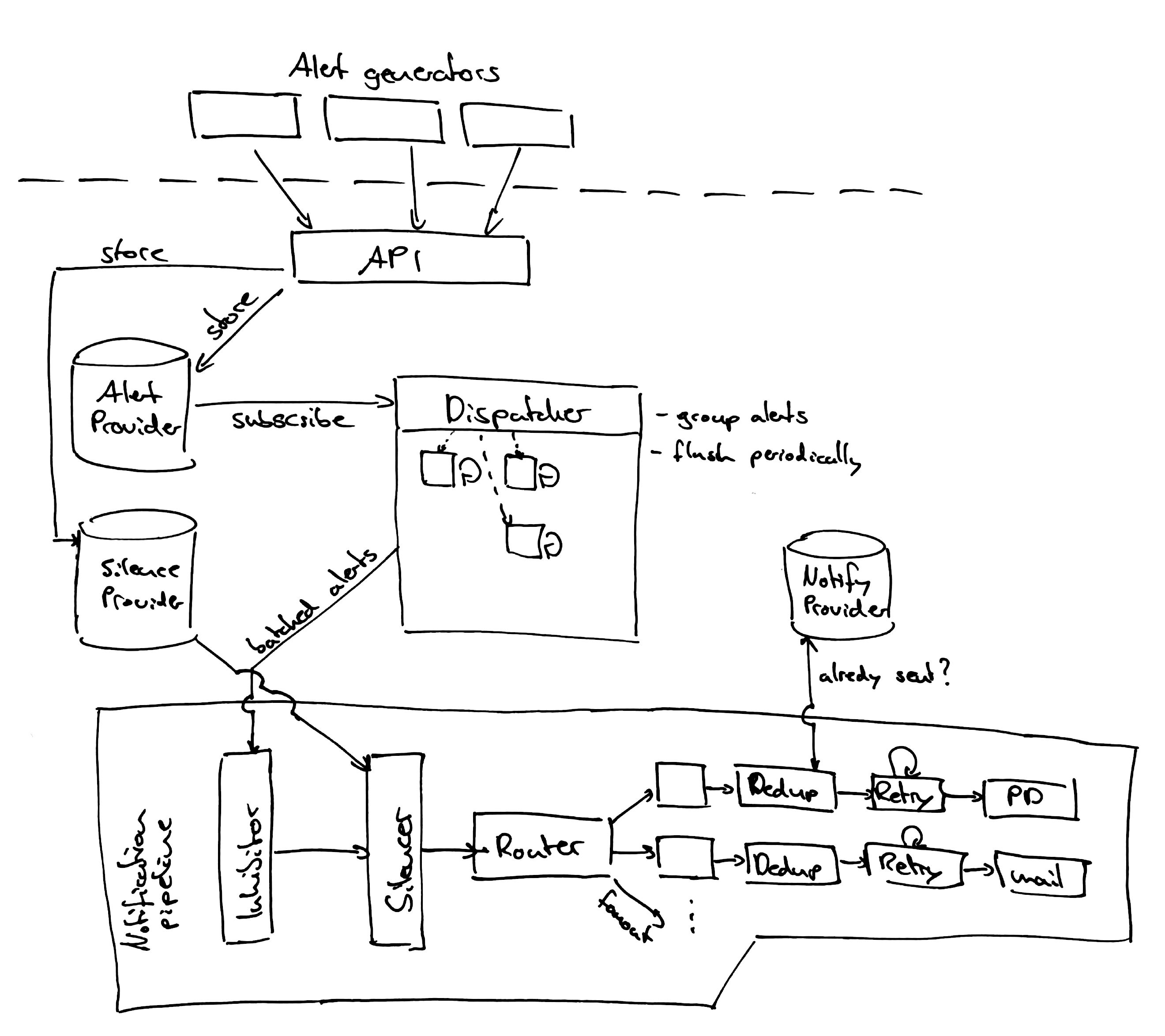
The Alertmanager handles alerts sent by client applications such as the Prometheus server. It takes care of deduplicating, grouping, and routing them to the correct receiver integrations such as email, PagerDuty, or OpsGenie. It also takes care of silencing and inhibition of alerts.
Motivation
We built this image to use Consul and Consul Template to be able to configure alertmanager dynamically.
In particular we want to be able to add receivers.
This image allows to define the alertmanager.yml file as a Consul key.
Configuration through Consul
To manage the alertmanager configuration through Consul you have to create Consul keys to define:
- The global configuration
- The routes
- The receivers
- The inhibit rules
- The templates
Please take a look to the example provided in the consulator.yml running docker-compose up -d.
Configuration file Example
This is an example configuration that should cover most relevant aspects of the new YAML configuration format. The full documentation of the configuration can be found here.
global:
  # The smarthost and SMTP sender used for mail notifications.
  smtp_smarthost: 'localhost:25'
  smtp_from: '[email protected]'

# The root route on which each incoming alert enters.
route:
  # The root route must not have any matchers as it is the entry point for
  # all alerts. It needs to have a receiver configured so alerts that do not
  # match any of the sub-routes are sent to someone.
  receiver: 'team-X-mails'

  # The labels by which incoming alerts are grouped together. For example,
  # multiple alerts coming in for cluster=A and alertname=LatencyHigh would
  # be batched into a single group.
  group_by: ['alertname', 'cluster']

  # When a new group of alerts is created by an incoming alert, wait at
  # least 'group_wait' to send the initial notification.
  # This way ensures that you get multiple alerts for the same group that start
  # firing shortly after another are batched together on the first
  # notification.
  group_wait: 30s

  # When the first notification was sent, wait 'group_interval' to send a batch
  # of new alerts that started firing for that group.
  group_interval: 5m

  # If an alert has successfully been sent, wait 'repeat_interval' to
  # resend them.
  repeat_interval: 3h

  # All the above attributes are inherited by all child routes and can
  # overwritten on each.

  # The child route trees.
  routes:
  # This routes performs a regular expression match on alert labels to
  # catch alerts that are related to a list of services.
  - match_re:
      service: ^(foo1|foo2|baz)$
    receiver: team-X-mails

    # The service has a sub-route for critical alerts, any alerts
    # that do not match, i.e. severity != critical, fall-back to the
    # parent node and are sent to 'team-X-mails'
    routes:
    - match:
        severity: critical
      receiver: team-X-pager

  - match:
      service: files
    receiver: team-Y-mails

    routes:
    - match:
        severity: critical
      receiver: team-Y-pager

  # This route handles all alerts coming from a database service. If there's
  # no team to handle it, it defaults to the DB team.
  - match:
      service: database

    receiver: team-DB-pager
    # Also group alerts by affected database.
    group_by: [alertname, cluster, database]

    routes:
    - match:
        owner: team-X
      receiver: team-X-pager

    - match:
        owner: team-Y
      receiver: team-Y-pager


# Inhibition rules allow to mute a set of alerts given that another alert is
# firing.
# We use this to mute any warning-level notifications if the same alert is
# already critical.
inhibit_rules:
- source_match:
    severity: 'critical'
  target_match:
    severity: 'warning'
  # Apply inhibition if the alertname is the same.
  equal: ['alertname']


receivers:
- name: 'team-X-mails'
  email_configs:
  - to: '[email protected]'

- name: 'team-X-pager'
  email_configs:
  - to: '[email protected]'
  pagerduty_configs:
  - service_key: <team-X-key>

- name: 'team-Y-mails'
  email_configs:
  - to: '[email protected]'

- name: 'team-Y-pager'
  pagerduty_configs:
  - service_key: <team-Y-key>

- name: 'team-DB-pager'
  pagerduty_configs:
  - service_key: <team-DB-key>
Architecture
Tag summary
Content type
Image
Digest
Size
31.6 MB
Last updated
over 8 years ago
docker pull bandsintown/alertmanager