battermanz/kamosu
Self-hosted cookbook for the people you cook with: a web app for you, MCP for your AI agent.
589
battermanz/kamosu repository overview

Kamosu
A self-hosted cookbook for the people you cook with. Everyone keeps their own recipes, a Kitchen lets you cook from each other's, and your AI agent can do everything you can.
Kamosu keeps your recipes, every change ever made to them, each time someone cooked one and how it went, and the shopping list for the dishes you picked this week. Each person writes in their own Cookbook. Put the people you cook with in a Kitchen, your household, your parents, a group of friends, and each of you can open, cook and record how it went for everyone else's recipes, while only the person who wrote a recipe can change it.
Everything you can do in the web app, an agent can do over MCP (the Model Context Protocol), because both are built from the same list of operations. Kamosu runs on a machine you own, in one container with one folder and one port, and it sends your data nowhere.
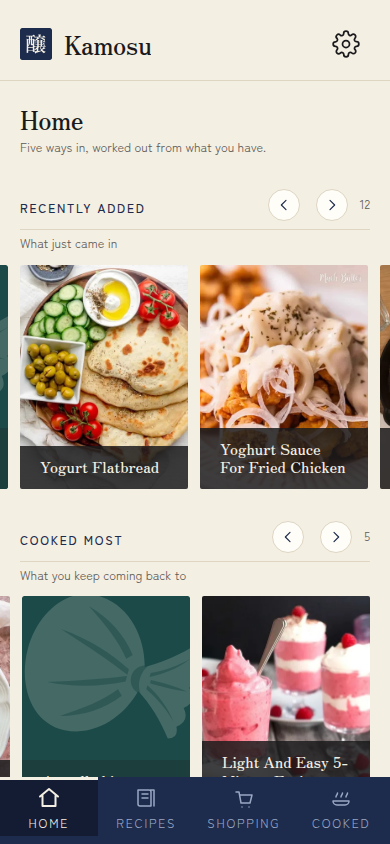 | 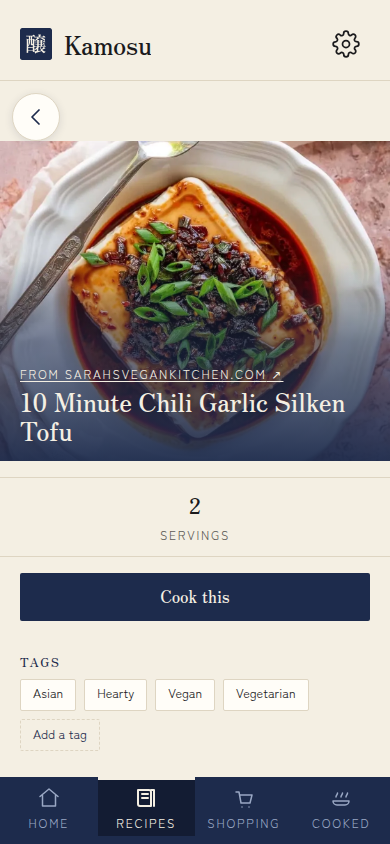 |
| Home: shelves worked out from what you cook | A recipe, with its whole history behind it |
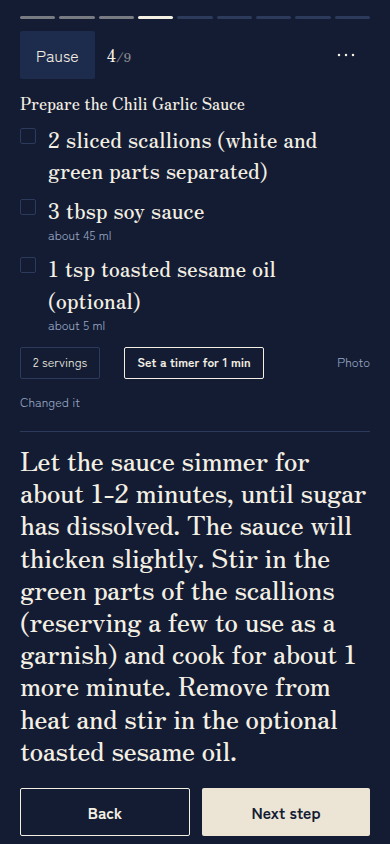 | 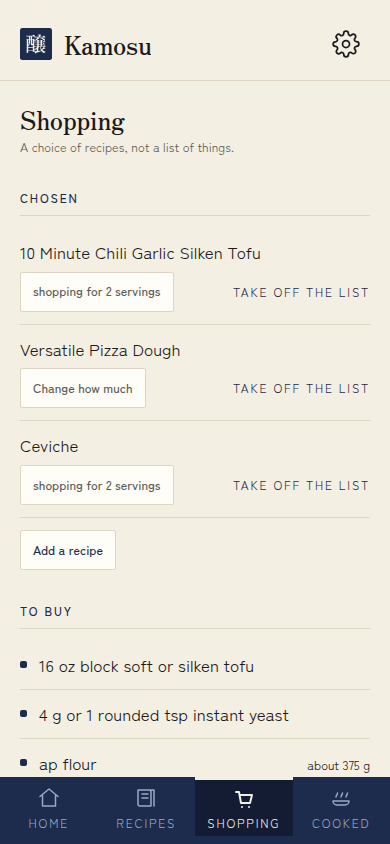 |
| Cooking mode: one step and what it uses | Shopping, added up from the recipes you chose |
- Source and full README: https://github.com/BatterWorks/Kamosu
- Changelog: https://github.com/BatterWorks/Kamosu/blob/main/CHANGELOG.md
What you get
- Cook from your phone, offline. Cooking mode walks you through the steps with the amounts each step needs, lets you tick off ingredients, and turns a time in the step text into a timer. Install it to your home screen like an app.
- On a tablet or a computer too. A wider window gets a sidebar where the phone has its tab bar, and a recipe in two columns.
- Kitchens. Cook from the recipes of everyone you share a Kitchen with, and see how it went when they cooked yours.
- A recipe keeps its whole history. Every save is a new version and none is ever lost. Start a variation or a translation beside the original, and Kamosu shows how two versions differ line by line.
- A diary of what you cooked. Each cooking is dated and rated, with photos, notes, and what you actually did if it differed from the recipe.
- Scaling and conversions. Cook for 3 instead of 6 and every amount follows, with metric or US measures beside the amounts as written.
- A shopping list worked out from recipes. Pick dishes and how many you are cooking for. Flour from three recipes becomes one row.
- Search by words, or by meaning. Turn on Meaning Search and "that thing with aubergines" finds a recipe that never says aubergine.
- Bring your recipes in. A web page, a pasted recipe or a recipe PDF, a Crouton export, or a recipe from another Kamosu.
- Share with anyone. A Share Link shows one recipe to whoever holds it, no account needed, with a printable PDF.
- Agents are first-class. Each person creates their own Access Keys, read-only or not, and connects Claude Code, Codex, Hermes or any MCP client to
/mcp. - In English, French and Spanish. Each person picks the language they read in.
Who it is for
Kamosu suits a person, a household or a group of people who want to keep their recipes on their own server, cook from a phone, and let an agent add, fix or translate recipes for them.
It is not a hosted service, a meal planner, a nutrition tracker or a public recipe site. Every account starts from an invite, and nothing is visible to strangers unless you share a link.
Tags
latestand<version>: images for Dockerpodman-latestandpodman-<version>: images for Podman
Every tag is built for amd64 and arm64. The image is distroless and rootless: it has no shell and runs as the unprivileged user 65532.
Quick start
Everything Kamosu keeps goes in one folder. Create it and give it to the user Kamosu runs as:
mkdir -p kamosu-data && sudo chown 65532:65532 kamosu-data
With rootless Podman, use podman unshare chown 65532:65532 kamosu-data instead.
Create docker-compose.yml beside that folder:
services:
  kamosu:
    image: battermanz/kamosu:latest
    container_name: kamosu
    ports:
      - "5266:5266"
    volumes:
      - ./kamosu-data:/data
    restart: unless-stopped
    healthcheck:
      test: ["CMD", "/app/kamosu", "health-check"]
      interval: 30s
      timeout: 5s
      retries: 3
      start_period: 10s
Start it:
docker compose up -d
Open Kamosu on port 5266 and create the first account. The first person to open it becomes the Operator, the account that runs the instance and invites everyone else. Do this straight after the first start.
Put HTTPS in front of it
Kamosu serves plain HTTP and never handles a certificate. Put your own reverse proxy (Caddy, Traefik, nginx) in front of it. Without HTTPS you cannot stay signed in from another device, and offline cooking does not work. To try it on the machine that runs it, http://localhost:5266 is enough.
Connecting an agent
In Kamosu, open Settings, then Account, and create an Access Key. Tick Read-only if the agent only needs to look things up. Point any MCP client at https://your-kamosu/mcp with the key as a bearer token. The GitHub README has the exact configuration for Claude Code, Codex and Hermes.
Your data
Everything Kamosu owns lives in the one folder mounted at /data: the database, the photographs, the Backups, and the search model if you turn Meaning Search on.
- Backups. Kamosu takes its own and keeps three under
/data/backups, one replaced every day, one every week and one every month. It never sends a Backup anywhere, so copy that folder off the machine. - Upgrading. Pull the new image and restart. Kamosu copies the database to a Snapshot before it migrates, and migrations only go forward. Pin a version tag to choose when you upgrade.
- Taking recipes elsewhere. Any recipe exports as a zip of readable Markdown notes with its full history, and prints as a PDF.
Configuration
No environment variable is required.
| Variable | Default | Purpose |
|---|---|---|
KAMOSU_ADDRESS | 0.0.0.0 | Address to listen on. |
KAMOSU_PORT | 5266 | Port to listen on. |
KAMOSU_DATA_DIR | /data | The folder that holds everything. Leave it alone and change the mount instead. |
KAMOSU_LOG | info | Log level, such as debug. |
The GitHub README covers Meaning Search, troubleshooting and security.
License
AGPL-3.0-only
Tag summary
Content type
Image
Digest
sha256:9b1fc6aa4…
Size
46.3 MB
Last updated
5 days ago
docker pull battermanz/kamosu