bbate/veeam_backup_and_replication_grafana
Agent which connects to Veeam Backup & Replication REST API uploading to an Influx DB.
1.1K
bbate/veeam_backup_and_replication_grafana repository overview
Grafana Dashboard for Veeam Backup & Replication REST API
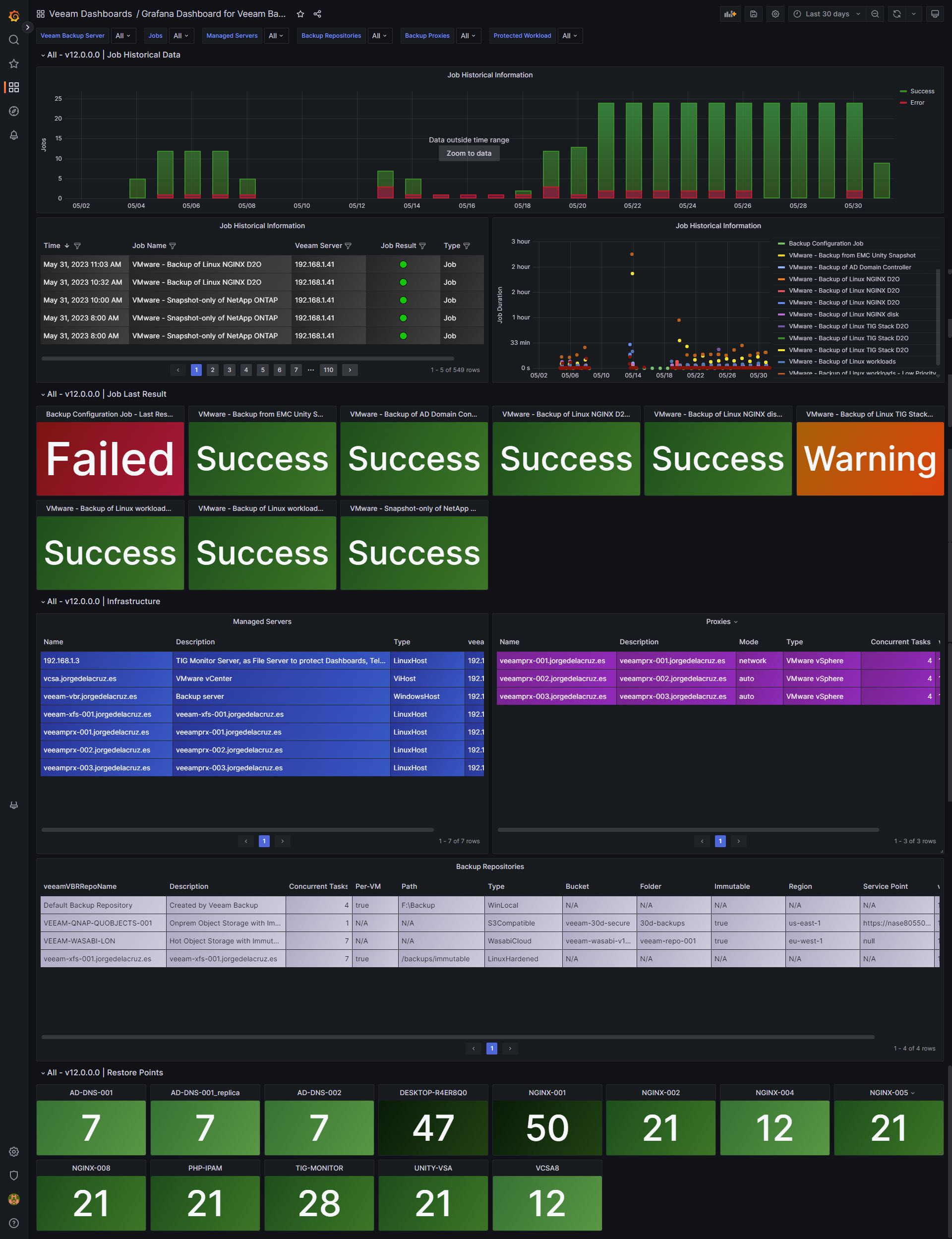
This project consists of a Docker Container which uses cron to run a Bash Shell script to retrieve the Veeam Backup & Replication information, directly from the RESTfulAPI, about last jobs, users and much more. The information is being saved it into InfluxDB output directly into the InfluxDB database using curl, then in Grafana: a Dashboard is created to present all the information.
We use Veeam Backup & Replication RESTfulAPI to reduce the workload and increase the speed of script execution.
Configuration
The configuration is applied by applying environment variables to your Docker container as follows:
Required Variables:
INFLUX_URLYour InfluxDB Server, http://FQDN or https://FQDN if using SSLINFLUX_BUCKETInfluxDB bucket name (not ID)INFLUX_TOKENInfluxDB access token with read/write privileges for the bucketINFLUX_ORGInfluxDB organisation name (not ID)VEEAM_USERVeeam usernameVEEAM_PASSWORDVeeam passwordVEEAM_ADDRESSThe IP address or host name of your Veeam server
Optional Variables:
INFLUX_PORTDefault Port 8086VEEAM_PORTDefault Port 9419VEEAM_JOBSESSIONSDefaults to 1000
Getting started
- Deploy a container with the above environment variables set:
docker run -e INFLUX_URL='http://FQDN' -e INFLUX_BUCKET='my_bucket'... etc ...bbate/veeam_backup_and_replication_grafana:latest - Download the Veeam Backup & Replication JSON file and import it into your Grafana
- Enjoy :)
For more information see the original script author's Blog Post - https://jorgedelacruz.uk/2023/05/31/looking-for-the-perfect-dashboard-influxdb-telegraf-and-grafana-part-xliv-monitoring-veeam-backup-replication-api/
Additional Information
- Timing of running the script (default every 15mins) is controlled by the crontab file and can therefore only be changed by editing the crontab and rebuilding the container.
- The Dockerfile manually references the amd64 version of the influx CLI so this line must be changed to build a container image compatible with other architectures.
Known issues
Would love to see some known issues and keep opening and closing as soon as I have feedback from you guys. Fork this project, use it and please provide feedback.
Tag summary
Content type
Image
Digest
sha256:e4be1b344…
Size
32.7 MB
Last updated
almost 3 years ago
docker pull bbate/veeam_backup_and_replication_grafana