bdekkernl/atlas
Atlas is an all-in-one, self-hosted media management dashboard.
5.9K
bdekkernl/atlas repository overview
Atlas 🎬 🎵
An elegant, all-in-one media management dashboard — track, search, download, and stream your Movies, TV Shows, and Music.
Replaces Radarr • Sonarr • Lidarr • Bazarr • Tautulli • Overseerr/Jellyseerr
One lightweight container to manage, automate, and stream your entire media stack.



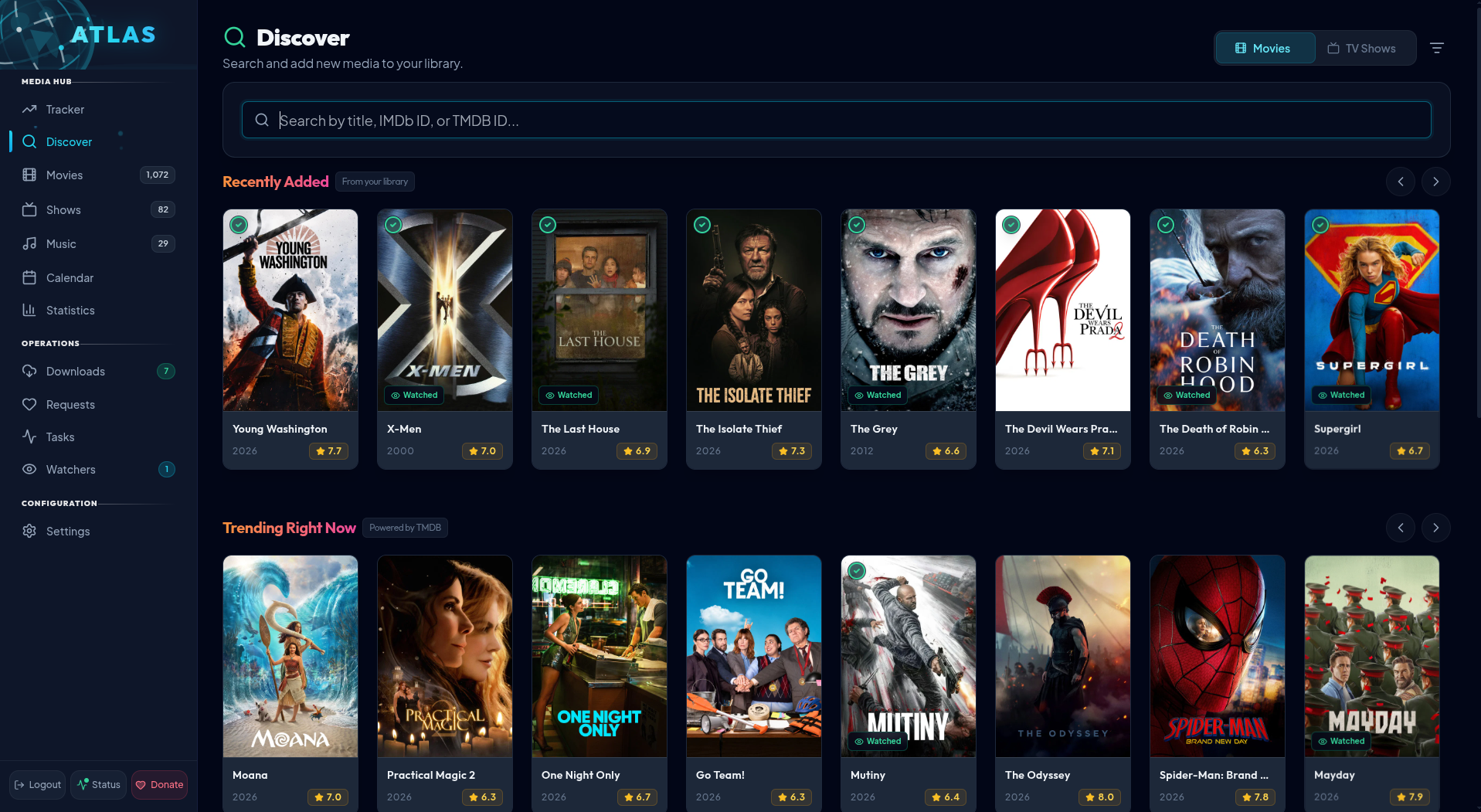
What is Atlas?
Atlas is an ultra-fast, self-hosted media management dashboard that unites the capabilities of Radarr, Sonarr, Lidarr, Bazarr, Tautulli, and Overseerr into a single cohesive, high-performance web application built with Node.js 22, React 18, and native SQLite.
Eliminate the resource overhead of running 6 separate containers — Atlas manages discovery, automated downloads, quality profiles, multi-track subtitle synchronization, artist discographies, and continuous lossless audio streaming from one unified interface.
Features ✨
🎬 Movies & TV Shows (Radarr / Sonarr)
- Unified Media Tracking — Monitor existing and upcoming Movies, TV Shows, seasons, and episodes with real-time status indicators (monitored, downloaded, downloading, missing, partial).
- Smart Discovery (TMDB) — Discover trending releases, explore upcoming theatrical and digital releases, and add them with one click.
- Interactive Calendar — Track theatrical debuts, physical/digital release dates, and TV airings with an intuitive calendar view.
- Detailed Media Views — Full cast & crew with person filmographies, season/episode overviews, community ratings, and embedded trailer playback.
- Custom Renaming & Artwork — Automated file renaming using customizable token templates (
{Title} ({Year}) [{Quality}]) and automatic high-resolution poster/backdrop retrieval. - Smart Cleanup Candidates — Automated scoring algorithm identifies safe-to-delete movies based on franchise detection, TMDB rating, watch status, age, and file size. Includes one-click library removal or disk file deletion.
- Season 0 Specials Management — Clutter-free season tracking with automated filtering and purging of unwanted season 0 extra files.
🎵 Music Management & Streaming (Lidarr + Web Player)
- Artist Discographies (MusicBrainz) — Automatically import complete artist discographies, release years, cover artwork, and official tracklists.
- Interactive Album Carousel — Smooth horizontal album carousel on artist pages with instant tracklist selection and high-contrast active rings.
- Compact Circular Status Badges — Clean status indicators on every album artwork:
(✔)Downloaded — Dark circular badge with emerald checkmark.(✕)Missing — Dark circular badge with rose cross.(!)Partial — Dark circular badge with amber warning icon showing downloaded vs. expected count.
- Canonical Release Resolution — Smart release filtering prioritizes standard canonical album editions over promotional deluxe bundles, preventing single tracks from showing as phantom "Disc 2" missing tracks while still preserving local bonus tracks.
- Accurate Media Format Tags — Format pills (
FLAC 16B,FLAC 24B,MP3 320) are strictly derived from actual files on disk, ensuring un-downloaded albums never show misleading format tags. - Floating Lossless Web Audio Player:
- Persistent floating audio player engineered with high-elevation z-index that stays active across all page navigations.
- Full playback controls: play/pause, scrubbable progress bar, elapsed/remaining time, volume slider with mute toggle, shuffle, and repeat modes.
- Integrated Playlist Queue modal and dynamic audio visualizer.
- Direct FLAC and MP3 streaming with browser-native audio buffering.
🔤 Subtitle Management & Speech-Sync (Bazarr)
- Multi-Provider Search — Automatically search and download subtitles across OpenSubtitles, SubDL, and SubSource.
- Automated Speech-to-Subtitle Sync — Built-in Voice Activity Detection (VAD) audio extraction and FFmpeg alignment to automatically repair out-of-sync subtitle offsets.
- AI-Powered Translation — Auto-translate subtitle tracks into your preferred languages using Claude (Anthropic), DeepSeek, or Google Cloud Translate.
- Embedded & External Language Badges — Visual indicators showing existing embedded audio/subtitle languages and newly fetched external
.srttracks on every media card.
📥 Download Clients & Indexers
- Supported Download Clients — Full two-way integration with qBittorrent, Transmission, Deluge, rTorrent, SABnzbd, and NZBGet.
- Real-Time Downloads Queue:
- Live speeds, progress bars, ETA calculations, pause/resume, and bulk selection/delete.
- Graceful Magnet Metadata (
metaDL) Handling — Shows an active "Fetching Metadata..." status with a spinner instead of raw 40-character hex hashes, and safely reports "Size: Retrieving..." instead ofNaN. - Clean Single-Title Display — Strips redundant duplicate subtext, cleans up HTML entities (
ö→ö), and removes broken trailing punctuation.
- Prowlarr Integration — Native indexer support for automated background searches and manual interactive release grab modals.
- Quality & Release Profiles — Enforce preferred resolutions (1080p, 4K HDR/DV), audio formats (FLAC, MP3 320k), preferred release groups, and automatic quality upgrades.
👥 Users, Requests & Activity (Overseerr / Tautulli)
- User Request Portal — Dedicated portal for family and users to discover and request movies, TV shows, and music with admin approval workflows.
- Media Server User Sync — Auto-discover and import existing user profiles from Plex, Jellyfin, and Emby.
- Real-Time Presence & Activity — Live WebSocket online/offline presence tracking and playback activity monitoring.
- JWT Role-Based Auth — Secure authentication with granular permissions for administrators vs. standard users.
Quick Start 🐳
Deploy Atlas with Docker Compose in under two minutes:
1. Create your .env file
cat > .env << 'EOF'
JWT_SECRET=$(node -e "console.log(require('crypto').randomBytes(32).toString('hex'))")
TMDB_API_KEY=your_tmdb_api_key_here
EOF
2. Create docker-compose.yml
services:
  atlas:
    image: bdekkernl/atlas:latest
    container_name: Atlas
    restart: unless-stopped
    ports:
      - '9898:9898'
    environment:
      - TZ=Europe/Amsterdam
      - NODE_ENV=production
      - PORT=9898
      - JWT_SECRET=${JWT_SECRET}
      - TMDB_API_KEY=${TMDB_API_KEY}
    volumes:
      - '/path/to/atlas/config:/app/server/data'
      - '/path/to/movies:/data/movies'
      - '/path/to/tvshows:/data/tvshows'
      - '/path/to/music:/data/music'
      - '/path/to/downloads:/data/downloads'
3. Launch
docker compose up -d
Open http://localhost:9898 in your browser and complete the initial setup!
⚠️ Prerequisite: Get a free TMDB API Key before starting.
Volume Mounts 📁
| Container Path | Description | Required |
|---|---|---|
/app/server/data | Database (database.sqlite), artwork cache, and application settings | Yes |
/data/movies | Movies storage directory | Optional |
/data/tvshows | TV Shows storage directory | Optional |
/data/music | Music albums & artist discographies library | Optional |
/data/downloads | Completed downloads directory from your torrent/usenet client | Optional |
Environment Variables 🌐
| Variable | Required | Default | Description |
|---|---|---|---|
JWT_SECRET | Yes | — | Random 32+ character string for JWT session signing |
TMDB_API_KEY | Yes | — | The Movie Database API key |
PORT | No | 9898 | Web UI and server port |
TZ | No | UTC | Timezone (e.g. Europe/Amsterdam, America/New_York) |
NODE_ENV | No | production | Environment mode (production / development) |
CORS_ORIGIN | No | http://localhost:9898 | Allowed CORS origin (useful behind reverse proxies) |
ANTHROPIC_API_KEY | No | — | Optional Claude API key for AI subtitle translations |
DEEPSEEK_API_KEY | No | — | Optional DeepSeek API key for AI subtitle translations |
GOOGLE_API_KEY | No | — | Optional Google Cloud API key for subtitle translation |
First Run Guide 🚀
- Open
http://localhost:9898 - Head to Settings → API and verify your TMDB API Key.
- Under Settings → Library, configure your media library folders:
- Movies:
/data/movies - TV Shows:
/data/tvshows - Music:
/data/music
- Movies:
- Connect your download client (Settings → Clients) and indexers via Prowlarr (Settings → Indexers).
- Set up your Quality Profiles and start tracking your favorite movies, shows, and albums!
Tech Stack 🛠️
- Frontend: React 18, Vite 5, Tailwind CSS, Lucide Icons, React Router 7
- Backend: Node.js 22+, Express, Native
node:sqlite(zero external SQLite binary dependencies) - Real-Time Engine: WebSockets (
ws) for instant presence and queue updates - Audio & Media Processing: HTML5 Web Audio API, FFmpeg metadata analysis & VAD speech sync
- External Integrations: TMDB, MusicBrainz, Cover Art Archive, SubDL, SubSource, OpenSubtitles, Prowlarr, Plex, Jellyfin, Emby
Contributing & Support 💬
- 📖 Documentation & Source: GitHub Repository
- 🐛 Issue Tracker: GitHub Issues
- 🐳 Docker Hub: bdekkernl/atlas
- 🌐 Project Home: BDekker.nl
Made with ❤️ by Hoaxr • BDekker.nl
Tag summary
Content type
Image
Digest
sha256:dd61b7b8c…
Size
110.3 MB
Last updated
about 21 hours ago
docker pull bdekkernl/atlas