berdav/greenpass
Scriptable green pass / Digital Covid Certificate verifier.
450
berdav/greenpass repository overview
Green Pass Verifier
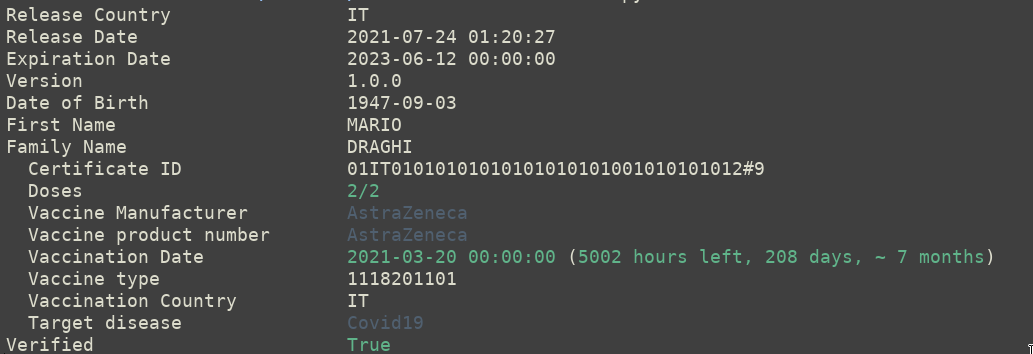
Scriptable green pass verifier.
With this application you can automatize accesses based on green pass validity.
It can also be used to analyze your digital certification (e.g. to print
which key was used to sign the certificate, --verbose).
It is compatibile with EU certificates (DGC) and UK certificate (NHS).
Installation
You need to have pip and libzbar to install the application.
You can install it using your favorite package manager, for instance in Ubuntu:
sudo apt install python3-pip libzbar0
You can just install the application using pip:
pip install greenpass
If you want to install it from sources, install the python3 requirements using the following command:
pip3 install -r requirements.txt
Usage
You can feed the application with different file formats, for instance:
Green pass official PDFs
greenpass --pdf greenpass.pdf
QRCode images in PNG
greenpass --qr greenpass.png
Txt files with the content of the qrcode
greenpass --txt greenpass.txt
Standard input and pipes
zbarimg --raw greenpass.png | greenpass --txt -
On a side note, you can verify camera-acquired images if your scanner prints the raw content of the QRcode on stdout
zbarcam --raw -q1 | greenpass --txt -
The application returns an UNIX compatible code, therefore you can concatenate commands that will be executed only if the green pass is verified.
greenpass --qr greenpass.png && echo "green pass ok"
You can also get the expiration configuration using --settings without
other inputs.
greenpass --settings
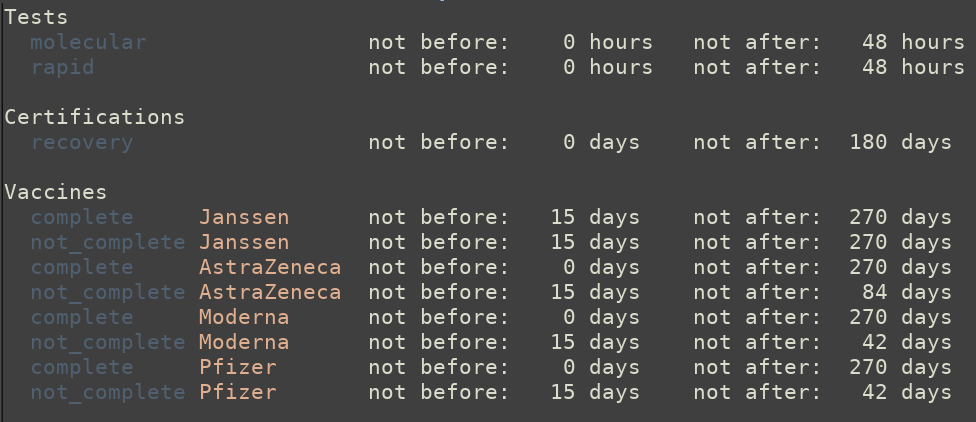
Debug the cryptographic part of your greenpass
greenpass --qr greenpass.png --dump-sign
Print the key which the greenpass was signed with
greenpass --qr greenpass.png --verbose --no-cache
Check if a greenpass was valid or will be valid on a certain date
greenpass --qr greenpass.png --at-date '2021-10-30 18:34'
Switches
-h --help
Help, print the help message
You need to use one of:
--settings
Dump the settings used by the Italian application
--qr QR
Analyze the qrcode QR
--pdf PDF
Analyze the pdf file PDF
--txt TXT
Analyze the txt file TXT
Caching options:
--cachedir CACHEDIR
Use CACHEDIR as the cache directory, by default the cache is placed in $HOME/.local/greenpass.
Miscellaneous switches:
--raw
Print the raw content (JSON) of the certificate
--no-color
Disable colored output.
--no-cache
Disable cache, download everything without saving it.
--clear-cache
Redownload the entire cache, useful to update settings.
--key KEY
Use the content of the file KEY as the public certificate (DGC) or the public key (NHS) to verify the certificate.
--verbose
Print more information (e.g. which key verifies the certificate).
--dump-sign
Print details on the headers and signature of the certificate.
--at-date AT_DATE
Use AT_DATE instead of the current date
Docker Container
The docker image shipped with the program can be used in the following way:
zbarimg --raw qrcode.png | sudo docker -i greenpass
Read a PNG greenpass qrcode
sudo docker -i greenpass --settings
To read the settings
And virtually with all the switches you can find in the previous section. At the moment, files are not easily passed in the container, therefore it is better to process the qrcode or the pdf outside of the container and extract the qrcode text to pass in the application.
Pointers
If you want more information on the green pass certification and how to parse or verify it you can refer to the following resources:
Greenpass Encoding documentation
Official Italian Android application
Tag summary
Content type
Image
Digest
Size
244.5 MB
Last updated
over 4 years ago
docker pull berdav/greenpass