bertschiweb/suitecrm
This is a dockerized version of the SuiteCRM open source CRM.
10K+
bertschiweb/suitecrm repository overview
Docker SuiteCRM
About
This is a dockerized version of the SuiteCRM open source CRM. for the official github project please see here: https://github.com/salesagility/SuiteCRM
This project only prepares the existing SuiteCRM version for a easy to use Docker Development Image. This image is not intended for production use!
Image on Dockerhub
All Images are public available on Dockerhub. Image tags rely on the SuiteCRM release naming convention. To get a specific release pull the image as following:
docker pull bertschiweb/suitecrm:<SuiteCRM-Release>
Proper Versions for example:
- 7.7.6
- 7.6.8
For a list of all available Versions please see Dockerhub Tags
Setup
Best use this image with the official docker-mysql image. This has been tested and just works.
Prerequisites: A working docker environment
-
Setup the Mysql Server
docker run -d -e MYSQL_ROOT_PASSWORD=scrmdbpass -e MYSQL_DATABASE=suitecrm --name mysqlserver mysql:5.7 -
Setup SuiteCRM. Enter the port you would like to expose
docker run -d -p 8020:80 --link mysqlserver --name suitecrmserver bertschiweb/suitecrm -
Open your browser and enter the url
http://yourdockerserver:8020-
Accept the License Agreement
-
Enter the Database configuration and Admin User Settings.
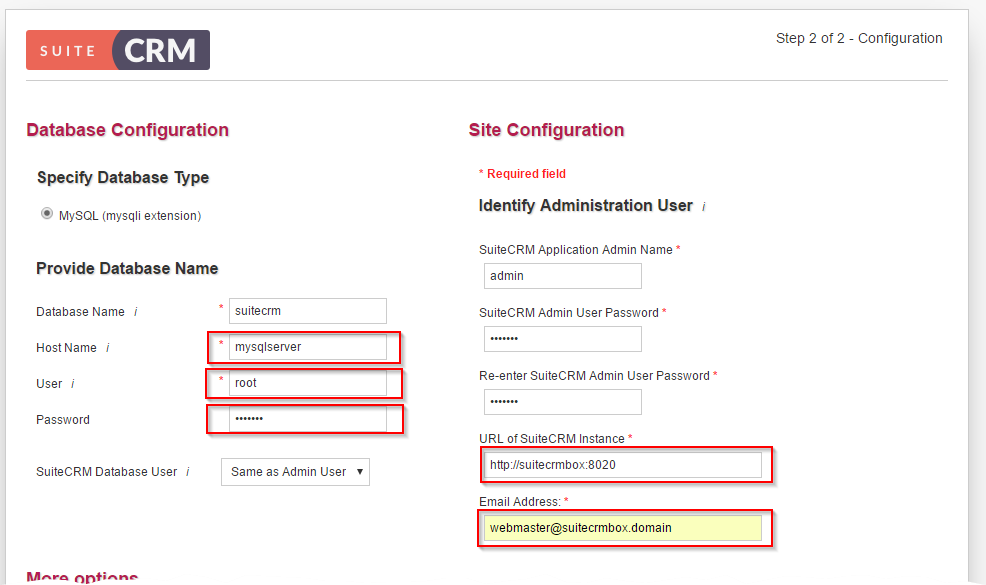
Attention: Make sure the database "Host Name" is the same as defined in the container link. eg.
mysqlserver -
Click next and finish the setup assistant.
-
-
Done!
Build Your own Image from Dockerfile
- Run Vagrant Box and connect
- change directory to
/vagrant - Build:
docker build -t suitecrm . - Run:
docker run -d -p 8020:80 --link mysqlserver --name suitecrmserver suitecrm
Persist SuiteCRM Installation
To persist your configuration the following files have to be mounted as Volume
- /localvoldir/upload:/var/www/html/upload
- /localvoldir/conf.d:/var/www/html/conf.d
docker run -d -p 8020:80 --link mysqlserver --name suitecrmserver -v /opt/localpath/upload:/var/www/html/upload -v /opt/localpath/conf.d:/var/www/html/conf.d suitecrm
Tag summary
Content type
Image
Digest
Size
378.7 MB
Last updated
about 9 years ago
docker pull bertschiweb/suitecrm