beztebya666/ansible-ui-api
Native real-PTY live terminal for Ansible & IaC - a free, open Ansible-Semaphore alternative
301
beztebya666/ansible-ui-api repository overview
ansible·ui
A fast, minimal control plane for Ansible — with a genuinely native live terminal.
Run playbooks from a clean web UI and watch them stream in real time, byte-for-byte,
exactly as they look in a terminal: real ANSI colour, real TTY behaviour, real ansible-playbook.
Go · React + Vite · xterm.js · PostgreSQL · Docker · Kubernetes / Helm
🚀 Try the live demo →
A full, in-browser sandbox — no signup, your own private data (nobody else can touch it), and a Reset Demo button to start fresh. Runs, workflows and the live terminal are all simulated client-side.
ansible·ui vs. Ansible Semaphore
Everything in ansible·ui is free and open-source — no tiers, no seats, no paywalls.
The table shows where Ansible Semaphore charges for the same capability behind its paid Pro
($490/yr) or Enterprise tier, ships only a partial version, or has nothing at all. Rows are
ordered by Semaphore status: parity → partial → Pro → Enterprise → absent.
ansible·ui is
✅ Freefor every row. Semaphore:✅ Free(open-source core) ·◑ Partial·💲 Pro·💲 Enterprise(paid) ·❌ —(absent). Semaphore tiers verified against semaphoreui.com/pro and its docs (June 2026).
| Feature | ansible·ui | Ansible Semaphore |
|---|---|---|
| Apps: Ansible · Terraform · OpenTofu · Terragrunt · Bash · PowerShell · Python | ✅ Free | ✅ Free |
| Single-binary self-host (one port) | ✅ Free | ✅ Free |
| Scheduled runs — cron + one-time | ✅ Free | ✅ Free |
| Project export / import (incl. CLI) | ✅ Free | ✅ Free |
| Native PTY live terminal — real ANSI/TTY, byte-for-byte | ✅ Free | ◑ Parsed log |
| Live lists & run updates over WebSocket (no refresh) | ✅ Free | ◑ |
| Workflows — DAG editor · conditional steps · parallel · per-step overrides · cross-project · versioning | ✅ Free | ◑ Build→deploy only |
| Notification channels — Slack · Telegram · Teams · Discord · PagerDuty · Opsgenie · +10 | ✅ Free | ◑ A few |
| Dynamic cloud inventory — AWS · GCP · Azure | ✅ Free | ◑ |
| Run artifacts · retention + CSV export | ✅ Free | ◑ |
| Full bilingual UI — EN + RU, every string | ✅ Free | ◑ Partial i18n |
| Distributed runners (tags / pools) + concurrency limits | ✅ Free | 💲 Pro |
| 2FA — TOTP authenticator + email OTP | ✅ Free | 💲 Pro |
| LDAP / AD + OIDC login | ✅ Free | 💲 Pro |
| External HashiCorp Vault secret storage | ✅ Free | 💲 Pro |
| Log export to external systems (syslog · Splunk · Elasticsearch) | ✅ Free | 💲 Pro |
| Analytics / insights / Prometheus metrics | ✅ Free | 💲 Pro |
| Terraform / OpenTofu HTTP state backend | ✅ Free | 💲 Pro |
| HA active-active (leader election + run-stream routing) | ✅ Free | 💲 Enterprise |
| Capability-based custom roles | ✅ Free | 💲 Enterprise |
| LDAP / OIDC group → role mapping | ✅ Free | 💲 Enterprise |
| Air-gapped / offline install + multi-instance | ✅ Free | 💲 Enterprise |
| AI-agent control plane (MCP server) | ✅ Free | ❌ — |
| Pulumi app | ✅ Free | ❌ — |
| Auth: SAML SSO | ✅ Free | ❌ — |
| Auth: RADIUS · TACACS+ | ✅ Free | ❌ — |
| Secret managers: AWS · Azure · GCP · CyberArk | ✅ Free | ❌ — |
| SSH certificates (CA-signed) + per-inventory SSH keys | ✅ Free | ❌ — |
| Secret-access audit trail + notification delivery log | ✅ Free | ❌ — |
| Host fact storage & visualisation + reachability monitoring | ✅ Free | ❌ — |
| Compliance report (access matrix · secret-access · activity) | ✅ Free | ❌ — |
| Notification egress proxy (alert-proxy) | ✅ Free | ❌ — |
| Licensing / seats | ✅ Unlimited — free forever | 💲 Paid Pro / Enterprise |
Semaphore status verified against semaphoreui.com/pro + docs (Jun 2026): runners, 2FA, LDAP/OIDC, log export, insights, Terraform HTTP backend & HashiCorp Vault are Pro; HA, custom roles, group→role mapping & air-gapped are Enterprise; SAML, Pulumi, RADIUS/TACACS+ are absent. ✅ Free = in Semaphore's open-source core; ◑ = partial.
Screenshots
Live PTY terminal — watch ansible-playbook stream byte-for-byte, real ANSI colour:
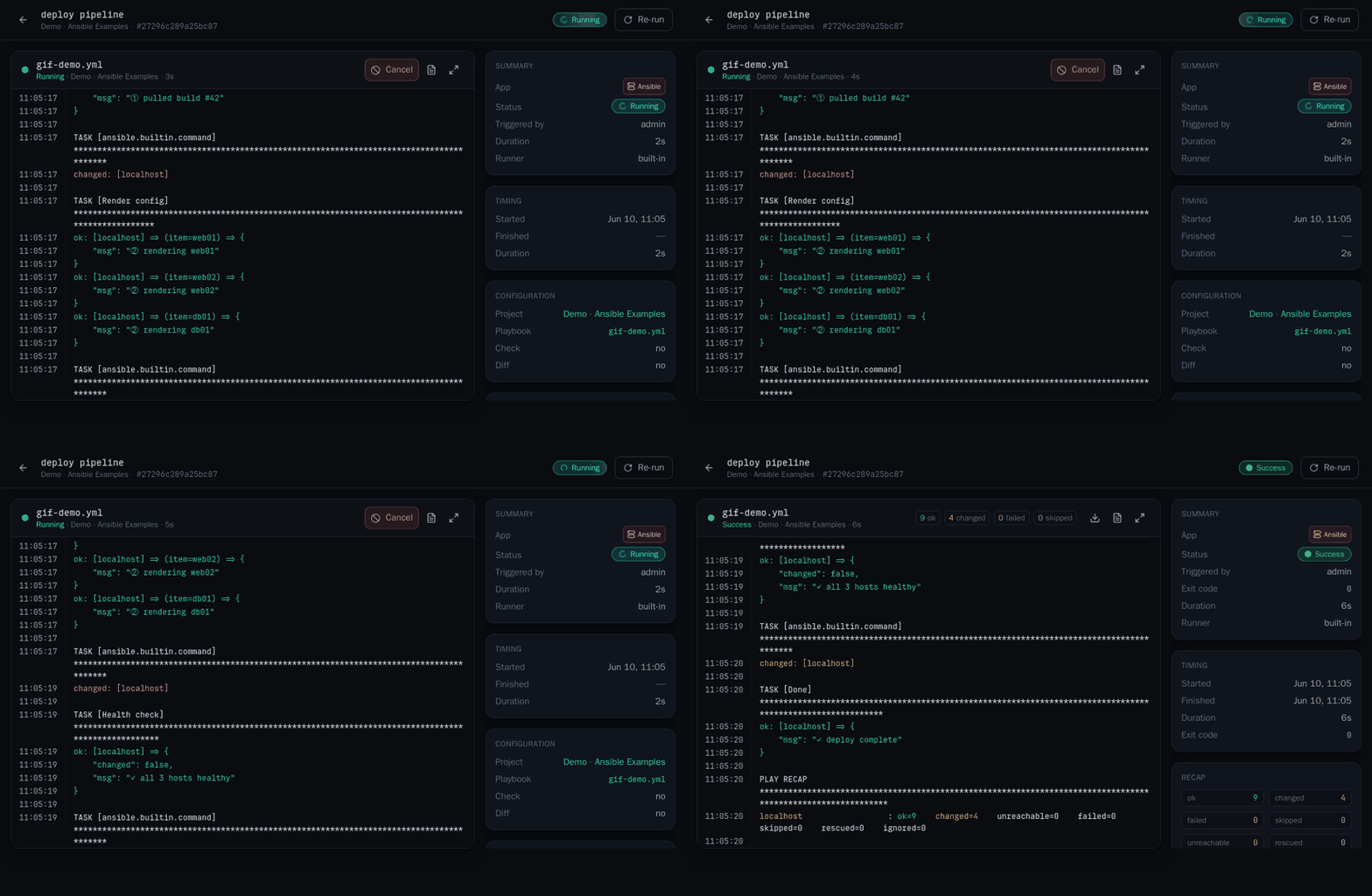
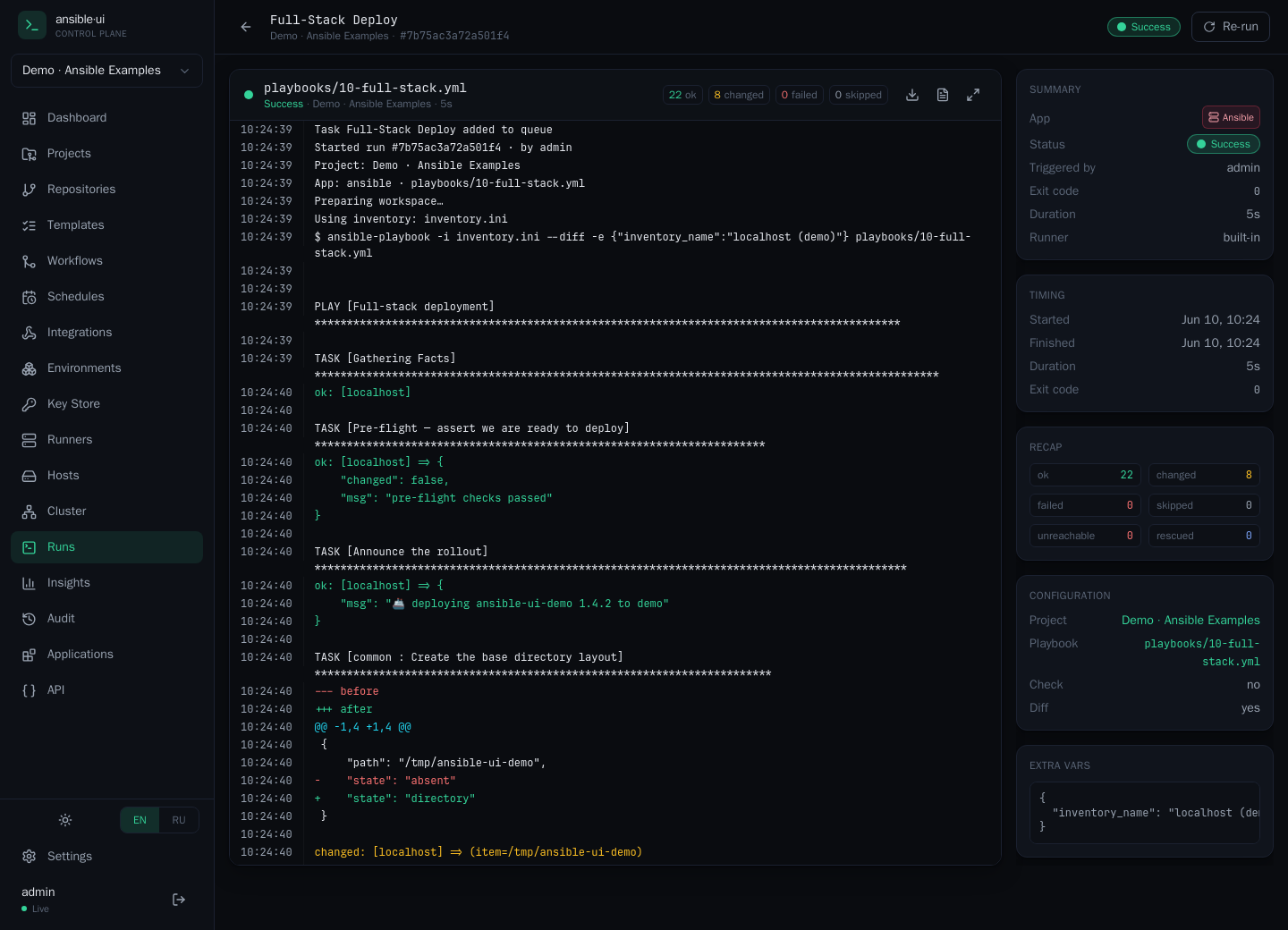
Full run detail (static)
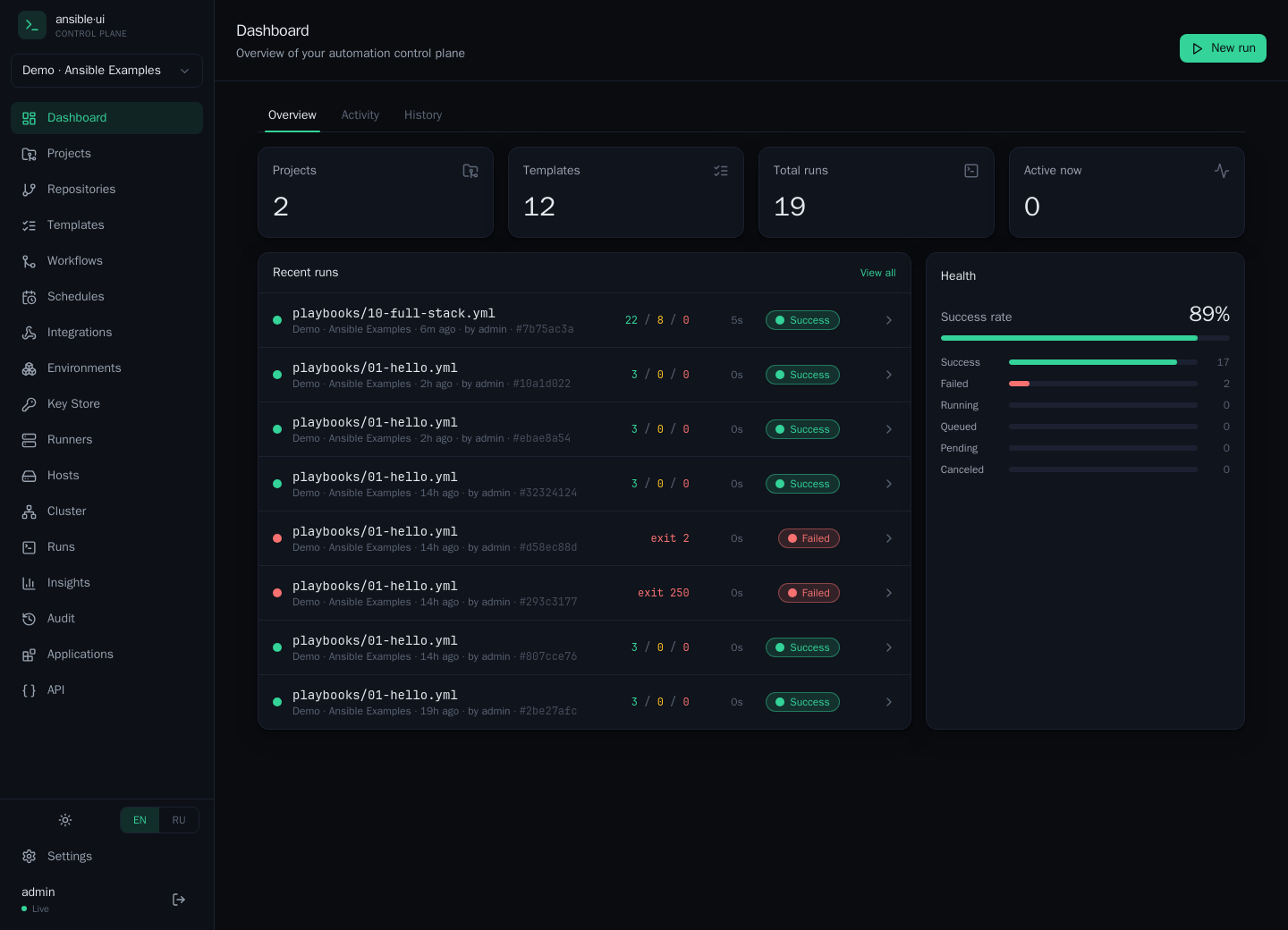
| Dashboard — live overview, recent runs & health | Workflows — visual DAG, conditional + parallel steps |
 | 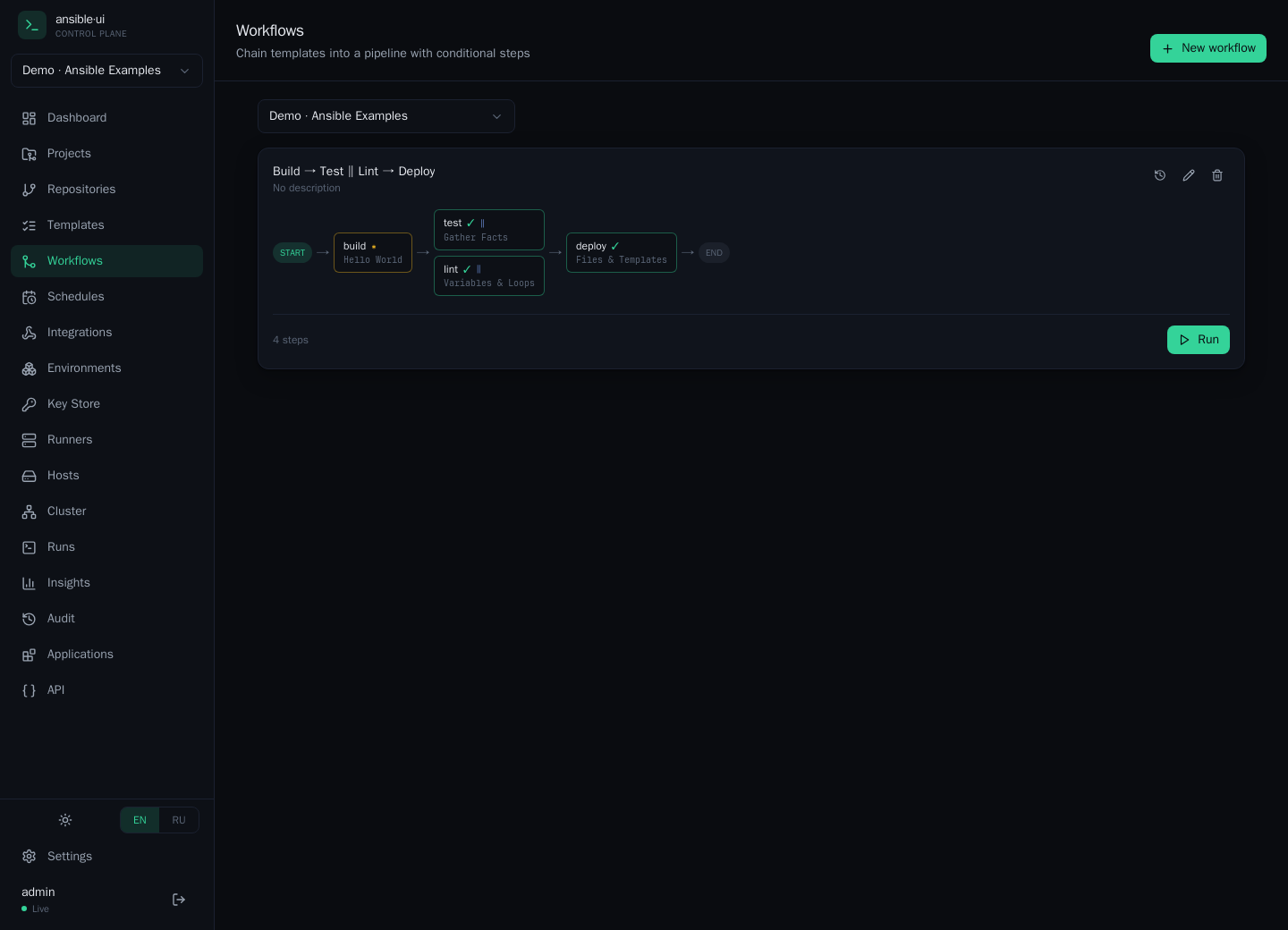 |
| HA cluster — leader, runner capacity, live queue | Insights — success rate, duration & dispatch trends |
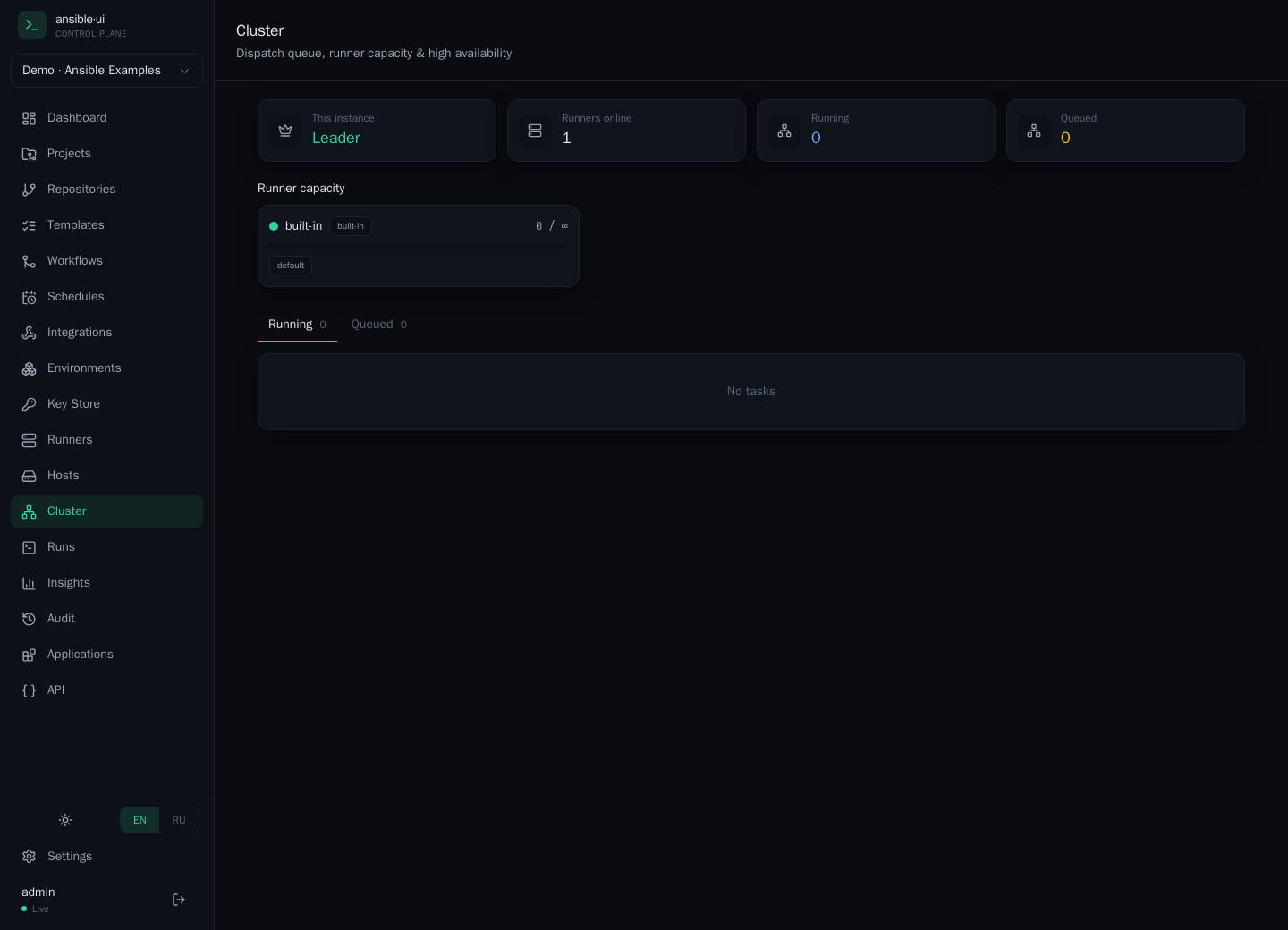 | 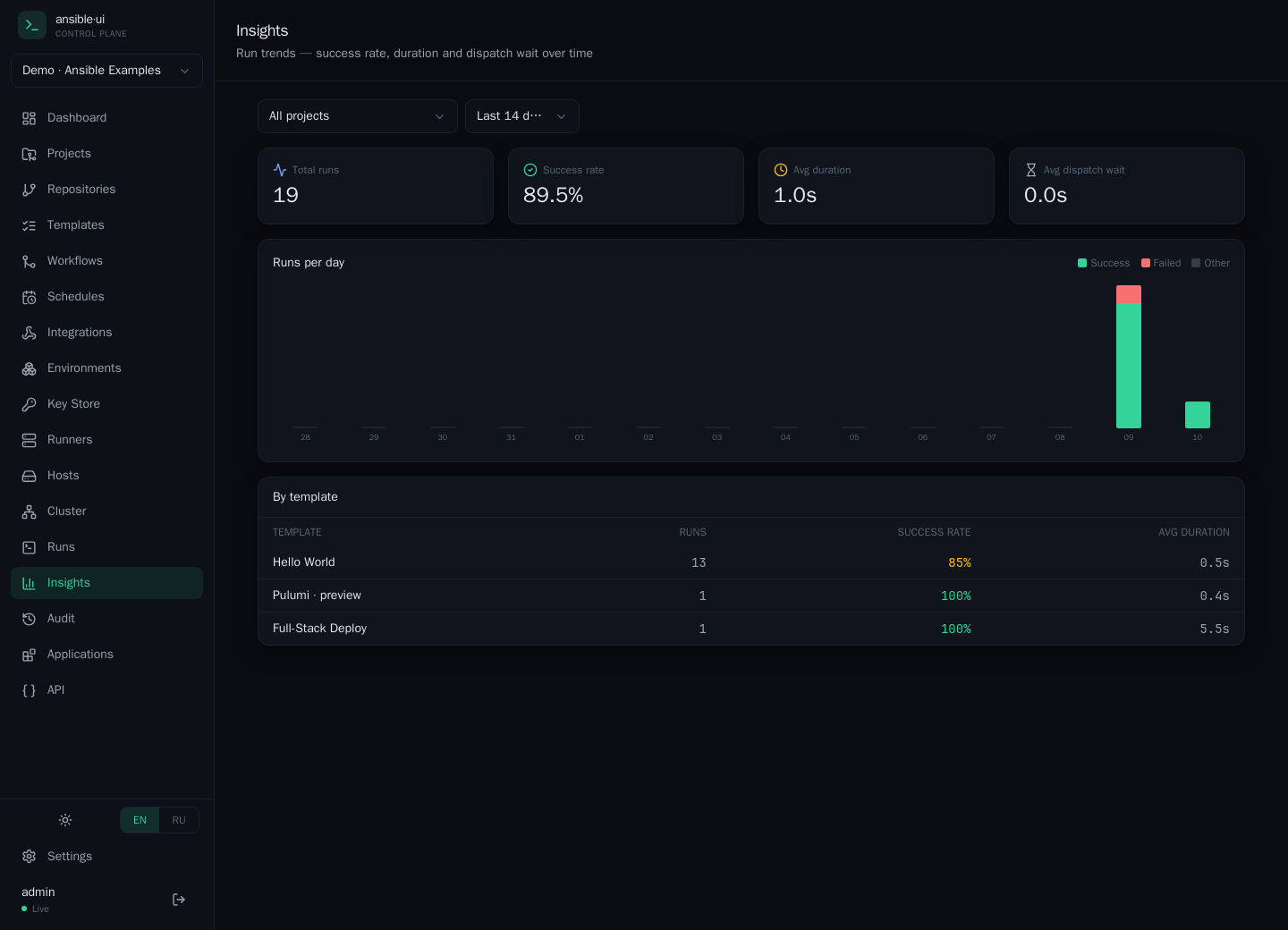 |
Why
Ansible Semaphore works, but the UX is dated and the output viewer doesn't feel like a terminal. ansible·ui is built around three ideas:
- The terminal is the product. Playbooks run inside a real PTY on a dedicated
runner; raw bytes are streamed over WebSocket into xterm.js. What you see is what
ansible-playbookactually printed — colour, progress, alignment and all. - Fast and minimal. A snappy single-page app, a tiny Go API, no bloat. Lists update live over a WebSocket event bus — no spinners, no manual refresh.
- Production-shaped. Decoupled microservices, Postgres persistence, run history with full replay, health checks, and a one-command Docker Compose deploy.
Architecture
The app is two containers (one pod in Kubernetes — runner as a sidecar) plus a database:
                       ┌───────────────────── pod ─────────────────────┐
            REST+WS+UI │  ┌──────────┐   ws://localhost  ┌──────────┐   │
 browser ──────────────┼─▶│   api    │──────────────────▶│  runner  │   │
 xterm.js  (one port)  │  │  (Go,    │     (PTY bytes)   │  (Go +   │   │
                       │  │  serves  │                   │ ansible) │   │
                       │  │  the SPA)│◀── shared /data ─▶│          │   │
                       │  └────┬─────┘                   └────┬─────┘   │
                       └───────┼─────────────────────────────┼─────────┘
                               ▼                              │ exec in PTY
                         ┌──────────┐                         ▼
                         │ postgres │                  ansible-playbook
                         └──────────┘                  (real TTY, colour)
| Container | Stack | Responsibility |
|---|---|---|
| api | Go (stdlib mux, pgx, gorilla/ws) + embedded React/Vite SPA | Serves the UI and REST + WebSocket on one port; persistence, auth, seeding; relays the runner stream and persists it for replay |
| runner | Go + creack/pty + ansible-core + git | Clones repos, installs ansible-galaxy requirements, executes ansible-playbook inside a PTY |
| postgres | PostgreSQL 16 | Projects, repositories, credentials, templates, runs, users |
The SPA is compiled into the api binary (go:embed), so there is no nginx/web container.
The runner is the only component that touches Ansible/git, so the Ansible version is pinned
in its image — full compatibility regardless of the host (here: a RHEL 7 host with no Python 3,
Node, Go or Ansible installed; everything lives in containers).
Database (PostgreSQL) — required, and why
ansible·ui keeps all of its state in PostgreSQL: projects, repositories, inventories, templates, the full run history including every byte of terminal output (for replay), schedules, workflows, users & API tokens, Key Store credentials (encrypted at rest), the audit trail, and host facts. There is no SQLite / file / in-memory mode — the api will not start without a reachable database.
Why a real database (and not an embedded one)? Postgres isn't only storage — it's the
coordination layer for active-active HA: the dispatch queue, leader election, and run-stream
routing all live in transactional Postgres tables, so any number of api replicas can share one
database and stay consistent. An embedded store couldn't provide that — which is exactly why it's required.
Do I have to install/manage Postgres myself? No. Every turnkey path brings one up for you — so "running without Postgres" really means "without you setting one up":
| Install path | What provides Postgres |
|---|---|
All-in-one image (ansible-ui) | bundled inside the one container — zero setup, ideal for trials |
Docker Compose / docker-run.sh | a postgres:16 container started alongside the api + runner |
| Helm (default) | a bundled PostgreSQL Deployment + PVC (postgres.enabled=true) |
For production, point it at your own managed/HA Postgres (recommended — and required if you run more than one api replica, since replicas must share a single database):
# Compose / docker-run.sh — set DATABASE_URL to your instance:
DATABASE_URL="postgres://user:[email protected]:5432/ansible_ui?sslmode=require"

# Helm — disable the bundled DB and supply your own:
helm ... --set postgres.enabled=false \
         --set externalDatabase.url="postgres://user:pass@host:5432/ansible_ui?sslmode=require"
The schema is created/migrated automatically on first start. It's lightweight (mostly text + JSON; the heaviest rows are stored run logs, capped by the retention policy in Settings). A recent PostgreSQL works well — the bundled images use 16.
Installation
Pre-built images are published on both registries — use whichever you prefer (identical content):
| Docker Hub | GitHub Container Registry | |
|---|---|---|
| all-in-one (trials) | docker.io/beztebya666/ansible-ui | ghcr.io/beztebya666/ansible-ui |
| api (UI + REST + WS) | docker.io/beztebya666/ansible-ui-api | ghcr.io/beztebya666/ansible-ui-api |
| runner (executes playbooks) | docker.io/beztebya666/ansible-ui-runner | ghcr.io/beztebya666/ansible-ui-runner |
Tags: v1.0.0 (pinned) or latest.
Two services, one job each (plus Postgres for state):
- api — serves the web UI + REST + WebSocket on :8080 (the only port you expose). It persists everything to Postgres and relays the runner's live output to your browser.
- runner — executes the automation (
ansible-playbook/ terraform / pulumi / bash / …) inside a real PTY and streams the raw bytes back. Never exposed publicly; scale it for more concurrent runs.They're split so the Ansible/IaC toolchain (big, version-sensitive) is isolated from the web tier, and so each can scale and be secured independently.
Pick the shape that fits 👇 — on first load, create the admin account (first-run setup); the api seeds a Demo project so you can hit New run → Hello World → Launch immediately.
1. Single container — quickest trial
Everything (api + runner + bundled Postgres) in one container. Great for a kick-the-tyres demo, not for production.
docker run -d --name ansible-ui -p 8080:8080 docker.io/beztebya666/ansible-ui:v1.0.0
#   or:  ghcr.io/beztebya666/ansible-ui:v1.0.0
# → http://localhost:8080   (add `-v aui-data:/data -v aui-db:/var/lib/postgresql/data` to persist)
2. Docker Compose — recommended for a single host
Three services (api + runner + Postgres), declarative, with named volumes. See deploy/docker-compose.yml.
curl -O https://raw.githubusercontent.com/beztebya666/ansible-ui/main/deploy/docker-compose.yml
docker compose up -d                       # → http://localhost:8080
# GHCR instead of Docker Hub, or a custom port:
REGISTRY=ghcr.io/beztebya666 WEB_PORT=8888 docker compose up -d
3. Plain docker run (no compose)
Three independent containers via the helper script — same as Compose, no Compose needed.
APP_SECRET=$(openssl rand -hex 16) WEB_PORT=8080 \
  REGISTRY=ghcr.io/beztebya666 bash deploy/docker-run.sh up      # `down` / `restart` too
4. Kubernetes (Helm) — one pod, runner as a sidecar
api + runner in one pod sharing /data, with a bundled PostgreSQL (or point at your own). Images default to GHCR — switch with --set image.registry=docker.io/beztebya666.
helm upgrade --install ansible-ui deploy/helm/ansible-ui \
  -n ansible-ui --create-namespace \
  --set appSecret=$(openssl rand -hex 16)

kubectl -n ansible-ui port-forward svc/ansible-ui-ansible-ui 8080:80   # → http://localhost:8080
5. Kubernetes (Helm) — scaled / active-active HA
The api is multi-replica safe — leader-elected scheduler, a Postgres-backed dispatch queue, and run-stream routing (any replica can serve a run's live /ws/runs/{id} by tailing Postgres), so no sticky sessions are needed. Each replica carries its own runner sidecar, growing run capacity as you scale.
helm upgrade --install ansible-ui deploy/helm/ansible-ui \
  -n ansible-ui --create-namespace \
  --set appSecret=$(openssl rand -hex 16) \
  --set replicaCount=3 \
  --set postgres.enabled=false --set externalDatabase.url="postgres://…"   # use an HA/managed Postgres
Behind an Ingress/Service the three replicas load-balance freely. Everything is configurable in
deploy/helm/ansible-ui/values.yaml: images/registry, appSecret/existingSecret,
bundled vs external Postgres, persistence, Service type, Ingress + TLS, resources, and every auth provider
(LDAP/OIDC/SAML/RADIUS/TACACS+/GitHub/Bitbucket).
6. Build from source
git clone https://github.com/beztebya666/ansible-ui && cd ansible-ui
make up        # builds the two images locally, then runs postgres + runner + api
7. Air-gapped (offline) install
For hosts with no internet or registry access, build a single self-contained tarball on a connected machine and copy it across:
bash deploy/bundle.sh # → dist/ansible-ui-airgapped-<tag>-<date>.tgz
The bundle docker saves the api + runner + postgres images (+ checksum/manifest)
alongside the run script, an offline installer, and the Helm chart. On the air-gapped
host:
tar xzf ansible-ui-airgapped-*.tgz && cd ansible-ui-airgapped-*
APP_SECRET="$(head -c32 /dev/urandom | base64)" bash install.sh   # loads images offline, then runs
install.sh verifies the checksum, docker loads the images (no pull), and starts the
stack — bash install.sh load only loads, down stops. For Kubernetes, load
images.tar.gz onto every node (or push to a private registry) then helm install.
Make shortcuts
make up            # build images + run (Docker)
make down          # stop
make smoke         # demo-playbook smoke test
make verify        # auth + git-repo + run-from-repo
make helm-lint     # lint the Helm chart
make helm-install  # install into Kubernetes
The demo playbooks
The seeded Demo project is a progression from trivial to advanced — every playbook is
localhost-safe (connection: local, writes only under /tmp) so it runs with no remote
hosts or credentials. See examples/project/.
| # | Playbook | Teaches |
|---|---|---|
| 01 | 01-hello.yml | ping, debug, loops |
| 02 | 02-facts.yml | fact gathering, set_fact |
| 03 | 03-variables-loops.yml | vars, loops, conditionals, register, assert |
| 04 | 04-files-and-templates.yml | copy/template/lineinfile/blockinfile + handlers + idempotency |
| 05 | 05-handlers.yml | notify, listen, flush_handlers |
| 06 | 06-roles.yml | role composition (common, webserver, monitoring) |
| 07 | 07-blocks-rescue.yml | block/rescue/always |
| 08 | 08-async-parallel.yml | async/poll, async_status |
| 09 | 09-vault.yml | secrets, no_log, Ansible Vault |
| 10 | 10-full-stack.yml | pre/post tasks, tag-driven roles, a verification gate |
Features
- Git repositories — point at GitHub / GitLab / Bitbucket / internal git. One repo, many
project folders; per-run pull;
ansible-galaxyrequirements installed automatically. - Key Store — SSH keys, logins and vault passwords, encrypted at rest (AES-256-GCM).
- Environments — reusable extra-vars + process env vars, attached to templates.
- Survey variables — typed operator prompts (text/int/enum/secret) at launch.
- Schedules — cron-driven template runs with pause/resume and next-run times.
- Authentication — local users (bcrypt), LDAP and OIDC SSO, first-run setup, sessions, API tokens (bearer), webhooks to trigger templates, guarded API + RBAC.
- Live terminal — real PTY, real ANSI colour, resizes with your window, cancel mid-run.
- Run history & replay — every run's full output is stored; reopen a finished run and it replays instantly. Open a running run from another tab and it catches you up, then streams live.
- Templates — save a project + playbook + inventory + options as a one-click run config.
- Projects — browse and edit playbooks/roles/inventories in the built-in file editor.
- Inventories — managed in the UI or as files; pick per-run.
- Ad-hoc runs — choose limit, tags, skip-tags, extra-vars (JSON or
key=value), check/dry-run, diff, and verbosity. - Live everywhere — lists and the dashboard update over a WebSocket event bus.
Development
Backend (cross-compiles to Linux; the runner needs Linux for the PTY):
GOOS=linux go build ./...
Frontend (Vite dev server with API proxy):
cd web && npm install && npm run dev # proxies /api + /ws to $VITE_API_TARGET (default :8080)
See docs/ARCHITECTURE.md for the request/stream flow and
docs/API.md for the HTTP + WebSocket contract.
License
MIT.
Tag summary
Content type
Image
Digest
sha256:bbc01ce22…
Size
10.6 MB
Last updated
4 months ago
docker pull beztebya666/ansible-ui-api