blazordevlab/paddleocr-api
A simple way to deploy PaddleOCR based on FastAPI. (PaddleOCR 的 FastAPI 快速部署方案)
2.4K
blazordevlab/paddleocr-api repository overview


PaddleOCRFastAPI

A simple way to deploy PaddleOCR based on FastAPI.
Support Version
| PaddleOCR | Branch |
|---|---|
| v2.5 | paddleocr-v2.5 |
| v2.7 | paddleocr-v2.7 |
Features
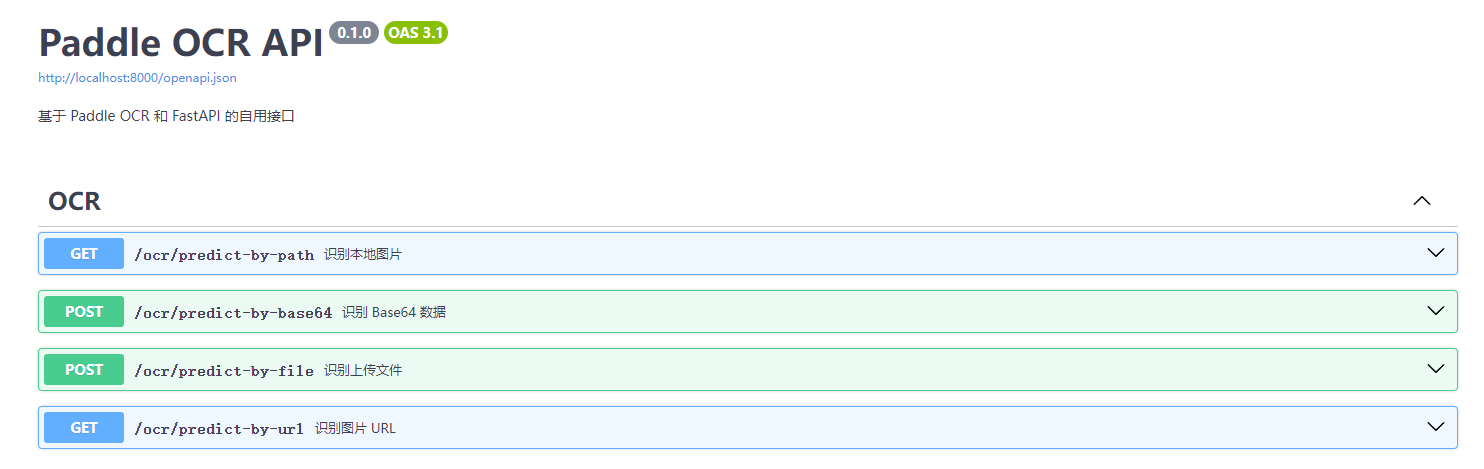
- Local path image recognition
- Base64 data recognition
- Upload file recognition
Deployment Methods
Deploy Directly
-
Copy the project to the deployment path
git clone https://github.com/neozhu/PaddleOCRFastAPI.gitThe master branch is the most recent version of PaddleOCR supported by the project. To install a specific version, clone the branch with the corresponding version number.
-
(Optional) Create new virtual environment to avoid dependency conflicts
-
Install required dependencies
pip3 install -r requirements.txt -
Run FastAPI
uvicorn main:app --host 0.0.0.0
Docker Deployment
Test completed in Centos 7, Ubuntu 20.04, Ubuntu 22.04, Windows 10, Windows 11, requires Docker to be installed.
-
Copy the project to the deployment path
git clone https://github.com/neozhu/PaddleOCRFastAPI.gitThe master branch is the most recent version of PaddleOCR supported by the project. To install a specific version, clone the branch with the corresponding version number.
-
Building a Docker Image
cd PaddleOCRFastAPI # 手工下载模型,避免程序第一次运行时自动下载,实现完全离线,加快启动速度 cd pp-ocrv4/ && sh download_det_cls_rec.sh # 返回Dockfile所在目录,开始build cd .. # 使用宿主机网络 # 可直接使用宿主机上的代理设置,例如在build时,用宿主机上的代理 # docker build -t paddleocrfastapi:latest --network host --build-arg HTTP_PROXY=http://127.0.0.1:8888 --build-arg HTTPS_PROXY=http://127.0.0.1:8888 . docker build -t paddleocrfastapi:latest --network host . -
Edit
docker-compose.ymlversion: "3" services: paddleocrfastapi: container_name: paddleocrfastapi # Custom Container Name image: paddleocrfastapi:lastest # Customized Image Name & Label in Step 2 environment: - TZ=Asia/Hong_Kong - OCR_LANGUAGE=ch # support 80 languages. refer to https://github.com/Mushroomcat9998/PaddleOCR/blob/main/doc/doc_en/multi_languages_en.md#language_abbreviations ports: - "8000:8000" # Customize the service exposure port, 8000 is the default FastAPI port, do not modify restart: unless-stopped -
Create the Docker container and run
docker compose up -d -
Swagger Page at
localhost:<port>/docs
deploy and push your local code as blazordevlab/paddleocrapi:latest to Docker Hub
- Login to Docker Hub
docker login
- Build the Docker Image
docker build -t blazordevlab/paddleocrapi:latest .
- Push the Image to Docker Hub
docker push blazordevlab/paddleocrapi:latest
Change language
-
Clone this repo to localhost.
-
Edit
routers/ocr.py, modify the parameter "lang":ocr = PaddleOCR(use_angle_cls=True, lang="ch")Before modify, read the supported language list.
-
Rebuild the docker image, or run the
main.pydirectly.
Screenshots
API Docs: /docs
Todo
- support ppocr v4
- GPU mode
- Image url recognition
License
PaddleOCRFastAPI is licensed under the MIT license. Refer to LICENSE for more information.
Tag summary
Content type
Image
Digest
sha256:28869e51c…
Size
967.4 MB
Last updated
3 months ago
docker pull blazordevlab/paddleocr-api