blomstertj/protonvpn-natpmp
Runs the natpmp port forward loop for ProtonVPN. Optionally update qBittorrent port
1.3K
blomstertj/protonvpn-natpmp repository overview
Thank you for all the pulls! I'm new to docker and bash still so thank you for the support
Upcoming
- Create heathcheck of some sorts
Changelog
- v2026.10.28 - latest/dev
- Merged normal version and qbsync versions. qBittorrent script code only executes if both environment variables for it are filled in. Otherwise it's skipped
- Complete script rework
- Removed *-qbsync tags
- v2026.10.19 - latest-qbsync/dev-qbsync
- Added re-checking qBittorrent preferences after submitting the port update API payload to confirm port was actually updated
- Trim trailing slash on web URL if present when forming API endpoint URL
- Added more verbose console messages
- Tweaked comments
- v2026.10.18 - latest-qbsync/dev-qbsync
- Added updating qBittorrent connection port via API
- v2026.10.17 - latest/dev
- Changed to saving the natpmpc output to script variables instead of files in /tmp (reduces disk usage)
- Updated to hardened Alpine 3.24-dev
- https://hub.docker.com/hardened-images/catalog/dhi/alpine-base
- I had to inject the community repository since 3.23. I assume the Hardened Image team decided to only include the core repos. Source: https://wiki.alpinelinux.org/wiki/Repositories#Enabling_the_community_repository
- For security, https is used: https://dl-cdn.alpinelinux.org/alpine/v3.24/community
- As a reminder, the container user is changed to "nonroot" post package install so you cannot install packages
Tags
- latest
- latest stable version with qBittorrent port sync
- dev
- testing version with qBittorrent port sync
Description
Source code: https://github.com/blomstertj/protonvpn-natpmp-docker
Runs the NATPMP loop from the ProtonVPN manual port forward guide in a nice script. This process is detailed in Proton's support article here: https://protonvpn.com/support/port-forwarding-manual-setup#linux
- This "microservice" container is:
- lightweight and secure (based on Alpine Docker hardened image and uses nonroot user)
- uses basic Linux tools (bash, curl, libnatpmp, and jq)
- relies on an external device/service/container to direct the traffic through VPN
- Routers and firewalls can send traffic from specific IP addresses and/or MAC addresses through the VPN
The purpose of the container is to spit out the port numbers to put in your other applications like a BitTorrent client. You don't need to run natpmpc on the same device, the ports will work for all devices that use the VPN. Fill in your qBittorrent API key and the web UI URL then the container can set the port number in qBittorrent via API automatically.
How I use it
I connect to ProtonVPN using WireGuard with my router. This configuration does not support port forwarding unless you have a loop running all the time to keep the port forwards open. I decided to create my own light weight container based on Alpine to run this natpmpc loop with some cleaned up console output. I use Dockhand to view the console logs but you can run "docker logs ContainerName" to view the console.
Environment vars
- COMPACT_OUTPUT
- only outputs public IP(s) and forwarded ports on successful loop run
- SKIP_IPME_CHECK
- skips the public IP check to Proton operated https://ip.me
- TZ
- Set timezone for correct log timestamps
- QBITTORRENT_API_KEY
- only available for the latest-qbsync and dev-qbsync tags
- API key generated by qBittorrent
- QBITTORRENT_WEBUI_URL
- only available for the latest-qbsync and dev-qbsync tags
- the URL that you use to access qBittorrent web UI (ex: http://qbitorrent:8080 or http://192.168.1.50:8080)
Example docker compose
services:
  container_name: "protonvpn-natpmp"
    environment:
      - "COMPACT_OUTPUT=true"
      - "SKIP_IPME_CHECK=false"
      - "TZ=America/Chicago"
    hostname: "protonvpn-natpmp"
    image: "blomstertj/protonvpn-natpmp:latest"
    mac_address: "92:ec:7c:a2:69:fd"
    networks:
      bond0-macvlan:
        ipv4_address: "192.168.1.100"
    restart: "always"
networks:
  bond0-macvlan:
    external: true
    name: "bond0-macvlan"
Example docker compose with qBittorrent port sync
services:
  container_name: "protonvpn-natpmp-qbsync"
    environment:
      - "COMPACT_OUTPUT=true"
      - "SKIP_IPME_CHECK=false"
      - "TZ=America/Chicago"
      - "QBITTORRENT_API_KEY=abc123"
      - "QBITTORRENT_WEBUI_URL=http://qbittorrent:8080"
    hostname: "protonvpn-natpmp-qbsync"
    image: "blomstertj/protonvpn-natpmp:latest"
    mac_address: "92:ec:7c:a2:69:fd"
    networks:
      bond0-macvlan:
        ipv4_address: "192.168.1.100"
    restart: "always"
networks:
  bond0-macvlan:
    external: true
    name: "bond0-macvlan"
Example console output
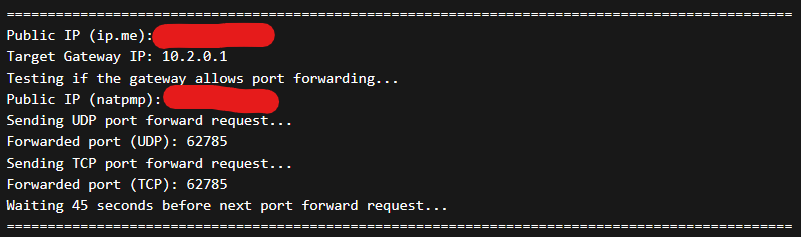
Example compact console output

Example console error output
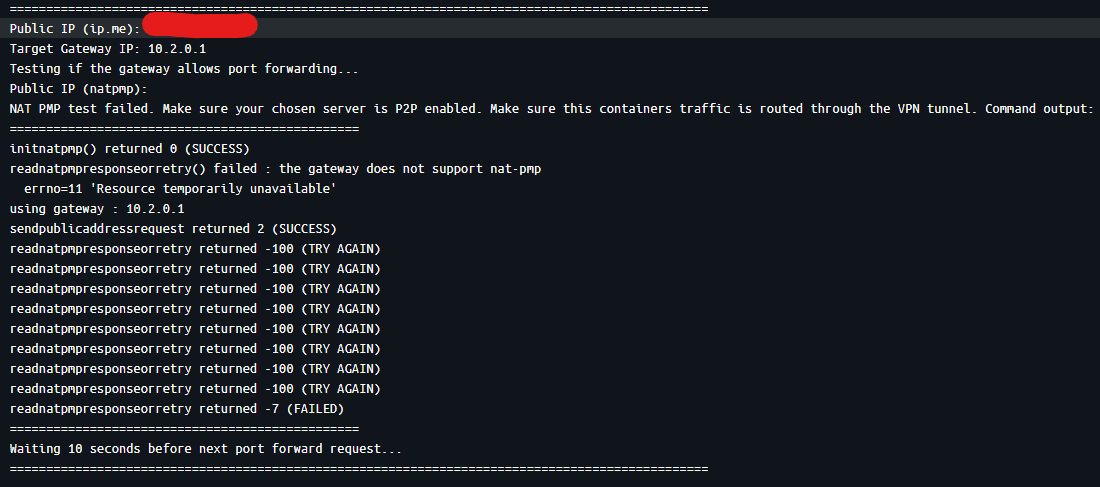
Tag summary
Content type
Image
Digest
sha256:9a36640a4…
Size
11.4 MB
Last updated
2 days ago
docker pull blomstertj/protonvpn-natpmp