
bmaged23/multimodal-document-parser
Quantized dots.mocr GPU PDF/DOCX parsing, structured exports and cloud visual enrichment
593
bmaged23/multimodal-document-parser repository overview
Multimodal Document Parser
GitHub repository: bmaged23/multimodal-document-parser
This project compares multiple OCR and document parsing models to find which performs best overall on our test documents and which works best for text, handwriting, tables, charts and images. We evaluate their outputs and show them beside the original pages in an interactive demo, making strengths and failures easy to inspect.
We then use these findings to build a practical PDF/DOCX parsing pipeline that extracts and structures content, adds optional chart/image descriptions, and exports JSON, Markdown and HTML. Chunking, retrieval and RAG extend the extracted data as secondary studies; model comparison and the parsing pipeline are the project’s main focus.
Turn PDF and DOCX files into source-linked JSON, Markdown and HTML review reports. The GPU parsing pipeline combines quantized dots.mocr (Q4_K_M language + Q8_0 projector) with optional chart/image interpretation through Gemma on Ollama Cloud.
Why quantized dots? dots.mocr is our preferred model family overall on the 70-page test corpus, with original BF16 offering the strongest balance. The production Q4/Q8 configuration runs on the tested 6 GB GPU; BF16 reached 8.53 GiB peak PyTorch allocation on Colab T4. Paddle leads some table checks. Ranking, methodology and measured metrics.

▶ Open the interactive four-model demo
Compare the same source pages across all four OCR profiles, with synchronized PDF and extraction panes. OCR content and Gemma-generated visual descriptions carry separate producer labels. Documents open in this order: Handwritten mathematics → IMF · complex tables → IRENA · charts and tables → NASA financial report. The model selector starts with dots.mocr BF16 (default), then dots.mocr Q4/Q8, PaddleOCR-VL-1.6 and Unlimited-OCR 2. Switching PDFs keeps your selected model. Each starts at its first available page and remembers your place when you switch away and return in the same open demo. This is a saved-output viewer, with no live inference or API key required.
Inspect the evaluation references beside the source pages.
Open the 70-page evaluation report: rankings, per-page metrics and metric definitions. The demo displays 53 shareable source pages; evaluation metrics cover all 70 retained pages and 280 page/profile slots. Omitted source pages are not redistributed.
Source and evaluation · Complete Docker setup · API guide · Release and checksums
What this image does
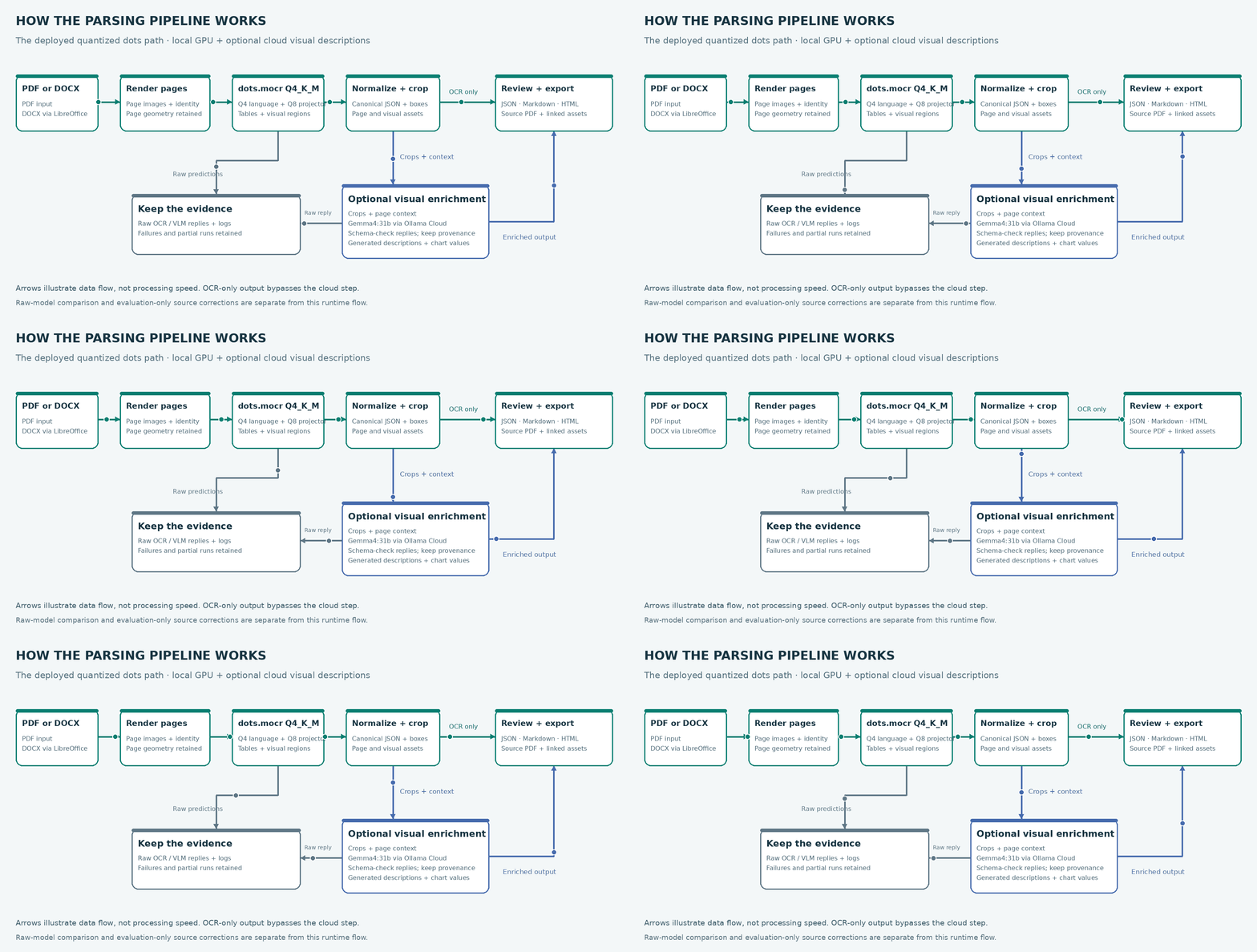
- Prepare PDF pages, or convert DOCX to PDF using bundled LibreOffice.
- Run quantized dots.mocr on a compatible NVIDIA GPU to extract text, layout, tables and visual regions.
- Normalize supported output into canonical document JSON with source coordinates and visual crops.
- Optionally send visual crops and page context to Ollama Cloud for generated descriptions and chart values.
- Export JSON, Markdown and HTML with linked source pages, assets, provenance and visible warnings.
OCR-only processing bypasses the cloud step. Raw predictions, model replies and failure diagnostics remain available. Descriptions and inferred structure are not silently presented as verified source facts.
Pull the public image
docker pull bmaged23/multimodal-document-parser:0.1.0-rc.4
Platform: Linux amd64. Live OCR requires a compatible NVIDIA GPU and host container GPU support. Development used an NVIDIA GeForce GTX 1660 Ti with 6 GB VRAM. The image includes its CUDA 12.6/sm75 native server; checksum-pinned Q4/Q8 weights download to a persistent cache on first use. The worker starts and releases the server per job. Paddle and BF16 weights are not bundled.
Docker Hub distributes the image; it does not host a running parsing API. The interactive demo above displays saved outputs and needs no GPU, account or key.
Start the APIs and workers
Clone the source to obtain the supported Compose configuration:
git clone https://github.com/bmaged23/multimodal-document-parser.git
cd multimodal-document-parser
export PARSER_IMAGE=bmaged23/multimodal-document-parser:0.1.0-rc.4
Create the local secret files using the secret setup step in the Docker README. It generates the service key and optionally accepts an Ollama key without printing or replacing existing values. Then start the stack:
docker compose -f compose.parsing.yaml pull
docker compose -f compose.parsing.yaml up -d
docker compose -f compose.parsing.yaml ps
One image runs four independently started containers:
| Container | Responsibility |
|---|---|
documents-api | Upload PDF/DOCX inputs and queue preparation jobs |
documents-worker | Convert DOCX, render pages and publish prepared artifacts |
parsing-api | Queue parsing jobs, report status and serve output artifacts |
parsing-worker | GPU OCR and optional cloud visual enrichment |
APIs bind localhost by default. Only the parsing worker reserves a GPU; shared named volumes retain document artifacts and model caches. The image runs as a non-root user with a read-only application filesystem in Compose.
API entry points
| Service | Address | Main routes |
|---|---|---|
| Preparation | http://127.0.0.1:8101/docs | POST /v1/documents, POST /v1/jobs, GET /v1/jobs/{id} |
| Parsing | http://127.0.0.1:8102/docs | POST /v1/jobs, GET /v1/jobs/{id} |
| Artifact download | On the producing service | GET /v1/artifacts/{id} and GET /v1/artifacts/{id}/files/{filename} |
Use the local PIPELINE_API_KEY as a bearer token for data and job routes.
Long-running jobs return an ID for polling. Readiness checks confirm API/storage
availability, not that every model has already loaded. The
API guide
includes an upload → prepare → parse → download example.
Optional cloud visual descriptions
Use enrich_visuals: false for OCR-only parsing. For chart/image descriptions,
provide an Ollama Cloud key with model access and set enrich_visuals: true.
The configured model is gemma4:31b. It executes remotely; Gemma weights and an
Ollama server are not inside this image. Visual enrichment sends document image
crops and context to the cloud provider. Credentials belong in runtime secrets,
not image layers or build arguments.
Scope and evaluation
The repository compares PaddleOCR-VL-1.6, dots.mocr Q4/Q8, original dots.mocr BF16 and experimental Unlimited-OCR 2. This image uses quantized dots.mocr by default; its native server is bundled and verified weights download separately. The optional full chunking/RAG stack is configured separately.
PDF and .docx are supported; legacy .doc and encrypted documents are not.
Extraction quality varies with layout, handwriting, image resolution and model
limits. Source-reviewed evaluation repairs are disclosed case-specific processing,
not a guarantee that every new document is automatically corrected.
The GPU launcher disables the fixed-size dummy vision warmup that exhausted workspace on the tested 6 GB device. Actual input pixel limits and GPU offload remain unchanged. A synthetic text/table page completed through the real workers, including HTML export and server teardown. This is a runtime check, not corpus accuracy.
Release verification
The release workflow requires source/browser CI, hosted image/runtime checks and anonymous registry verification. It publishes SPDX SBOM and SLSA build provenance. The real GPU worker probe is a separate release check; CPU-hosted runners cannot establish GPU inference. Earlier Paddle CUDA tests are historical and are not credited to the new dots image. These checks establish software/runtime behavior, not OCR accuracy. Evaluation PDFs, private outputs, credentials and model weights are not redistributed in the container. Consult the versioned GitHub release for the published digest and validation record.
CI/CD process · Measured parser comparisons
Why this profile
Our qualitative overall ranking for the retained 70-page test corpus is:
| Rank | OCR profile | Main finding |
|---|---|---|
| 1 | dots.mocr original BF16 | Strongest balance: 91.67% visual-region recall and 80.96% table row/value matching |
| 2 | dots.mocr Q4/Q8 | Lowest scoped text error rate (0.67%); weaker table associations than BF16 |
| 3 | PaddleOCR-VL-1.6 | Best table row/value matching (86.58%) and heading detection |
| 4 | Unlimited-OCR 2 | Lowest table row/value matching (55.62%) and two missing handwriting outputs |
Original BF16 used 8.53 GiB peak PyTorch allocation on Colab T4. Quantized dots is the production default for the tested GTX 1660 Ti with 6 GB VRAM. Allocation is not total device usage or a minimum VRAM requirement. These are assistant-created source-reference development checks, not independent human labels or a universal model ranking. Raw OCR scores exclude Gemma enrichment and source-based repairs. Method, metric definitions and limitations.
Tag summary
Content type
Image
Digest
sha256:3cc1432bb…
Size
1.7 GB
Last updated
15 days ago
docker pull bmaged23/multimodal-document-parser