bootcamps/vote repository overview
Docker Voting App (Node.js version)


| Service | Docker Image |
|---|---|
| API | registry.gitlab.com/bootcamp-juniors/vote/vote |
| Worker | registry.gitlab.com/bootcamp-juniors/vote/worker |
| Auditor | registry.gitlab.com/bootcamp-juniors/vote/auditor |
| Client | registry.gitlab.com/bootcamp-juniors/vote/voter |
| Node.js Packages | npm | Build Status |
|---|---|---|
| @subfuzion/database |  |  |
| @subfuzion/queue |  | |
Quick Reference
- Update stack.yml
- Setup auto image build in docker cloud via github trigger
- Scp or git clone stack.yml file to PwD
    # start it
    mkdir -p /home/docker/data/db/
    docker stack deploy -c stack.yml vote
    docker stack ps vote

    # use it
    docker run -it --rm --name=voter -e VOTE_API_HOST=172.18.0.18 -e VOTE_API_PORT=5000  bootcamps/vote-voter vote
    docker run -it --rm --name=voter -e VOTE_API_HOST=172.18.0.18 -e VOTE_API_PORT=5000  bootcamps/vote-voter results
Introduction
This app is forked from subfuzion and inspired by the original Docker Example Voting App.
The original app is an excellent demonstration of how Docker can be used to containerize any of the processes of a modern application regardless of the programming language used and runtime environment needed for any specific one.
It is an effective example, particularly from a devops perspective. However, if one is interested in studying the application source code itself, then the use of multiple languages, even for a simple example, potentially raises the barrier to comprehension. Furthermore, because each different language/platform has specific runtime requirements, understanding the differences also increases some of the cognitive overhead required. The ability to encapsulate these runtime differences through different images is a big part of the value proposition of Docker and its ecosystem, but it does add extra overhead that we can at least avoid in the beginning.
This version of the voting app has been developed to support an introductory course on Docker and is meant to be easier to follow and comprehend due to symmetric use of a single programming language for all of the application service and client code, especially for those programmers who have already had some exposure to JavaScript and Node.js.
While JavaScript has its quirks, the code for the various packages in this example are written using
the latest EcmaScript support available in recent (8.0+) versions of Node. In particular, the use of
async functions
should make control flow easier to follow for developers not as familiar with Node.js asynchronous callback
conventions.
As modest as the app is in terms of actual functionality (it only supports casting votes and querying the vote tally), it has nevertheless been designed to reflect principles of a relatively sophisticated architecture implemented as a modern 12-Factor App, well suited to showcasing the benefits of Docker.
Goal
The first goal is to introduce basic Docker concepts, so the initial instructions reflect that. Subsequent goals include introducing Docker swarm orchestration concepts, and then refactoring the application architecture to explore evolving paradigms, such as serverless function computing. Real world concerns, such as monitoring, rolling updates, etc., will also be introduced.
License
The Voting App is open source and free for any use in compliance with the terms of the MIT License.
Introduction to Docker
The app will be used for an introductory course called Software Containerization with Docker for Developers. The course is offered through the UC Davis Extension online program, available through Coursera in early 2018.
See the wiki for more detail about the course modules.
Application Architecture
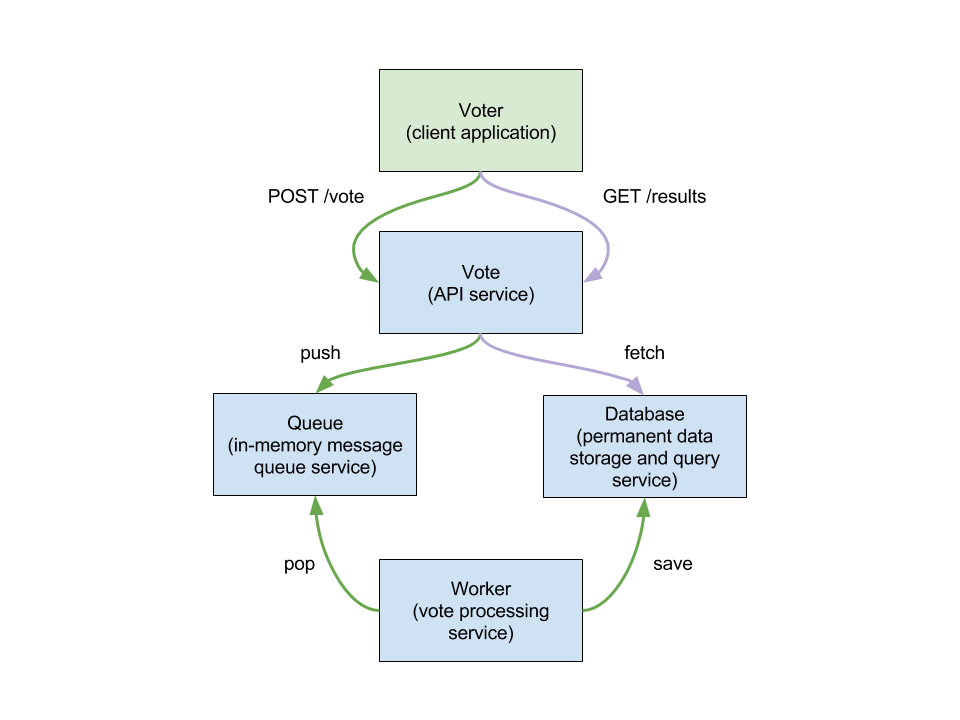
The application consists of the following:
- Voter - this is the client application that users use to cast votes.
- Vote - this is the service that provides a REST API for casting votes and
retrieving vote tallies. The
voterapplication is the client that uses this API. When a vote is posted to the API, the service pushes it to a queue for subsequent, asynchronous processing. When a request is made for vote results, the service submits a query to a database where votes are ultimately stored by a worker processing the queue. - Worker - this is a background service that watches a queue for votes and stores them in a database. The worker represents a typical service component designed to scale as needed to handle various asynchronous processing tasks, typically pulled from a queue, so that the main service doesn't get bogged down handling requests.
- Queue - this is a service that allows the vote service to post votes without slowing down to do any special processing or waiting for a database to save votes. The queue is an in-memory data store (using Redis) that enhances performance by not requiring the vote service to wait on the database since database operations that involve disk I/O are much slower; consequently, the vote service is ready to continue to accept new API requests faster. Redis (and similar tools) are typical components of many real-world applications that require message queue, publish-subscribe, key-value storage, or caching support.
- Database - this service (using MongoDB) provides structured data storage and query support. One or more types of database are typical service components of most real world applications.
Launching the app
The process is intentionally manual for the introduction course to allow gaining familiarity with various processes. We will build on this until ultimately we have a fully automated processes that starts the app services in a Docker swarm.
Create a bridge network
Create a bridge network that will be shared by the services for communication with each other:
docker network create -d bridge bridgenet
Start a MongoDB container
MongoDB is a NoSQL database that we will use for storing votes. There is already an existing image that we can use:
docker run -d --network bridgenet --name database mongo
Start a Redis container
Redis provides a fast in-memory data store that we will use as a queue. Votes will be pushed to the queue, where workers will dequeue them asynchronously for saving to the MongoDB database for subsquent query processing.
Like, MongoDB, there is already an existing image that we can use:
docker run \
    --detach \
    --name=queue \
    --network=bridgenet \
    --health-cmd='[ $(redis-cli ping) = "PONG" ] || exit 1' \
    --health-timeout=5s \
    --health-retries=5 \
    --health-interval=5s \
    redis
or as one line:
docker run --detach --name=queue --network=bridgenet --health-cmd='[ $(redis-cli ping) = "PONG" ] || exit 1' --health-timeout=5s --health-retries=5 --health-interval=5s redis
Start a Vote Worker container
A vote worker pulls votes from the queue and saves them to the database for subsequent query processing.
You will need to build the image first:
cd worker
docker build -t worker .
Then you can start it:
docker run -d --network=bridgenet --name=worker worker
Start a Vote API container
The vote service provides the API that clients will use to submit votes and fetch
voting tally results. The vote service receives votes that it then pushes to the
queue (where they will subsequently pulled by workers and saved to the database),
and it also queries the database to tally the votes.
You will need to build the image first:
cd vote
docker build -t vote .
Then you can start it:
docker run -d --network=bridgenet --name=vote vote
Run a Vote client container
The vote app is a terminal program that you run to cast votes and fetch the
voting results.
You will need to build the image first:
cd voter
docker build -t voter .
Then you can start it:
docker run -it --rm --network=bridgenet --name=voter voter <cmd>
where <cmd> is either vote or results (if you don't enter any command,
then usage help will be printed to the terminal).
Run the assessor
The assessor is for evaluating the performance of the Voting App
running under Docker. It works by monitoring the logs of each service
for patterns that must be matched to indicate success. The assessor
produces a report when complete or when the evaluation times out.
See here for instructions on running an assessment for the final project.
    _    ____  ____                   ___
   / \  / ___|/ ___|___  _ __ _ __   |_ _|_ __   ___
  / _ \| |  _| |   / _ \| '__| '_ \   | || '_ \ / __|
 / ___ \ |_| | |__| (_) | |  | |_) |  | || | | | (__ _
/_/   \_\____|\____\___/|_|  | .__/  |___|_| |_|\___(_)
                             |_|
hash:5a6d6286e5af9bddca8a35d6a993567748d9e2ef86f294ef5a77de72dd8731918d4aae6a8a61480aca6e3365a58b453229c14bef81d01f052093e60af959d7c2 -
    _    ____    ____ ___  ____  ____   ___  ____      _  _____ ___ ___  _   _
   / \  / ___|  / ___/ _ \|  _ \|  _ \ / _ \|  _ \    / \|_   _|_ _/ _ \| \ | |
  / _ \| |  _  | |  | | | | |_) | |_) | | | | |_) |  / _ \ | |  | | | | |  \| |
 / ___ \ |_| | | |__| |_| |  _ <|  __/| |_| |  _ <  / ___ \| |  | | |_| | |\  |
/_/   \_\____|  \____\___/|_| \_\_|    \___/|_| \_\/_/   \_\_| |___\___/|_| \_|

 ____  _         _    _      _
|  _ \| |_ ___  | |  | |_ __| |
| |_) | __/ _ \ | |  | __/ _` |
|  __/| ||  __/ | |__| || (_| |
|_|    \__\___| |_____\__\__,_|
In collaboration with
    _    ____ ____   ___  _____ _____
   / \  / ___/ ___| / _ \|  ___|_   _|
  / _ \| |  _\___ \| | | | |_    | |
 / ___ \ |_| |___) | |_| |  _|   | |
/_/   \_\____|____/ \___/|_|     |_|
    _    ____ ____         __ _     ___
   / \  / ___/ ___|  ___  / _| |_  |_ _|_ __   ___
  / _ \| |  _\___ \ / _ \| |_| __|  | || '_ \ / __|
 / ___ \ |_| |___) | (_) |  _| |_   | || | | | (__ _
/_/   \_\____|____/ \___/|_|  \__| |___|_| |_|\___(_)
hash:f858cab48ae4c9011572b62dca0c0fc5b4765864910d16938cea3ede8a98bf301f0de9389c10c2cbe01439c4c40d83998b66b29411ae54ab9998506fa160909d -
 ____ _____      _        _   _
|  _ \_   _|    / \   ___| |_(_)_ __   __ _
| |_) || |     / _ \ / __| __| | '_ \ / _` |
|  __/ | |    / ___ \\__ \ |_| | | | | (_| |
|_|    |_|   /_/   \_\___/\__|_|_| |_|\__,_|

  ____           _           ____        _           _
 / ___|_ __ __ _| |__   __ _/ ___|  ___ | |_   _ ___(_)
| |  _| '__/ _` | '_ \ / _` \___ \ / _ \| | | | / __| |
| |_| | | | (_| | | | | (_| |___) | (_) | | |_| \__ \ |
 \____|_|  \__,_|_| |_|\__,_|____/ \___/|_|\__,_|___/_|

 ____        _       _     _
/ ___|  ___ (_) __ _| |__ | |_ ___ _ __ __ _
\___ \ / _ \| |/ _` | '_ \| __/ _ \ '__/ _` |
 ___) |  __/| | (_| | | | | ||  __/ | | (_| |
|____/ \___|/ |\__,_|_| |_|\__\___|_|  \__,_|
          |__/
Tag summary
Content type
Image
Digest
Size
280.7 MB
Last updated
over 8 years ago
docker pull bootcamps/vote