boxmls/service-mls-api repository overview

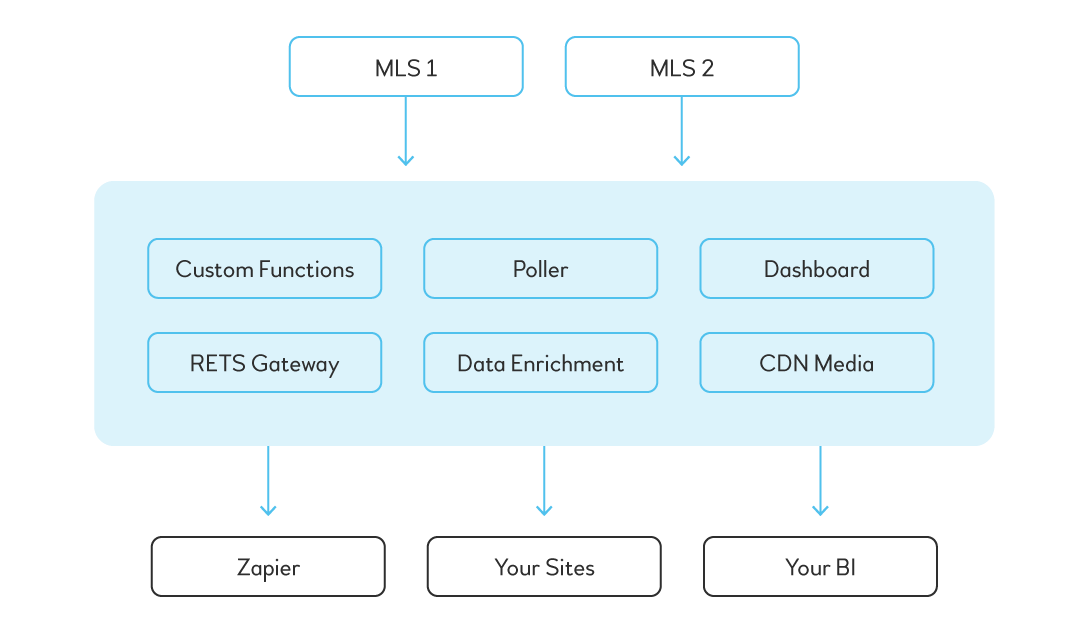
Service MLS API
- The service which manages all MLS configurations.
- All MLS configurations should be stored in
yamlformat at the separate private repository. Here you can find an example of MLS configurations. - Indexing MLS configuration proceeds automatically on container start. On every update of MLS configuration, the data must be re-indexed, so to (re)index Elasticsearch data, restart the container.
Installation
- Make a fork of the current repository into your user/organization
- Setup environment variables before start container. You can check the list of needed variables at the
docker-composer.yml
git clone https://github.com/boxmls/service-mls-api -b develop
docker-compose up --build --renew-anon-volumes
Installation
MLS Configuration
All existing MLS configurations should be stored at the own private repository. Here you can find an example of MLS configurations.
MLS Configuration includes:
- Configuration file (
config.yaml) - Template processors (
handlebars)
Configuration File
MLS configuration is stored in YAML file. It contains all necessary MLS details, options and credentials, which are being used by major of micro-services of BoxMLS application.
It includes the following conditional sections:
- Poller. Stores some specific options for Poller Service
- RETS connector configuration. It includes RETS credentials used by RETS API service for doing requests to RETS Provider. Also it describes the rules for resources, which are mostly needed for syncing the data by poller.
All available configuration options can be found in config.yaml example.
Template processors
BoxMLS stores all MLS data in two formats:
- Original MLS meta retrieved from RETS. Original meta can be different from MLS to MLS. This kind of data is used only for specific internal purposes and only by Poller service. The data is stored in Elasticsearch
retsindex ( e.g.rets/agent). - Internal standartized ( we also call it
normalized) data. The main format for all MLSs. Poller takes care of converting original MLS data tonormalized. The data is stored in different indexes of Elasticsearch.
Templates
MLS original data is being normalized to internal standartized format by MLS Poller Service using handlebarsjs templates. Every resource has its own handlebarsjs template, which describes standartized JSON object.
Templates are stored in /handlebars/views folder. See example here.
MLS can have up to five templates:
- agent.handlebars
- office.handlebars
- openhome.handlebars
- virtualopenhome.handlebars
- property.handlebars
- tour.handlebars
Helpers
Helpers is the set of handlebar functions used in templates. There are two types of Helpers:
- Common. All common helper functions are defined in Poller service and can be found in lib/helpers directory.
- MLS Custom. Custom helpers are used and defined only by the specific MLS. They are defined and stored under MLS configuration on
mls-api. See example handlebars/helpers.
Note: common function is being re-declared by MLS custom function with the same name. E.g.: if MLS custom stringToList function will be defined it will be used instead of already existing common function with the same name.
Common and MLS Custom helper functions may have the following set of files:
helper.js. It's a common set of functions, which can be used by any handlebarsjs template.agent.js. The specific set of functions used only inagent.handlebarstemplate.office.js. The specific set of functions used only inoffice.handlebarstemplate.property.js. The specific set of functions used only inproperty.handlebarstemplate.openhome.js. The specific set of functions used only inopenhome.handlebarstemplate.virtualopenhome.js. The specific set of functions used only invirtualopenhome.handlebarstemplate.tour.js. The specific set of functions used only intour.handlebarstemplate.
MLS Setup
MLS configuration
- Create default MLS configuration files (
handlebars,config.yaml). The example is available here. - Be sure that all
pm2processes inconfig.yamlare disabled for now ( e.g.poller.pm2.sync-property: false) to prevent startingpm2processes automatically. - Setup RETS credentials (
connector.config.credentials) and test them using Swagger UI of RETS API service. - Setup RETS resources (
connector.config.resources) and test them using Swagger UI of RETS API service.
Notes
- MLS configuration is being retrieved from Elasticsearch. To apply changes in
config.yaml, - be sure to restart the container. - To setup RETS resources (
connector.config.resources) RETS M.D. service can be used. It's rendering RETS meta schema.
Grunt Commands
All grunt commands below belong to service-mls-api
grunt index. Indexes all MLS configurations ( they are stored in Elasticsearch )grunt extend-data. Extends MLS configurations ( they are stored in Elasticsearch ) with additional datagrunt get-field-schema. Retrieves and indexes all RETS meta fields and their schemas. It's required for Poller sync and data normalization processes.
Sync RETS RAW Data from MLS to ElasticSearch
- Start Poller docker container for the MLS.
- Enter to the container and run grunt commands:
- Sync property (
TYPE=property DEBUG=grunt,sync,ret-request grunt sync) - Sync agent (
TYPE=agent DEBUG=grunt,sync,ret-request grunt sync) - Sync office (
TYPE=office DEBUG=grunt,sync,ret-request grunt sync)
- Sync property (
Find, Prep, and Import areas (GeoJSON data) to Elasticsearch.
- Scour the internet to find neighborhood, city, zipcode, county data for the market.
- Possibly simplify GeoJSON zip codes, city, neighborhood data via mapshaper.org
- Import all shapes into Elasticsearch by type ( e.g.
city,zipcode, etc. )
If issues with indexing geojson data occurred:
- Repair problematic GeoJSON features if needed via QGIS v3.0's "Fix Geometry Script"
- Repair problematic GeoJSON features if needed from "right hand" error via https://mapster.me/right-hand-rule-geojson-fixer/
- Re-import repaired area by type ( e.g.
city,county)
Setup Handlebars views and normalize Raw RETS Data
- Agent handlebar mapping
- Office handlebar mapping
- Openhome handlebar mapping (depending on market)
- Virtualopenhome handlebar mapping (depending on market)
- Tour handlebar mapping (depending on market)
- Property handlebar mapping ( note, list must be normalized last, when all other resources above are done ).
Support
Do you have any questions. Please, visit Support page for consulting and help.
Tag summary
Content type
Image
Digest
Size
692.4 MB
Last updated
about 6 years ago
docker pull boxmls/service-mls-api