brannondorsey/docker-stackgan
Docker image for the hanzhanggit/StackGAN GitHub repo
779
brannondorsey/docker-stackgan repository overview
StackGAN Docker Image
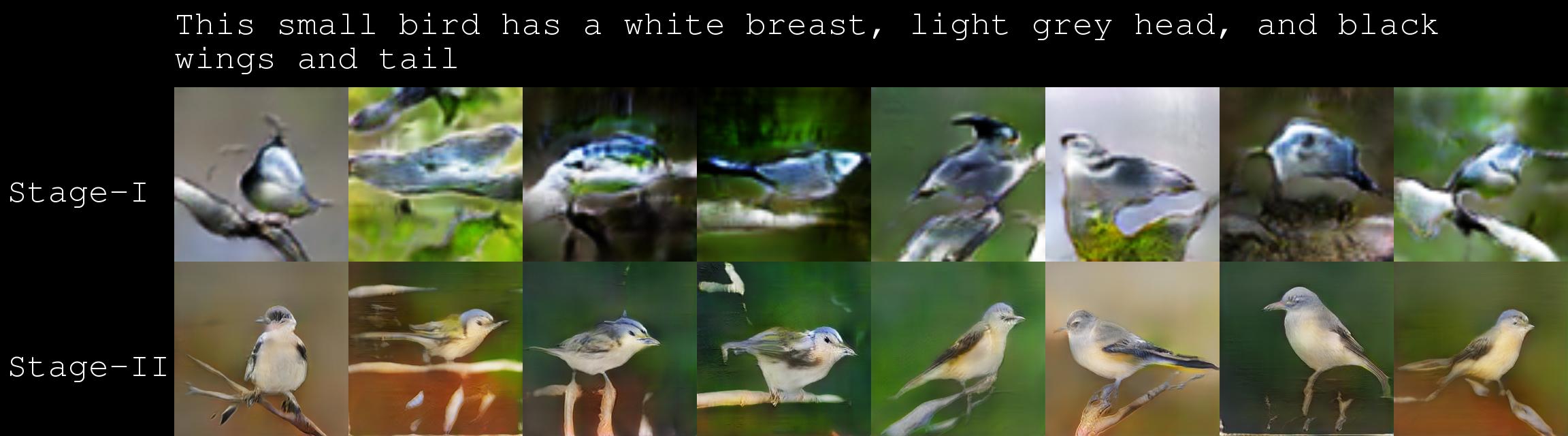
Dockerized version of the wonderful StackGAN implementation code. It provides an environment with all of the required StackGAN dependencies, as well as helper scripts to automate the download and installation of Torch as well as the ~6GB of data required to run the examples. Check out the ArXiv paper if you haven't seen it. This paper is seriously one of the most impressive GANs I've seen in the past year. All of the bird images you see below were generated entirely from the input sentence at the top of the image.
Running the Container
This container was built using the Tensorflow 12.1 GPU image and works with Nvidia-docker. The only requirement is that you have Nvidia-docker and the appropriate Nvidia drivers installed on your machine. If you would like to try and run this container in a CPU-only environment see the section at the bottom of this README.
Begin by pulling and runing the container with the following commands (optionally you could just execute the run.sh file):
# create an empy StackGAN/ folder that will be mounted/shared with the container and
# populated with the StackGAN github repo contents.
mkdir -p StackGAN
# pull and run the docker image
nvidia-docker run -it -v "$PWD/StackGAN:/root/StackGAN" brannondorsey/docker-stackgan bash
Upon your first login, which should occur immediately when you run the above commands, hanzhanggit/StackGAN will be cloned to /root/StackGAN which has been shared with your host machine in the StackGAN folder which was created in the directory that you ran the above command from. This will allow you to easily access any files you generate inside the docker container from your host machine.
Note: Because the root docker user created these files, these files will likely be owned by root on your host machine. You can easily transfer ownership to your user by running the following on the StackGAN/ directory from your host machine:
sudo chown -R $USER:$USER StackGAN/
Optional Installs and Downloads
This container comes with the required apt and pip dependencies as well as the cloned StackGAN repos only. To actually use the example code or train the GANs using your own data you must install Torch and download the data and pre-trained models. I've provided three scripts inside of /root to easily do this.
# Download and build Torch from source, this can take a while
./install_torch.sh

# Download the example birds and flower data used in the paper
# This script also pre-processes the image files using StackGAN/misc/preprocess_*.py
# WARNING: This downloads ~2.3GB of files
./download_data.sh

# Download the pre-trained models and text encoders
# WARNING: This downloads ~3.7GB of files
./download_models.sh
CPU Only
We haven't tried a CPU-only install, but in theory it should work. All you would need to do is change a file and rebuild the image using the Dockerfile from this repo.
First, change the first line of the Dockerfile to FROM tensorflow/tensorflow:0.12.1.
Next rebuild the image with:
docker build -t brannondorsey/docker-stackgan:latest .
Finally change nvidia-docker to docker in run.sh. You should now be able to run the container by executing run.sh. If you get this to work, or have any trouble, let us know and we will see if we can help :)
Tag summary
Content type
Image
Digest
Size
1.3 GB
Last updated
over 9 years ago
docker pull brannondorsey/docker-stackgan