breezechms/apache-php
Base docker image to run PHP applications on Apache
10K+
breezechms/apache-php repository overview
Breeze ChMS
Breeze ChMS is the world's easiest web-based church management software for small and mid-sized churches.
Development Environment Setup
MacOSx
Prerequisites
- Install Homebrew
$ /usr/bin/ruby -e "$(curl -fsSL https://raw.githubusercontent.com/Homebrew/install/master/install)"
- Install docker, docker-machine, docker-compose and virtualbox
$ brew cask install virtualbox
$ brew install docker docker-machine docker-compose
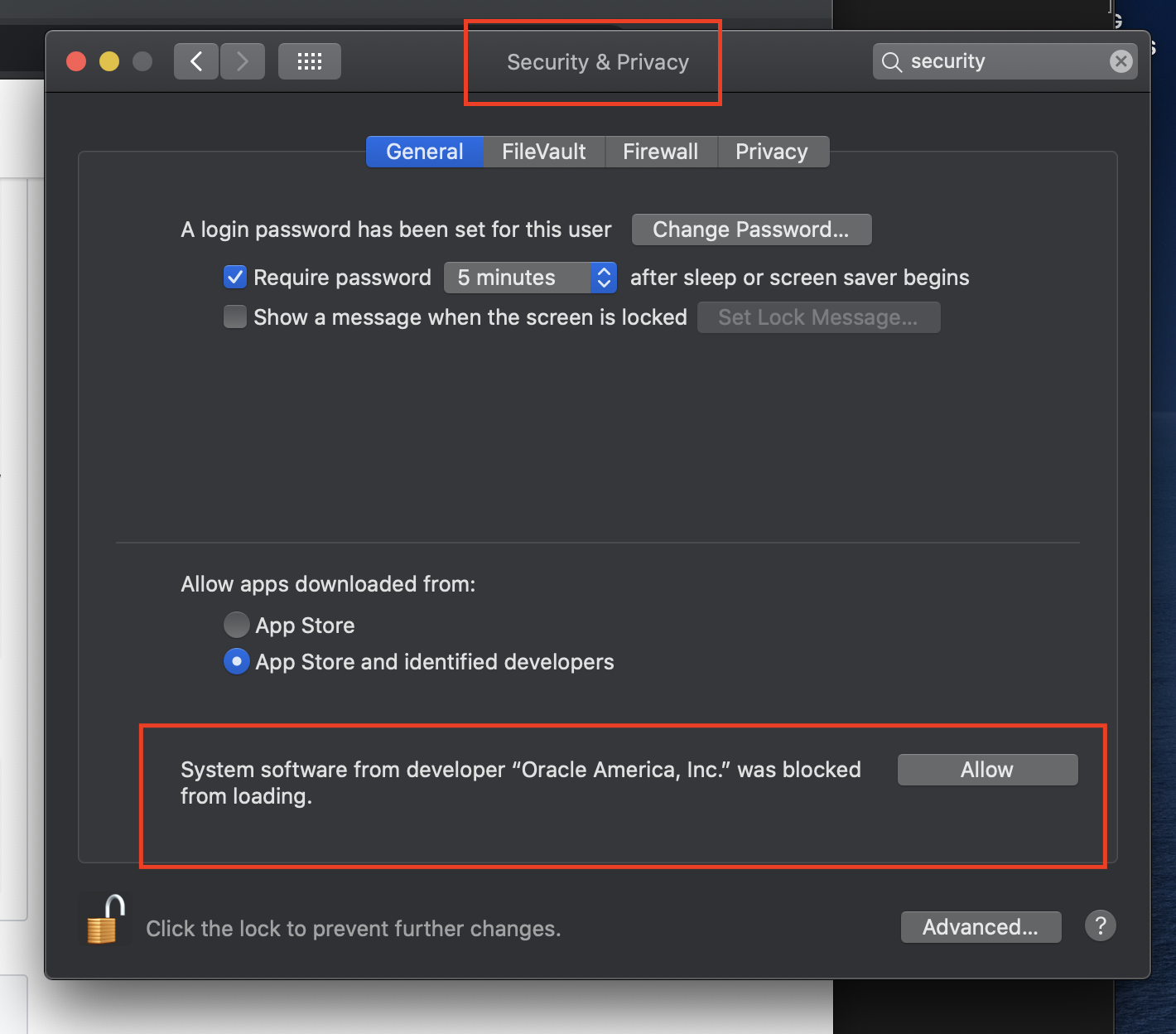
If this gives an error due to permissions, navigate to "System Preferences" > "Security & Privacy" > "General" and look for a prompt on the bottom to allow this
- Install dinghy
$ brew tap codekitchen/dinghy
$ brew install dinghy
4. Create a virtualbox VM:
$ dinghy create --memory=1024 --cpus=2 --provider virtualbox
Once the VM is up, you'll get instructions to add some Docker-related environment variables, so that your Docker client can contact the Docker server inside the VM. You can add these to your .bashrc (or equivalent). You can also update them by running:
$ eval $(dinghy env)
Getting the code and starting the server
- Clone the repository using git
$ git clone [email protected]:BreezeChMS/breeze.git breeze
$ cd breeze
2. Generate a self-signed SSL certificate
$ docker/generate_certs.sh
3. Build the docker containers
$ docker-compose build
$ docker-compose run --rm web composer install -n
4. Start the docker containers
$ docker-compose up
5. Navigate to Breeze
  * Open https://www.breezechms.docker.
  * You'll need to accept any HTTPS warnings you may get. The server uses a self-signed certificate that your browser will complain about.

  * If you are getting an ERR_CERT_INVALID request error you likely need to install a local certificate.
  https://github.com/BreezeChMS/zephyr/wiki/Installing-Local-Certificate
6. To connect to MySQL server
  * Open http://phpmyadmin.docker
  * Login as _root_ using _root_ as the password
7. To generate PDFs, you'll need to install wkhtmltopdf on the server
# Run docker in detached mode so you can log into it in the same terminal window
$ docker-compose up -d

# Access the docker CLI
$ docker exec -it breeze_web_1 bash

# Run the following commands to install wkhtmltopdf
$ apt-get update
$ apt-get install xvfb libfontconfig build-essential xorg wget libssl-dev
$ WKHTML2PDF_VERSION='0.12.4'
$ wget "https://github.com/wkhtmltopdf/wkhtmltopdf/releases/download/${WKHTML2PDF_VERSION}/wkhtmltox-${WKHTML2PDF_VERSION}_linux-generic-amd64.tar.xz"
$ tar -xJf "wkhtmltox-${WKHTML2PDF_VERSION}_linux-generic-amd64.tar.xz"
$ cd wkhtmltox
$ cp -r * /usr/

# You may see permission errors in the `tar` step. This is okay.

Testing (using Docker)
Run all tests
docker-compose run --rm web vendor/bin/codecept run --steps
Run unit or acceptance tests
docker-compose run --rm web vendor/bin/codecept run unit
docker-compose run --rm web vendor/bin/codecept run acceptance
Testing (locally, without Docker)
Install Dependencies
- Install Homebrew
$ ruby -e "$(curl -fsSL https://raw.githubusercontent.com/Homebrew/install/master/install)"
- Install PHP 5.6 (MacOSx defaults to the latest version of PHP, which currently is PHP 7)
$ brew install [email protected]
$ cat export PATH="$(brew --prefix)/opt/[email protected]/bin:$PATH" >> ~/.bashrc
$ source ~/.bashrc

on newer machines, Homebrew may complain of no available formula for php56, in this case, you may try:

$ brew tap exolnet/homebrew-deprecated
$ brew install [email protected]

have your system use this version with:

$brew link [email protected] --force

open a new terminal window and try:

$php --version

you should see 5.6 listed. If php complains of 'Unable to load dynamic library', you can rename /usr/local/etc/php/5.6/conf.d to conf.d.disabled
3. Install composer
$ brew install composer
4. Install Selenium WebDriver and ChromeDriver
$ brew install selenium-server-standalone
$ brew cask install chromedriver
5. Install Codeception
$ brew install codeception
6. Use composer to install more stuff...
$ composer install
Running Acceptance or Unit Tests
- In a new terminal, run the selenium-server:
$ selenium-server
- In another terminal, run the acceptance tests
$ vendor/bin/codecept run acceptance --steps
- Run unit tests
$ vendor/bin/codecept run unit
Acceptance Tests
Creating an Acceptance Test
- Generate your acceptance test
$ vendor/bin/codecept generate:cest acceptance First
- Write your first test
<?php
class FirstCest
{
    public function frontpageWorks(AcceptanceTester $I)
    {
        $I->amOnPage('/');
        $I->see('Home');
    }
}
- Run your tests
$ codecept run --steps ./acceptance/FirstCest.php
To learn about Codeception and all the wonderful kinds of tests you can write with it, see the Codeception Getting Started Guide
Tag summary
Content type
Image
Digest
Size
371.4 MB
Last updated
about 5 years ago
docker pull breezechms/apache-php