brspoon/keep
Keep what you still want to watch. Free space when you're done. For Plex and Maintainerr.
8.0K
brspoon/keep repository overview
Keep
Keep gives the people who use your Plex server a say in what stays and what goes.
Disk space is limited, and automated cleanup helps keep a media library manageable. But a movie or show someone still plans to watch can be removed before they get around to it. Keep was created to make that decision more personal: a simple, interactive way to see what's leaving and give a title more time.
Keep is a self-hosted companion for Plex and Maintainerr. Viewers sign in, browse titles scheduled for removal, and choose what they want to keep. A 30-day Keep buys time to watch; owners can also allow indefinite protection. Maintainerr continues to handle the cleanup rules, while Keep gives viewers an easy way to protect the titles that matter to them.
When it's time to make room, Manage Library lets people with the owner's permission delete movies, shows, or selected seasons they no longer want. Access can be limited to specific libraries and a person's own Seerr requests. Active Keeps are checked before deletion, and every deletion requires confirmation.
- See what's leaving. Browse selected Maintainerr collections and the time remaining before possible removal.
- Keep your watch plans. Protect titles for 30 days, manage your Keeps, and see who kept each title.
- Make space together. Give trusted users controlled access to library cleanup through Radarr and Sonarr.
- Stay informed. Optional email summaries and watch history help people decide what to keep.
Sign-in and access
Sign in with Plex using the account that owns the selected server or an account with access to that server. Having a Plex account alone does not grant access to Keep. Keep verifies server access for non-owner Plex accounts and rechecks it in the background. The owner can also disable an account in Keep.
The owner can create local Keep accounts that sign in with an email address and password, without requiring a Plex account or Plex server access. These accounts give access to Keep under the owner's chosen permissions; they do not grant access to watch media in Plex. There is no public account registration.
See the features and access guide for account types, permissions, integrations, and how Keep protection and library cleanup work.
Preview
Leaving — see what's leaving Plex and how much time remains to keep it.
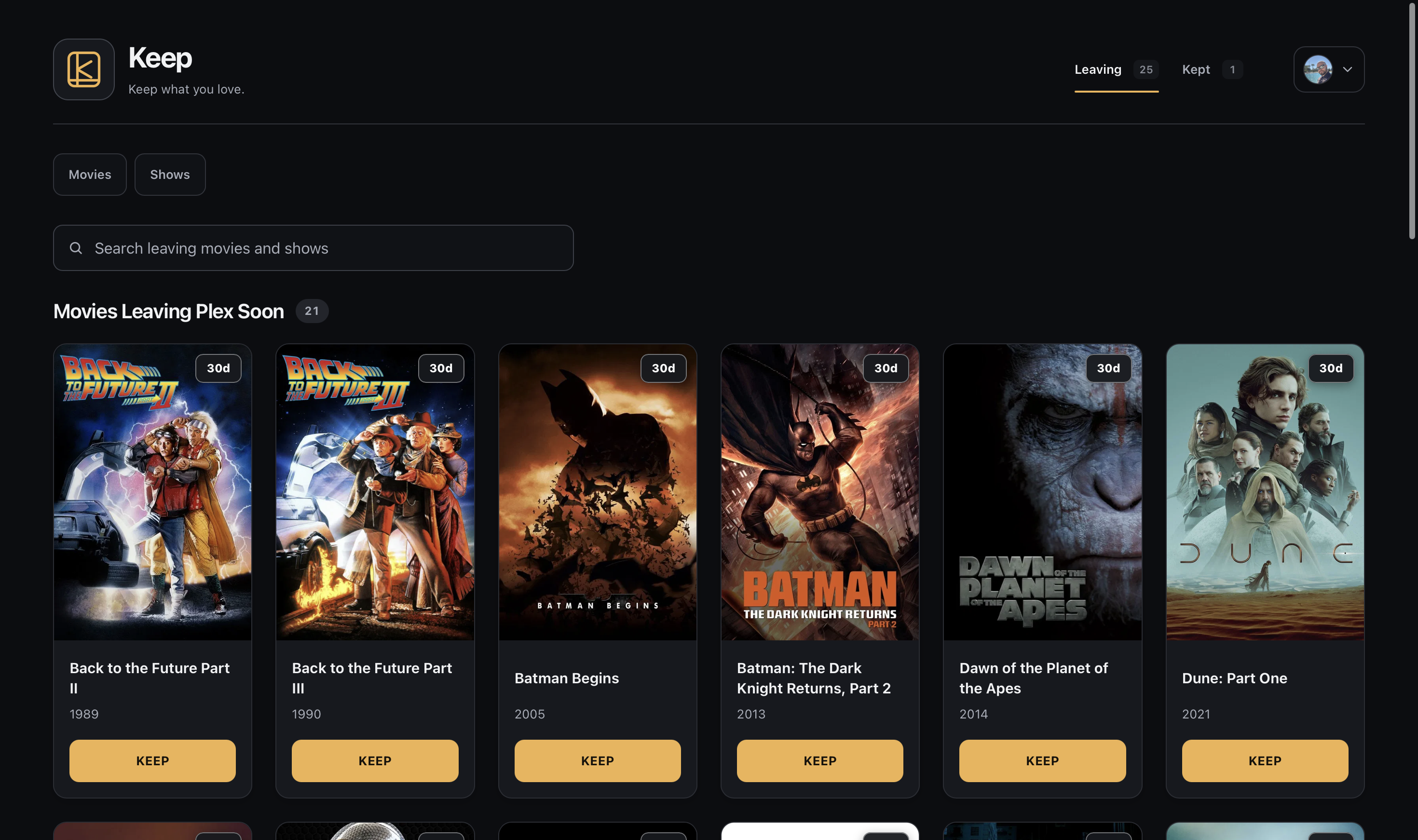
Browse the preview gallery to see light and dark mode, protected titles, and library cleanup.
Before you install
Keep is intended for self-hosters who already operate Plex Media Server and Maintainerr. Both services must be running and reachable from Keep. They are installed separately.
Install Docker with Compose v2 using Docker Desktop for macOS or Windows, or Docker Engine with the Compose plugin on Linux. You also need Python 3.9 or newer (Linux, macOS, Windows) and either curl on Linux/macOS or PowerShell 5.1 or newer on Windows. macOS includes curl; Windows PowerShell 5.1 is sufficient. Start Docker, use Linux containers on Windows, and make sure your account can run Docker.
The installer checks prerequisites and stops with repair guidance if a tool is missing; it does not install those tools automatically. Python runs the installer, while Keep's application dependencies are included in this image. Radarr, Sonarr, Seerr, Tautulli, and email are optional.
Install
After preparing the prerequisites, run the one-command Keep installer. It creates private configuration, pulls this image, and starts two required services with Docker Compose: keep-app runs the web app, and keep-digest runs the background worker. Installers are available for Linux/macOS shells and Windows PowerShell. This image supports Linux amd64 and arm64.
Open the printed /setup address and enter the setup code supplied by the installer. Sign in with the Plex account that owns your server and select that server. From the setup checklist, open Configure services and collections, save and test Maintainerr, and save at least one collection. Select Return to Setup and review the checklist. Verify services and finish setup stays disabled until the required configuration is saved; the checklist explains anything missing. Once selected, it checks the live Plex connection and selected Maintainerr collections, plus SMTP if email is enabled, before offering Open Keep.
Follow the installation and configuration guide for setup, manual Compose installation, supported image tags, and HTTPS configuration. Back up your configuration and data before upgrading.
Use an explicit version tag, such as brspoon/keep:2.23.3, for a predictable deployment; stable tracks the current stable release and can change. GitHub Releases provides release notes, matching source archives, and checksums. Only the latest stable release receives support and security fixes.
Integrations and API
Maintainerr supplies Leaving collections and Keep protection. Radarr and Sonarr provide optional library cleanup, Seerr verifies request ownership for restricted deletion, and Tautulli adds watch history. The API guide describes scoped access to Leaving and Kept lists and Keep protection. The owner manages API keys; those keys do not grant administration or media-file deletion.
Documentation and support
- Source code and documentation
- Releases and changelog
- Backup and restore
- Report a bug or request a feature
- Contributing
- Security policy
Report suspected vulnerabilities through GitHub's private reporting form. If the form is unavailable, open an issue asking the maintainer to enable private reporting without including vulnerability details, and wait for a private channel before sharing the report.
Keep's own source code is licensed under MIT. Dependencies and bundled assets may have separate licenses and notices. Keep is independent of Plex, Maintainerr, Radarr, Sonarr, Seerr, and Tautulli; their names identify compatible services and do not imply endorsement.
Plex and the Plex logo are trademarks of Plex and used under a license.
Tag summary
Content type
Image
Digest
sha256:736087976…
Size
29.8 MB
Last updated
3 days ago
docker pull brspoon/keep:stable