bryanlarsen/github-pr-triage repository overview
Github PR Triage
A dashboard of Github Pull Requests
An example: mozilla/socorro
License: MPL2
Install
Dependencies
- python with pip
- memcached
Ubuntu:
sudo apt-get install python-pip memcached
Requirements
pip install -r requirements.txt
Configure
GitHub
Generate a github oauth personal access token with public_repo scope using
instructions here.
Environment
export GITHUB_OAUTH_TOKEN=<token>
export MEMCACHE_URL=localhost:11211
Run
python app.py
point your browser at http://localhost:5000
Deploy
Prepare (Optional)
You might want to make a "dist version" - a copy of the ./app directory made
for production use. All CSS and JS is concatenated and minified correctly.
To do that you need to first:
grymt -w ./app
That will create a directory called "./dist" which will contain an optimized
index.html which the server app (app.py) knows to serve instead.
Stackato
You can deploy this on Stackato by simply running:
stackato push
Heroku
Follow standard Heroku Python Deployment
Set the GITHUB_OAUTH_TOKEN environment variable on heroku:
heroku config:set GITHUB_OAUTH_TOKEN=<github-token>
Send your browser to your Heroku app:
heroku open
Docker
sudo docker run --name memcached -d borja/docker-memcached
sudo docker build -t triage .
sudo docker run --link memcached:memcached -p 5000:5000 -e GITHUB_OAUTH_TOKEN=<token> -d triage
Cache invalidation Webhook
Once you have your site set up in production, you can set up a GitHub Webhook that pings this site whenever pull requests are created or updated in some way. What this does is that it immediately invalidates our cache so that you get more up to date information.
To do that, go to your favorite GitHub project, click the "Settings". Then click "Webhooks & Services". Then click the "Add Webhook" button.
Suppose you have this site set up at http://somedomain.com/ then the
"Payload URL" you need to enter is http://somedomain.com/webhook.
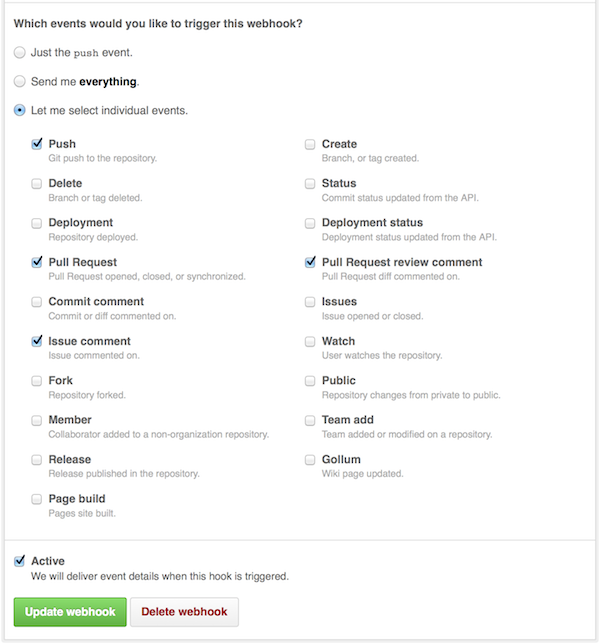
Next, you need to select the "Let me select individual events" radio button. When a bunch of choices are offered, check:
- Push
- Pull Request
- Issue comment
- Pull Request review comment
Make sure it's Active and then click "Add webhook".
Now it should hopefully inform the site when things change so that the cache can quickly be invalidated.
Tag summary
Content type
Image
Digest
sha256:6866b8534…
Size
94.8 MB
Last updated
about 11 years ago
docker pull bryanlarsen/github-pr-triage