cailurus/hearth
Hearth is a lightweight home dashboard for self-hosted services.
9.9K
cailurus/hearth repository overview

Hearth
A lightweight, self-hosted home dashboard for your services.





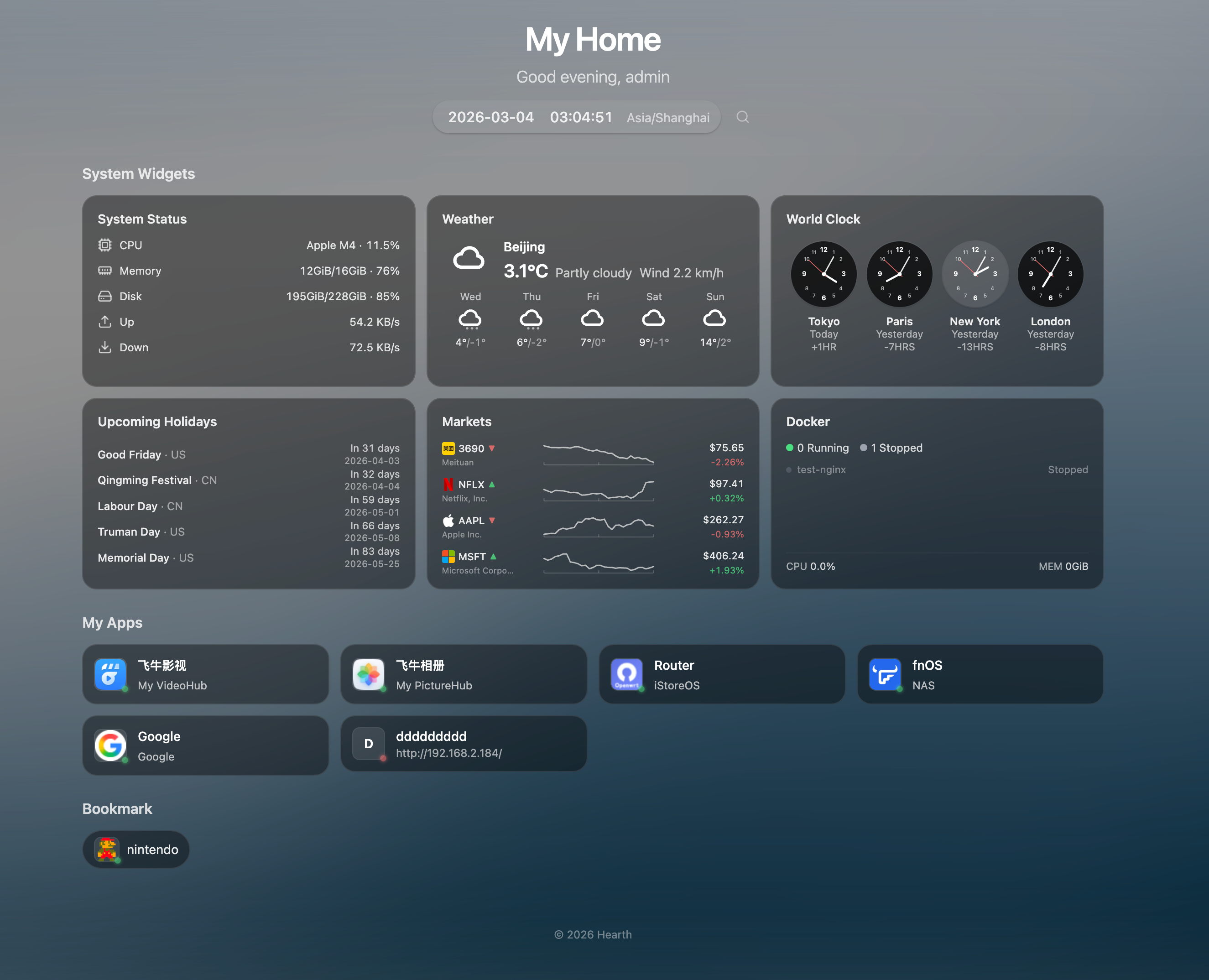
✨ Features
Navigation & Layout
- 🏠 Grouped App Links - Organize your services into custom groups
- 🔖 Bookmarks - Compact pill-style link groups for quick access
- 🔍 Quick Launch -
Cmd/Ctrl+Kto search apps instantly, with pinyin support - 🟢 Service Status - Live health-check indicators (supports HTTPS with self-signed certs)
- 🖱️ Drag & Drop - Reorder groups and items freely
- 🎨 Frosted Glass UI - Borderless glassmorphism card design with backdrop blur
Widgets
- 🌤️ Weather - Current weather with 7-day forecast (Open-Meteo, no API key needed)
- 📈 Market Ticker - US stocks, HK stocks, and crypto prices with intraday sparkline charts (Yahoo Finance)
- 💱 Currency Exchange - Up to 4 currency pairs with 30-day history sparklines and flag emojis (Frankfurter API)
- 📰 RSS Feed - Aggregate up to 10 RSS/Atom feeds with manual refresh, resizable height
- 🕐 World Clock - Up to 4 configurable timezone clocks
- 📊 System Metrics - CPU, memory, disk, and network monitoring with historical charts (7-day retention)
- 🐳 Docker Monitoring - Container status, resource usage, start/stop/restart actions
- 🗓️ Holidays - Upcoming holidays for selected countries
- 📝 Notes - Quick notes and memos
Personalization
- 👋 Greeting & Daily Quote - Time-based greeting with daily quotes (Hitokoto in Chinese, ZenQuotes in English)
- 🗓️ Solar Terms - Optional Chinese 24 solar terms display next to date (toggleable)
- 🎨 Dynamic Backgrounds - Bing daily, random, Unsplash, Picsum, or video backgrounds
- 🌓 Bilingual UI - Chinese and English with full i18n
- 📱 Mobile Friendly - Responsive design for all devices
- ✨ Easter Eggs - 5 hidden particle effects (snow, rain, sakura, firefly, shooting stars)
🚀 Quick Start
Docker (Recommended)
docker run -d \
  --name hearth \
  -p 8787:8787 \
  -v hearth-data:/data \
  -v /var/run/docker.sock:/var/run/docker.sock \
  --restart unless-stopped \
  cailurus/hearth:latest
Open http://localhost:8787 and log in as admin. Use HEARTH_INITIAL_PASSWORD if configured; otherwise find the generated first-run password in docker logs hearth.
The Docker socket mount (
-v /var/run/docker.sock:...) is optional — it enables the Docker monitoring widget. Without it, all other features work normally.
Docker Compose
services:
  hearth:
    image: cailurus/hearth:latest
    ports:
      - "8787:8787"
    volumes:
      - hearth-data:/data
      - /var/run/docker.sock:/var/run/docker.sock  # Optional: enables Docker monitoring
    restart: unless-stopped

volumes:
  hearth-data:
🔐 Security
| Item | Details |
|---|---|
| First-run username | admin |
| First-run password | If HEARTH_INITIAL_PASSWORD is set, that value is used. Otherwise Hearth generates a 16-char random password, prints it once to stdout as a banner, and forces a password change on first login. The password is never written to disk and never re-emitted via the structured logger. |
| Rate Limiting | 5 attempts per 15 min, then 5 min lockout |
| Password Reset | docker exec -it hearth /hearth/reset-password -db /data/hearth.db -password NEW |
To retrieve the generated password from a running container:
docker logs hearth | head -20
⚙️ Configuration
| Variable | Default | Description |
|---|---|---|
HEARTH_ADDR | :8787 | Listen address |
HEARTH_DATA_DIR | /data | Data directory |
HEARTH_SESSION_TTL | 168h | Session expiration |
HEARTH_COOKIE_SECURE | auto | Secure cookie flag (auto / true / false) |
HEARTH_DOCKER_SOCKET | auto-detect | Docker socket path (auto-detects common paths) |
HEARTH_INITIAL_PASSWORD | (unset) | Initial admin password. If unset, a 16-char random password is generated and printed to stdout (visible via docker logs). |
HEARTH_COINGECKO_API_KEY | (unset) | Optional CoinGecko Demo API key for crypto fallback/search. Kept on the server, never returned to the browser. Without it the existing anonymous fallback remains best-effort. Observe your provider quota; 429 responses are backed off rather than retried aggressively. |
HEARTH_CORS_ORIGINS | http://localhost:5173,http://127.0.0.1:5173 | Comma-separated allowed cross-origin URLs. The default permits the bundled Vite dev server only; production deployments serve the frontend from the same origin and need no override unless using a separate domain. |
HEARTH_DOCKER_ALLOW_PATTERNS | (unset) | Comma-separated regex allowlist for container names that may receive start/stop/restart actions. Empty = allow any container the daemon exposes. Example: `^(jellyfin |
HEARTH_DOCKER_LABEL_INTERVAL | 30s | Poll interval for hearth.*/homepage.* label discovery. 0s (or 0) disables the loop entirely. |
HEARTH_TRUSTED_PROXY_HEADER | (unset) | Name of the header carrying the authenticated username when Hearth sits behind a forward-auth proxy (Authelia / Authentik / oauth2-proxy / Caddy forward_auth / Traefik forwardAuth). Common values: X-Remote-User, Remote-User. Requires HEARTH_TRUSTED_PROXY_NETWORKS to also be set; Hearth refuses to start otherwise. |
HEARTH_TRUSTED_PROXY_NETWORKS | (unset) | Comma-separated CIDR list naming the proxy's source IPs. The proxy header is honored only when the request arrives from one of these networks — bypassing the proxy and hitting Hearth directly cannot forge the header. Example: 10.0.0.0/8,172.20.0.0/16. |
Widget data and offline behavior
- Widgets load independently. A failed refresh retains usable previous data and displays a warning instead of turning a provider failure into a zero price or an endless loading placeholder.
- Weather, resolved locations, reference exchange rates, RSS metadata, annual holiday data and quotes use bounded snapshots under
$HEARTH_DATA_DIR/widget-cache. The existing Docker data volume preserves them across restarts. Expired but usable snapshots are displayed while one background refresh runs; data beyond the retention limit is not presented as current. - A first visit without any usable snapshot still needs a successful provider response. Timeouts, partial results, pending refreshes and source timestamps are shown explicitly. Manual RSS refresh bypasses the fresh cache.
- Picking a weather city saves its coordinates. Existing city-only configurations remain supported through a bounded, cached lookup that does not fetch timezone data before weather.
- Frankfurter v1 provides working-day reference rates, not bank buy/sell quotes. Market prices retain their actual currency and provider observation time; they are not guaranteed live trading data. Yahoo/CoinGecko prices remain memory-only, and deployments must comply with provider data-use terms.
- A verified 2026 Chinese holiday calendar is included for offline startup, with its source license and provenance. Annual data is updated in the background; unpublished future holidays are not invented.
- Chinese daily quotes use Hitokoto; English quotes use ZenQuotes. Provider attribution remains visible. No paid provider or shared API credential is enabled automatically.
NAS Docker Monitoring Setup (fnOS, Synology, etc.)
NAS Docker UIs typically only allow directory mounts, not individual files. To enable Docker monitoring:
-
Add a directory mount in your NAS Docker settings:
Host Path Container Path /var/run/host-run -
Add an environment variable:
Variable Value HEARTH_DOCKER_SOCKET/host-run/docker.sock
If your NAS restricts access to /var/run, SSH into the NAS and run:
mkdir -p /vol2/1000/ServiceStore/docker-sock
mount --bind /var/run /vol2/1000/ServiceStore/docker-sock
Then mount /vol2/1000/ServiceStore/docker-sock → /host-run instead.
🔍 Comparison
The self-hosted dashboard space has several mature options. Hearth is built for Chinese-speaking home users on NAS platforms (fnOS / Synology / ZSpace) who want a personal launcher with a sense of warmth — pinyin Cmd+K search, glassmorphism UI, 24 solar terms, particle Easter eggs. The table below is a reference, not a ranking.
| Dimension | Hearth | homepage | glance | homarr |
|---|---|---|---|---|
| Best for | CN home NAS users | Power users, labels | News + aesthetics | Teams, multi-user |
| Tech | Go + React 19 | Next.js | Pure Go | Next.js + tRPC |
| Config | UI + JSON | YAML files | YAML files | UI drag-and-drop |
| Widgets | Curated set | 100+ integrations | RSS / HN / Reddit | Plugin marketplace |
| Service discovery | Manual | Docker labels | Manual | Docker + Kubernetes |
| Multi-user | Single user | None | None | OIDC + RBAC |
| Bundle size | Single Go binary | Node runtime | ~25MB binary | Node runtime |
Choosing the right tool. If you run dozens of services and want auto-discovery via Docker labels, pick homepage. If you want the prettiest news-reader-style aggregator with the smallest footprint, pick glance. If you need shared dashboards with SSO and RBAC for a team, pick homarr. If you are a Chinese-speaking home user who wants pinyin search, seasonal touches, and a single-binary backend, Hearth is built for that taste.
🐳 Docker Labels (auto-discovery)
Hearth can pick apps up from the labels on your running Docker
containers and add them to the dashboard automatically — no UI clicks
per service. Add a few labels to any container's docker-compose.yml
and the app appears within ~30 seconds:
services:
  jellyfin:
    image: jellyfin/jellyfin
    labels:
      - "hearth.name=Jellyfin"
      - "hearth.group=Media"
      - "hearth.href=http://nas.lan:8096/"
      - "hearth.icon=lucide:film"
      - "hearth.description=Movie & TV server"
| Label | Required | Purpose |
|---|---|---|
hearth.name | yes | Display name |
hearth.href | yes | Where the card links to |
hearth.group | no | Falls into a same-named user group (case-insensitive) or a virtual "Docker" group |
hearth.icon | no | URL or lucide:icon-name |
hearth.description | no | Subtitle text |
Already on gethomepage / homepage? Hearth also reads homepage.*
labels with the same field names, so you can keep your existing
docker-compose unchanged. When both prefixes are set on the same
container, hearth.* wins per-field.
Lifecycle: Containers must be in state="running" to appear.
Stopping or removing a container makes the app vanish from the
dashboard within 30 seconds. Docker-discovered apps are read-only in
the UI (the backend refuses PUT / DELETE on them) — labels are the
source of truth.
Toggling discovery off: Set HEARTH_DOCKER_LABEL_INTERVAL=0 to
disable the polling loop entirely.
🛠️ Development
# Prerequisites: Go 1.25+, Node.js 20+

git clone https://github.com/cailurus/Hearth
cd Hearth

# Dev mode (backend + frontend with hot reload)
make dev

# Build production
make build
./dist/hearth
📁 Data Storage & Persistence
All data (including user credentials, app links, settings) is stored in /data:
data/
├── hearth.db    # SQLite database (users, apps, settings)
├── icons/       # Cached app icons
└── cache/       # Background images
Persisting Data Across Container Updates
To ensure your data survives container updates, mount a volume or host directory:
Using Docker named volume (recommended):
docker run -d -v hearth-data:/data cailurus/hearth:latest
Using host directory:
docker run -d -v /path/to/my/data:/data cailurus/hearth:latest
When updating the container, your data remains intact:
docker pull cailurus/hearth:latest
docker stop hearth && docker rm hearth
docker run -d --name hearth -p 8787:8787 \
  -v hearth-data:/data \
  -v /var/run/docker.sock:/var/run/docker.sock \
  cailurus/hearth:latest
📄 License
Tag summary
Content type
Image
Digest
sha256:47d6c110e…
Size
18.4 MB
Last updated
about 1 month ago
docker pull cailurus/hearth