caiodelgadonew/books-pyapi
Simple API written in Python using FastAPI to store and retrieve Books and Authors.
869
caiodelgadonew/books-pyapi repository overview
Simple API made with Python FastAPI
Project Repository: https://github.com/caiodelgadonew/books-pyapi
Simple API written in Python using FastAPI to store and retrieve Books and Authors.
Requisites
This app is intended to run at minimun Python version 3.6. Extra requirements can be seen in requirements.txt file.
Database Customization
It is possible to customize the application to use SQLite or MySQL.
By default, the application uses SQLite and stores the database in the root folder.
To customize the PATH for the SQLite database set the environment variable DB_PATH to the absolute path of the database file.
Environment Variables usages as following:
| ENV | Default Value | Description |
|---|---|---|
DB_TYPE | sqlite | Database type, valid values are sqlite and mysql. |
DB_PATH | ./database.db | Database absolute path for sqlite database only. |
DB_HOST | 127.0.0.1 | Database host address for mysql database only. |
DB_PORT | 3306 | Database port for mysql database only. |
DB_NAME | books | Database name for mysql database only. |
DB_USER | user | Database user for connecting to mysql database only. |
DB_PASS | password | Database password for connecting to mysql database only. |
Application
The default webpage is the swagger-ui running at the root path of the webserver (/).
You can also access the redoc-ui at the docs path of the webserver (/docs)
Deployment
Local
To deploy it locally its suggested to set up a venv.
Clone the repository:
$ git clone [email protected]:caiodelgadonew/book-pyapi.git
Create a Virtual Environment and source it:
$ python3 -m venv book-pyapi
$ source book-pyapi/bin/activate
After initializing your Virtual Environment install all dependencies
$ pip3 install -r app/requirements.txt
Execute uvicorn
$ uvicorn books.main:app --reload
Access http://127.0.0.1:8000 at your browser.
Docker Container - SQLite
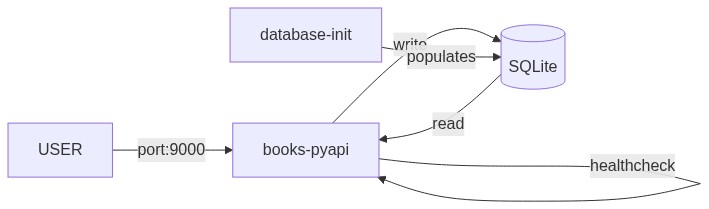
To run the application as a Docker Container you can use the provided docker-compose-sqlite.yml
Be sure to have docker and docker-compose installed before proceeding
Clone the repository:
$ git clone [email protected]:caiodelgadonew/book-pyapi.git
Run docker-compose up to create the environment:
$ docker-compose -f book-pyapi/docker-compose-sqlite.yml up
You can add
-dto thedocker-composecommand to start detached
The database will be automatically populated through the API with two users and some books, if you dont want to populate the database comment the block database-init from docker-compose-sqlite.yml.
After the application healthcheck (30s) the database-init container will start and populate the database with some data.
Access the application at the address: http://<CONTAINER_HOST_IP>:9000
Docker Container - MySQL
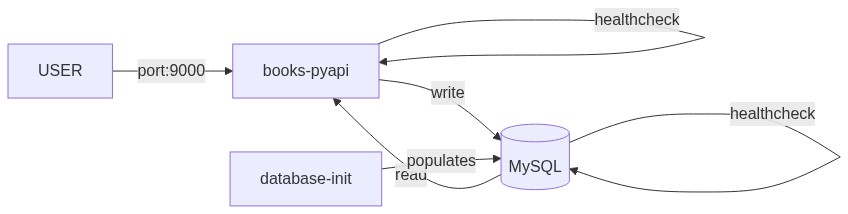
To run the application as a Docker Container you can use the provided docker-compose.yml
Be sure to have docker and docker-compose installed before proceeding
Clone the repository:
$ git clone [email protected]:caiodelgadonew/book-pyapi.git
Run docker-compose up to create the environment:
$ docker-compose -f book-pyapi/docker-compose-mysql.yml up
You can add
-dto thedocker-composecommand to start detached
The database will be automatically populated through the API with two users and some books, if you dont want to populate the database comment the block database-init from docker-compose-mysql.yml.
After the application healthcheck (30s) the database-init container will start and populate the database with some data.
Access the application at the address: http://<CONTAINER_HOST_IP>:9000
Deploy in AWS with Terraform
There are many ways of deploying this code into AWS using terraform, for those ones there will be a file with explanation on steps to do everything through code in the /infra folder. Be sure to read the /infra/README.md file.
Tag summary
Content type
Image
Digest
sha256:5dece1c25…
Size
51.4 MB
Last updated
over 3 years ago
docker pull caiodelgadonew/books-pyapi