cav94mat/docker-maintenance
Automatically update (pull), load and re/build images, and run maintenance scripts on your stacks.
6.7K
cav94mat/docker-maintenance repository overview
cav94mat/docker-maintenance




Schedulable maintenance procedure for docker-compose stacks. It can be embedded as a service to existing stacks, run autonomously in a separated stack or container, or built and installed locally.
The procedure takes care of pulling (updating to the latest version), side-loading and/or building all the images specified in the stack, optionally running scripts before, during or after the operation, and re-creating the containers that need to.
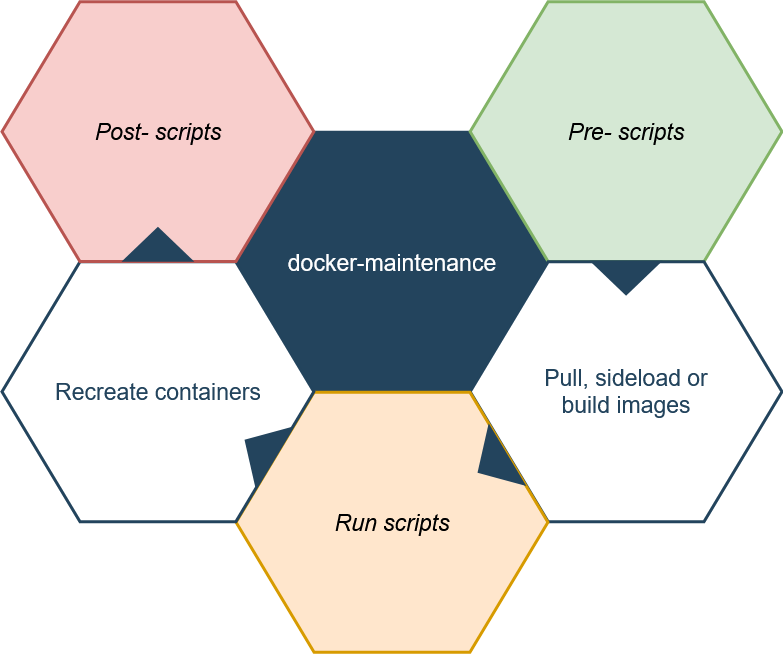
You can also use the --dry-run option to simulate the execution, without actually performing any operations or running any scripts.
For the entire reference of supported arguments refer to the official wiki, or run:
docker run -it --rm cav94mat/docker-maintenance --help
Embedding to an existing stacks
You just need to add a cav94mat/docker-maintenance service to your pre-existing docker-compose.yml file. Maintenance can be scheduled by specifying a cron expression in the $ON_SCHEDULE variable, whereas $ON_START can be set to zero to suppress triggering every time the container is re-started.
services:
  # [...]
  docker-maintenance:
    image: cav94mat/docker-maintenance
    reboot: unless-stopped
    command: --clean ${PWD}
    environment:
      ON_SCHEDULE: '0 0 4 ? * * *' # Everyday, 4:00 am
      TZ: 'Europe/Rome' # Set your timezone here
    volumes:
      - '${PWD}:${PWD}:z'
      - '/var/run/docker.sock:/var/run/docker.sock:z'
⚠ Make sure the stack is mounted at the same path within the maintenance container.
${PWD}normally expands to the docker-compose.yml directory.
Deploying in a separate stack
This approach is useful if you want to keep the maintenance services separated from the respective stacks. The --recurse and --recurse-one options may be useful if you have multiple stacks in nested directories.
In this example, it's assumed the root path to traverse recursively for finding stacks is /srv:
version: '3.7'
services:
  docker-maintenance:
    image: cav94mat/docker-maintenance
    reboot: unless-stopped
    command: --clean --recurse /srv
    environment:
      ON_SCHEDULE: '0 0 4 ? * * *' # Everyday, 4:00 am
      TZ: 'Europe/Rome' # Set your timezone here
    volumes:
      - '/srv:/srv:z'
      - '/var/run/docker.sock:/var/run/docker.sock:z'
⚠ If your stacks are in a different path than
/srv, make sure to replace it with the correct one not only in thevolumes:section, but also incommand:
Installing locally
You can also install the docker-maintenance script locally, in order to launch
the maintenance directly on the host, provided all the required binaries are available (refer to the Dockerfile).
Just clone the present repository and run sudo make install-sys:
git clone https://github.com/cav94mat/docker-maintenance.git
cd docker-maintenance/
sudo make install-sys
The script should now be accessible from your $PATH, or anyway installed in /usr/bin/docker-maintenance.
Tag summary
Content type
Image
Digest
Size
42.5 MB
Last updated
about 6 years ago
docker pull cav94mat/docker-maintenance