cavo789/media-dedup
Photo and video library hygiene: duplicates, broken files, sorting. Journaled, undoable, local.
199
cavo789/media-dedup repository overview
media-hygiene
Hygiene for photo and video libraries spread over several folders and disks: clear out duplicates, spot broken files, then sort what remains into folders you approve. Every change is journaled and can be undone. Everything runs locally, in this image, from PowerShell or WSL.
Source code, full documentation (English and French) and issues: github.com/cavo789/media-hygiene
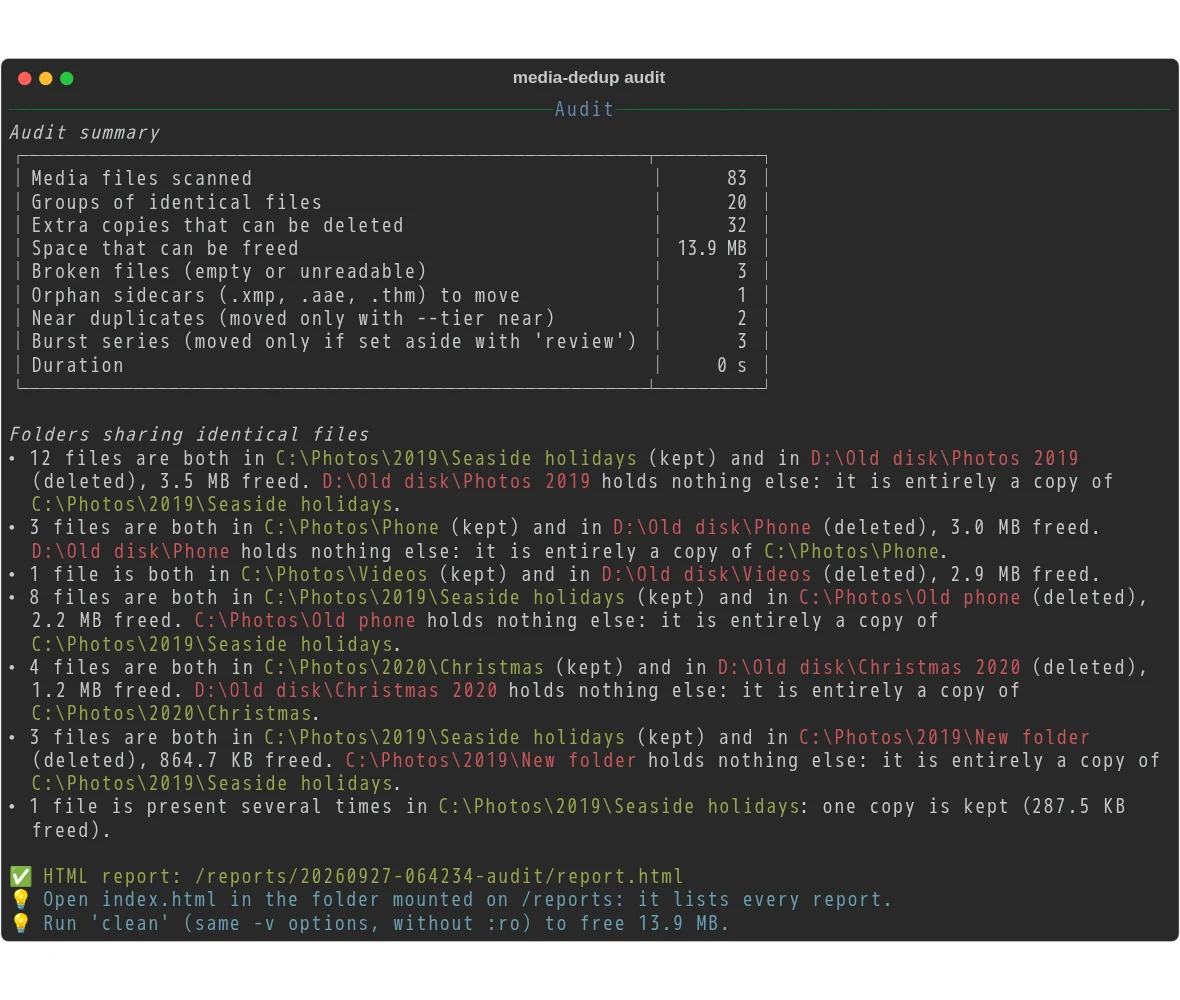
Quick start
docker run --rm -it -v "C:\Photos:/data/c/Photos:ro" cavo789/media-hygiene audit
This lists the duplicate and broken photos and videos of C:\Photos and changes nothing: :ro
(read-only) makes Docker itself forbid any write.
Your first audit
explains the command and its result, part by part.
Clean
- Exact duplicates, across folders and disks: same size and same SHA-256, compared byte for byte again right before any deletion.
- Near duplicates and burst series: resized or recompressed copies, re-encoded videos, and bursts whose best shots you choose in your browser, with the keyboard. Near duplicates are moved to the quarantine, never deleted.
- Broken files: empty files, images and RAW files that cannot be decoded, videos that cannot be opened.
- The right copy stays: a folder you protect, the copy with its sidecar (
.xmp,.aae), a name someone chose rather thanIMG_1234, a named folder rather thanDCIM. - Any file type on request:
--ext video,--ext pdf,docxor a category of your own; copies of documents are moved to the quarantine, never deleted.
Sort (in development)
classifyproposes a folder structure from dates, folder names, events, trips and places (GPS resolved offline, optionally a local vision model through Ollama), in an Excel workbook you edit. Nothing is imposed: you change what you want.sortapplies the edited workbook, journaled, and proves that no file was lost. The nextclassifykeeps your edits.- Albums as hard links (no copy, no move), a map page to name your places, an inventory of the library exported to Excel.
Safe by design
- A write-ahead journal of every change;
undorestores deleted copies from the kept one and quarantined files from the quarantine;historyandpurgeto review and empty it. cleanrefuses to run without a persistent/journal, or on read-only data mounts.- Protected folders are never modified; excluded folders are never analysed.
- Local: no account, no cloud. Your photos, and where they were taken, never leave your computer. How your photos stay safe.
Mount points
| Mount | Holds |
|---|---|
/data/<drive>/<path> | The folders to analyse, e.g. C:\Photos → /data/c/Photos (:ro for an audit) |
/cache | The fingerprint index: the next audits take seconds instead of minutes |
/reports | The HTML reports |
/config | config.toml only: your preferred, protected and excluded folders, once for all |
/journal | The journal of every change (required by clean) |
/quarantine | The files set aside, restorable |
Details: mount points.
A full clean
docker run --rm -it `
  -v "C:\Photos:/data/c/Photos" `
  -v "D:\Old disk:/data/d/Old disk" `
  -v media-hygiene-cache:/cache `
  -v "$HOME\media-hygiene\reports:/reports" `
  -v "$HOME\media-hygiene\config:/config" `
  -v "$HOME\media-hygiene\journal:/journal" `
  -v "$HOME\media-hygiene\quarantine:/quarantine" `
  cavo789/media-hygiene clean
It shows what it will do and asks for confirmation first. Step by step: the user guide · guide en français.
Tags
latest: the last release;X.Y.Z: a given release.linux/amd64andlinux/arm64, with SBOM and provenance attestations.
License
media-hygiene is released under the MIT license.
The image also contains third-party components under their own licenses, among them FFmpeg's
ffprobe (LGPL-2.1+, built without GPL parts), libheif and libde265 (LGPL-3.0), x265 (GPL-2.0+)
and LibRaw (LGPL-2.1 / CDDL-1.0).
Tag summary
Content type
Image
Digest
sha256:62d71660a…
Size
86.1 MB
Last updated
5 days ago
docker pull cavo789/media-dedup