chrislongros/anki-sync-server-enhanced repository overview
Anki Sync Server Enhanced



Production-ready Docker image for self-hosted Anki sync server with backups, monitoring, dashboard, and security features.
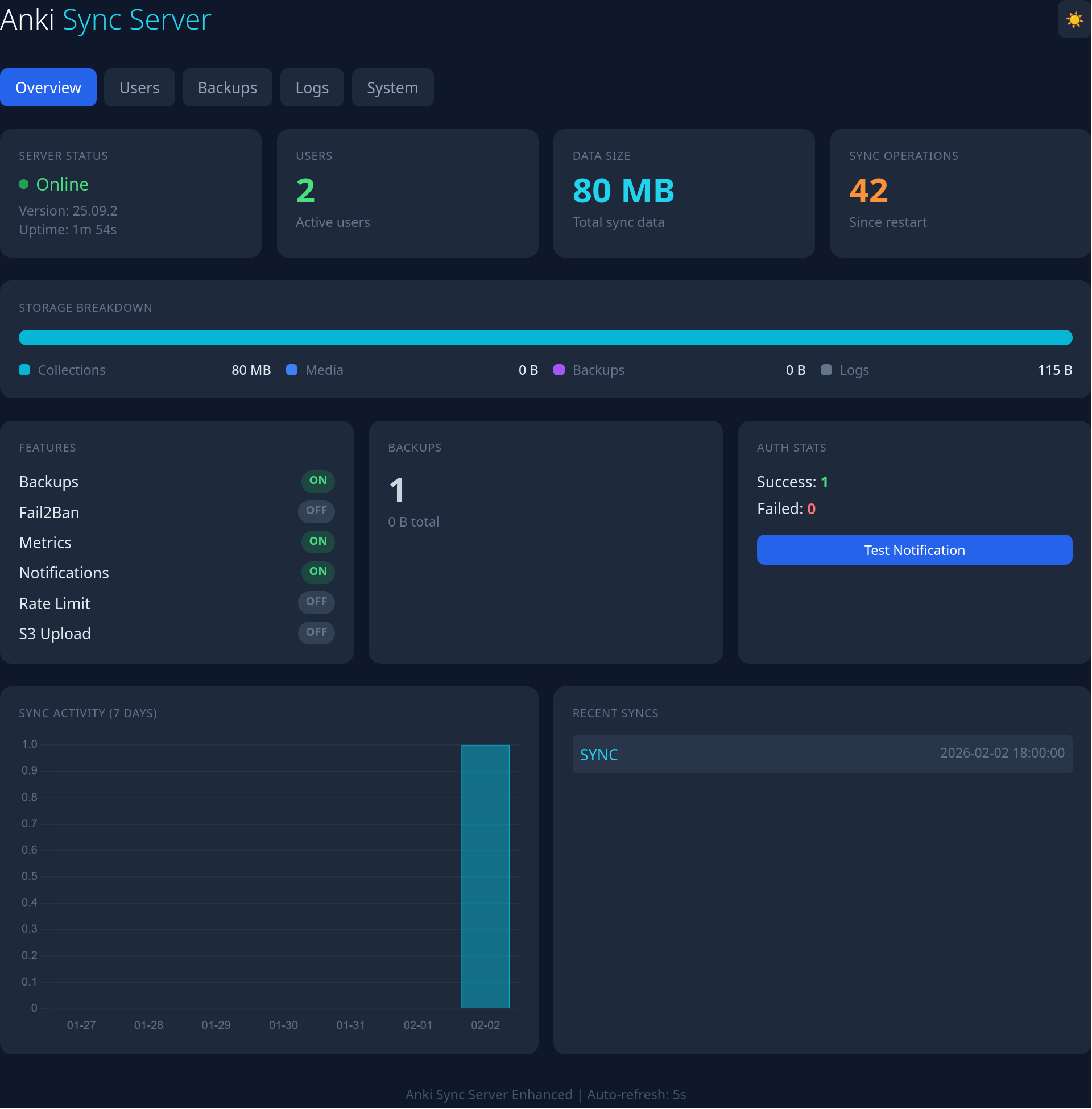
Why This Image?
The official Anki project provides sync server source code but no pre-built Docker images. This project provides:
- Zero build time - Pre-compiled for amd64, arm64, and arm/v7
- Auto-updates - Daily builds automatically track the latest Anki release
- Enterprise features - Backups, monitoring, alerts, and security out of the box
- NAS-ready - Works on TrueNAS SCALE, Unraid, Synology, and any Docker host
Features
| Feature | This Image |
|---|---|
| Pre-built Docker image | ✅ |
| Auto-updates (daily builds) | ✅ |
| Multi-arch (amd64, arm64, arm/v7) | ✅ |
| Automated backups with retention | ✅ |
| S3/MinIO backup upload | ✅ |
| Prometheus metrics | ✅ |
| Web dashboard | ✅ |
| Discord/Telegram/Slack/Email alerts | ✅ |
| Docker secrets support | ✅ |
| Hashed passwords | ✅ |
| Fail2ban integration | ✅ |
| Rate limiting | ✅ |
| Built-in TLS (Let's Encrypt/self-signed) | ✅ |
| User management CLI | ✅ |
| PUID/PGID support | ✅ |
Quick Start
docker run -d \
  --name anki-sync \
  -p 8080:8080 \
  -e SYNC_USER1=user:password \
  -v anki_data:/data \
  chrislongros/anki-sync-server-enhanced:26.05
Then configure your Anki client to sync to http://your-server:8080/
Docker Compose
services:
  anki-sync-server:
    image: chrislongros/anki-sync-server-enhanced:26.05
    container_name: anki-sync
    ports:
      - "8080:8080"   # Sync server (HTTP)
      - "8443:8443"   # Sync server (HTTPS, if TLS_ENABLED)
      - "8081:8081"   # Dashboard (optional)
      - "9090:9090"   # Metrics (optional)
    environment:
      - SYNC_USER1=alice:password1
      - SYNC_USER2=bob:password2
      - TZ=Europe/Berlin
      - BACKUP_ENABLED=true
      - METRICS_ENABLED=true
      - DASHBOARD_ENABLED=true
    volumes:
      - anki_data:/data
      - anki_backups:/backups
    restart: unless-stopped

volumes:
  anki_data:
  anki_backups:
Web Dashboard
Enable with DASHBOARD_ENABLED=true and access at http://server:8081/
Features:
- Overview - Server status, uptime, user count, data size, sync operations
- Users - Per-user statistics with data size and last sync time
- Backups - List backups, create new backups with one click
- Logs - View sync, auth, and backup logs with color-coded entries
- System - Disk usage, memory usage, load average
Protect with basic auth using DASHBOARD_AUTH=admin:password
Configuration Reference
Core
| Variable | Description | Default |
|---|---|---|
SYNC_USER1-SYNC_USER99 | User credentials (user:pass) | Required |
SYNC_HOST | Listen address | 0.0.0.0 |
SYNC_PORT | Listen port | 8080 |
LOG_LEVEL | debug/info/warn/error | info |
TZ | Timezone | UTC |
PUID / PGID | File permissions | 1000 |
PASSWORDS_HASHED | Set to true to supply pbkdf2 password hashes instead of plain text (generate with user-manager.sh hash); leave unset otherwise | unset |
Backups
| Variable | Description | Default |
|---|---|---|
BACKUP_ENABLED | Enable backups | false |
BACKUP_SCHEDULE | Cron schedule | 0 3 * * * |
BACKUP_RETENTION_DAYS | Keep days | 7 |
S3 Upload
| Variable | Description | Default |
|---|---|---|
S3_BACKUP_ENABLED | Upload to S3 | false |
S3_ENDPOINT | S3 endpoint (MinIO/Garage) | - |
S3_BUCKET | Bucket name | - |
S3_ACCESS_KEY | Access key | - |
S3_SECRET_KEY | Secret key | - |
S3_REGION | Region | us-east-1 |
Monitoring
| Variable | Description | Default |
|---|---|---|
METRICS_ENABLED | Prometheus metrics | false |
METRICS_PORT | Metrics port | 9090 |
DASHBOARD_ENABLED | Web dashboard | false |
DASHBOARD_PORT | Dashboard port | 8081 |
DASHBOARD_AUTH | Auth (user:pass) | - |
Notifications
| Variable | Description | Default |
|---|---|---|
NOTIFY_ENABLED | Enable webhooks | false |
NOTIFY_TYPE | discord/telegram/slack/ntfy | discord |
NOTIFY_WEBHOOK_URL | Webhook URL | - |
EMAIL_ENABLED | Enable email | false |
EMAIL_HOST | SMTP host | - |
EMAIL_PORT | SMTP port | 587 |
EMAIL_USER / EMAIL_PASS | SMTP credentials | - |
EMAIL_FROM / EMAIL_TO | Email addresses | - |
Security
| Variable | Description | Default |
|---|---|---|
FAIL2BAN_ENABLED | Enable fail2ban | false |
FAIL2BAN_MAX_RETRIES | Max failures | 5 |
FAIL2BAN_BAN_TIME | Ban seconds | 3600 |
TLS / HTTPS
Built-in TLS support via Caddy reverse proxy. Three modes available:
| Variable | Description | Default |
|---|---|---|
TLS_ENABLED | Enable TLS | false |
TLS_PORT | HTTPS port | 8443 |
TLS_DOMAIN | Domain for Let's Encrypt | - |
TLS_EMAIL | Email for Let's Encrypt | - |
TLS_CERT | Path to manual certificate | - |
TLS_KEY | Path to manual private key | - |
Mode 1: Let's Encrypt (automatic)
docker run -d \
  -p 80:80 -p 443:443 \
  -e SYNC_USER1=user:password \
  -e TLS_ENABLED=true \
  -e TLS_DOMAIN=anki.yourdomain.com \
  -e [email protected] \
  -v anki_data:/data \
  -v anki_config:/config \
  chrislongros/anki-sync-server-enhanced:26.05
Mode 2: Manual certificates
docker run -d \
  -p 8443:8443 \
  -e SYNC_USER1=user:password \
  -e TLS_ENABLED=true \
  -e TLS_CERT=/config/certs/fullchain.pem \
  -e TLS_KEY=/config/certs/privkey.pem \
  -v ./certs:/config/certs:ro \
  -v anki_data:/data \
  chrislongros/anki-sync-server-enhanced:26.05
Mode 3: Self-signed (local/testing)
docker run -d \
  -p 8080:8080 -p 8443:8443 \
  -e SYNC_USER1=user:password \
  -e TLS_ENABLED=true \
  -v anki_data:/data \
  chrislongros/anki-sync-server-enhanced:26.05
Then configure clients to use https://your-server:8443/
Note: Self-signed certificates will show browser warnings. For local networks, you may prefer using HTTP or a proper certificate.
CLI Tools
# User management
docker exec anki-sync user-manager.sh list
docker exec anki-sync user-manager.sh add john
docker exec anki-sync user-manager.sh add john mypassword
docker exec anki-sync user-manager.sh reset john newpass
docker exec anki-sync user-manager.sh hash mypassword
docker exec anki-sync user-manager.sh stats

# Backup management
docker exec anki-sync backup.sh
docker exec anki-sync restore.sh --list
docker exec anki-sync restore.sh --list-s3
docker exec anki-sync restore.sh backup_file.tar.gz
docker exec anki-sync restore.sh --s3 backup_file.tar.gz
Client Configuration
Desktop (Windows/Mac/Linux)
- Open Anki
- Go to Tools → Preferences → Syncing
- Set custom sync server to:
http://your-server:8080/ - Click Sync and enter your credentials
AnkiDroid (Android)
- Open AnkiDroid
- Go to Settings → Sync → Custom sync server
- Set sync URL:
http://your-server:8080/ - Set media URL:
http://your-server:8080/msync/ - Sync with your credentials
AnkiMobile (iOS)
- Open AnkiMobile
- Go to Settings → Sync → Custom server
- Enter:
http://your-server:8080/ - Sync with your credentials
Tip: Enable built-in TLS with
TLS_ENABLED=trueor use a reverse proxy (Traefik, Caddy, nginx) for secure remote access.
Prometheus Metrics
Available at http://server:9090/metrics when METRICS_ENABLED=true:
| Metric | Description |
|---|---|
anki_sync_users_total | Configured user count |
anki_sync_data_bytes | Total data size |
anki_sync_backup_count | Number of backups |
anki_sync_uptime_seconds | Server uptime |
anki_sync_operations_total | Total sync operations |
anki_auth_success_total | Successful logins |
anki_auth_failed_total | Failed logins |
Docker Secrets
For secure credential management:
services:
  anki-sync-server:
    image: chrislongros/anki-sync-server-enhanced:26.05
    environment:
      - SYNC_USER1_FILE=/run/secrets/anki_user1
    secrets:
      - anki_user1

secrets:
  anki_user1:
    file: ./secrets/user1.txt  # Contains: username:password
Image Sources
| Registry | Image |
|---|---|
| Docker Hub | chrislongros/anki-sync-server-enhanced:26.05 |
NAS Installation
- TrueNAS SCALE: See truenas/README.md
- Unraid: Add unraid/my-anki-sync-server.xml to the templates-user folder
Troubleshooting
Can't connect to server:
- Ensure port 8080 is exposed and not blocked by firewall
- Check container logs:
docker logs anki-sync - Verify the sync URL ends with
/(e.g.,http://server:8080/)
Sync fails with large collections:
- If using a reverse proxy, increase
client_max_body_size(nginx) or equivalent - Set
MAX_SYNC_PAYLOAD_MEGSenvironment variable if needed
Authentication issues:
- Ensure username doesn't contain special characters
- Check auth log:
docker exec anki-sync cat /var/log/anki/auth.log - Try resetting password:
docker exec anki-sync user-manager.sh reset username newpassword
Dashboard not loading:
- Ensure
DASHBOARD_ENABLED=trueis set - Check port 8081 is exposed
- View logs:
docker logs anki-sync | grep dashboard
Building Locally
# Auto-detect latest Anki version
docker build -t anki-sync-server-enhanced .

# Specify Anki version
docker build --build-arg ANKI_VERSION=26.05 -t anki-sync-server-enhanced:26.05 .
Credits
Built from the official Anki sync server by Ankitects.
License
AGPL-3.0 - © 2026 Christos Longros - see LICENSE
Tag summary
Content type
Image
Digest
sha256:195621423…
Size
266.7 MB
Last updated
about 23 hours ago
docker pull chrislongros/anki-sync-server-enhanced