chrisss404/powerdns
PowerDNS dnsdist, recursor, authoritative, and admin interface. Supports DNSCrypt, DoH, and DoT.
100K+
chrisss404/powerdns repository overview
Introduction
Get your own secure nameserver up and running within minutes, using this dockerized installation of the PowerDNS nameserver.
Source code of PowerDNS here: https://github.com/PowerDNS/pdns
Private Recursor
Simple example of an ad blocking private recursor that is listening for DNSCrypt and DNS-over-TLS (DoT) queries. Easy setup for any desktop OS using dnscrypt-proxy and Android 9 has native support for DoT.
Create private-recursor.yml like this:
version: '2.1'

services:

  gateway:
    image: jwilder/nginx-proxy:alpine
    volumes:
      - "/var/run/docker.sock:/tmp/docker.sock:ro"
      - "/etc/nginx/vhost.d"
      - "/usr/share/nginx/html"
      - "/etc/nginx/certs"
    ports:
      - "80:80"

  letsencrypt:
    image: jrcs/letsencrypt-nginx-proxy-companion:latest
    volumes:
      - "/var/run/docker.sock:/var/run/docker.sock:ro"
    volumes_from:
      - gateway

  dnsdist:
    image: chrisss404/powerdns:latest-dnsdist
    environment:
      - VIRTUAL_HOST=dot.example.com
      - VIRTUAL_PORT=9999
      - [email protected]
      - LETSENCRYPT_HOST=dot.example.com
      - DNSDIST_DNSCRYPT=yes
      - DNSDIST_DNS_OVER_TLS=yes
      - DNSDIST_DNS_OVER_TLS_DOMAIN=dot.example.com
    volumes:
      - "./blacklist.txt:/etc/dnsdist/blacklist.txt:ro"
    volumes_from:
      - gateway:ro
    networks:
      - recursor
    ports:
      - "853:853/tcp"
      - "8443:8443/udp"
      - "8443:8443/tcp"

  recursor:
    image: chrisss404/powerdns:latest-recursor
    sysctls:
      - net.ipv6.route.max_size=16384
    networks:
      recursor:
        ipv4_address: 172.31.117.117

networks:
  recursor:
    ipam:
      driver: default
      config:
        - subnet: "172.31.117.0/24"
Create blacklist.txt like this:
googleadservices.com
...
Then you can do the following:
# start secure recursor (restart dnsdist after the let's encrypt certificate is created)
docker-compose -f private-recursor.yml up

# get DNSCrypt provider public key fingerprint
docker-compose -f private-recursor.yml exec dnsdist dnsdist -e 'printDNSCryptProviderFingerprint("/var/lib/dnsdist/providerPublic.key")'

# create DNS stamp using python dnsstamps library or visit https://dnscrypt.info/stamps
dnsstamp.py dnscrypt -s -a 1.2.3.4:8443 -n 2.dnscrypt-cert.example.com -k 2251:468C:FE4C:C39F:9DF3:C2BA:7C95:ED8F:94F6:06BC:7A24:0493:D168:DE9E:7682:E8AD
Connect using DNSCrypt Proxy
- Install dnscrypt proxy as described here.
- Configure dnscrypt proxy to use previously created dnsstamp, e.g.: vim /etc/dnscrypt-proxy/dnscrypt-proxy.toml
-server_names = ['cisco', 'cloudflare']
+server_names = ['example']

[static]
+  [static.'example']
+  stamp = 'sdns://AQEAAAAAAAAADDEuMi4zLjQ6ODQ0MyAiUUaM_kzDn53zwrp8le2PlPYGvHokBJPRaN6edoLorRsyLmRuc2NyeXB0LWNlcnQuZXhhbXBsZS5jb20'
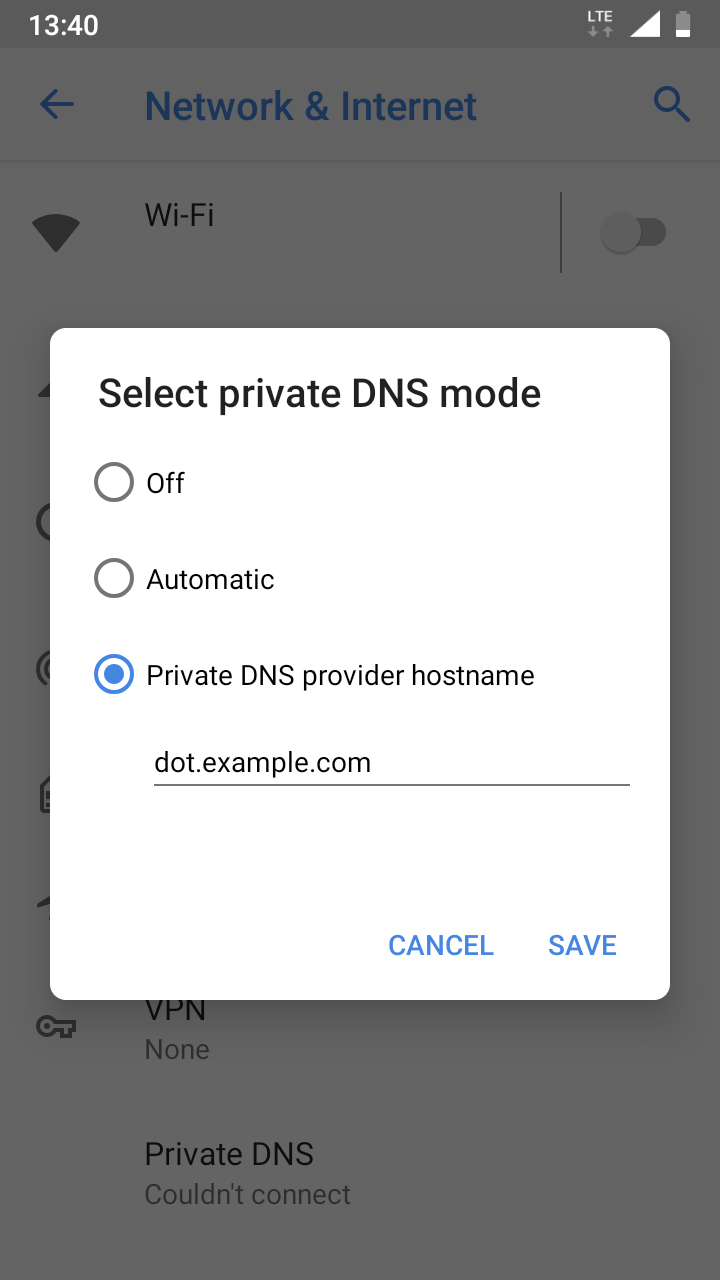
Connect using Android
- Go to
Settings>Network & Internet>Advanced>Private DNS>Private DNS provider hostname - Enter DoT hostname:
dot.example.com
Private Authoritative Server
Simple example of full powerdns stack including private authoritative nameserver and admin interface for editing DNS records.
Create private-authoritative.yml like this:
version: '2.1'

services:

  admin:
    image: chrisss404/powerdns:latest-admin
    depends_on:
      - admin-db
      - authoritative
    environment:
      - ADMIN_PDNS_API_KEY=api-secret-authoritative
      - ADMIN_USER_PASSWORD=very-secret
    networks:
      - admin-db
      - authoritative
    ports:
      - "80:3031"

  admin-db:
    image: postgres:12.1-alpine
    environment:
      - POSTGRES_DB=pda
      - POSTGRES_INITDB_ARGS=--data-checksums
      - POSTGRES_PASSWORD=pda
      - POSTGRES_USER=pda
    networks:
      - admin-db

  authoritative:
    image: chrisss404/powerdns:latest-authoritative
    depends_on:
      - authoritative-db
    environment:
      - AUTHORITATIVE_API=yes
      - AUTHORITATIVE_API_KEY=api-secret-authoritative
      - AUTHORITATIVE_WEBSERVER=yes
      - AUTHORITATIVE_WEBSERVER_PASSWORD=web-secret-authoritative
    networks:
      authoritative:
        ipv4_address: 172.31.118.118
      authoritative-db:
    ports:
      - "8081:8081/tcp"

  authoritative-db:
    image: postgres:12.1-alpine
    environment:
      - POSTGRES_DB=pdns
      - POSTGRES_INITDB_ARGS=--data-checksums
      - POSTGRES_PASSWORD=pdns
      - POSTGRES_USER=pdns
    networks:
      - authoritative-db

  dnsdist:
    image: chrisss404/powerdns:latest-dnsdist
    environment:
      - DNSDIST_API_KEY=api-secret-dnsdist
      - DNSDIST_PLAIN=yes
      - DNSDIST_QUIET=no
      - DNSDIST_WEBSERVER=yes
      - DNSDIST_WEBSERVER_PASSWORD=web-secret-dnsdist
    networks:
      - recursor
    ports:
      - "1053:53/tcp"
      - "1053:53/udp"
      - "8083:8083/tcp"

  recursor:
    image: chrisss404/powerdns:latest-recursor
    environment:
      - RECURSOR_API_KEY=api-secret-recursor
      - RECURSOR_DNSSEC=validate
      - RECURSOR_FORWARD_ZONES=sys=172.31.118.118
      - RECURSOR_QUIET=no
      - RECURSOR_TRUST_ANCHORS=sys=54970 13 1 27efe1c1a790c3cbb43b947d6d6dfac62507097e
      - RECURSOR_WEBSERVER=yes
      - RECURSOR_WEBSERVER_PASSWORD=web-secret-recursor
    sysctls:
      - net.ipv6.route.max_size=16384
    networks:
      recursor:
        ipv4_address: 172.31.117.117
      authoritative:
    ports:
      - "8082:8082/tcp"

networks:
  admin-db:
  authoritative:
    ipam:
      driver: default
      config:
        - subnet: "172.31.118.0/24"
  authoritative-db:
  recursor:
    ipam:
      driver: default
      config:
        - subnet: "172.31.117.0/24"
Then you can do the following:
# start powerdns stack
docker-compose -f private-authoritative.yml up

# send DNS queries
dig -p 1053 example.com

# PowerDNS admin interface
http://localhost:80

# PowerDNS authoritative stats
http://localhost:8081

# PowerDNS recursor stats
http://localhost:8082

# PowerDNS dnsdist stats
http://localhost:8083
Settings
Admin
| Env-Variable | Description |
|---|---|
| ADMIN_DB_HOST | Postgres host (default: admin-db) |
| ADMIN_DB_NAME | Postgres database (default: pda) |
| ADMIN_DB_PASS | Postgres password (default: pda) |
| ADMIN_DB_PORT | Postgres port (default: 5432) |
| ADMIN_DB_USER | Postgres username (default: pda) |
| ADMIN_PDNS_API_KEY | PowerDNS API key (default: pdns) |
| ADMIN_PDNS_API_URL | PowerDNS API URL (default: http://authoritative:8081/) |
| ADMIN_PDNS_VERSION | PowerDNS version number (default: 4.2.1) |
| ADMIN_SIGNUP_ENABLED | Allow users to sign up (default: no) |
| ADMIN_USER_EMAIL | Email address of admin user (default: [email protected]) |
| ADMIN_USER_FIRSTNAME | First name of admin user (default: Administrator) |
| ADMIN_USER_LASTNAME | Last name of admin user (default: User) |
| ADMIN_USER_PASSWORD | Password of admin user (default: admin) |
Authoritative
| Env-Variable | Description |
|---|---|
| AUTHORITATIVE_ALLOW_AXFR_IPS | Allow zonetransfers only to these subnets (default: 127.0.0.0/8,::1) |
| AUTHORITATIVE_ALLOW_NOTIFY_FROM | Allow AXFR NOTIFY from these IP ranges (default: 0.0.0.0/0,::/0) |
| AUTHORITATIVE_API | Enable/disable the REST API (default: no) |
| AUTHORITATIVE_API_KEY | Static pre-shared authentication key for access to the REST API (default: pdns) |
| AUTHORITATIVE_API_READONLY | Disallow data modification through the REST API when set (default: no) |
| AUTHORITATIVE_DB_HOST | Postgres host (default: authoritative-db) |
| AUTHORITATIVE_DB_NAME | Postgres database (default: pdns) |
| AUTHORITATIVE_DB_PASS | Postgres password (default: pdns) |
| AUTHORITATIVE_DB_PORT | Postgres port (default: 5432) |
| AUTHORITATIVE_DB_USER | Postgres username (default: pdns) |
| AUTHORITATIVE_DEFAULT_KSK_ALGORITHM | Default KSK algorithm (default: ecdsa256) |
| AUTHORITATIVE_DEFAULT_KSK_SIZE | Default KSK size (default: 0) |
| AUTHORITATIVE_DEFAULT_PUBLISH_CDNSKEY | Default value for PUBLISH-CDNSKEY (default: ) |
| AUTHORITATIVE_DEFAULT_PUBLISH_CDS | Default value for PUBLISH-CDS (default: ) |
| AUTHORITATIVE_DEFAULT_ZSK_ALGORITHM | Default ZSK algorithm (default: ) |
| AUTHORITATIVE_DEFAULT_ZSK_SIZE | Default ZSK size (default: 0) |
| AUTHORITATIVE_DIRECT_DNSKEY | Fetch DNSKEY, CDS and CDNSKEY RRs from backend during DNSKEY or CDS/CDNSKEY synthesis (default: no) |
| AUTHORITATIVE_DISABLE_AXFR | Disable zonetransfers but do allow TCP queries (default: yes) |
| AUTHORITATIVE_DNAME_PROCESSING | If we should support DNAME records (default: no) |
| AUTHORITATIVE_EXPAND_ALIAS | Expand ALIAS records (default: no) |
| AUTHORITATIVE_LOG_DNS_DETAILS | If PDNS should log DNS non-erroneous details (default: no) |
| AUTHORITATIVE_LOG_DNS_QUERIES | If PDNS should log all incoming DNS queries (default: no) |
| AUTHORITATIVE_LOGLEVEL | Amount of logging. Higher is more. Do not set below 3 (default: 4) |
| AUTHORITATIVE_MASTER | Act as a master (default: no) |
| AUTHORITATIVE_MAX_TCP_CONNECTION_DURATION | Maximum time in seconds that a TCP DNS connection is allowed to stay open (default: 0) |
| AUTHORITATIVE_MAX_TCP_CONNECTIONS | Maximum number of TCP connections (default: 20) |
| AUTHORITATIVE_QUERY_LOGGING | Hint backends that queries should be logged (default: no) |
| AUTHORITATIVE_RECEIVER_THREADS | Default number of receiver threads to start (default: 1) |
| AUTHORITATIVE_RESOLVER | Use this resolver for ALIAS and the internal stub resolver (default: no) |
| AUTHORITATIVE_RETRIEVAL_THREADS | Number of AXFR-retrieval threads for slave operation (default: 2) |
| AUTHORITATIVE_REUSEPORT | Enable higher performance on compliant kernels by using SO_REUSEPORT allowing each receiver thread to open its own socket (default: no) |
| AUTHORITATIVE_SLAVE | Act as a slave (default: no) |
| AUTHORITATIVE_SIGNING_THREADS | Default number of signer threads to start (default: 3) |
| AUTHORITATIVE_TCP_FAST_OPEN | Enable TCP Fast Open support on the listening sockets (default: 0) |
| AUTHORITATIVE_WEBSERVER | Start a webserver for monitoring on port 8081 (default: no) |
| AUTHORITATIVE_WEBSERVER_PASSWORD | Password required for accessing the webserver (default: pdns) |
Dnsdist
| Env-Variable | Description |
|---|---|
| DNSDIST_API_KEY | Static pre-shared authentication key for access to the REST API (default: pdns) |
| DNSDIST_DNSCRYPT | Listen for DNSCrypt queries on port 8443 (default: no) |
| DNSDIST_DNSCRYPT_PROVIDER_NAME | DNSCrypt provider name (default: 2.dnscrypt-cert.example.com) |
| DNSDIST_DNS_OVER_HTTPS | Listen for DNS-over-HTTPS queries on port 443 (default: no) |
| DNSDIST_DNS_OVER_HTTPS_DOMAIN | Domain name of DNS server. |
| DNSDIST_DNS_OVER_HTTPS_PATH | The absolute URI path. (default: /dns-query) |
| DNSDIST_DNS_OVER_TLS | Listen for DNS-over-TLS queries on port 853 (default: no) |
| DNSDIST_DNS_OVER_TLS_DOMAIN | Domain name of DNS server. |
| DNSDIST_PLAIN | Listen for plain DNS queries on port 53 (default: no) |
| DNSDIST_QUIET | Suppress logging of questions and answers (default: no) |
| DNSDIST_WEBSERVER | Start a webserver for REST API on port 8083 (default: no) |
| DNSDIST_WEBSERVER_PASSWORD | Password required for accessing the webserver (default: pdns) |
Recursor
| Env-Variable | Description |
|---|---|
| RECURSOR_ALLOW_FROM | If set, only allow these comma separated netmasks to recurse |
| RECURSOR_API_KEY | Static pre-shared authentication key for access to the REST API (default: pdns) |
| RECURSOR_API_READONLY | Disallow data modification through the REST API when set (default: yes) |
| RECURSOR_DNSSEC | DNSSEC mode: off / process-no-validate (default) / process / log-fail / validate |
| RECURSOR_FORWARD_ZONES | Zones for which we forward queries, comma separated domain=ip pairs |
| RECURSOR_FORWARD_ZONES_RECURSE | Zones for which we forward queries with recursion bit, comma separated domain=ip pairs |
| RECURSOR_LOGLEVEL | Amount of logging. Higher is more. Do not set below 3 (default: 3) |
| RECURSOR_QUIET | Suppress logging of questions and answers (default: no) |
| RECURSOR_TCP_FAST_OPEN | Enable TCP Fast Open support on the listening sockets, using the supplied numerical value as the queue size |
| RECURSOR_THREADS | Launch this number of threads |
| RECURSOR_TRUST_ANCHORS | Trust anchors for private zones when using DNSSEC validation, comma separated domain=ds-key pairs |
| RECURSOR_WEBSERVER | Start a webserver for REST API on port 8082 (default: no) |
| RECURSOR_WEBSERVER_PASSWORD | Password required for accessing the webserver (default: pdns) |
Tag summary
Content type
Image
Digest
sha256:db9c05b8c…
Size
24.4 MB
Last updated
about 18 hours ago
docker pull chrisss404/powerdns:nightly-recursor