cinny09/orca-q
The open source Next Generation database editor
2.5K
cinny09/orca-q repository overview
 OrcaQ - Next Generation database editor


Orca Query
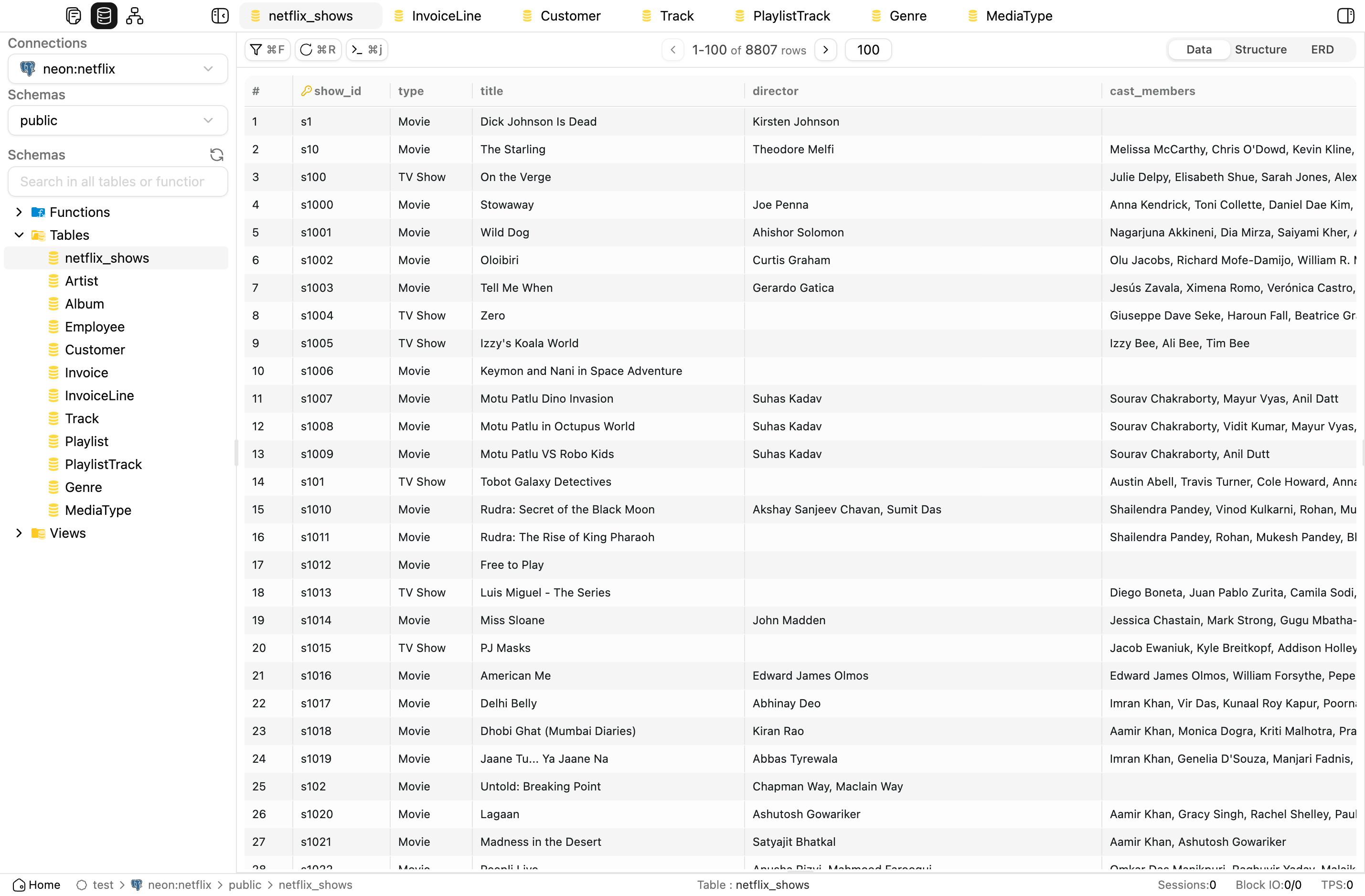
Overview
OrcaQ is a modern desktop application designed for managing, querying, and manipulating data across various database management systems (DBMS) in an intuitive, fast, and secure manner. Built with Electron, Vue 3, TypeScript, and Vite, it targets developers, data engineers, analysts, DBAs, or anyone who needs to work with SQL/PostgreSQL data on the desktop.
Features
- 🚀 Cross-platform Desktop App: Runs smoothly on Windows, macOS, and Linux thanks to Electron.
- 🖥️ Modern UI/UX: Minimalist interface with dark mode support, drag & drop, and flexible sidebar.
- ⚡ Quick Query: Fast data querying with preview, filtering, and dynamic field search.
- 📝 Raw SQL Editor: Write and execute SQL queries with multiple layout modes (vertical/horizontal).
- 🗂️ Explorer: Browse database structures, tables, schemas, and files.
- 🔒 Workspace & Connection Management: Manage multiple connections and independent workspaces.
- 🛠️ Hotkey Support: Supports shortcuts for faster operations.
- ⚙️ Electron Backend: Leverages Node.js, native modules, and OS integration.
Installation
Requirements
- Node.js >= 18.x
- pnpm or bun
- macOS, Windows, or Linux
Steps (Web setup)
-
Clone the repository:
git clone https://github.com/cin12211/orca-q.git cd orcaq -
Install dependencies:
bun install -
Run in development mode:
npm run nuxt:dev -
Build for production:
npm run nuxt:build
Steps (App setup)
-
Clone the repository:
git clone https://github.com/cin12211/orca-q.git cd orcaq -
Install dependencies:
bun install -
Run in development mode:
npm run dev -
Build for production:
npm run app:build
Note: Ensure you have the correct Node.js version and necessary dependencies installed to run Electron. See more at Electron Docs.
Usage
- Launch the app:
Runnpm run devto start the application in development mode. - Connect to a database:
Add a workspace, create a new connection, and enter DB details (PostgreSQL, etc.). - Quick Query:
Use the Quick Query tab to filter, search, and view table data. - SQL Editing:
Switch to the Raw Query tab to write and execute custom SQL queries. - Manage Layout:
Use the sidebar and hotkeys (Cmd+Shift+Bon Mac) to show/hide panels.
Contributing
We welcome all contributions!
-
Fork the repo and create a new branch:
git checkout -b feat/my-feature -
Follow commit conventions:
feat: ...Add a new featurefix: ...Fix a bugchore: ...Miscellaneous tasksdocs: ...Update documentationrefactor: ...Improve code without changing logic
-
Create a Pull Request:
Clearly describe changes and link to relevant issues (if any). -
Review & Merge:
The core team will review and provide feedback promptly.
See more: CONTRIBUTING.md
Roadmap
- Quick Query UI/UX
- Raw SQL Editor
- Sidebar/Panel Layout
- Support for multiple DBMS (MySQL, SQLite, etc.)
- Plugin/Extension system
- Export/Import workspace
- Multi-language support (i18n)
- AI query assistant integration
Changelog
See details at CHANGELOG.md
- 1.0.4: Updated UI, fixed layout bugs, optimized user experience.
- 1.0.2: First public release.
Community / Contact
- Issues: GitHub Issues
- Discussions: GitHub Discussions
- Email: [email protected]
License
This project is licensed under the MIT License.
Acknowledgements
- Electron - Build cross-platform desktop apps with JavaScript
- Vue 3 - Progressive JavaScript framework
- Vite - Next Generation Frontend Tooling
- TypeScript
- Zod - TypeScript-first schema validation
- @vueuse/core - Vue Composition API utilities
- Icon design: Figma Community
- Contributions from the open-source community
⭐ Stargazers
Many thanks to the kind individuals who leave a star. Your support is much appreciated!
Made with ❤️ by the OrcaQ team and open-source contributors.
Tag summary
Content type
Image
Digest
sha256:d5c7b0b75…
Size
277.2 MB
Last updated
6 months ago
docker pull cinny09/orca-q