ckaserer/cloudflare-dns-server
DNS connected to Cloudflare 1.1.1.1 DNS over TLS
1.5K
ckaserer/cloudflare-dns-server repository overview
Cloudflare DNS over TLS Docker container
Docker container running a DNS using Cloudflare 1.1.1.1 DNS over TLS (IPv4 only), with a built-in healthcheck











| Download size | Image size | RAM usage | CPU usage |
|---|---|---|---|
| 4.3MB | 9.58MB | 6MB | Very Low |
It is based on:
Diagrams are shown for router and client-by-client configurations in the Connect clients to it section
Testing it
docker run -it --rm -p 53:53/udp qmcgaw/cloudflare-dns-server -vvv
Note the -vvv to set the verbose level to 3. It defaults to 1 if no command is provided.
See the Connect clients to it section to finish testing.
Run it as a daemon
docker run -d --name=cloudflareTlsDNS -p 53:53/udp qmcgaw/cloudflare-dns-server
You can also download and use docker-compose.yml
Connect clients to it
Option 1: Router (recommended)
All machines connected to your router will use the 1.1.1.1 encrypted DNS by default
Configure your router to use the LAN IP address of your Docker host as its primary DNS address.
- Access your router page, usually at http://192.168.1.1 and login with your credentials
- Change the DNS settings, which are usually located in Connection settings / Advanced / DNS server
- If a secondary fallback DNS address is required, use Cloudflare address 1.1.1.1 without TLS
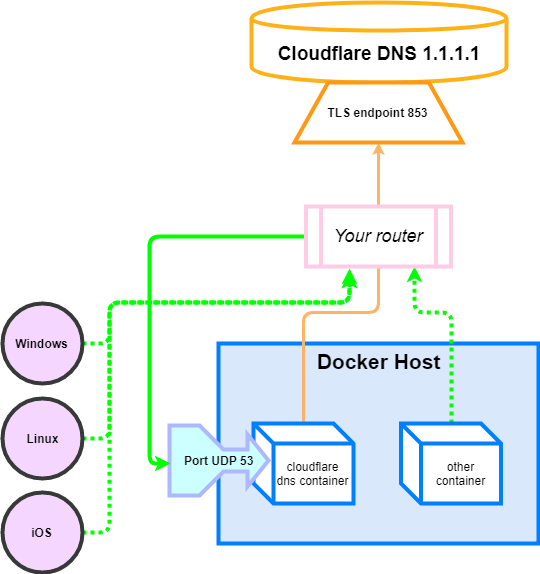
Option 2: Client, one by one
You have to configure each machine connected to your router to use the Docker host as their DNS server.

Docker containers
Connect other Docker containers by specifying the DNS to be 127.0.0.1
-
Use the argument
--dns=127.0.0.1with thedocker runcommand -
Or modify your docker-compose.yml by adding the following to your container description:
dns:
    - 127.0.0.1
Windows
- Open the control panel and follow the instructions shown on the screenshots below.

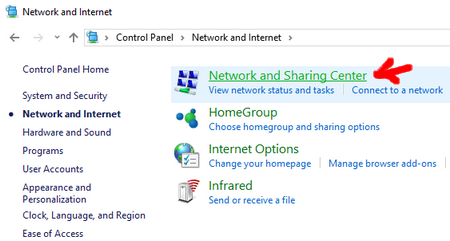
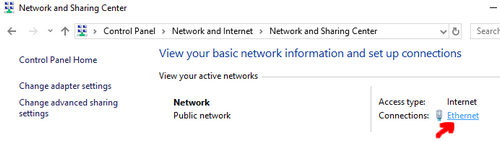
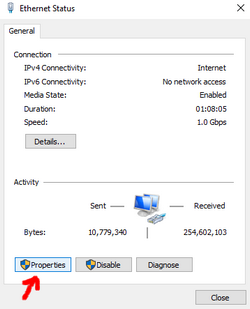

Enter the IP Address of your Docker host as the Preferred DNS server (192.168.1.210 in my case)
You can set the Cloudflare DNS server address 1.1.1.1 as an alternate DNS server although you might want to
leave this blank so that no domain name request is in plaintext.


When closing, Windows should try to identify any potential problems. If everything is fine, you should see the following message:

Mac OS
Follow the instructions at https://support.apple.com/kb/PH25577
Linux
You probably know how to do that. Otherwise you can usually modify the first line of /etc/resolv.conf by changing the IP address of your DNS server.
Android
See this
iOS
See this
Tag summary
Content type
Image
Digest
Size
5 MB
Last updated
almost 7 years ago
docker pull ckaserer/cloudflare-dns-server