cogitools/dolibarr
Image pour l'installation de Dolibarr suivant le Dockerfile du GitHub/Develop de Dolibarr Officiel
928
cogitools/dolibarr repository overview
UTILISATION DE L'IMAGE
Récupérer l'image sur son serveur :
docker pull cogitools/dolibarr/
Créer un container à partir de cette image et le renommer :
docker run -d -p 80:80 --name dolibarr_cogitools cogitools/dolibarr
DOLIBARR ERP & CRM
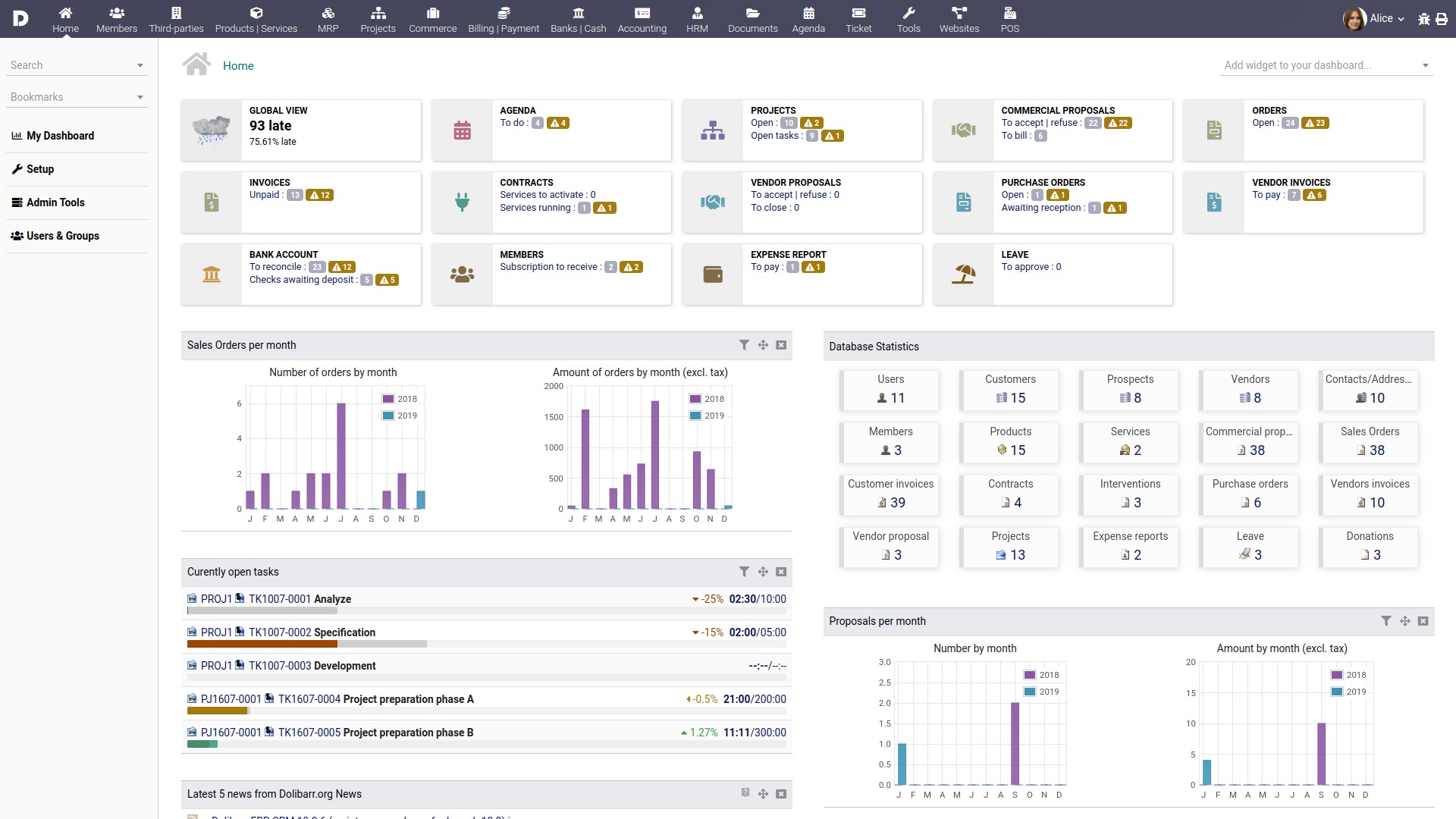
Dolibarr ERP & CRM is a modern software to manage your company or foundation activity (contacts, suppliers, invoices, orders, stocks, agenda, ...).It's an opensource software (wrote with PHP language) designed for small and medium companies, foundation and freelances. You can freely install, use and distribute it as a standalone application or as a web application to use it from every internet access and media.
LICENSE
Dolibarr is released under the terms of the GNU General Public License as published by the Free Software Foundation; either version 3 of the License, or (at your option) any later version (GPL-3+).
INSTALL
If you have no technical knowledge, and you are looking for an autoinstaller to install Dolibarr ERP/CRM in few clicks, you must download DoliWamp (the all-in-one package of Dolibarr for Windows), DoliDeb (the all-in-one package of Dolibarr for Debian or Ubuntu) or DoliRpm (the all-in-one package of Dolibarr for Fedora, Redhat, Opensuse, Mandriva or Mageia).
You can download this from the download area of [Official website] (http://www.dolibarr.org/)
If you already have installed a Web server and a Mysql database, you can install the standard version like this:
-
Uncompress the downloaded archive.
-
Copy directory "dolibarr" and all its files inside your web server root, or copy directory anywhere and set up your web server to use "dolibarr/htdocs" as root for a new web server virtual host (second choice need to be server administrator).
-
Create an empty file "htdocs/conf/conf.php" and set permissions for your web server user (write permissions will be removed once install is finished).
-
From your browser, call the dolibarr "install/" page.
Url depends on choice made on first step:
http://localhost/dolibarr/htdocs/install/
or
http://localhost/dolibarr/install/
or
http://yourdolibarrvirtualhost/install/
- Follow instructions provided by installer...
UPGRADE
To upgrade Dolibarr from an old version to this one:
-
Overwrite all old files inside old 'dolibarr' directory by files provided into new version package.
-
If you came from version x.y.z to x.y.w (only third number differ), there is no need to run any migrate process.
-
If you came from a beta version or from any version x.y.z to any other where x or y number differs, you must call the Dolibarr "install/" page in your browser (this should be done automatically at first dolibarr access).
This URL should looks like:
http://localhost/dolibarr/htdocs/install/
or
http://localhost/dolibarr/install/
or
http://yourdolibarrhost/install/
Then choose the "update" option according to your case. Note: Migrate process can be ran safely several times.
WHAT'S NEW
See ChangeLog file found into package.
WHAT DOLIBARR CAN DO
Main modules/features:
- Customers, Prospects or Suppliers directory.
- Products and services catalog.
- Bank accounts management.
- Orders management.
- Commercial proposals management.
- Contracts management.
- Invoices management.
- Payments management.
- Standing orders management.
- Stock management.
- Shipping management.
- PDF or ODT generation for invoice, proposals, orders...
- Agenda with ical,vcal export for third tools integration.
- EDM (Electronic Document Management).
- Foundations members management.
- Employee's holidays management.
- Mass Emailing.
- Realize surveys.
- Point of Sale.
Other modules:
- Bookmarks management.
- Donations management.
- Reporting.
- Data export/import.
- Third parties or products categories.
- LDAP connectivity.
- ClickToDial integration.
- RSS integration.
- Can be extended with a lot of other external modules available onto DoliStore.com.
Miscellaneous:
- Multi-user, with several permissions levels for each feature.
- Very user friendly and easy to use.
- Highly customizable: Enable only modules you need, user personalized fields, choose your skin, several menu managers (can be used by internal users as a back-office with a particular menu, or by external users as a front-office with another one).
- Works with PHP 5.3+, MySql 4.1 or PostgreSQL 8.1.
- Require PHP and Mysql or Postgresql (See exatc versions on http://wiki.dolibarr.org/index.php/Prerequisite).
- Compatible with all Cloud solutions that match MySql, PHP or PostgreSQL prerequisites.
- An easy to understand, maintain and code interfaces with your own system information (PHP with no heavy frameworks, trigger and hook architecture).
- Support countries specific features:
Spanish Tax RE and ISPF.
French NPR VAT rate (VAT called "Non Perçue Récupérable" for DOM-TOM).
Canadian double taxes (federal/province) and other countries using cumulative VAT.
Tunisian tax stamp.
Compatible with European directives (2006/112/CE ... 2010/45/UE) (http://europa.eu/legislation_summaries/taxation/l31057_en.htm) ...
WHAT DOLIBARR CAN'T DO YET (TODO LIST)
This is features that Dolibarr does not support completely yet:
- No double party accountancy (only bank and treasury management).
- Dolibarr manage one currency at once (mono-currency).
- Dolibarr manage one master activity (mono-company). If you want to manage several companies or foundations, you must install several time the software (on same server or not). Another solution is to extend Dolibarr with the addon Module MultiCompany that allows to manage several companies in one Dolibarr instance (one database but with a logical isolation of datas).
- Tasks on module project can't have dependencies between each other.
- Dolibarr does not contains Payroll module.
- Dolibarr does not include any Webmail.
- Dolibarr can't do coffee (not yet).
SOCIAL NETWORKS
Follow Dolibarr project on
Facebook: https://www.facebook.com/dolibarr
Google+: https://plus.google.com/+DolibarrOrg
Twitter: http://www.twitter.com/dolibarr
Tag summary
Content type
Image
Digest
sha256:1753d56cf…
Size
-
Last updated
almost 11 years ago
docker pull cogitools/dolibarr