corundex/comfyui-rocm
ComfyUI with AMD ROCm support for GPU-accelerated AI image generation on AMD RX 6000/7000+ GPUs
50K+
corundex/comfyui-rocm repository overview
ComfyUI ROCm Docker Image
🔥 ComfyUI with AMD ROCm support - Run ComfyUI on AMD GPUs with optimized ROCm-compatible dependencies.



corundex/comfyui-rocm GitHub repository
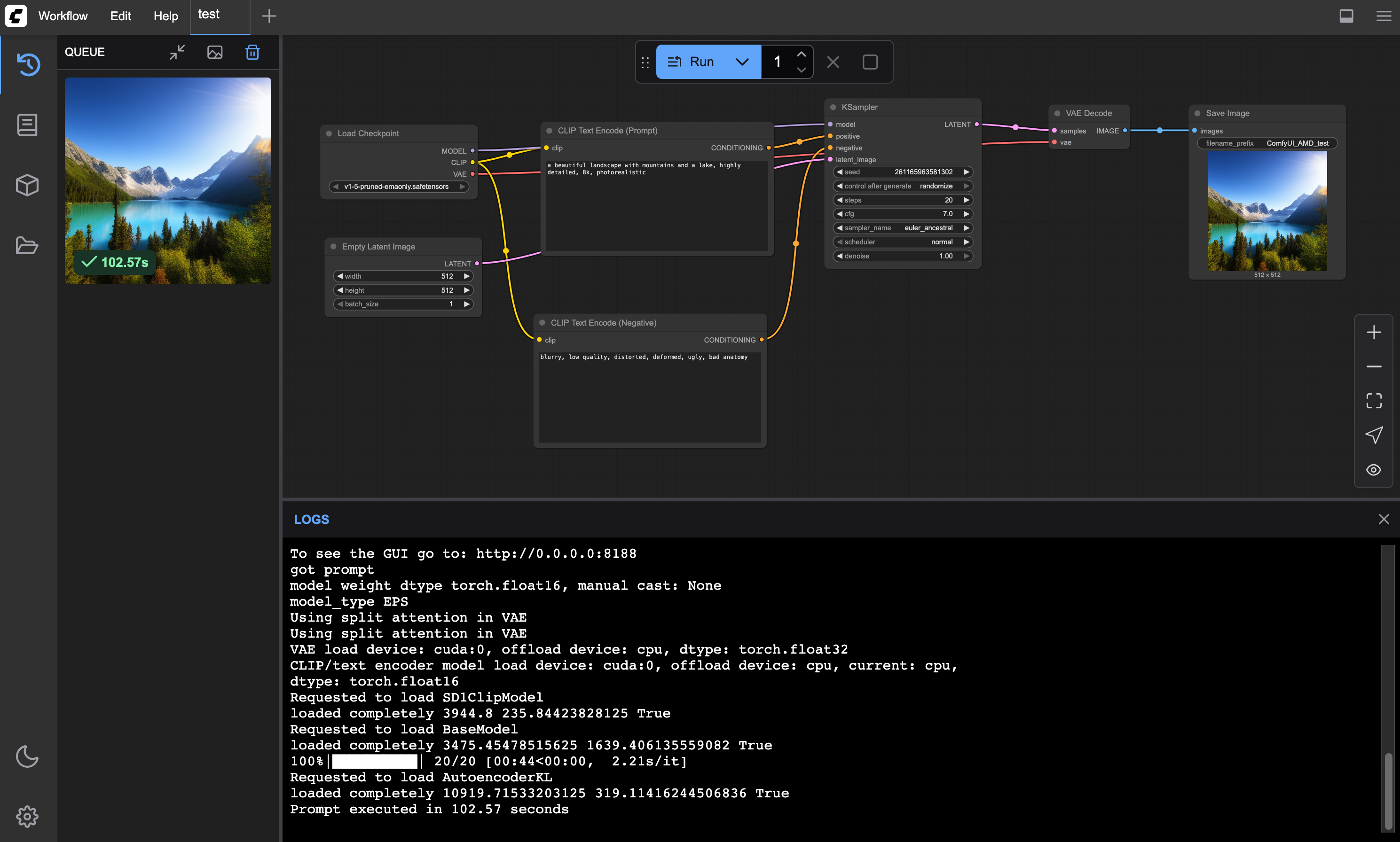 ComfyUI running on AMD ROCm with sample workflow and generated landscape image
📋 Version Information
- Base Image:
rocm/pytorch:rocm6.4.1_ubuntu24.04_py3.12_pytorch_release_2.6.0 - Python: 3.12.10
- PyTorch: 2.6.0+git684f6f2
- ROCm: 6.4.43483-a187df25c
- ComfyUI: v0.3.43 (e18f53c, 2025-06-27)
📦 What's Different from Standard ComfyUI?
This ROCm-optimized build:
- ✅ Uses ROCm PyTorch instead of CUDA PyTorch
- ✅ Pre-tested dependencies on real AMD hardware
🧪 Tested Package Compatibility
All packages in this container have been tested on real AMD hardware. See requirements_rocm.txt for the complete lists:
✅ ROCm-Compatible Packages (18 total):
comfyui-frontend-package==1.23.4comfyui-workflow-templates==0.1.30comfyui-embedded-docs==0.2.3torchsdeeinopstransformers>=4.37.2tokenizers>=0.13.3sentencepiecesafetensors>=0.4.2pyyamlPillowalembicSQLAlchemykornia>=0.7.1spandrelav>=14.2.0pydantic~=2.0pydantic-settings~=2.0
📦 Pre-installed in ROCm Base (9 total):
torchtorchvisionnumpy>=1.25.0aiohttp>=3.11.8yarl>=1.18.0scipytqdmpsutilsoundfile
🌙 Incompatible packages (1 total):
torchaudio- Excluded from the image
🚀 Quick Start
# Pull and run ComfyUI with ROCm support
docker run -d \
  --device=/dev/kfd \
  --device=/dev/dri \
  --group-add=video \
  -p 8188:8188 \
  -v $(pwd)/models:/workspace/ComfyUI/models \
  -v $(pwd)/output:/workspace/ComfyUI/output \
  corundex/comfyui-rocm:latest
Access ComfyUI at: http://localhost:8188
🎯 What's Included
- ComfyUI - Latest stable version
- ROCm-optimized PyTorch - AMD GPU acceleration
- Filtered dependencies - Only ROCm-compatible packages
- Ready-to-use workflow - Sample workflow included
- Persistent storage - Models and outputs preserved
📋 Requirements
Hardware
- AMD GPU with ROCm support (RX 6000+, RX 7000+, etc.)
- 8GB+ VRAM (16GB+ recommended for larger models)
Software
- Docker with GPU support
- ROCm drivers 6.4+ installed on host
- Linux (Ubuntu 24.04+ recommended)
🔧 Installation & Setup
1. Install ROCm Drivers
# Ubuntu/Debian
curl -fsSL https://repo.radeon.com/rocm/rocm.gpg.key | sudo gpg --dearmor -o /etc/apt/keyrings/rocm.gpg
echo "deb [arch=amd64 signed-by=/etc/apt/keyrings/rocm.gpg] https://repo.radeon.com/rocm/apt/6.4 jammy main" | sudo tee /etc/apt/sources.list.d/rocm.list
sudo apt update && sudo apt install rocm-dkms
sudo usermod -a -G render,video $USER
2. Verify ROCm Installation
rocm-smi
# Should show your AMD GPU(s)
3. Run ComfyUI Container
docker run -d \
  --name comfyui-rocm \
  --device=/dev/kfd \
  --device=/dev/dri \
  --group-add=video \
  -p 8188:8188 \
  -v ./models:/workspace/ComfyUI/models \
  -v ./output:/workspace/ComfyUI/output \
  -v ./input:/workspace/ComfyUI/input \
  -v ./custom_nodes:/workspace/ComfyUI/custom_nodes \
  corundex/comfyui-rocm:latest
📁 Volume Mounts
| Host Path | Container Path | Purpose |
|---|---|---|
./models | /workspace/ComfyUI/models | Store models (checkpoints, VAE, LoRA, etc.) |
./output | /workspace/ComfyUI/output | Generated images and videos |
./input | /workspace/ComfyUI/input | Input images for processing |
./custom_nodes | /workspace/ComfyUI/custom_nodes | Custom ComfyUI extensions |
🎛️ Smart Model Management
The ComfyUI Docker image includes an intelligent model management system that automatically downloads models based on your needs.
Model Download Modes
Control model downloading with the MODEL_DOWNLOAD environment variable:
MODEL_DOWNLOAD=default (Default)
Downloads essential model to get started:
- Stable Diffusion 1.5 - Most popular base model (4GB)
MODEL_DOWNLOAD=common
Downloads comprehensive starter set:
- Stable Diffusion 1.5 + SD 1.5 VAE
- SDXL Base 1.0 + SDXL Refiner 1.0
- ControlNet models (Canny, Depth, OpenPose)
- Real-ESRGAN upscalers (4x General + 4x Anime)
- EasyNegative embedding
MODEL_DOWNLOAD=realistic
Downloads realistic photo models:
- Realistic Vision v5.1 - High-quality realistic images
- DreamShaper 8 - Versatile realistic model
- Realistic VAE
MODEL_DOWNLOAD=photorealistic
Downloads SDXL-based photorealistic models:
- Juggernaut XL v9 - Top-tier SDXL photorealism
- RealVisXL V4.0 - Excellent SDXL realistic model
MODEL_DOWNLOAD=artistic
Downloads creative/stylized models:
- Deliberate v2 - Artistic and painterly style
MODEL_DOWNLOAD=all
Downloads everything from all model sets above (⚠️ Large download ~100GB+)
MODEL_DOWNLOAD=none
Skips all downloads - uses only existing models in volumes
Custom Model Sets
Add your own sections to models.yaml and use them:
MODEL_DOWNLOAD=mycustom
Docker Usage Examples
Basic Usage (SD 1.5 only)
docker run -d \
  --device=/dev/kfd --device=/dev/dri --group-add=video \
  -p 8188:8188 \
  -v ./models:/workspace/ComfyUI/models \
  corundex/comfyui-rocm:latest
Common Model Set
docker run -d \
  --device=/dev/kfd --device=/dev/dri --group-add=video \
  -p 8188:8188 \
  -e MODEL_DOWNLOAD=common \
  -v ./models:/workspace/ComfyUI/models \
  corundex/comfyui-rocm:latest
All Models (Large Download)
docker run -d \
  --device=/dev/kfd --device=/dev/dri --group-add=video \
  -p 8188:8188 \
  -e MODEL_DOWNLOAD=all \
  -v ./models:/workspace/ComfyUI/models \
  corundex/comfyui-rocm:latest
No Downloads (Use Existing Models)
docker run -d \
  --device=/dev/kfd --device=/dev/dri --group-add=video \
  -p 8188:8188 \
  -e MODEL_DOWNLOAD=none \
  -v ./models:/workspace/ComfyUI/models \
  corundex/comfyui-rocm:latest
Smart Features
Automatic Skip Existing
- Never re-downloads existing models
- Validates file sizes - redownloads corrupted files
- Resume support - continues interrupted downloads
Model Inventory
On startup, see what's available:
[ComfyUI] Current model inventory:
  checkpoints: 3 models
  vae: 1 models
  loras: 2 models
  upscale_models: 1 models
  controlnet: 3 models
  embeddings: 1 models
Customizing Models
Edit models.yaml
Add your own model sections in YAML format:
models:
  mycustom:
    - name: "My Custom Model"
      url: "https://example.com/model.safetensors"
      path: "checkpoints/my_model.safetensors"
      min_size: 2000000000
    - name: "Another Model"
      url: "https://example.com/model2.safetensors"
      path: "checkpoints/model2.safetensors"
      min_size: 4000000000
Model Configuration Format
- name: Human-readable description
- url: Download URL
- path: Relative path from
/workspace/ComfyUI/models/ - min_size: Minimum file size in bytes for validation
🎨 Getting Started
Load Sample Workflow
- Open ComfyUI at
http://localhost:8188 - Click "Load" → "Upload"
- Upload
sample_workflow.json(included in this directory) - Click "Queue Prompt" to generate your first image!
🐳 Docker Compose (Recommended)
Create docker-compose.yml:
version: '3.8'

services:
  comfyui-rocm:
    image: corundex/comfyui-rocm:latest
    container_name: comfyui-rocm
    devices:
      - /dev/kfd:/dev/kfd
      - /dev/dri:/dev/dri
    group_add:
      - video
    ports:
      - "8188:8188"
    volumes:
      # Model storage (checkpoints, VAE, LoRA, etc.)
      - ./data/models:/workspace/ComfyUI/models
      # Generated images and outputs
      - ./data/output:/workspace/ComfyUI/output
      # Input images for processing
      - ./data/input:/workspace/ComfyUI/input
      # Custom nodes and extensions
      - ./data/custom_nodes:/workspace/ComfyUI/custom_nodes
      # ComfyUI user settings and workflows
      - ./data/user:/workspace/ComfyUI/user
    environment:
      # Model download behavior: default, common, realistic, photorealistic, artistic, all, none
      - MODEL_DOWNLOAD=default
      # ROCm environment
      - HIP_VISIBLE_DEVICES=0
      - CUDA_VISIBLE_DEVICES=""
    restart: unless-stopped
Run with: docker compose up -d
Recommended Volume Structure
./data/
├── models/           # AI models (checkpoints, VAE, LoRA, etc.)
│   ├── checkpoints/  # Main AI models (.safetensors)
│   ├── vae/         # VAE models for better image quality
│   ├── loras/       # LoRA fine-tuning models
│   ├── embeddings/  # Text embeddings
│   ├── controlnet/  # ControlNet guidance models
│   └── upscale_models/ # Image upscaler models
├── output/          # Generated images and videos
├── input/           # Input images for processing
├── custom_nodes/    # ComfyUI extensions
└── user/            # User settings and saved workflows
🧪 Tested Hardware
- AMD Radeon RX 9060 XT (16GB VRAM) ✅
⚡ Performance Notes
- Image Generation: ~30-60 seconds for 512x512 (depends on model and steps)
- Memory Usage: 4-8GB VRAM for basic operations
- Model Loading: ~30-60 seconds first time, cached afterward
- Batch Processing: Supported for multiple images
🚀 Performance Tips
- Use Persistent Volumes: Always mount model directories to avoid re-downloading
- Start with
default: Test with basic model first - Upgrade to
all: Download full set when ready - Custom Sets: Create targeted collections for specific workflows
- External Storage: Use fast SSD for model storage
🔍 Troubleshooting
Container won't start
# Check ROCm drivers
rocm-smi

# Check Docker GPU access
docker run --rm --device=/dev/kfd --device=/dev/dri rocm/pytorch:latest rocm-smi
ComfyUI shows "No GPU detected"
# Verify ROCm in container
docker exec comfyui-rocm python -c "import torch; print(f'ROCm: {torch.cuda.is_available()}')"
Model Download Failures
- Check internet connection
- Verify HuggingFace/source availability
- Check disk space in mounted volumes
- Review logs for specific error messages
Model Not Found
- Ensure model downloaded successfully
- Check file permissions in mounted volumes
- Verify model file isn't corrupted (size check)
Startup Issues
- Check MODEL_DOWNLOAD value is valid
- Ensure volumes are properly mounted
- Review container logs for errors
Out of memory errors
- Reduce batch size in workflow
- Use smaller models
- Ensure sufficient VRAM (8GB minimum)
📄 License
This Docker image packages ComfyUI with ROCm support. ComfyUI is licensed under GPL-3.0.
🤝 Contributing
Found an issue or want to contribute? Visit our GitHub repository to:
- Report bugs
- Suggest improvements
- Submit pull requests
- Share your AMD GPU test results
📄 License & Credits
This project is licensed under GPL-3.0.
Third-Party Components
🙏 Acknowledgments
Tag summary
Content type
Image
Digest
sha256:3079597cb…
Size
21.5 GB
Last updated
over 1 year ago
docker pull corundex/comfyui-rocm