corysanin/seance
A self-hostable contact form for Ghost blogs
6.7K
corysanin/seance repository overview
Seance for Ghost
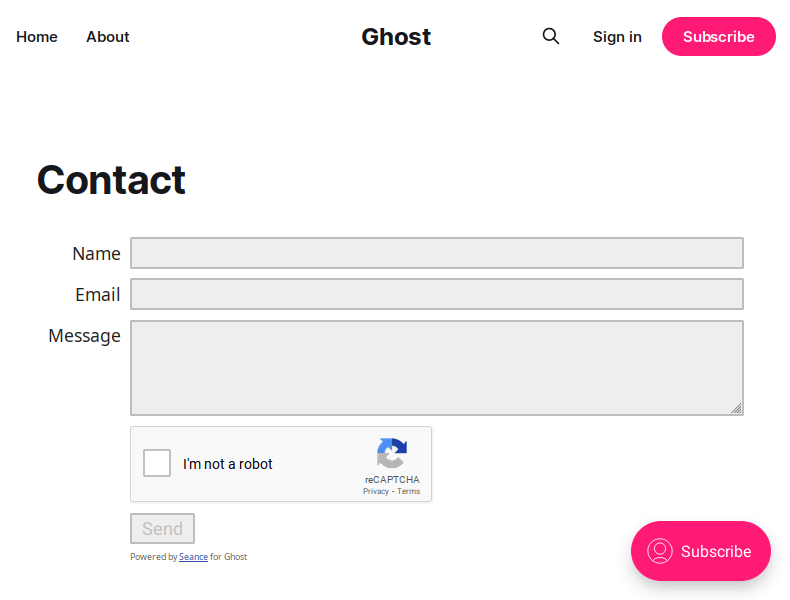
Self-hostable contact form service for Ghost blogs. Or any other applications you can think of. The limit is in your mind.
Add a contact form to your Ghost site without a subscription!
Install and run
bun install
To run:
bun run index.ts [path/to/config.json5]
A docker image ghcr.io/corysanin/seance is provided. A list of tags is available here.
See docker-compose.yml.
Configuration
Seance takes a JSON or JSON5 config file (default location is config/config.json):
{
    // The port the web server will run on (default 8080)
    "port": number,
    // Array of hosts allowed to embed the contact form. Default is to allow all (not recommended)
    allowedHosts: string[],
    // If using reCAPTCHA, provide the site key
    recaptchaKey: string,
    // If using reCAPTCHA, provide the site secret
    recaptchaSecret: string,
    // The Nodemailer transport configuration. See https://nodemailer.com/smtp/
    smtp: SMTPTransport | SMTPTransport.Options,
    // The address to send emails from. Defaults to the smtp username
    senderAddress: string,
    // The address to send emails to
    recipientAddress: string,
    // The subject prefix for all mail sent using this form. Default is "Form submission"
    subject: string,
}
Ghost Installation
Create a page for your contact form. Add an "Other" embed section. Enter your Seance instance's URL:
https://contact.example.com/?dark=false
If you're using a dark theme you can change the dark parameter to true. Note that the dark mode may look weird in the editor. It will look better on the live site.
Tag summary
Content type
Image
Digest
sha256:30efc6669…
Size
70.2 MB
Last updated
21 days ago
docker pull corysanin/seance