cppis/herald
:octocat: elio means event loop io library. Herald written with elio is simple app to test pub/sub o
10K+
cppis/herald repository overview
Herald
Herald means a messanger.
It is a simple app to test pub/sub of backing emqx MQTT broker.
Herald is written using elio library.

- Docker Hub: cppis/herald
Prerequisites
⚙️ Setting Go on WSL
Covers Go settings on WSL.
⚙️ Setting up elio
Before start, set up elio project.
git clone https://github.com/cppis/elio && cd elio
go mod vendor
export ELIO_ROOT=$(pwd)
Now, $ELIO_ROOT is the project root path.
⚙️ Setting Docker on WSL
Covers Docker settings on WSL.
⚙️ Setting Kubernetes on WSL
Covers Kind+Skaffold settings on WSL for continuous developing a Kubernetes-native app.
⚙️ Setting Service Ports
Covers the port settings for the Kubernetes Service.
Running app on Host
You can easily run a Herald container on the host (without MQTT Broker):
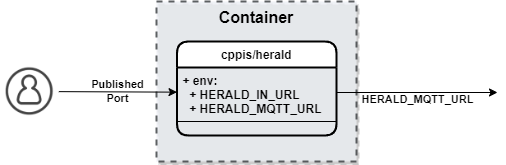
🚀 Using go run
To run Herald service, run the following command:
HERALD_IN_URL="0.0.0.0:7003" go run ./app/herald
You can change the listening url of service Herald by changing
environment variable HERALD_IN_URL.
🚀 Using Docker
To run Herald container, run the following command:
docker run -d -e HERALD_IN_URL="0.0.0.0:7003" -p 7003:7003 --name herald cppis/herald:latest
To kill Herald container, run the following command:
docker rm -f herald
Running app on Kubernetes
You can easily run a Herald + emqx(MQTT Broker) chart on the kubernetes cluster.
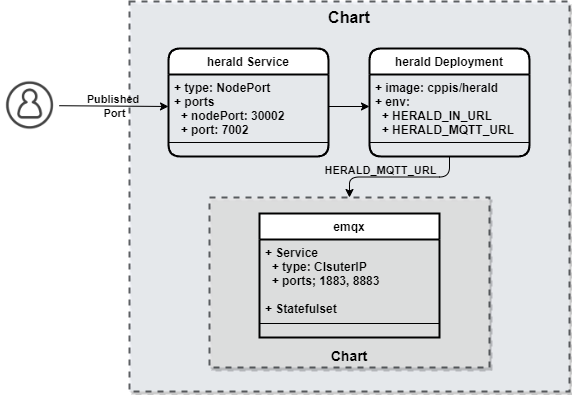
If the kubernetes cluster does not exist, Follow the next step Create a Kind cluster.
If you have, Follow the next step 'Using Helm' or 'Using Skaffold'.
🚀 Create a Kind cluster
To create a kind, run the following command:
kind create cluster --config app/assets.k8s/kind.cluster.yaml --name elio
To check if the kind cluster is up and running, run the following command:
kubectl config current-context
  kind-elio
🚀 Using Helm
To deploy using helm, run the following command:
helm upgrade --install herald app/herald/assets.k8s/helm
helm uninstall herald
🚀 Using Skaffold
To run herald using Skaffold,
run the following command in the Project root directory:
skaffold -f app/herald/assets.k8s/skaffold.yaml dev
To debugging
Skaffold, use option-vdebug.
To change detection triggered to manual mode, use option
--trigger=manual.
Or, to run Herald in debugging mode using Skaffold, run the following command:
skaffold -f app/herald/assets.k8s/skaffold.yaml debug
Testing app
You can test echo easily by using telnet.
app protocol is custom t2p like http.
procotol header is separated by newline(\n or \r\n).
And packet delimiter is double newline(\n\n or \r\n\r\n).
🚀 connect
connect to echo using telnet
telnet localhost 7003
🚀 echo
echo message
echo<newline>
{message}<newline><newline>
🚀 sub
subcribe to topic
sub<newline>
{topic}<newline><newline>
🚀 unsub
unsubcribe from topic
unsub<newline>
{topic}<newline><newline>
🚀 pub
publish message to topic
pub<newline>
{topic}<newline>
{message}<newline><newline>
Ending app
🏁 Kubernetes resource cleanup
After running skaffold run or skaffold deploy and deploying your app to a cluster, running skaffold delete will remove all the resources you deployed. Cleanup is enabled by default, it can be turned off by --cleanup=false
🏁 Ctrl + C
When running skaffold dev or skaffold debug, pressing Ctrl+C (SIGINT signal) will kick off the cleanup process which will mimic the behavior of skaffold delete. If for some reason the Skaffold process was unable to catch the SIGINT signal, skaffold delete can always be run later to clean up the deployed Kubernetes resources.
To enable image pruning, you can run Skaffold with both --no-prune=false and --cache-artifacts=false:
skaffold dev --no-prune=false --cache-artifacts=false
🏁 Delete a Kind cluster
To delete a Kind cluster, run the following command:
kind delete cluster --name elio
Troubleshooting
Shows some tips to solve the problem.
Tag summary
Content type
Image
Digest
sha256:ded2f531c…
Size
7.6 MB
Last updated
about 4 years ago
docker pull cppis/herald