craft4fun/pimoo
piMoo is a php-based party player using a console mpg player. With webinterface and rest-api.
2.0K
craft4fun/pimoo repository overview
craft4fun presents piMoo
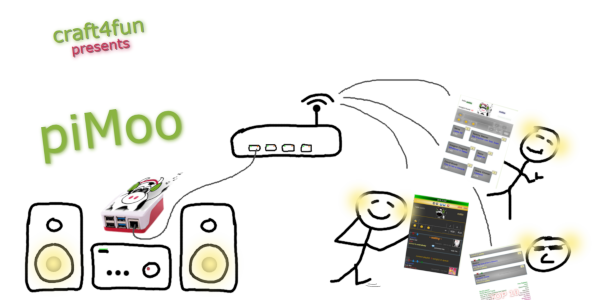
1. Basic steps to make it work
1.1 Restore feedback.xml
You can skip this step if you never have used piMoo before or don't have a feedback.xml to restore!
If you have used piMoo before and want to add your own "feedback.xml", you have to copy it to the root of your music path. It will be synchronized then with the mediabase. Keep in mind, that futher feedbacks will go to the feedback.xml in the volume under "keep/". You can download it in the backend area to save it!
1.2 Create a volume for permanent data (mediabase and feedback)
Creating a volume manually is only required for special purposes. Normally it will be created automatically with docker run (see below) and you can skip this step either.
docker volume create vol-pimoo
2. Run container with mapped path to your music files
(-v /path/to/music/:/music/)
2.1 Raspberry Pi OS 64 Bit (arm64)
docker run -d --name pimoo \
  -p 8080:80 \
  -v /home/pi/music/:/music/ \
  -v vol-pimoo:/var/www/html/keep/ \
  --device /dev/snd \
  -e ADM_PASSWD='secret' \
  --restart always \
  --device /dev/input/event0 \
  --privileged  -v /sys/class/gpio/:/sys/class/gpio/ \
craft4fun/pimoo:arm64
2.2 Debian like Linux machine 64 Bit (amd64 aka x64)
docker run -d --name pimoo \
  -p 8080:80 \
  -v /home/pi/music/:/music/ \
  -v vol-pimoo:/var/www/html/keep/ \
  --device /dev/snd \
  -e ADM_PASSWD='secret' \
  --restart unless-stopped \
  craft4fun/pimoo:amd64
2.3 Options
These arguments are optionally and depends on features you want to use:
  -e ADM_PASSWD='secret' (backend password - if don't set, it will stay default)
  --restart always (especially in headless mode this is useful)
  --device /dev/input/event0 (event0 is triggerhappy's mouse detection)
  --device /dev/input:/dev/input (triggerhappy's keyboard detection)
  --privileged  -v /sys/class/gpio/:/sys/class/gpio/ (gpio pin control)
  ~~ --device /dev/gpiomem (gpio pin control) ~~
2.3.1 Example for raspberry pi running in headless mode
docker run -d --name pimoo \
  -p 8080:80 \
  -v /home/pi/music/:/music/ \
  -v vol-pimoo:/var/www/html/keep/ \
  --device /dev/snd \
  -e ADM_PASSWD='secret' \
  --restart always \
  --device /dev/input/event0 \
  --privileged  -v /sys/class/gpio/:/sys/class/gpio/ \
craft4fun/pimoo:arm64
2.3.2 Example for raspberry pi running with desktop (e.g. pi400)
docker run -d --name pimoo \
  -p 8080:80 \
  -v /home/pi/music/:/music/ \
  -v vol-pimoo:/var/www/html/keep/ \
  --device /dev/snd \
  -e ADM_PASSWD='secret' \
  --restart unless-stopped \
  -e TRIGGERHAPPY='keyboard' \
  --device /dev/input:/dev/input \
craft4fun/pimoo:arm64
2.3.3 Example for raspberry pi without triggerhappy at all
docker run -d --name pimoo \
  -p 8080:80 \
  -v /home/pi/music/:/music/ \
  -v vol-pimoo:/var/www/html/keep/ \
  --device /dev/snd \
  -e ADM_PASSWD='secret' \
  --restart unless-stopped \
  -e TRIGGERHAPPY='disabled' \
craft4fun/pimoo:arm64
3. Known issues
There are some sound card issues, still it doesn't work well with every Raspberry Pi device.
Raspberry Pi 1 ...OK
Raspberry Pi 3b+ ...OK
Raspberry Pi 4 ...OK
Raspberry Pi 400 ...NOK [1]
[1] Depends on connection type, e.g. HDMI with DENON amplifier works perfectly
4. Start using it
4.1 access in browser
http://your-docker-machine:8080
4.2 Running first time
4.2.1 Early versions
When you're running piMoo for the first time, you have to initiate your music mediabase. Either click onto the slightly hidden [become admin] link or you enter http://your-docker-machine:8080/admin directly. Then click onto the blue button "(re-) import mediabase".
4.2.2 Latest versions
The mediabase is created automatically (if not existing yet) on container start - depending on the amount of your files this could take some time, please be patient - you can watch the progress with docker logs -f pimoo. And don't get scared, in best case the music starts playing after that directly ;)
5. More possibilities
5.1 Shutdown Docker host by piMoo container
One feature of piMoo is, to shutdown the computer (in this case the Docker host) by three possibilities:
- Last song in playlist has been played and piMoo is configured in "none-party" and "Debian" mode.
- Shutdown with red button in backend.
- Shutdown with middle mouse button when no song is playing (useful, because Raspberry Pi has no shutdown button)
Unfortunatelly this is not possible from inside a container, so there is one thing you have to set-up in the host environment if you want to use this feature:
#!/bin/bash

# This script (shutdownDetection.sh) is required to shutdown the host system from inside the piMoo docker container.
# Requires "apt install inotify-tools" on the host machine.
# Copy it to host systems /root/ path, make it executable with chmod +x and trigger it like this after reboot:
# crontab -e
# @reboot /root/shutdownDetection.sh > /root/shutdownDetection.log 2>&1

if [ ! -x "$(command -v inotifywait)" ]; then
  echo 'inotify not found, please install with: apt install inotify-tools' >&2
  exit 1
fi

while true; do
  inotifywait -e modify /var/lib/docker/volumes/vol-pimoo/_data/PIPE/shutdown && \
  docker container stop pimoo && \
  /sbin/shutdown -h now;
  sleep 2
done
6. References
6.1 Project page
https://gitlab.com/craft4fun/pimoo
6.2 piMoo homepage (main developer)
7. Have fun!
8. Advanced
8.1 Connect piMoo to mysql / mariadb
8.1.1 Set up an mysql / mariadb database.
8.1.2 Change settings in config.php (inside volume) accordingly:
$cfg_mediaBaseType = MEDIABASETYPE_MYSQL;
$cfg_mySQL_host = '127.0.0.1';
$cfg_mySQL_port = 3306;
$cfg_mySQL_dataBase = 'piMoo';
$cfg_mySQL_user = 'piMoo';
$cfg_mySQL_passwd = 'piMoo';
8.1.3 example snippet to create a docker mysql database.
docker network create net-piMoo
database itself. Use -p 3306:3306 if database shall expose a port also to host
docker run -d --name piMooDB --network net-piMoo \
  -e MYSQL_RANDOM_ROOT_PASSWORD=1 \
  -e MYSQL_DATABASE=piMoo \
  -e MYSQL_USER=piMoo \
  -e MYSQL_PASSWORD=piMoo \
  -p 3306:3306 \
  -v vol-piMooDB:/var/lib/mysql \
  --restart unless-stopped \
  mariadb
optionally phpMyAdmin
docker run -d --name phpMyAdmin --network net-piMoo \
  -p 8080:80 \
  -e PMA_HOST=piMooDB \
  --restart unless-stopped \
  phpmyadmin
8.1.4 import mediaBase.sql template file (at the easiest with phpmyadmin), find it also inside volume.
8.1.5 Use script admin/cli_importerMYSQL.php to create the database
Connect to the running container by docker exec -it pimoo sh and change directory to admin. Than call cli_importerMYSQL.php.
9. Docker Compose
If you prefer running piMoo stack with docker compose you can use something similar to this:
docker-compose.yml
services:

  pimoo:
    image: craft4fun/pimoo:arm64
    container_name: piMoo
    healthcheck:
      test: [ "CMD", "/healthcheck.sh" ]
      interval: 15s
      timeout: 5s
      retries: 3
    restart: always
    ports:
      - "8080:80"
    volumes:
      - /home/pi/music/:/music/
      - vol-pimoo:/var/www/html/keep/
      - /sys/class/gpio/:/sys/class/gpio/
    devices:
      - /dev/snd
      - /dev/input/event0
    environment:
      ADM_PASSWD: 'secret'
    privileged: true
    profiles:
      - pimoo

  piMooDB:
    image: mariadb
    container_name: piMooDB
    restart: unless-stopped
    networks:
      - net-piMoo
    ports:
      - "3306:3306"
    environment:
      MYSQL_RANDOM_ROOT_PASSWORD: "1"
      MYSQL_DATABASE: "piMoo"
      MYSQL_USER: "piMoo"
      MYSQL_PASSWORD: "piMoo"
    volumes:
      - vol-piMooDB:/var/lib/mysql

volumes:
  vol-pimoo:
  vol-piMooDB:
9.1 run the stack
docker-compose.yml up -d
9.2 stop the stack
docker-compose.yml down
9.3 health check
As you might notice, there is a health check. When the mp3 player is running inside the container it displays "healthy", if the player is stopped "unhealthy".
10 The End
Actually that should be all!
Tag summary
Content type
Image
Digest
sha256:6feaaa2ce…
Size
326.6 MB
Last updated
6 months ago
docker pull craft4fun/pimoo:arm64