cruise/webviz repository overview
Webviz 
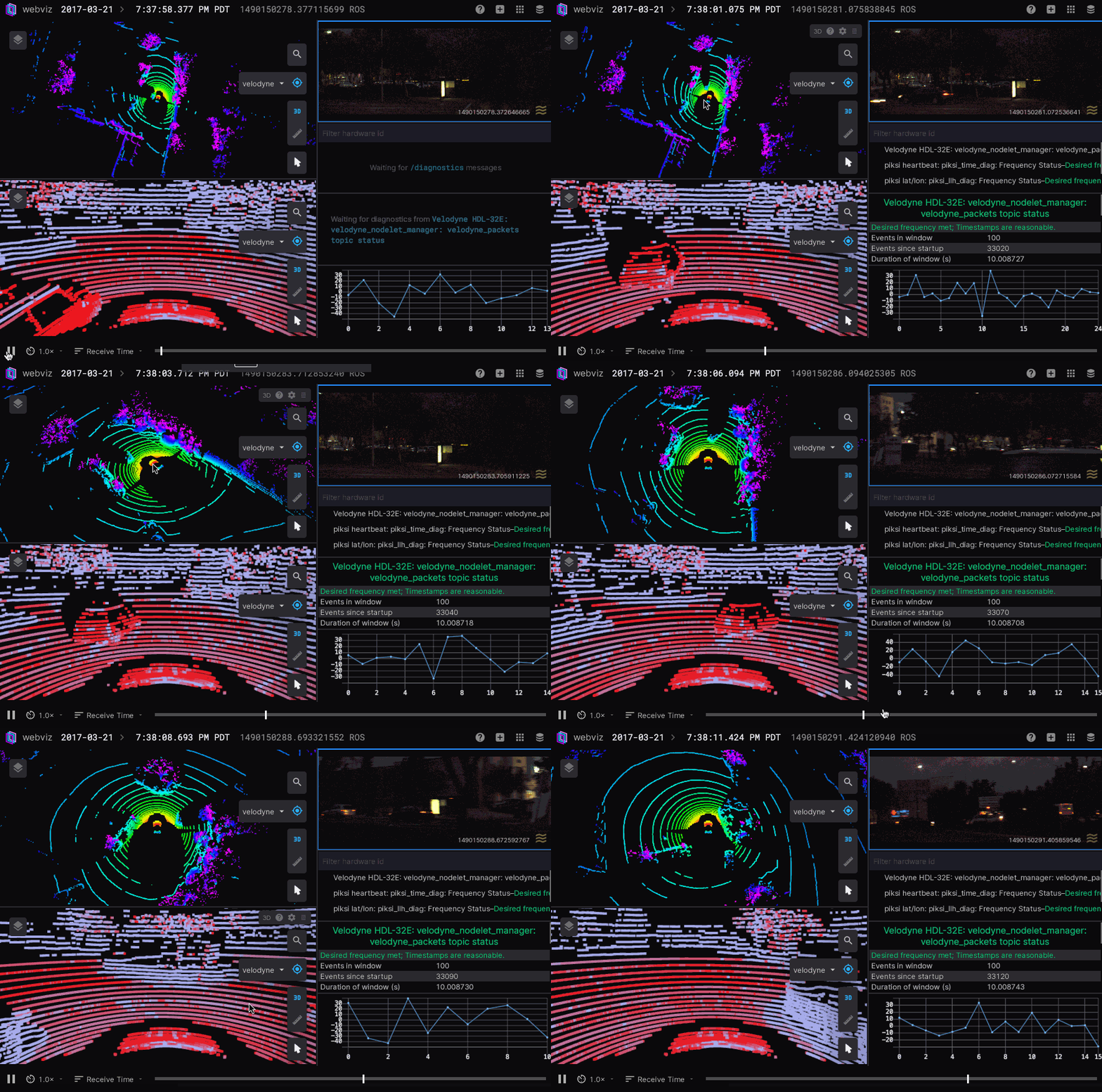
Drag and drop your own bag files into Webviz to explore your robotics data, or connect to a live robot or simulation using the rosbridge_server.
Webviz is a web-based application for playback and visualization of ROS bag files. This repository also contains some libraries that can be used independently to build web-based visualization tools.
- webviz-core (homepage, tool, github): A tool to inspect ROS bags.
- regl-worldview (homepage, npm, github): React library for rendering 2D and 3D scenes using regl.
- @cruise-automation/hooks (npm, github): A list of resusable React hooks.
- @cruise-automation/button (npm, github): React button component that supports animated progress for destructive actions, "pulse" animation, and Bulma classes.
- @cruise-automation/tooltip (npm, github): React component that uses popper.js to add rich, customizable tooltips to DOM elements.
Please see the individual package READMEs for details on how to install and use them.
Slack
We have a Slack workspace to make it easier to ask questions and chat with other people who use Webviz. Join using the latest link posted here.
Foxglove
Foxglove Studio is a fork of Webviz that was started by former Cruise employees. The tools have the same purpose (visualizing ROS data), but Cruise does not currently offer commercial support for Webviz, and community support can be ad-hoc. Webviz also has a slightly different feature set than Foxglove. Check out Foxglove if Webviz does not currently meet your needs.
How to use Webviz
We have in-app help resources. Go to the application and click the "?" icon in the top right. Each individual panel also has a "?" icon in its top right.
Running the static Webviz application
We recommend using the hosted version of Webviz, which can connect to your rosbridge_server or stream in bag data from your S3/GCS bucket. This way you'll always use the latest version of Webviz.
However, sometimes the hosted version is inconvenient, when streaming data from robots on the field where there is poor internet connectivity. For this it is useful to use a static build of webviz.
Docker
The easiest way to use the static build, is to use our Docker image, which is automatically built on every commit to the master branch.
docker run -p 8080:8080 cruise/webviz
Building manually
npm run bootstrap # install dependencies
npm run build-static-webviz # generate static build in __static_webviz__
npm run serve-static-webviz # serve static build on localhost:8080
Recording videos
Prerequisites:
npm run bootstrapto install dependencies- Install FFmpeg:
apt-get install ffmpegorbrew install ffmpegor so. - Download the ROS bag to your local machine, and also save the layout to a
.jsonfile. - Make sure that the bag+layout that you want to record actually work when you manually play it in Webviz.
Now run the packages/webviz-core/script/record-local-bag-video.js script, usually something like this:
packages/webviz-core/script/record-local-bag-video.js --bag ~/my-bag.bag --layout ~/my-layout.json --mp3 ~/loud-dance-music.mp3 --out ~/my-video.mp4 --speed 1.5
By default it will use webviz.io/app for the recording, but if you want to use a local instance of Webviz you can use the --url parameter. For full options run packages/webviz-core/script/record-local-bag-video.js --help.
Measuring performance
Similarly to recording videos, we have a script to measure the performance of a given layout+bag combination. This is useful for determining if a new feature makes things slower or faster. Run packages/webviz-core/script/measure-performance.js --help to learn more.
Developing
To install dependencies, first run npm run bootstrap. This command will populate the repos root /node_modules and underyling packages /node_modules. From there, you have a few options depending on where you'd like to make changes.
Webviz Core
npm run webviz-dev
Docs
npm run docs-dev
Storybook
npm run storybook
Useful for regl-worldview changes.
Full list of scripts
npm run webviz-devto run a webviz-only server that you can develop Webviz on.npm run bootstrapin the root directory to install dependencies.npm run buildto run a single build ornpm run watchto watch and build.npm run docs-devto run the docs app (e.g. go to http://localhost:8080/app to open Webviz). Requiresbuildto be run first.npm run docs-deployto deploy the docs to https://webviz.io/.npm run storybookto run storybook. Requiresbuildto be run first.npm run screenshot-localornpm run screenshot-local-debugto generate screenshots from stories.npm run lintto run the linters (andnpm run lint:fixto automatically fix issues).npm run flowto run Flow.npm run flow-typed-rebuildto update the flow-typed definitions (any time when changing packages).npm testto run tests.npm run build-static-webvizto make a special build of just the Webviz application in the__static_webviz__directory.npm run serve-static-webvizto host the contents of the__static_webviz__directory onlocalhost:8080.
If you have the right permissions, you can publish:
npm run publishto publish npm packages.npm run docs-deployto deploy that statically hosted website (this is also done automatically in CI on the master branch).
If you run into any issues, file an issue on Github or ask us on Slack (see above).
Contributing
PRs, bug reports, and feature requests are welcome! Please observe CONTRIBUTING.md and CODE_OF_CONDUCT.md when making a contribution.
Note that while it's possible to fork Webviz to make your own custom version, we'd encourage you to use webviz.io/app and propose generic solutions that everyone would benefit from. Cruise also still has its own fork of Webviz, but long term we'd like to move away from that. For examples of generic features, see the Node Playground panel, using generic RViz markers in the 3d panel, streaming in bags from any cloud service, loading layouts hosted on arbitrary URLs, and so on. We'd love your creative ideas for making Webviz widely useful!
Tag summary
Content type
Image
Digest
Size
35.4 MB
Last updated
over 4 years ago
docker pull cruise/webviz