czantoine/yriser
Yriser: FinOps tool to perform AWS tagging best practices
1.8K
czantoine/yriser repository overview











Description
Yriser is an Open Source FinOps tool to perform AWS tagging best practices, tagging strategy, continuous adjustments in cloud optimization.
Yriser will help you answer these questions:
- How are tags enforced and what methods and automation will be used (proactive vs reactive)?
- How are tagging effectiveness and goals measured?
- How often should the tagging strategy be reviewed?
- Who drives improvements? How is this done?
📃 Documentation
The full documentation can be found at https://yris-ops.github.io/yriser/
🚀 Quick Start
Yriser has been written in Shell using the jq, bc and AWS CLI.
From Github
Once Yriser repository is cloned, get into the folder and you can run it:
Commands:
cd yriser
Configuration file
Edit the configuration file
vi config.txt
Below ## TAG KEY and between ## TAG VALUE place your tag keys.
Below ## TAG VALUE and between ## END place your tag values.
Start
Once Yriser repository is cloned, get into the folder and you can run it:
./yriser.sh
🏛️ High level architecture
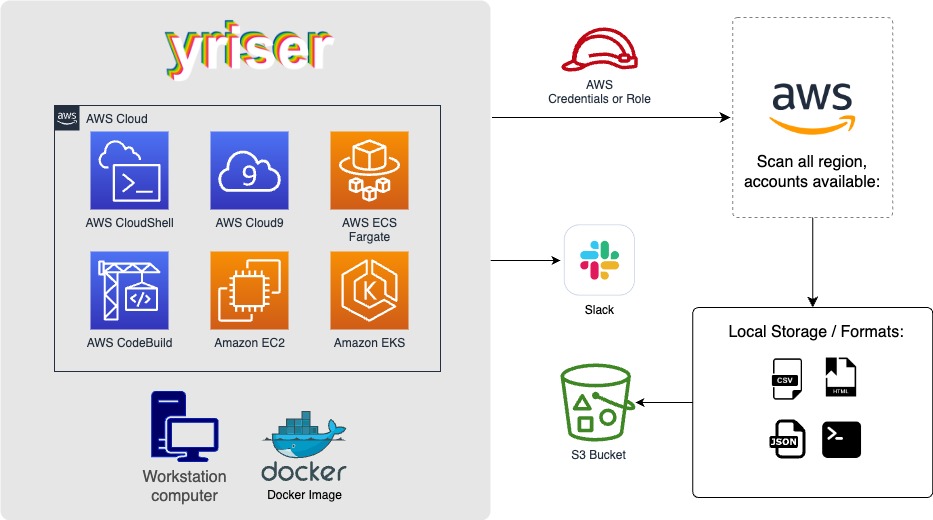
You can run Yriser from your workstation, an EC2 instance, ECS Fargate or any other container, Codebuild, CloudShell, Cloud9 and many more.
🏁 Basic Usage
./yriser.sh

Running the
yriser.shscript whitout options will use your environment variable credentials.
By default, Yriser will generate a CSV, HTM and JSON reports.
The HTML report will be located in the output directory as the other files and it will look like:

You can always use -h to access to the usage information and all the possible options:
./yriser.sh -h
More details at https://www.docs.yriser.com
Docker
Requirements:
- Have
dockerinstalled: https://docs.docker.com/get-docker/. - AWS credentials.
- In the command below, change
-vto your local directory path in order to access the reports. - Before launching the Docker Image, create your
config.txtlocal file.
Commands:
docker run -it \
--name yriser \
--env AWS_ACCESS_KEY_ID=$AWS_ACCESS_KEY_ID \
--env AWS_SECRET_ACCESS_KEY=$AWS_SECRET_ACCESS_KEY \
--env AWS_SESSION_TOKEN=$AWS_SESSION_TOKEN \
-v /your/local/dir/config.txt:/home/yriser/config.txt \
czantoine/yriser:latest
Use this command to copy reports locally:
docker cp yriser:/home/yriser/output /path/output
AWS
You can always use -a to access to the usage information and all the possible options:
./yriser.sh -a
Use a custom AWS profile with -p and/or AWS regions which you want to audit with -r:
./yriser.sh -p <aws_profile> -r "us-east-1 eu-west-1"
By default, Yriser will scan all AWS regions.
Security
See CONTRIBUTING for more information.
License
Yriser is licensed as Apache License 2.0 as specified in each file. You may obtain a copy of the License at http://www.apache.org/licenses/LICENSE-2.0
Tag summary
Content type
Image
Digest
sha256:3f7f7f4a0…
Size
216.6 MB
Last updated
about 2 years ago
docker pull czantoine/yriser